

Prerequisites
- The Nextedy AI package is installed on your Polarion server, a valid Nextedy AI license is in place, and a language model is connected.
- The assistant is enabled for your project, and your administrator has configured at least one action.
- You have edit rights on the sheet — applying a suggestion is an ordinary sheet edit.
If the sparkle button is greyed out, or missing entirely, the assistant is not available to you yet — hover it and the tooltip names the reason, whether that is the package, the license, or actions not yet configured. Toolbar and Risksheet Menu lists every state, and Configure the AI Assistant covers what an administrator needs to do.
Run an action
There are two ways in, and they do the same thing.1
Select the row you want help with
Click any cell in the risk row. The assistant always works on the row your cursor is in, so this is the one decision that matters most — it is the entire input to the action.
2
Choose an action
From the cell menu — right-click the cell and pick the action. AI actions sit together in their own group, after the Open … Item entries and before the New … entries. Choosing one runs it straight away and opens the assistant panel for you.From the panel — click the sparkle AI Assistant button at the right-hand end of the toolbar to open the panel, then pick an action from the list.Which actions you see in the cell menu depends on the column you right-clicked: an action can be restricted to particular columns, so a “Find Harms” action may only appear on the hazard columns. The panel’s list is not filtered, so it always shows everything configured for the sheet.
3
Wait for the result
The panel reports progress while it works — Processing query…, then Searching project data…, then Analyzing and ranking candidates… — and then lists what it found. It searches your project as you, so it only ever finds items you have permission to see.
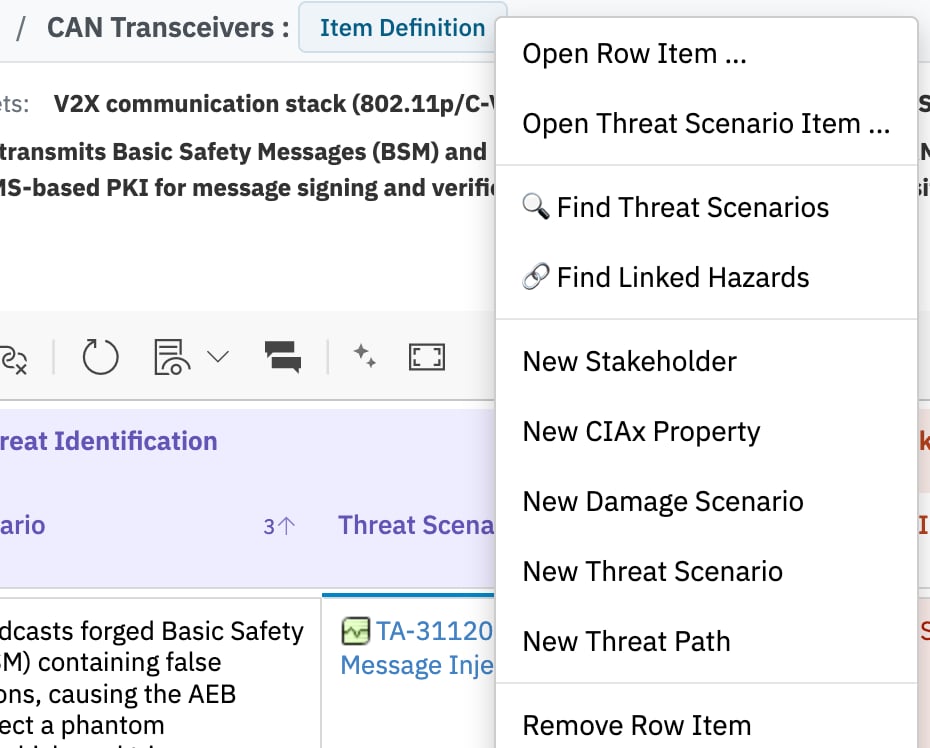
Configured AI actions in the cell context menu, between the Open-item entries and the New-item block. Their labels come from the action configuration, so they differ per project.
Read the results
Each recommendation is one work item from your project, with:- its ID and title, taken from Polarion rather than from the model;
- a one-sentence rationale for why it matches your row;
- an Apply link that writes it into the sheet.
When nothing comes back
Two messages mean two different things:
Neither message means the assistant is broken. Both are it declining to guess.
Apply a suggestion
Click Apply on a recommendation and Risksheet writes the link into the column the action targets. What happens next depends on the column:
Once the link is written, Risksheet fetches the item from Polarion and fills in the columns derived from it, so the row looks the same as if you had linked it by hand.
Undo and save
Applying is an ordinary sheet edit: it lands in the grid, and it becomes permanent when you save the sheet. Applying into an empty cell is registered with the sheet’s undo, so you can step it back the usual way before saving.Start over
The circular-arrow New conversation button in the panel header clears the panel and returns you to the action list without re-running anything. The Close button closes the panel; your applied changes stay in the sheet either way. Running the same action again on a row you have not touched returns the same answer. Change something in the row, or move to a different one, to get a fresh result.Getting better results
The assistant is only as good as the row it reads. In practice:- Fill in the descriptive fields before asking. A hazard row with a one-word hazard gives the assistant almost nothing to go on.
- Write phrases that share vocabulary with your target items. Matching is loose rather than exact, so one distinctive noun helps more than a long sentence.
- Avoid leaning on abbreviations. Very short terms such as “UV” or “CO” do not help the assistant find anything — spell the concept out somewhere in the row.
- Ask on the right column. An action is written for a particular target column, and only the work-item types that column accepts can come back.
See Also
- AI Assistant — what the assistant does, what context is sent, and where its limits are
- Configure the AI Assistant — enable it and define actions
- AI Action Configuration — the action file reference
- Configure HARA Workflows — the HARA sheet an action typically runs on
- Configure FMEA Workflows — the FMEA equivalent
- Undo and Redo — how the sheet’s undo stack behaves