

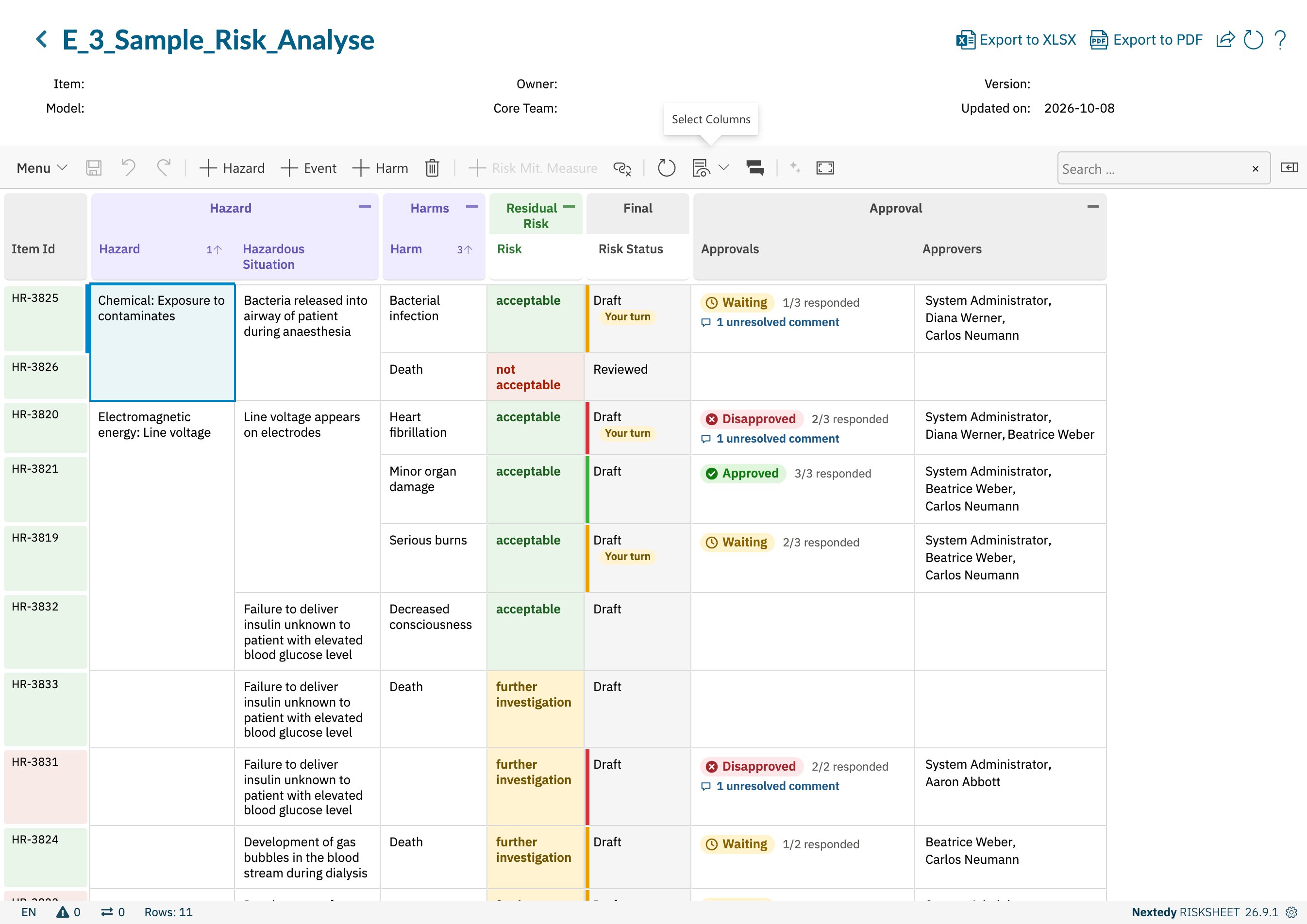
A sheet with an Approvals column, an Approvers column, and the Risk Status column decorated by approval state
The Same Approvals as in Polarion
Risksheet keeps no approval data of its own. Every approver, verdict and approval comment is Polarion’s: an approval filed in Risksheet appears in the Polarion work item and its history like one filed in Polarion, and an approval filed in Polarion shows up in Risksheet. Approval comments are the comments Polarion tags as approval comments, so they appear in both places too. Risksheet also counts comments titled “Approval comment”, the form older Risksheet versions wrote. What Risksheet adds is the context. A risk record is approved next to its hazard, harm, ratings and risk controls, and the sheet can be filtered to the items that still need a decision.Three Building Blocks
The columns are configured per sheet; the sidebar is available on every sheet unless the sheet switches it off. See Approval Columns for the column properties.
Only Risk Records Are Approved in the Sidebar
The sidebar files approvals on the risk record of each row — the row’s own work item. An Approvals column can also show the approvals of a row’s risk control or of a linked item such as a hazard, so a reviewer can see them, but those are not approved from the risk’s row. Approving a linked item from a risk’s row would leave it unclear what is being signed off.How the Overall State Is Decided
The overall state of an item follows Polarion’s own rule:- Disapproved as soon as one approver has disapproved — one disapproval is enough.
- Approved only when every approver has approved.
- Waiting in every other case.
- An item with no approvers has no approval state. The sidebar counts it as Not asked yet; the column filter calls it No approvers.
Approvals Are Saved With the Sheet
An approval action in the sidebar — a verdict, an approval comment, a reply, resolving a thread, resetting an item’s approvals — is a pending change of the sheet, like an edited cell. It is written to Polarion when you click Save, together with the content it approves, and until then it is marked as pending and can be undone with Undo. A verdict filed on a risk you have just edited is therefore saved in the same step as the edit. If Polarion refuses an approval change, for example because of a permission, that change and any approval change queued after it on the same item stay pending, and the sheet tells you why; the rest of the save goes through. When a verdict is refused after its comment was written, the comment is saved and only the verdict stays pending.Permissions Come From Polarion
Every action is checked against Polarion’s own permissions, both when the sidebar offers it and again when it is saved:- Filing a verdict needs permission to modify the item’s approvals, and Polarion’s rules for each verdict. Resetting your own verdict back to Waiting is a separate Polarion permission, so a reviewer who may approve cannot necessarily undo an approval.
- Approving without being invited is possible for users Polarion allows to approve the item: every user while neither the global
approverrole nor the project’sproject_approverrole is defined, otherwise only users who hold one of them. Filing a verdict then adds them as an approver. - Commenting needs permission to comment on the item, independently of the approval permission.
- Changing who approves needs permission to manage other users’ approvals; removing an approver who has already filed a verdict also needs permission to reset approvals.
- Resetting all approvals on an item needs the Polarion permission to reset approvals.
What Stays in Polarion
- Electronic signatures. When Polarion is configured to require an electronic signature for approvals, Risksheet cannot file them. The verdict buttons are disabled with a message pointing you to the Polarion Document View.
- Document-level approvals of the LiveDoc stay with Polarion’s document workflow.
- Work item status. Approvals do not change the risk’s workflow status; status transitions are still made through the workflow.
How Approvals Relate to Approval-Based Reviews
The approval-based review mode (reviews.reviewManager: ApprovalBased) predates work item approvals. It adds two review columns that list approval comments and add new ones, without any verdict. With work item approvals in place, those columns show the same approval comments as the sidebar, and are labelled Approval Comments and Add Approval Comment. See Configure Approval-Based Reviews and Review Workflows.
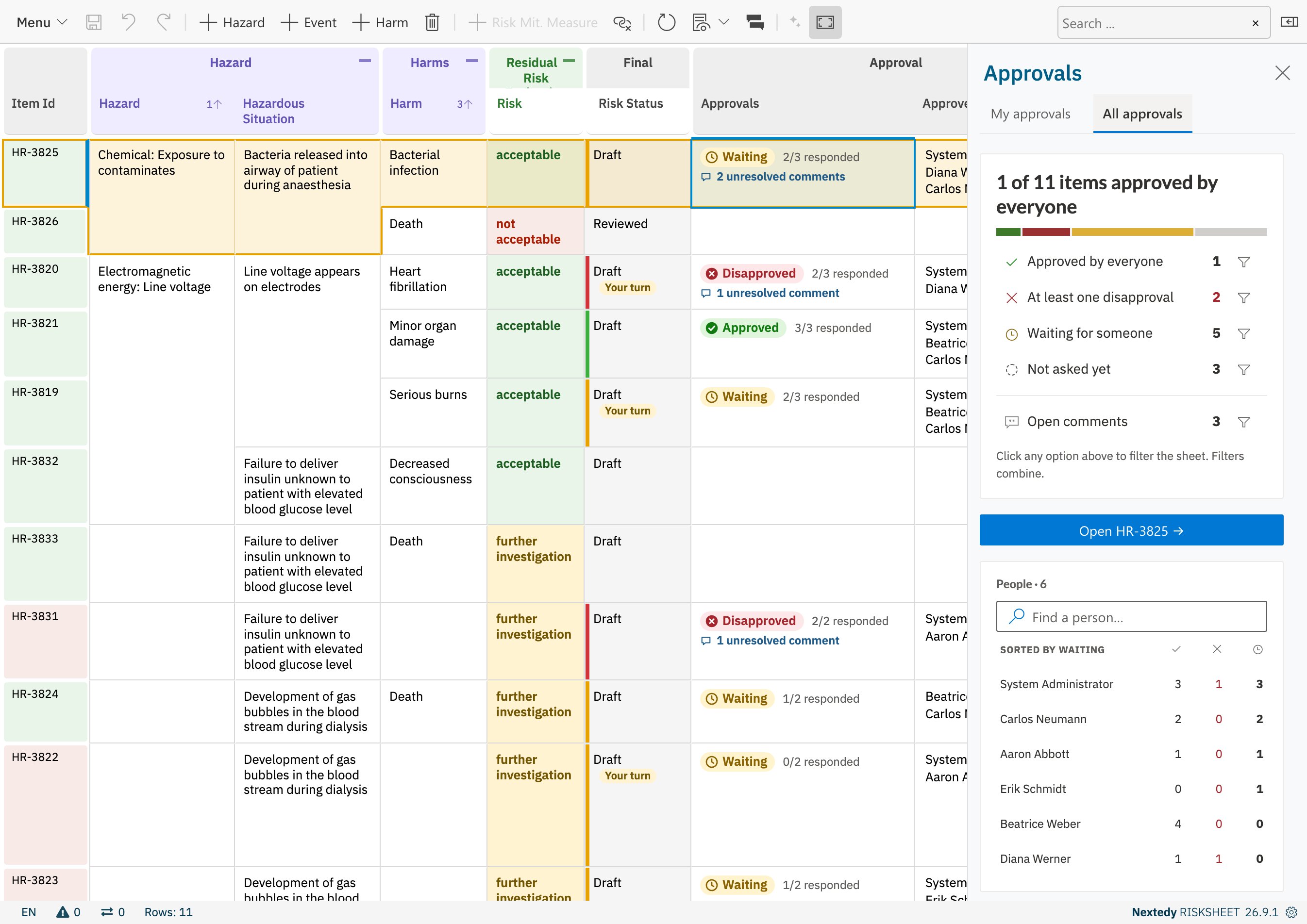
All approvals: the progress of the round, by item state and by person