

Prerequisites
- Risksheet installed and configured in your Polarion project
- Access to the sheet configuration for the target document (see Find Configuration Files)
- Users with comment creation permissions on the target work items
How Approval-Based Reviews Work
Approval-based reviews use Polarion’s approval comment system. Each review created through Risksheet is stored on the underlying work item as an approval comment: a comment that Polarion tags as an approval comment, with the fixed title “Approval comment”. The review column shows only approval comments, separating formal approval feedback from regular discussion comments. These are the same approval comments that Polarion and the Approvals sidebar show; to file approvals themselves, see Work Item Approvals.
1
Enable Approval-Based Reviews
Open the sheet configuration (No additional properties are required for the approval-based strategy. The approval-based mechanism reuses Polarion’s built-in approval comment system, so reviewer identity, timestamps, and resolution status are all managed by Polarion itself.
risksheet.json) for your document and add the reviews section with reviewManager set to ApprovalBased. The configuration editor (v25.5.0+) supports YAML editing with syntax highlighting:2
Toggle Review Columns
After updating the sheet configuration, display the review columns in the grid:
- Open the Risksheet in your Polarion LiveDoc
- Use the review toggle command in the toolbar
-
Two system columns appear, under the header group Approval Comments:
- Approval Comments (
reviewsRendered) — displays existing approval comments - Add Approval Comment (
reviewsAdd) — interface for creating new approval comments
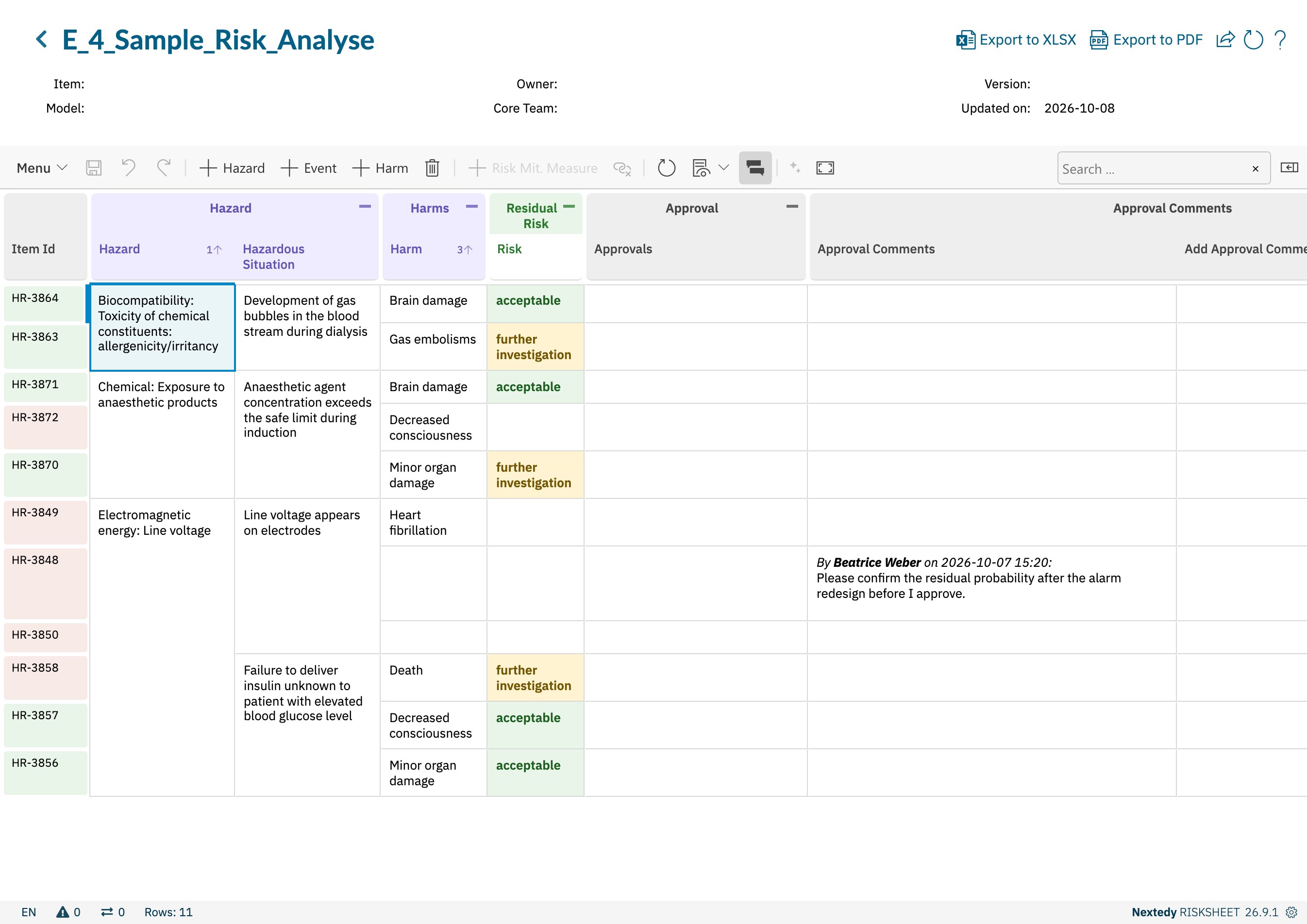
The review columns in approval-based mode
- Approval Comments (
3
Create an Approval Review
To add an approval on a risk item:
- Locate the risk item row in the grid
- Click the add review control in the Add Approval Comment column
- Enter your approval comment text
- Submit the review
4
View Approval Reviews
The Approval Comments column displays approval comments with the following details:
The system automatically filters out:
- Resolved comments — approval comments marked as resolved in Polarion. To keep them visible, set
approval.showResolved: truein the sheet configuration; they are then marked (resolved). - Unresolvable comments — comments that cannot be loaded
risk_reviews CSS class for styling customization through cell styles.Comparison with Other Review Managers
Risksheet provides three review managers, each suited to a different audit and process scenario:When to Use Approval-Based Reviews
Approval-based reviews are suitable when:- You need to distinguish formal approval feedback from regular discussion comments
- Your audit process requires a clear trail of approval actions, but does not require a separate linked work item per review
- You want approvals visible in Polarion’s standard approval comment views
- Full work item-based traceability and Polarion workflow state transitions are not required
Troubleshooting
Verification
After completing configuration, you should now see:- The review toggle available in the Risksheet toolbar
- Approval comments created through Risksheet appear with the “Approval comment” title in Polarion
- Only approval comments display in the Approval Comments column — regular comments are filtered out
- Reviewer names, timestamps, and content render correctly
- Resolved or unresolvable approval comments are hidden from the Approval Comments column, unless
approval.showResolvedis set
See Also
- Set Up Review Process — overview of all review managers
- Configure Comment-Based Reviews — lightweight review comments without approval distinction
- Configure Work Item-Based Reviews — reviews stored as separate linked work items, with Polarion workflow support
- Manage Cross-Project Reviews — reviews spanning multiple Polarion projects
- Work Item Approvals — approve or disapprove risks with Polarion work item approvals