

Configuration File Types
Risksheet uses three configuration files, each stored as a Polarion document attachment:
All three files follow the same inheritance model: if a file is not found directly on the document, the system searches the document’s template hierarchy.
1
Check Document Attachments
- Open the LiveDoc document in Polarion.
- Navigate to the document’s Attachments section.
- Look for sheet configuration in the attachment list.
2
Identify the Configuration Source
The configuration metadata exposes several properties that indicate where the active configuration was loaded from: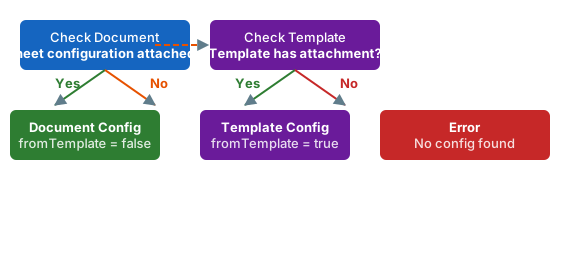
When
templateName is populated (for example, SharedTemplates/FMEA Template), the configuration is inherited. When it is empty, the configuration is attached directly to the document.3
Download and Edit Locally
To edit sheet configuration outside the built-in editor:
- Open the LiveDoc document in Polarion.
- Navigate to the document’s Attachments section.
- Download the sheet configuration file.
- Edit the JSON in your preferred text editor. Validate syntax with a JSON linter before uploading.
- Upload the modified file back as an attachment, replacing the existing one.
Configuration Caching
Risksheet caches configuration files using the data revision identifier of the attachment. The cache is automatically invalidated when:- The sheet configuration attachment content changes (new revision)
- The template document is updated
- You manually refresh the Risksheet page
Project Properties
In addition to document-level configuration files, Risksheet uses Polarion project properties for project-wide settings. These are managed through Polarion Administration, not through sheet configuration:Troubleshooting
- “Error while reading configuration” — The sheet configuration file contains invalid JSON. Download it and validate with a JSON linter.
- Different users see different configurations — Verify that all users have read access to the project where the template configuration is stored.
- Configuration appears inconsistent across sessions — Clear your browser cache and confirm you are not viewing a cached historical revision.
Verification
After identifying your configuration source, you should now see either sheet configuration in the document’s attachments (document-specific config) or atemplateName value in the Risksheet metadata (template-inherited config).
See Also
- Use the Configuration Editor — modify configuration visually
- Set Up Global Templates — create reusable configurations
- Override Template Configuration — detach from a template
- Configure Template Paths — control where documents are created