

Symptoms
After updating Risksheet, you may encounter:- The Risksheet menu item is missing from the Polarion navigation bar
- The Setup and License pages in Polarion administration appear empty
- Risksheet features are completely unavailable despite the plugin files being present
1
Verify Plugin Folder Structure
A common update mistake is copying the new plugin version over the old one instead of deleting the old version first. Only one version folder per product is allowed in the Extensions directory.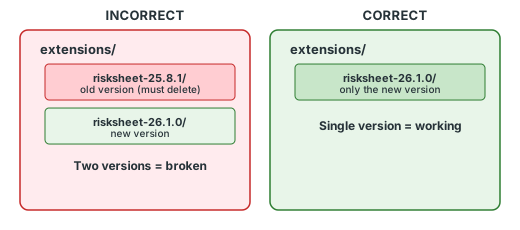
- Navigate to
[POLARION_INSTALL]/polarion/extensions/ - Look for Risksheet-related folders
- Verify that only one Risksheet folder exists
2
Delete the Workspace Cache
After installing or updating Risksheet, you must clear the Polarion workspace cache:
- Stop the Polarion server
- Delete the directory:
[POLARION_INSTALL]/data/workspace/.config - Optionally, also delete:
[POLARION_INSTALL]/data/workspace/.metadata
3
Restart Polarion
- Start the Polarion server service
- Wait for the server to fully initialize (check server logs for startup completion)
- Clear your browser cache or open a new incognito/private window
- Navigate to the Polarion project where Risksheet is configured
4
Verify Context Menu Availability
After Risksheet loads successfully, confirm that the context menu and navigation items are available:
- Open a Risksheet-enabled document
- Right-click on any cell in the grid
- Verify that menu options appear, including:
- Open Row Item
- Open Linked Item (when applicable)
- New Level Items (for creating risk items)
- Freeze Pane / Unfreeze Pane
Debug Mode for TroubleshootingWhen debug/developer mode is active, a Debug option appears in the context menu that logs diagnostic information to the browser console. Debug mode is a developer/runtime mode and is not enabled through the sheet configuration — setting
debug: true in the global section has no effect (the key is silently ignored).Verification
You should now see the Risksheet menu in the Polarion navigation bar and the Setup and License pages should display their full content in the administration panel. The context menu should appear when right-clicking cells in the Risksheet grid.See Also
- Installation — for initial setup instructions
- Rendering and Display Errors — for other display issues
- Access Denied Errors — if menu is visible but access is denied