

1
Define Views in the Sheet Configuration
Open the sheet configuration file (Each view entry accepts these properties:
risksheet.json) in the YAML editor and add a views section. Each entry specifies a display name and the list of column IDs to show:The
columnIds array supports two special tokens: "@all" includes every column defined in the columns section, and "-columnId" excludes the named column from the active set. Combine them to express a view as “everything except these columns” — useful when most columns should stay visible and only a handful need to be hidden for a given stage.2
Assign Column IDs
Ensure every column referenced in
columnIds has an explicit id in the columns section. If you omit id, the system auto-generates one from header or bindings, which may not match your view references.3
Select a View at Runtime
After loading the risksheet, use the view selector in the toolbar to switch between defined views. The grid immediately updates to show only the columns listed in the selected view, and hides every other column — saved views override all other column visibility settings.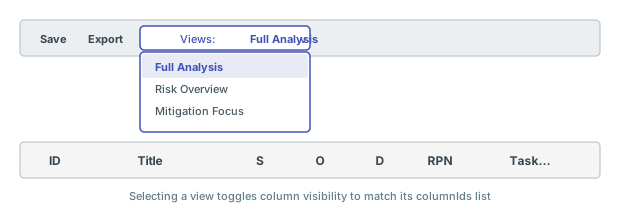
4
Combine with Personal Column Visibility
Users can further refine which columns appear using the Select visible columns feature, which persists on the user’s local machine. However, saved views take precedence over every other visibility setting: switching to a different saved view resets any personal column visibility selections, and the grid snaps back to the columns listed in the newly selected view’s
columnIds.Saved views are administrator-definedSaved views are configured in the sheet configuration by administrators. Individual users cannot create personal saved views through the UI. The Select visible columns feature provides per-user customization that persists locally but resets the moment a different saved view is selected.
Verification
You should now see a view selector dropdown in the Nextedy RISKSHEET toolbar listing each view by itsname. The view marked defaultView: true loads first. Selecting any view immediately toggles column visibility to match the defined columnIds list — columns not listed (or explicitly excluded via the -columnId prefix) are hidden from the grid, and any earlier personal visibility tweaks are discarded.
See Also
- Configure Column Visibility — control visibility per column in the configuration
- Control Column Visibility in Exports — manage which columns appear in exports
- Configure Calculated Columns — set up formulas referenced in views
- Consolidate Multiple Link Columns — combine link columns with saved views for cleaner layouts