

How does Risksheet fit into Polarion?
How does Risksheet fit into Polarion?
Risksheet is a Polarion server app that renders an interactive grid inside Polarion LiveDoc documents. Each row in a risksheet is a standard Polarion work item, and each column maps to a field on that work item via the 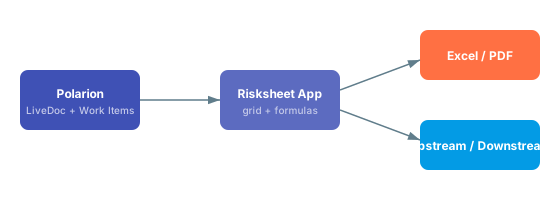
bindings property. Because the data lives in Polarion, you can mix risksheet pages with normal LiveDoc content in the same document and reuse Polarion features such as workflows, baselines, and reports.See Concepts for the architectural overview and Reference for the configuration details.How do I link risk items to requirements?
How do I link risk items to requirements?
Risksheet uses Polarion’s standard link roles to connect risk items to upstream requirements and downstream mitigation tasks. You configure upstream traceability in the sheet configuration so that linked requirements appear as columns in the grid, and the same mechanism feeds downstream traceability for tasks and verification items. Because links are normal Polarion links, they are visible in Polarion’s traceability matrices and impact analysis views.See Integration for step-by-step configuration and Configuration Examples for upstream and downstream snippets.
Can Risksheet exchange data with Excel?
Can Risksheet exchange data with Excel?
Yes. Risksheet supports export of the grid to Excel and PDF using the export configuration, and the exported tables preserve formatting such as severity colors and merged cells where applicable. There is no direct round-trip import — Polarion remains the system of record — but you can use Polarion’s standard Excel round-trip on the underlying work items if your process requires it. See Export for the supported export options.
How does Risksheet integrate with Polarion enumerations?
How does Risksheet integrate with Polarion enumerations?
Severity, occurrence, detection, ASIL levels, and similar pick-lists are defined as standard Polarion enumerations under Administration > Enumerations. A custom field on the relevant work item type binds to the enum, and the column in the risksheet uses
type: rating:<enumId> or type: enum:<enumId> with bindings: <fieldId> to reference it. The server loads enum values automatically, so the grid stays in sync with whatever the Polarion administrator configures.The severity/occurrence/detection scales are not defined inside the sheet configuration. Define them as Polarion enumerations and reference them by id from the column — that way the same scales are reusable across documents and reports.
Does Risksheet expose an API for automation?
Does Risksheet expose an API for automation?
Risksheet provides a server-side API surface that can be used from Velocity scripts and Polarion’s existing extension points to render content, compute values, or assemble reports. For most automation needs — bulk updates, reporting, or integrations with external systems — the recommended approach is to use Polarion’s REST or SOAP APIs against the underlying work items, since that is where the data actually lives. See API for the available Velocity context entries.
How do I integrate Risksheet output into LiveReport dashboards?
How do I integrate Risksheet output into LiveReport dashboards?
Because every risk item is a Polarion work item, you can build Polarion LiveReport widgets and queries against the same data the grid displays. Typical patterns include displaying top-RPN risks, counting open mitigation tasks, or charting risk distribution by severity. There is no special Risksheet widget — use the standard LiveReport widgets with Lucene queries against the work item type used for risk items.
How does the approval review interact with Polarion workflows?
How does the approval review interact with Polarion workflows?
Risksheet provides three review styles: comment-based review, work-item-based review, and approval review. The approval review records approval-tagged comments on the relevant work items, which is useful for audit evidence and ISO 26262 / ISO 14971 review records.See Review Management for the recommended setup.
Does Risksheet support any specific standards or methodologies?
Does Risksheet support any specific standards or methodologies?
Risksheet is a generic tool that supports any risk management methodology, including FMEA, HARA, TARA, STRIDE, and CVSS. Nextedy provides solution templates for typical methodologies across automotive (ISO 26262), medical devices (ISO 14971), industrial (IEC 61508), and cybersecurity (ISO/SAE 21434, IEC 62443) industries. Pick the closest solution template for your industry, understand its configuration, then modify it to match your process — never start from a blank configuration.
Where do I go for integration-specific guidance?
Where do I go for integration-specific guidance?
Start with the Integration guide for end-to-end setup, then consult Configuration Examples for ready-to-adapt sheet configurations. For questions about feature scope see Feature Questions, and for environment/version questions see Compatibility. If something behaves unexpectedly, check Common Troubleshooting first.