

General Questions
What Risksheet is, who it's for, Polarion requirements, and supported methodologies (FMEA, HARA, TARA, STRIDE, CVSS).
General Questions
What Risksheet is, who it's for, Polarion requirements, and supported methodologies (FMEA, HARA, TARA, STRIDE, CVSS).
What is Risksheet?
What is Risksheet?
What risk analysis methodologies does Risksheet support?
What risk analysis methodologies does Risksheet support?
Which industry standards does Risksheet align with?
Which industry standards does Risksheet align with?
How does Risksheet store data?
How does Risksheet store data?
Can I use Risksheet with custom work item types?
Can I use Risksheet with custom work item types?
dataTypes section of sheet configuration, specifying your custom work item type IDs. See Configuration Questions for more details.Does Risksheet require a separate database or server?
Does Risksheet require a separate database or server?
Can I have multiple risk analysis documents in one project?
Can I have multiple risk analysis documents in one project?
What export formats does Risksheet support?
What export formats does Risksheet support?
See Also
- Feature Questions — specific capability details
- Configuration Questions — setup and customization
- Getting Started — initial setup tutorials
Feature Questions
Column types, formulas, conditional formatting, saved views, review workflows, exports, and hierarchical levels.
Feature Questions
Column types, formulas, conditional formatting, saved views, review workflows, exports, and hierarchical levels.
Column and Data Entry
Does Risksheet support dependent enums (cascading dropdowns)?
Does Risksheet support dependent enums (cascading dropdowns)?
queryFactory or column-level dependency declaration), not as a top-level configuration section. The available options in the child column are filtered at runtime based on the value selected in the parent enum column.Note that severity, occurrence, and detection scales use integer IDs (for example, 1 through 10 for an FMEA severity scale), unlike regular Polarion enumerations which use string IDs. This distinction is important when configuring risk parameter columns: define the scale as a Polarion enumeration with integer IDs and bind a custom field on the work item type to it, then reference it from the column with type: rating:<enumId> and bindings: <fieldId>.Can I drag and drop existing work items into a Risksheet?
Can I drag and drop existing work items into a Risksheet?
Does Risksheet enforce Polarion mandatory fields?
Does Risksheet enforce Polarion mandatory fields?
cellDecorators and styles in the sheet configuration to highlight mandatory column backgrounds with conditional formatting:Can I rename the first "Item Id" column?
Can I rename the first "Item Id" column?
systemItemId binding is a reserved system column that always displays as “Item Id” in the grid header.Risk Analysis Workflows
Can I configure Risksheet for different FMEA types (SFMEA, DFMEA, PFMEA)?
Can I configure Risksheet for different FMEA types (SFMEA, DFMEA, PFMEA)?
bindings, severity/occurrence/detection scales, and formula definitions appropriate to the analysis type.You can maintain multiple Risksheet configurations within a single Polarion project — each LiveDoc document can have its own sheet configuration with an independent column layout and risk parameter setup. Rather than starting from a blank configuration, pick the closest Nextedy solution template for your industry and methodology and modify it to match your process. See Configure FMEA Workflows for setup details.Does Risksheet support STRIDE analysis?
Does Risksheet support STRIDE analysis?
Can I have multiple Risksheet configurations in one project?
Can I have multiple Risksheet configurations in one project?
Document and Integration Scope
Is Risksheet limited to a single document?
Is Risksheet limited to a single document?
createInCurrentDocument parameter controls whether newly created items are stored in the current document.
Does Risksheet support Polarion collections?
Does Risksheet support Polarion collections?
Does Risksheet support electronic signatures?
Does Risksheet support electronic signatures?
- In Risksheet: Execute the rejection workflow action (without signature)
- In Polarion: Execute a separate workflow action that requires the electronic signature
Approval and Review Workflows
Can I approve work items directly from Risksheet?
Can I approve work items directly from Risksheet?
reviews.reviewManager. See Set Up Review Process.Does Risksheet support freeze rows?
Does Risksheet support freeze rows?
Feature Availability Summary
See Also
- Configuration Questions — setting up columns and properties
- General Questions — product overview and methodology support
- Licensing Model — license types and entitlements
Configuration Questions
Sheet configuration structure, template inheritance, document-level overrides, columns, and enum and rating definitions.
Configuration Questions
Sheet configuration structure, template inheritance, document-level overrides, columns, and enum and rating definitions.
What ships out-of-the-box with Risksheet?
What ships out-of-the-box with Risksheet?
risksheet_template for general FMEA risk analysis and a risksheet_templateHara for HARA workflows. These templates provide starting configurations with pre-built columns, formulas, and risk scales. However, most organizations customize the configuration to match their specific work item types, custom fields, and risk methodologies. Risksheet does not require specific work item types or mandatory Polarion fields — it adapts to your existing Polarion setup through the sheet configuration.Where is the Risksheet configuration stored?
Where is the Risksheet configuration stored?
risksheet.json attached to each Polarion LiveDoc document. If a document does not have its own sheet configuration, it inherits the configuration from its Polarion document template hierarchy. You can also define global templates that multiple documents inherit from. The sheet configuration file contains the complete configuration including columns, dataTypes, levels, formulas, styles, cellDecorators, views, global, reviews, and sortBy. Rating and enumerated values are not stored as top-level sections in the file — they are defined as Polarion enumerations and referenced from columns (for example via type: rating:<enumId>). You can edit it using the built-in configuration editor (accessible to users with canAdmin privileges) or by modifying the JSON attachment directly.
How do I configure multiple risk analysis types in one project?
How do I configure multiple risk analysis types in one project?
dataTypes section determines which Polarion work item types appear as risk items and mitigation tasks:Risks/Risk Specification), allowing you to organize different risk document types in different folders within your project.Does Risksheet require specific work item types or fields?
Does Risksheet require specific work item types or fields?
dataTypes.risk.type and dataTypes.task.type properties in sheet configuration. Columns are bound to any Polarion field using the bindings property. The system supports all standard Polarion field types: text, integer, float, date, datetime, time, boolean, enum, multiEnum, duration, currency, rating, and user references. Custom fields are accessed the same way as built-in fields.How do I customize the tool name and document labels?
How do I customize the tool name and document labels?
How does the autocomplete search work for linking items?
How does the autocomplete search work for linking items?
queryFactory functions on individual columns or data types.How do I create items within the current document?
How do I create items within the current document?
createInCurrentDocument parameter to store newly created upstream items within the same LiveDoc document rather than in a separate location. This is configured in the dataTypes section of sheet configuration and reduces context switching when building traceability chains.Does Risksheet support branching?
Does Risksheet support branching?
Can I disable suspect link marking for Risksheet changes?
Can I disable suspect link marking for Risksheet changes?
true in project administration. When enabled, edits made in Risksheet will not flag upstream or downstream linked items as suspect. This may be desirable in workflows where Risksheet edits are considered routine updates that should not require re-verification of linked items.Can I protect approved or verified work items from editing?
Can I protect approved or verified work items from editing?
id, status, type, project, outlineNumber, author, resolution, created, updated) are always read-only in Risksheet. Additionally, any column can be marked as readOnly in the column configuration, and the entire grid can be set to read-only using the top-level readonly property.Do catalogs work with Risksheet?
Do catalogs work with Risksheet?
See Also
- General Questions — overview and general product questions
- Feature Questions — capability details and limitations
- Licensing Model — license types and user management
- Getting Started — initial configuration tutorial
- Performance Troubleshooting — optimization and performance
Integration Questions
How Risksheet works with Polarion LiveDoc, work items, and other Nextedy products.
Integration Questions
How Risksheet works with Polarion LiveDoc, work items, and other Nextedy products.
How does Risksheet fit into Polarion?
How does Risksheet fit into Polarion?
bindings property. Because the data lives in Polarion, you can mix risksheet pages with normal LiveDoc content in the same document and reuse Polarion features such as workflows, baselines, and reports.See Concepts for the architectural overview and Reference for the configuration details.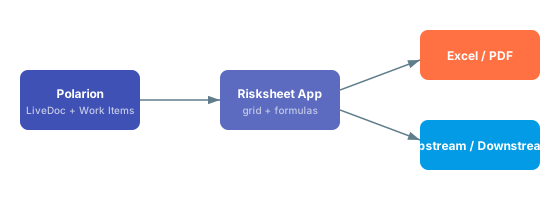
How do I link risk items to requirements?
How do I link risk items to requirements?
Can Risksheet exchange data with Excel?
Can Risksheet exchange data with Excel?
How does Risksheet integrate with Polarion enumerations?
How does Risksheet integrate with Polarion enumerations?
type: rating:<enumId> or type: enum:<enumId> with bindings: <fieldId> to reference it. The server loads enum values automatically, so the grid stays in sync with whatever the Polarion administrator configures.Does Risksheet expose an API for automation?
Does Risksheet expose an API for automation?
How do I integrate Risksheet output into LiveReport dashboards?
How do I integrate Risksheet output into LiveReport dashboards?
How does the approval review interact with Polarion workflows?
How does the approval review interact with Polarion workflows?
Does Risksheet support any specific standards or methodologies?
Does Risksheet support any specific standards or methodologies?
Where do I go for integration-specific guidance?
Where do I go for integration-specific guidance?
Performance Questions
Handling large risksheets, load times, and optimization.
Performance Questions
Handling large risksheets, load times, and optimization.
Performance Profile at a Glance
The diagram below shows the main factors that drive risksheet load time, in rough order of impact. Use it to decide where to focus when investigating a slow sheet.
Load Time and Sizing
Why does my risksheet take up to two minutes to load?
Why does my risksheet take up to two minutes to load?
What causes the biggest slowdowns: rows or columns?
What causes the biggest slowdowns: rows or columns?
multiItemLink columns, has a much larger impact than row count. A sheet with 250 rows and 17 linked-item columns (7 of them multiItemLink) can be noticeably slower than a sheet with several times more rows and fewer link columns. Each linked-item column triggers additional work item lookups per row, and that cost compounds.Is there a recommended row count limit?
Is there a recommended row count limit?
Sheet Design for Performance
My single FMEA sheet combines usability and design analysis. Is that a problem?
My single FMEA sheet combines usability and design analysis. Is that a problem?
How many linked-item columns is "too many"?
How many linked-item columns is "too many"?
multiItemLink columns, expect load time to grow noticeably. Treat each multiItemLink column as a significant cost, and ask whether the relationship truly needs to be visible in this sheet or whether it can live on an upstream document. See Column Configuration for column-design patterns.Are saved views a faster alternative to splitting a sheet?
Are saved views a faster alternative to splitting a sheet?
Concurrency and Multi-User Use
How does Risksheet behave with multiple concurrent users?
How does Risksheet behave with multiple concurrent users?
Diagnosing Slowness
How do I tell whether the slowdown is Risksheet or Polarion?
How do I tell whether the slowdown is Risksheet or Polarion?
Can Polarion server operations like reindexing make Risksheet slow?
Can Polarion server operations like reindexing make Risksheet slow?
What should I do about broken cross-project links?
What should I do about broken cross-project links?
Optimization Checklist
multiItemLink columns, and acceptable load times all depend on your Polarion deployment, hardware, and user load. Treat the guidance above as starting points and measure in your own environment.Migration and Upgrade Questions
Upgrading Risksheet and migrating configurations and data between versions.
Migration and Upgrade Questions
Upgrading Risksheet and migrating configurations and data between versions.
What gets upgraded when I install a new Risksheet version?
What gets upgraded when I install a new Risksheet version?
Do I need to migrate my existing sheet configuration after an upgrade?
Do I need to migrate my existing sheet configuration after an upgrade?
columns, levels, dataTypes, formulas, cellDecorators, and styles continue to work. Migration is typically needed only when you want to adopt a new property (for example createInDocument or linkToRisksheet) or fix a property name that was previously misspelled. See Configuration Management for the recommended workflow.Where do I edit a sheet configuration after I upgrade to v25.5.0 or later?
Where do I edit a sheet configuration after I upgrade to v25.5.0 or later?
risksheet.json) — the editor presents it as YAML so the file is easier to read and review.
How do I add features that appeared in newer versions to an older configuration?
How do I add features that appeared in newer versions to an older configuration?
createInDocument for choosing where new tasks are created, linkToRisksheet on dataTypes.task for subsheet navigation, and dependent enums at the column level. Add only the properties you need and leave the rest of the configuration unchanged.Which property changes most often cause issues after migrating between versions?
Which property changes most often cause issues after migrating between versions?
bindings (plural). Some older or hand-edited configurations contain binding (singular), which silently fails because the column never resolves a Polarion field. When you migrate, search every columns entry and confirm the property is bindings: <fieldId>. The reference for column properties is in Column Types and Fields.My old configuration has ratings, enums, or relations at the top level — what should I do?
My old configuration has ratings, enums, or relations at the top level — what should I do?
type: rating:<enumId>, type: enum:<enumId>, or type: multiEnum:<enumId>. Dependent enums are a column-level feature available from v25.3.1, not a top-level configuration section.How does template inheritance interact with upgrades?
How does template inheritance interact with upgrades?
What changes when I upgrade between Polarion licensing tiers?
What changes when I upgrade between Polarion licensing tiers?
How do I migrate a saved view configuration from older docs to a current configuration?
How do I migrate a saved view configuration from older docs to a current configuration?
columns for saved views — the real property name is columnIds. When migrating a views entry, rename the array to columnIds and check whether you want to use the @all shorthand or the -columnId exclude prefix:defaultView property (v24.1.0+) marks which view loads first when the document opens. See Saved Views under column configuration guides.Will my custom JavaScript in formulas and cell decorators still work after upgrading?
Will my custom JavaScript in formulas and cell decorators still work after upgrading?
formulas and cellDecorators are evaluated client-side and are not transformed by upgrades. The recommended pattern, especially in regulated industries, is to keep formulas thin and define the heavy logic (risk matrices, multi-field conditional formatting) in the top panel configuration (risksheetTopPanel.vm). This separation keeps the sheet configuration auditable while custom logic stays under code review. See Formulas and Styling.Where do I check whether a feature requires a minimum Risksheet version?
Where do I check whether a feature requires a minimum Risksheet version?
editableReferencedWorkItems (v23.3.3+), checkLinkRoleCompliance (v24.2.2+), createInDocument (v24.8.1+), moduleOnlyPermissions (v24.8.5+), the dependent enum column feature (v25.3.1+), and YAML editing in the configuration editor (v25.5.0+). Before adopting a property, confirm your server is at least at the listed version. See Compatibility and Configuration.Related pages
- Configuration Questions — general configuration questions
- Licensing Questions — license tiers and entitlement
- Common Troubleshooting — issues seen during and after upgrades
- Configuration Management — how to roll configuration changes safely
- Compatibility — version requirements per property
Licensing Model
License types, server vs. active users, tiers, Connect license, SMB discount, and Powersheet interaction.
Licensing Model
License types, server vs. active users, tiers, Connect license, SMB discount, and Powersheet interaction.

What is the difference between server users and active users?
What is the difference between server users and active users?
How do I assign active users?
How do I assign active users?
- Risksheet only: Assign users to the
nextedy_risksheet_usersgroup - Risksheet + Powersheet: Assign users to the
nextedy_powersheet_usersgroup (see the migration question below)
What licensing tiers are available?
What licensing tiers are available?
What is the Connect license?
What is the Connect license?
What is the SMB discount?
What is the SMB discount?
Does Risksheet count Polarion licenses or server accounts?
Does Risksheet count Polarion licenses or server accounts?
- Service accounts used by integrations
- Deactivated users who were never removed from the server
- Test accounts from previous deployments
- Integration accounts for CI/CD systems
What happens when I install both Risksheet and Powersheet?
What happens when I install both Risksheet and Powersheet?
- Risksheet reads active user assignments from the
nextedy_powersheet_usersgroup instead ofnextedy_risksheet_users - This change is automatic when Powersheet has a valid production license
- Evaluation or trial Powersheet licenses do not trigger this switch
- The dual license system tracks user counts for both products independently
Does Risksheet support evaluation licenses?
Does Risksheet support evaluation licenses?
How does license revalidation work?
How does license revalidation work?
Why can't I save changes even though I have a license?
Why can't I save changes even though I have a license?
- Server user count exceeded: Your Polarion server has more registered users than your license allows. Risksheet counts all registered server accounts, not just Polarion license holders. Clean up inactive server accounts or upgrade your license tier.
-
Not assigned as active user: Your user account is not in the active user group (
nextedy_risksheet_usersornextedy_powersheet_users). Ask your administrator to add your email to the appropriate group. - Read-only Connect access: You are accessing Risksheet through the Connect license (read-only mode). Contact your administrator to be assigned as an active user.
-
License group mismatch: If both Risksheet and Powersheet are installed, ensure you are in the
nextedy_powersheet_usersgroup rather than thenextedy_risksheet_usersgroup. - Polarion ALM license restriction: Risksheet honors your underlying Polarion ALM license capability (see the next question). If your Polarion license is PRO, you can modify existing risk items but cannot create new lines; if it is REVIEWER, you have read-only access.
- Document-level permissions: The Polarion document itself may have restricted write access. Verify your project role and document permissions.
How do Polarion ALM license types relate to Risksheet?
How do Polarion ALM license types relate to Risksheet?
Can I change the number of active users later?
Can I change the number of active users later?
How do I check my current server user count?
How do I check my current server user count?
Related Pages
- Evaluate Risksheet — starting a Risksheet evaluation
- Understanding Licenses — in-depth licensing guide
- General Questions — general product questions
- Installation — installing Risksheet on your Polarion server
Licensing Questions
Assigning users, applying license files, and resolving common licensing issues.
Licensing Questions
Assigning users, applying license files, and resolving common licensing issues.
How the Licensing Model Fits Together
The diagram below summarizes the three categories of users that can interact with a risksheet, and what each can do.
Active Users and Server Users
What is the difference between an Active User and a Server User?
What is the difference between an Active User and a Server User?
How are Active Users assigned?
How are Active Users assigned?
How do I know how many Active Users I am currently using?
How do I know how many Active Users I am currently using?
When does unlimited Active User licensing make sense?
When does unlimited Active User licensing make sense?
Relationship to Polarion ALM Licenses
Does Risksheet require a specific Polarion ALM license?
Does Risksheet require a specific Polarion ALM license?
Do Polarion REVIEWER users count against my Active User tier?
Do Polarion REVIEWER users count against my Active User tier?
Risksheet and Powersheet Together
What happens when both Risksheet and Powersheet are licensed?
What happens when both Risksheet and Powersheet are licensed?
Does a Powersheet evaluation license unlock the extra Risksheet features?
Does a Powersheet evaluation license unlock the extra Risksheet features?
Do I have to restart Polarion after changing my Powersheet license?
Do I have to restart Polarion after changing my Powersheet license?
Are Risksheet and Powersheet licensed independently?
Are Risksheet and Powersheet licensed independently?
Configurations, Documents, and Reuse
Does Risksheet need a license per project or per document?
Does Risksheet need a license per project or per document?
Can one project have multiple risksheet configurations?
Can one project have multiple risksheet configurations?
risksheet.json). This means a single project can run an FMEA, a HARA, and a TARA in parallel, each driven by its own sheet configuration. See Configuration Management for how to manage multiple configurations in one project.Can I reuse a risksheet across product variants without buying extra licenses?
Can I reuse a risksheet across product variants without buying extra licenses?
Trial, Evaluation, and Support
How do I evaluate Risksheet before buying?
How do I evaluate Risksheet before buying?
Where can I see a working FMEA or HARA before I license Risksheet?
Where can I see a working FMEA or HARA before I license Risksheet?
Who should I contact for licensing questions or quotes?
Who should I contact for licensing questions or quotes?
Pricing Questions
Pricing tiers, quotes, and how licensing maps to cost.
Pricing Questions
Pricing tiers, quotes, and how licensing maps to cost.
What license tiers are available?
What license tiers are available?
How do I decide between the 20, 50, and Unlimited tiers?
How do I decide between the 20, 50, and Unlimited tiers?

At what point does Unlimited become cost-effective?
At what point does Unlimited become cost-effective?
How are Polarion server users counted for licensing?
How are Polarion server users counted for licensing?
How do I get a quote?
How do I get a quote?
Are partner and reseller channels supported?
Are partner and reseller channels supported?
Can I upgrade from a lower tier to a higher tier later?
Can I upgrade from a lower tier to a higher tier later?
How do I assign which users count as Active Users?
How do I assign which users count as Active Users?
Does the license cover all risk methodologies (FMEA, HARA, TARA, STRIDE)?
Does the license cover all risk methodologies (FMEA, HARA, TARA, STRIDE)?
Do future price increases affect existing customers?
Do future price increases affect existing customers?
Where can I learn more?
Where can I learn more?
- Licensing Model — Active Users, Server Users, Connect license, and how seats are counted.
- Licensing Questions — activation, license files, renewals, and support entitlement.
- Licensing Guide — step-by-step administrator tasks for assigning Active Users.
- General Questions — high-level questions about what Risksheet is and who uses it.
Common Troubleshooting
Resolving common Risksheet errors, rendering issues, and unexpected behavior.
Common Troubleshooting
Resolving common Risksheet errors, rendering issues, and unexpected behavior.
Diagnostic Decision Path

Configuration Issues
Why is my Risksheet grid showing no rows even though risk items exist in the document?
Why is my Risksheet grid showing no rows even though risk items exist in the document?
dataTypes.risk.type in the sheet configuration and the actual Polarion work item type used in your LiveDoc. Confirm the work item type ID matches exactly (case-sensitive), and verify that the document contains items of that type. See Configuration Management for verification steps.I edited my sheet configuration but the changes do not appear in the grid — what should I check?
I edited my sheet configuration but the changes do not appear in the grid — what should I check?
Why do my formulas return undefined or NaN?
Why do my formulas return undefined or NaN?
info.item['columnId'] syntax with the exact column id, not the column header. Also confirm the column you are reading from has bindings set (plural — bindings, not binding) so values are actually loaded. See the Formulas reference for parameter conventions and the info object structure.Column and Data Issues
Why does a column show empty cells even though the linked Polarion field has data?
Why does a column show empty cells even though the linked Polarion field has data?
bindings value. The property is bindings (plural) and must contain the exact Polarion field ID — not the field label. Field IDs are case-sensitive. For linked-item bindings such as task.title or harm.title, the prefix must match the configured dataTypes key. See Column Configuration.How do I fix cell merging that does not work as expected?
How do I fix cell merging that does not work as expected?
levels configuration. Each level must declare three properties: name, controlColumn, and zoomColumn. Columns merge when consecutive rows share the same value in the level’s controlColumn. Also remember that the column level property is 1-indexed — level: 1 corresponds to levels[0]. See Risk Management Guides.Why are calculated columns (RPN, risk class) showing stale values?
Why are calculated columns (RPN, risk class) showing stale values?
info.item[...] properties, and that the source columns have bindings configured. If the formula calls a function from the top panel template, also verify the top panel configuration loads correctly. See the Formulas reference.Styling and Conditional Formatting
Why are my cell colors not applying even though the cellDecorator runs?
Why are my cell colors not applying even though the cellDecorator runs?
toggleClass to apply visual styling, because grid cells are reused across rows. The canonical form is jQuery $(info.cell).toggleClass(...), as used in the product’s reference templates (wijmo.toggleClass(...) is a non-canonical equivalent). Setting inline styles directly produces inconsistent results as cells scroll. Also confirm the CSS class name you toggle exists in the styles section, and that the style value is wrapped in {} braces, for example '.rpn3': '{background-color: #e53935 !important;}'. See Styling and Formatting.!important is a common reason styles silently fail to apply.Saving, Editing, and Permissions
Why can I open the Risksheet but not create new rows?
Why can I open the Risksheet but not create new rows?
Why are some cells in my row read-only even though the column is editable?
Why are some cells in my row read-only even though the column is editable?
info.item.systemReadOnlyFields inside a decorator function (a pipe-delimited string like '|asilSeverity|asilExposure|'). When a row is, for example, classified as “QM” in a HARA analysis, ASIL-specific fields become locked for that row only. Check your cellDecorators section for logic touching systemReadOnlyFields. See Styling and Formatting.Why does my new task item not appear after I create it from the grid?
Why does my new task item not appear after I create it from the grid?
dataTypes.task.canCreate: false is set, task creation is globally disabled — users can only link to existing items. Similarly, individual itemLink columns can disable creation with canCreate: false. If creation is enabled but new items are not visible, confirm dataTypes.task.createInCurrentDocument or dataTypes.task.createInDocument (v24.8.1+) targets a document you have access to. See Risk Management.Saved Views
My saved view is missing columns I expected — what should I check?
My saved view is missing columns I expected — what should I check?
columnIds array must use exact column id values (the property is columnIds, plural, not columns). You can use the special @all token to include all columns and the -columnId prefix to exclude one, for example ["@all", "-task"]. To make a view load by default, set defaultView: true on the view object (v24.1.0+). See Saved Views guide.Reviews and Approvals
Why does my approval review not change the Polarion document workflow status?
Why does my approval review not change the Polarion document workflow status?