

License Tier Overview
Risksheet offers tiered licensing based on the number of Active Users — users who can create, edit, and manage risk items. All other registered Polarion server users automatically receive read-only (Connect) access at no additional cost.1
Count Your Server Users
Navigate to Administration > Nextedy RISKSHEET > License to see your current server user count. The License page reports the current count next to the licensed 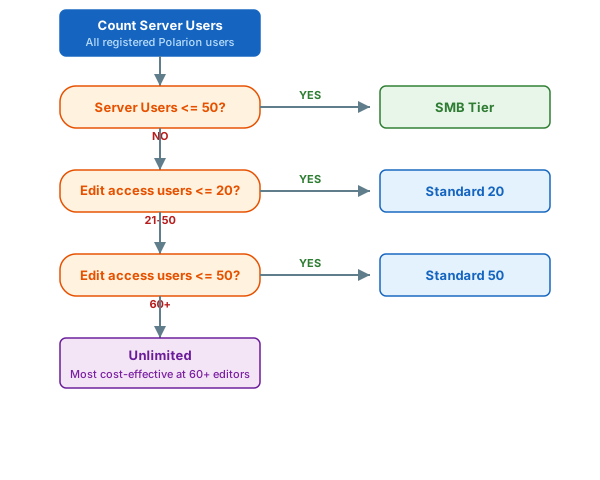
namedUsers limit — for example: “The Nextedy RISKSHEET license is set up for 30 server users. There are 7 users who have the ‘users’ role in your Polarion.”2
Identify Your Active Users
Active Users are the team members who need to perform any of the following actions:
- Create new risk items or mitigation tasks
- Edit severity, occurrence, and detection ratings
- Add or modify upstream and downstream links
- Change work item field values through the grid
- Export risk data to Excel or PDF
- Participate in review workflows as editors
3
Evaluate Powersheet Integration
If your organization also uses or plans to use Powersheet, consider how the licensing tiers interact:
- Risksheet and Powersheet are licensed independently
- When Powersheet has a valid production license, Risksheet automatically unlocks additional features
- Evaluation or trial Powersheet licenses do not enable enhanced features
- Starting with version 25.11.0, users must be added to both the
nextedy_risksheet_usersandnextedy_powersheet_usersgroups when Powersheet is installed
License Feature UnlockingRisksheet detects Powersheet license status automatically. When a valid Powersheet production license is present, enhanced features become available without manual configuration. License changes (activation, expiration, or upgrade from evaluation to production) are detected dynamically.
4
Select and Apply Your License
Once you have determined the appropriate tier:
- Contact Nextedy sales or your authorized reseller with your tier selection
- Provide your Polarion server details and server user count
- Receive your license file
- Navigate to Administration > Nextedy RISKSHEET > License
- Upload or apply the license file according to the instructions on the license page
5
Configure the Active Users Group
After applying the license, create and populate the Active Users group:
- Navigate to Administration > User Management > Groups
- Create a group named exactly
nextedy_risksheet_users - Add the Polarion user IDs of all users who should have edit access
- If Powersheet is installed (version 25.11.0+), also create
nextedy_powersheet_usersand add the same users - Restart Polarion services to ensure the license recognizes the group
6
Verify License Status
After restarting Polarion, navigate to Administration > Nextedy RISKSHEET > License and verify:
You should now see:
- Named users can edit cells, create items, and save changes
- Non-named users see the Risksheet in read-only mode
- The license page shows the correct user counts
- No “Reviewer License” error messages for named users
Tier Comparison Summary
Verify in applicationFeature availability per tier may vary. Contact Nextedy sales for the most current feature comparison by license tier.
See Also
- Understand License Types — detailed explanation of Named vs. Connect access
- Assign Active Users — step-by-step guide for managing the user group
- Manage User Groups — advanced group management scenarios
- License Validation Errors — troubleshoot license issues
- Installation — initial Risksheet deployment