

Before you begin
Swimlane sorting is available when using the Parent Item assignment type. This feature was introduced in version 25.9.0. For other assignment types (Users/Assignee, Enumeration Field, Project), theswimlaneSort widget parameter controls ordering.
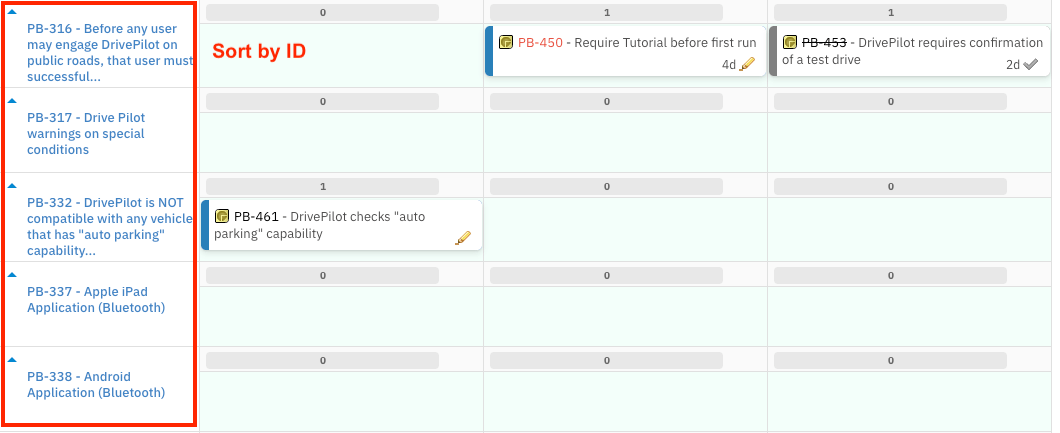
Sort Parent Item swimlanes
Step 1 — Set up Parent Item swimlanes
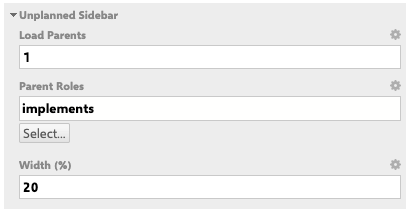
If you have not already configured Parent Item swimlanes, open your Planningboard widget parameters and complete the following before configuring sort order:- Go to Widget Parameters → Unplanned Sidebar.
- Set Load Parents to at least
1. - Set Parent Roles to the link role connecting child items to their parent (for example,
implements).
Step 2 — Configure the Sort by parameter
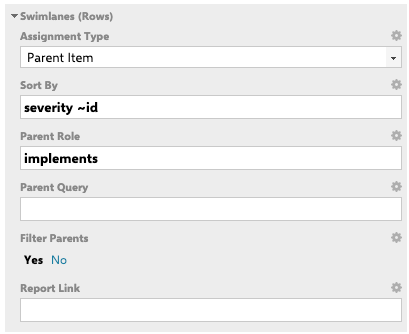
- Open Widget Parameters → Swimlanes (Rows).
- Set Assignment Type to Parent Item.
- In Parent Role, select the link role that defines the parent–child relationship.
- In Sort by, enter one or more work item field IDs.
Step 3 — Save and verify
Save the widget parameters and refresh the Planningboard. The swimlane rows now appear in the order defined by your Sort by expression. You should now see swimlane rows ordered according to the field you entered — for example, highest-priority parent items at the top when sorting bypriority.
Sort by syntax
The Sort by field accepts one or more work item field IDs, space-separated. Use the tilde operator (~) before a field name to sort in descending order.


Configuration overview
The table below summarises the key parameters involved in swimlane sorting.Sorting swimlanes with other assignment types
For assignment types other than Parent Item — such as Users (Assignee), Enumeration Field, or Project — theswimlaneSort widget parameter controls the vertical ordering of rows.
The default value is alphabetical, which orders swimlane rows by their display label in ascending alphabetical order.
Verify in applicationAdditional
swimlaneSort values beyond alphabetical are not confirmed in the current documentation sources. Check your installed version’s widget parameter options for the full list of accepted values.Common pitfalls
Verification
After saving your widget parameters and refreshing the board:- Swimlane rows appear in the order specified by your Sort by expression.
- Changing the sort expression and saving immediately reorders the rows on the next board load.
- If rows appear in an unexpected order, confirm the field ID is correct and that all parent items have the field populated.
See also
- Configure Swimlanes (Rows) — full reference for all swimlane widget parameters
- Parent Item Swimlanes — how to set up parent-based swimlane grouping
- Filter Swimlanes by Plan Range — hide swimlane rows outside the visible Plan timeframe
- User and Assignee Swimlanes — configure user-based swimlane rows
- Enumeration Field Swimlanes — use a custom enumeration field for swimlane grouping