

Configuration
cellDecorators Property
styles Property
Function Signature
Applying CSS Classes
Use jQuerytoggleClass to add or remove CSS classes based on conditions:
toggleClass method takes two parameters: the CSS class name and a boolean condition. When the condition is true, the class is added; when false, it is removed. You can chain multiple toggleClass calls to apply different classes based on different thresholds.
Cells Are Reused — Always Toggle, Never AssignRisksheet uses virtual scrolling, so cell DOM elements are recycled across rows as the user scrolls. If a decorator sets
info.cell.style.backgroundColor = 'red' directly, that color will remain on the recycled cell when it is reused to display a different row. Always express styling as toggleClass('className', condition) so the class is removed when the condition is false.Linking Decorators to Columns
Cell decorators are linked to columns in two ways.Automatic Matching by Column ID
When a decorator name incellDecorators matches a column’s id (or bindings), the decorator is automatically applied to that column. No additional configuration is needed:
Explicit Assignment via cellRenderer
To apply a decorator to a column that does not share the decorator’s name, use the column’scellRenderer property:
Built-In Decorator Patterns
RPN Color Coding
Applies risk-level CSS classes based on RPN value thresholds. The example below uses 150 and 250 as the boundary values; thresholds are user-configurable per deployment and there is no product default — adjust them to match your scoring scheme.
Row Header Decorator
Applies conditional styling to row headers based on the revised RPN value:Row Header RendererTo use a cell decorator on row headers, set
headers.rowHeader.renderer to the decorator name. The row header decorator accesses info.item['rpnNew'] instead of info.value because the row header cell does not have a direct binding to the RPN field. Row header decorators may also use wijmo.toggleClass(info.cell, 'className', condition) as an alternative to the jQuery syntax.Enum Value Color Coding
Apply a background color when an enum field has a specific value:Severity-Based Color Coding
Apply graduated colors based on numeric severity ratings:String Prefix Matching
Decorators are not limited to numeric thresholds. The pattern below usesString.startsWith to color cells based on the prefix of an enum value, for example to visually distinguish “initial” assessments from later “additional” rounds:
Advanced Patterns
Conditional Read-Only Fields
Cell decorators can dynamically make cells non-editable by appending to the row’ssystemReadOnlyFields. This field is a pipe-delimited string on info.item (for example '|severity||occurrence|'); appending '|fieldId|' marks that cell read-only for the current row. Combine it with the built-in rs-readonly CSS class for grayed-out visual feedback:
Use case. In HARA, hazards classified as
QM (non-safety) do not require detailed ASIL fields. The decorator locks asilSeverity and asilExposure for those rows while leaving them editable for ASIL_B and ASIL_D hazards.
Verify in your environmentThe
systemReadOnlyFields pattern is an advanced runtime technique. Test in a non-production document before deploying — interactions with other decorators and validation rules should be reviewed.Row Height Limiting
Limit row height for columns with long text content using a CSS max-height class:max-height to cells via the cellRenderer column property. It is a styling workaround rather than a built-in row height property.
Approval State in Decorators
info.approvals lets a decorator style a cell or a row header by the approval state of the row’s risk record, for example to mark the risks still waiting for the reader.
The values come from the sheet’s Approvals column for the row’s own item, so the sheet needs one; without it,
state and mine are null and the lists are empty. Verdicts filed in the sidebar but not saved yet are already included.
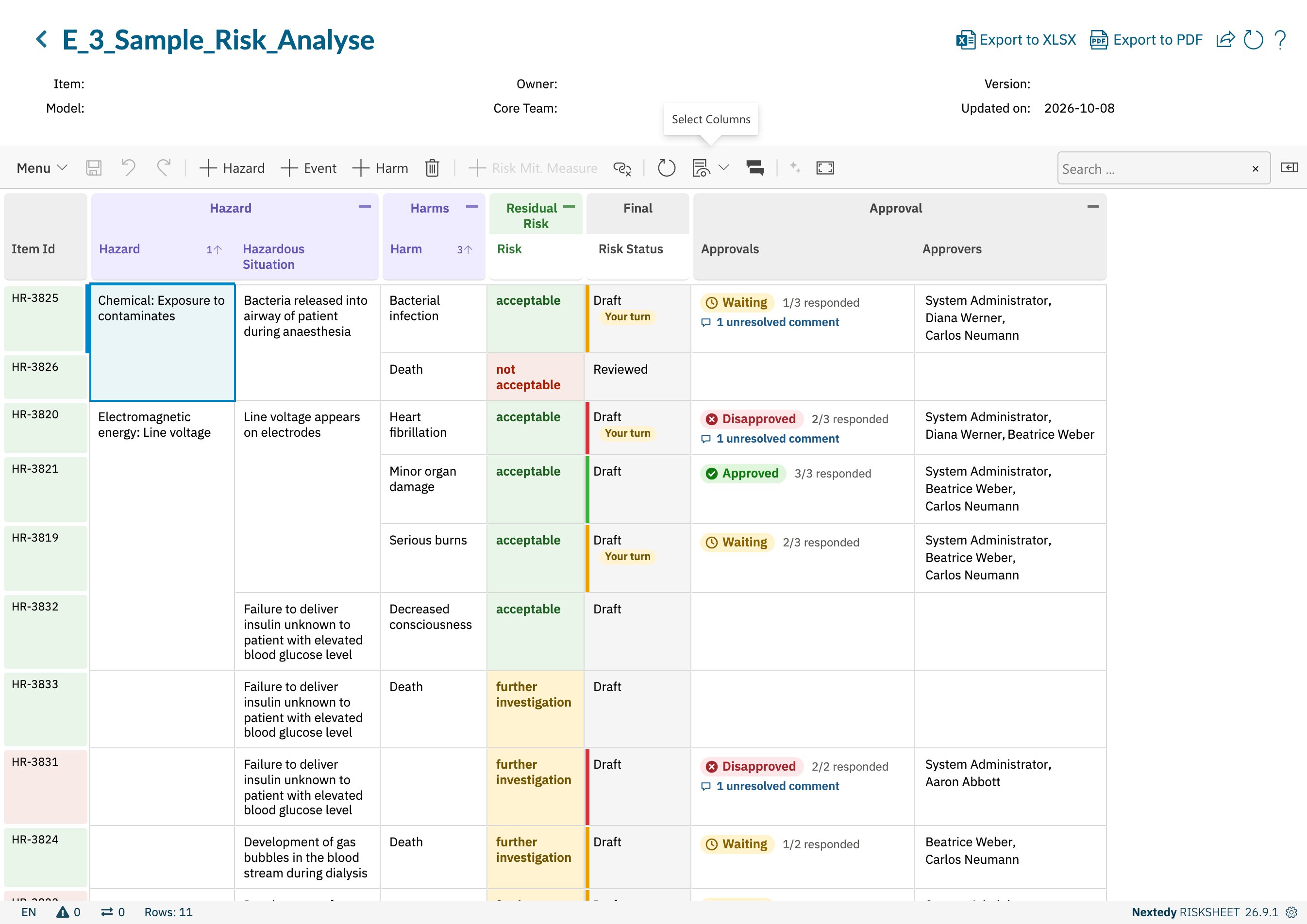
The Risk Status column decorated by approval state, with Your turn on the risks waiting for the reader
Header Group Styles
Thestyles section also supports styling for column group header rows using compound selectors. Each style value must be wrapped in curly braces:
The
<groupCss> value corresponds to the headerGroupCss property on the column definition.
Style Property Reference
Standard CSS properties supported in
styles include:
background-color— Cell background colorcolor— Text colorfont-weight— Text weight (e.g.,600for bold)max-height— Maximum cell height (withoverflow: hidden)border— Cell border styling
Comparison Mode Behavior
Cell decorators are not applied during comparison mode (baseline comparison view). In comparison mode, the grid uses its own highlighting system to show added, removed, and modified cells. Custom cell renderers are also disabled during comparison to prevent visual conflicts with the comparison indicators.Export Behavior
Cell decorator styles (background colors, text colors) are preserved when exporting to Excel and PDF formats (version 24.2.2+). The export process reads CSS colors from the rendered grid cells and converts them to the corresponding Excel fill/font colors or PDF styling.Interaction with Approval Review
Cell decorators are sometimes used to flag rows that are pending review or have been approved. Keep in mind:Approval review limitationRisksheet approval review creates approval-tagged comments but does not trigger Polarion’s formal approval workflow (draft → reviewed → approved). Decorators that visualize “approved” state are reading the Risksheet comment tag, not a Polarion workflow status — design your decorator conditions accordingly. To style by Polarion work item approvals instead, read
info.approvals; see Approval State in Decorators.Complete Example
Related Pages
- CSS Classes — defining CSS class styles
- Conditional Formatting — combining decorators with formulas
- Item Colors — row-level color coding
- Formula Examples — formulas that drive decorator values
- Sheet Configuration Format — complete configuration file reference