

1
Understand Query Factory
A query factory is a JavaScript function that returns a Lucene query string. When a user edits an 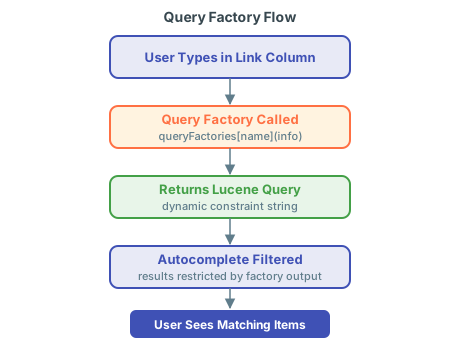
itemLink or multiItemLink column, Nextedy RISKSHEET calls the factory function and appends its returned query to the autocomplete search, restricting which items appear in the dropdown.queryFactories section in the sheet configuration (the risksheet.json file, editable as YAML since v25.5.0) and referenced by name from an itemLink column’s typeProperties.queryFactory property.2
Register a Query Factory Function
Add a named function to the The factory function receives an
queryFactories section of the sheet configuration, then reference it from a column via typeProperties.queryFactory:info object describing the current row and context. It returns a Lucene query string that the server appends to the autocomplete search.3
Create a Dependent Column Filter
A common pattern is filtering one upstream column based on the value selected in another. For example, restrict the Requirements autocomplete to requirements that are already linked to the row’s selected System Element:
- Define the first column (System Element) as a standard
itemLinkcolumn. - Define the second column (Requirement) with
typeProperties.queryFactorypointing to a factory that reads the System Element value frominfo.item. - The factory returns a Lucene query that restricts results to requirements related to that element.
4
Restrict Creation with canCreate
Control whether users can create new items inline from the link editor:Setting
canCreate: false lets users select and unlink existing items but disables inline creation from the autocomplete editor. The default is true. The flag can also be set globally for all task columns via dataTypes.task.canCreate.5
Use Query Factory with Multi-Item Links
Query factories work identically with
multiItemLink columns. Reference the factory through typeProperties.queryFactory; the function shape and info parameter are the same.6
Read Top Panel Controls via jQuery
Query factory functions are plain JavaScript and run in the browser, so they can read live values from DOM elements that the top panel template (When the user changes the dropdown in the top panel, the next autocomplete invocation re-runs the factory and updates the suggestion list. This pattern keeps the top panel and the grid loosely coupled through DOM-readable values, and is a clean way to expose document-level filters without hard-coding them in the configuration.
risksheetTopPanel.vm) renders. This turns the top panel from a passive display into an interactive filter for the grid.The pattern:- Render an interactive control in the top panel template, for example a
<select id="cars">with options such asall,ASIL_B,ASIL_D. - In the sheet configuration’s
queryFactoriessection, define a factory that reads the selected value via jQuery and returns a Lucene query based on it. - Reference the factory from an
itemLinkcolumn’stypeProperties.queryFactory.
7
Combine with Velocity Document Fields
For filters driven by document-level metadata rather than runtime UI, render the value into the top panel template with Velocity and read it from the factory:
- In
risksheetTopPanel.vm, write a document custom field into a hidden element or a JavaScript variable. - In the factory, read the rendered value (via jQuery or a global variable) and include it in the returned Lucene query.
Verification
- Open a Risksheet document with the
queryFactoriessection configured and at least one column referencing a factory viatypeProperties.queryFactory. - Click into a cell in that column and type at least three characters.
- Confirm the autocomplete dropdown shows only items that match both the user input and the Lucene query returned by your factory.
- If the factory depends on another column, change that column’s value and verify the dropdown updates accordingly.
- If the factory reads top panel controls, change the control and verify the next autocomplete reflects the new selection.
See Also
- Configure Queries — static Lucene query configuration
- Enable Conditional Linking — alternative approach to link filtering
- Configure Upstream Traceability Columns — set up the link columns that use query factories
- Customize the Top Panel — Velocity templates and DOM controls for document-level data