

How does a Powersheet document find its configuration file?
How does a Powersheet document find its configuration file?
Each Powersheet document has a custom field (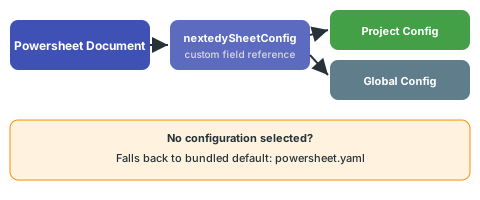
nextedySheetConfig) that references a sheet configuration YAML file. Powersheet scans both the global and project-specific configuration directories for available YAML files and populates a picklist from which you select the desired configuration. If no configuration is selected, the document uses a bundled default configuration (powersheet.yaml).How do I update the configuration for an existing document?
How do I update the configuration for an existing document?
You can change a document’s sheet configuration by updating the
nextedySheetConfig custom field on the document, either through the Polarion work item editor or programmatically. You can also edit the configuration YAML directly through Administration > Nextedy POWERSHEET > Sheet Configurations, which will affect all documents referencing that configuration.See Creating Your First Sheet Configuration for a guided walkthrough.