

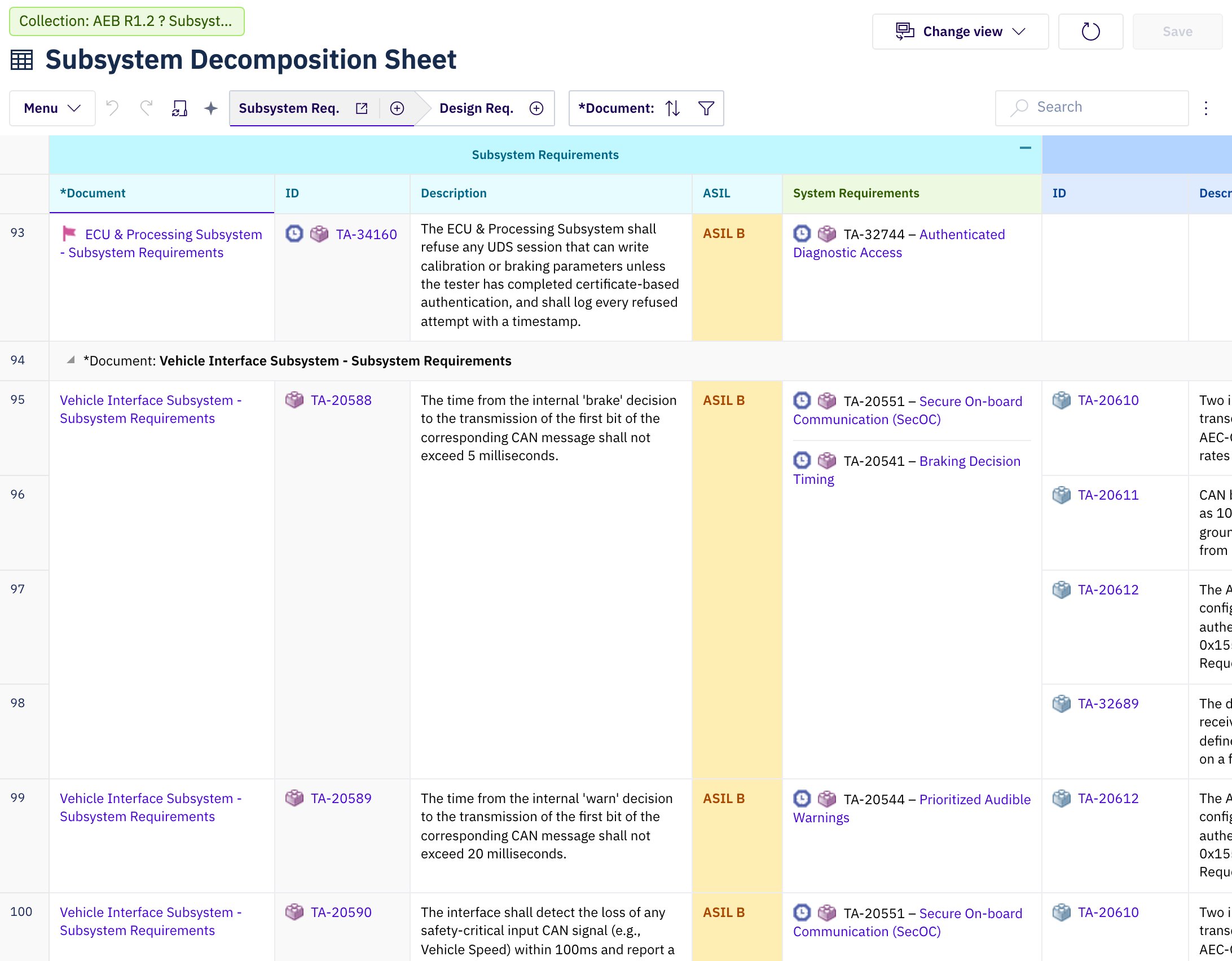
One sheet inside a Collection. The first requirement comes from a pinned document and carries Polarion's revision badge; the requirements below it come from a live document and carry none. The system requirements they link to are pinned.
Why Open a Sheet in a Collection
A baseline freezes a whole project at one revision. A Collection freezes one document at a time, which is how regulated teams work in practice: the upstream level is approved and frozen, and the downstream level is still being written against it. Opened without a Collection, a sheet reads every work item at its current revision, so a traceability view mixes approved content with whatever has changed since. Opened inside a Collection, the same view answers the question an assessor asks: which revision of each work product does this release rest on? Three situations this covers:- Reviewing a gate. A Collection whose documents are all pinned is a closed world. The sheet shows every work item exactly as it was approved, and work products that were not part of the gate are not there.
- Comparing two releases. Open the same sheet in two Collections and only the Collection changes. Each view shows its own revisions of the same documents.
- Working against a frozen baseline. A Collection that pins the upstream documents and leaves the downstream ones live is a working context: you author the live rows while everything they trace to stays frozen.
Pinned and Live Documents
A work item belongs to a Collection only through its document. Each document in the Collection carries its own revision, so one sheet can show frozen and live rows side by side:
A work item read at a pinned revision carries Polarion’s revision badge before its icon, with the revision number in its tooltip. A pinned document carries the baseline badge in the same place. Rows from live documents carry no badge.
What the Collection Scopes
The Collection applies to everything the sheet reads, not only to its top-level rows:Editing Inside a Collection
A Collection does not make the whole sheet read-only the way opening a historical revision does. Editability is decided per row, by the row’s document:- The fields of a row from a pinned document are read-only. Their cells do not open an editor. Its link cells follow the linking rule below.
- A row from a live document is edited as usual. The change is written to the work item’s current revision when you select Save; unsaved changes are lost when you reload or close the tab.
- New work items go into a live document of the Collection. Where the sheet lets you choose the document for a new row, it offers only live ones. Where no live document of the Collection accepts a work item type, the sheet does not offer the add action for that type. A sheet whose source is bound to the current document creates new rows in that document, so a new row cannot be saved while the Collection pins it.
- Links can be added or removed only when the work item that stores the link in Polarion is in a live document. The other end may be pinned, so a live requirement can be linked to a frozen upstream item, which is the point of working against a baseline.
Recognising a Scoped Sheet
A collection-scoped sheet states its scope above the title: a green chip readingCollection: <name>. A long name is shortened, and shown in full when you hover over the chip. Selecting the chip opens the Collection in Polarion in a new browser tab. The chip states the sheet’s scope; Polarion’s own Collection banner does not. A sheet can be scoped while Polarion is not inside the Collection, and the other way round.
To state the Collection in the heading itself, read it in the sheet header expressions through context.collection, which is empty when the sheet is not scoped.
Which Collections a Sheet Can Open
A sheet opens Collections of its own project: the Collection is looked up in the project of the sheet’s document. A Collection owned by another project cannot be named, even when it contains the document.See Also
- Open a Sheet in a Polarion Collection — the task, step by step
- Query Baseline or Revision — open a whole sheet at one historical revision instead
- URL Parameters — the
_collectionsystem parameter - Sheet Header — naming the Collection in the title or subtitle
- Scope a Server-Rendered Column to a Collection — narrowing a template’s own reads to the Collection