

What is Powersheet and what problems does it solve?
What is Powersheet and what problems does it solve?
Powersheet is a hierarchical sheet application for Polarion that provides configurable tabular views over complex work item hierarchies. It enables Excel-like editing and traceability directly inside Polarion, letting teams manage requirements traceability matrices, risk analyses, and structured data without leaving their ALM environment. For a full introduction, see Getting Started.
Who is Powersheet designed for?
Who is Powersheet designed for?
Powersheet serves systems engineers, requirements managers, quality engineers, and safety engineers who work with Polarion. Skill levels range from end users who view and edit data in sheets to administrators who configure data models and sheet configurations. It is particularly useful for teams managing structured hierarchical data in regulated industries — from requirements traceability matrices (RTM) to risk management workflows.
What is the difference between a data model and a sheet configuration?
What is the difference between a data model and a sheet configuration?
A data model defines entity types, their properties, and the relationships between them — it maps Powersheet entity types to Polarion work item types and establishes navigable links via link roles. A sheet configuration defines how data from the data model is displayed: column layout, widths, formatters, views, sorting, and expansion paths. Both are YAML files stored in the project SVN.
For details on each, see the Data Model Reference and Sheet Configuration Reference.
How does Powersheet connect to Polarion data?
How does Powersheet connect to Polarion data?
Powersheet maps data model entity types to Polarion work item types via the 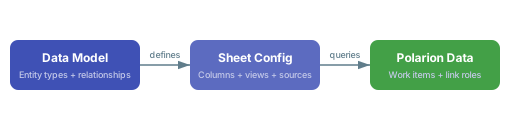
polarionType property. Relationships between entity types are stored using Polarion link roles, with direct and back navigation directions defined in the data model. When users load a sheet, Powersheet queries Polarion for work items matching the source configuration and displays them according to the column definitions. Save operations write changes back to Polarion work items through the server API.What standards and processes does Powersheet support?
What standards and processes does Powersheet support?
Powersheet supports ISO 15288 (systems engineering), Automotive SPICE, ISO 26262 (via RTM traceability), and general requirements management processes. The standard RTM example uses the entity hierarchy
UserNeed > SystemRequirement > DesignRequirement > Hazard > RiskControl to demonstrate traceability across these domains. For industry-specific models, see the Example Models Reference.How should I start configuring Powersheet?
How should I start configuring Powersheet?
Begin with the simplest possible configuration and extend incrementally. Create a data model with one or two entity types and a basic sheet configuration with a few columns. Verify each step works before adding complexity — this avoids hard-to-diagnose errors that arise from multi-level hierarchies with many-to-many relationships on a first attempt. See Getting Started for a guided walkthrough.
What are master-downstream relationships in sheets?
What are master-downstream relationships in sheets?
Master-downstream is the hierarchical display pattern where master items (such as
UserNeed) expand to show their related downstream items (such as SystemRequirement). The sheet automatically merges cells for master-level columns to span all downstream rows, providing visual grouping. Users can add or remove items at both levels, and undo/redo is fully supported across all operations.What is review mode?
What is review mode?
Review mode is a toggle in the sheet toolbar that filters the view to show only modified, added, or removed rows. It lets users focus on changes they have made before saving, reducing the risk of unintended modifications. Review mode displays counts of changed items and works alongside the standard save validation.
Where can I get help if I encounter issues?
Where can I get help if I encounter issues?
Check the Troubleshooting Guides for step-by-step error resolution, or browse the Troubleshooting FAQ for quick answers. For configuration-specific questions, see the Configuration FAQ and Sheet Configuration FAQ. If your issue is not covered in the documentation, submit a support ticket through the Nextedy support portal.