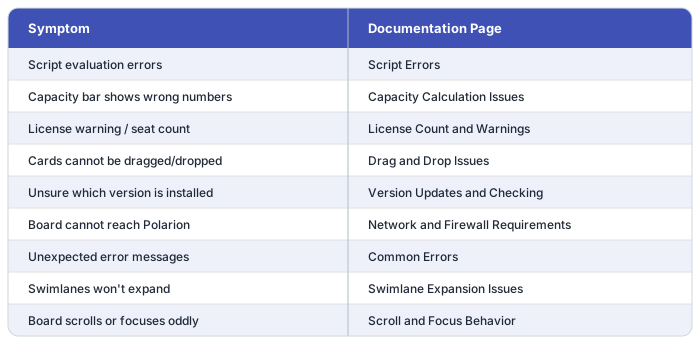
This section collects solutions to the most common problems encountered when running Nextedy PLANNINGBOARD in Siemens Polarion ALM.
Use the pages below when the board is not behaving as expected, a widget parameter is producing unexpected output, or an error message appears during planning work.
Script Errors — Diagnose and fix runtime errors from item scripts, config scripts, and data scripts embedded in widget parameters.Common Errors — Reference for error messages that appear in the board or browser console, with causes and resolution steps.
Capacity Calculation Issues — Resolve discrepancies in capacity bar totals, incorrect effort aggregation, and capacity normalization problems. See also the known limitations around multi-assignee and sub-item effort distribution.
Drag and Drop Issues — Fix problems where cards cannot be moved between swimlanes or Plans, including permission and configuration causes.Swimlane Expansion Issues — Address swimlanes that fail to expand, collapse unexpectedly, or do not display expected work items.Scroll and Focus Behavior — Resolve unexpected scroll jumps, lost focus, or board viewport issues after interacting with cards.
License Count and Warnings — Understand license seat consumption, resolve over-limit warnings, and verify license configuration.Version Updates and Checking — Determine the installed Planningboard version and apply updates correctly.Network and Firewall Requirements — Ensure the Polarion server and browser client can reach required endpoints; resolve connectivity-related failures.
Check the browser developer console for JavaScript errors and the Polarion server log for plugin exceptions. Include the Planningboard version (see Version Updates and Checking) and the relevant widget parameter values when reporting an issue.