

Why an Enumeration Runs Out
The resource view starts from a Resource Field on each work item. When that field is a User field, every row is a Polarion user; when it is an enumeration, every row is one enumeration value. Both work well for a single team planning a quarter. Long-term capacity planning asks questions neither shape can answer:- A resource is not always a person. A department, a discipline or a supplier has capacity of its own and appears on the plan long before anyone is named.
- Resources are nested. An engineering department containing a software group containing a firmware team is three levels, and the same short name can appear under more than one branch.
- Capacity is a property of the resource, not of the plan. A department that can supply 60 hours a day says so once, in one place.
- The same person reaches the plan twice: as the Assignee of a task and as the Resource of a Team Assignment. Without a shared identity that is two rows and a double-counted allocation.
The Three Layers
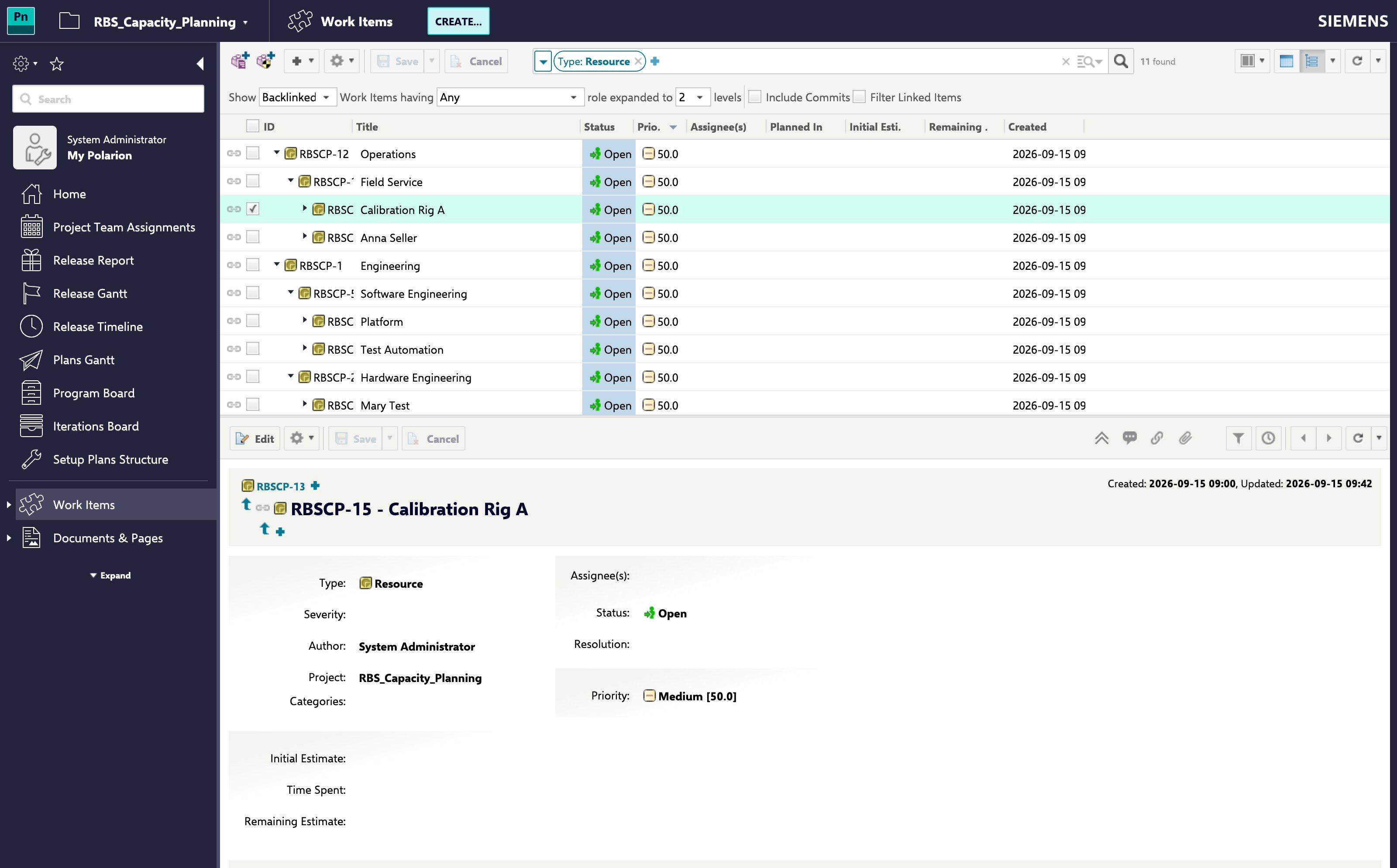
An RBS is built up in three independent layers. Each is opt-in, and each is useful on its own.Its Own ProjectThe hierarchy lives in the project named by
nextedy.gantt.resourceHierarchy.projectId. That is deliberately not the context project and not the team management project: a deployment can keep its resource breakdown and its teams apart, and nothing is turned on until the property names a project.Structure: Resources as a Tree
Every work item in the hierarchy project is a node. A node’s children are the work items that link to it as their parent, so the tree is whatever the project’s own parent link role already describes. Nodes with no parent are the roots.nextedy.gantt.resourceHierarchy.query narrows which work items of that project take part, so an RBS can share a project with other content.
Not every node is a resource you can assign to. nextedy.gantt.resourceHierarchy.pickableField names a boolean field on the node: when it is set, only nodes whose field is true can be selected, and the rest can only be opened to reveal their children. That is how a department becomes a container you browse through and the team inside it becomes a resource you assign to.
Because a short name repeats across branches, the Gantt labels the two places differently:
- The bar and the resource row carry the node’s own name, which is what fits in the space available.
- The picker, showing a value already chosen, carries the full path, with
/between the levels, so two identically named nodes are told apart at the point where the choice is made.
Identity: One Person, One Row
A node can stand for a Polarion user. When it does, its allocation and the allocation the same person picked up as an assignee land on a single resource row and are counted once. The mapping is normally declared on the node:nextedy.gantt.resourceIdentity.userIdField lists attributes of the node that hold a user — including the built-in assignee — and the first that resolves to a real user wins.is normally declared on the node: nextedy.gantt.resourceIdentity.userIdField lists attributes of the node that hold a user — including the built-in assignee — and the first that resolves to a real user wins.
Where an upstream system owns the resource structure and its work items cannot be changed, the mapping can instead be read from the Polarion user through nextedy.gantt.resourceIdentity.userResourceField. Polarion has no admin UI for adding custom fields to users, so that field exists only where user provisioning — LDAP/SSO, an import, or the API — puts it there. When both ends are configured the node side is tried first and the user side is the fallback.
Where an upstream system owns the resource structure and its work items cannot be changed, the mapping can instead be read from the Polarion user through nextedy.gantt.resourceIdentity.userResourceField. Polarion has no admin UI for adding custom fields to users, so that field exists only where user provisioning — LDAP/SSO, an import, or the API — puts it there. When both ends are configured the node side is tried first and the user side is the fallback.
A container node is not expected to name a user. Where nextedy.gantt.resourceHierarchy.pickableField is configured, the picker resolves an identity only for the nodes it offers for selection, because the levels above it are navigationA container node is not expected to name a user. Where nextedy.gantt.resourceHierarchy.pickableField is configured, the picker resolves an identity only for the nodes it offers for selection, because the levels above it are navigation.
Capacity: The Resource Declares Its Own
A Polarion working calendar expresses availability as a percentage of a working day. That is the right shape for a person and the wrong shape for a department, which is better described as “60 hours a day”.Capacity: The Resource Declares Its Own
A Polarion working calendar expresses availability as a percentage of a working day. That is the right shape for a person and the wrong shape for a department, which is better described as “60 hours a day”.nextedy.gantt.resourceCapacityField names a field on the resource work item holding that figure. With nextedy.gantt.resourceCapacityFieldUnit at its default perDay, the value is read as hours per working daynextedy.gantt.resourceCapacityField names a field on the resource work item holding that figure. With nextedy.gantt.resourceCapacityFieldUnit at its default perDay, the value is read as hours per working day. nextedy.gantt.resourceCapacityField names a field on the resource work item holding that figure, read by default as hours available on each working day (60 on a department means 60 hours a day, multiplied by the working days in the period). The nextedy.gantt.resourceCapacityFieldUnit property can instead treat the figure as a whole-period total (perPeriodAbsolute).
The declared figure does not compete with a working calendar — it covers the resources that have no calendar to draw on. A node that resolves to a Polarion user takes that user’s calendar, and its declared figure is not read; everything else is described by the figureThe declared figure does not compete with a working calendar — it covers the resources that have no calendar to draw on. A node that resolves to a Polarion user takes that user’s calendar, and its declared figure is not read; everything else is described by the figure.
What the working calendar keeps is the shape of the week: a non-working day still carries no capacity, so schedule exceptions, holidays and vacations continue to apply on top of the declaredWhat the working calendar keeps is the shape of the week: a non-working day still carries no capacity, so schedule exceptions, holidays and vacations continue to apply on top of the declared figure.
Declaring capacity is covered in Declare Resource Capacity in Hours per DayDeclaring capacity is covered in Declare Resource Capacity in Hours per Day.
How It Reaches the Plan
Team Assignments are what connect the structure to the plan. A Team Assignment work item takes its resource from the field named by the Resource Field widget parameter rather than from its assignee, so the resource it points at can be an RBS node. Where a resource field is configured, the Assignee field is the fallback and the lightbox hides it for a new assignment and for one that already carries a resource.How It Reaches the Plan
Team Assignments are what connect the structure to the plan. A Team Assignment work item takes its resource from the field named by the Resource Field widget parameter rather than from its assignee, so the resource it points at can be an RBS node. Where a resource field is configured, the Assignee field is the fallback and the lightbox hides it for a new assignment and for one that already carries a resource. The resource view then groups those assignments. With Group Resources By Teams on, each team becomes a collapsible header row carrying the team’s own aggregated allocation, with its resource rows beneath it — and a resource assigned in several teams appears under each of them. See Group Resources by Teamhe resource view then groups those assignments. With Group Resources By Teams on, each team becomes a collapsible header row carrying the team’s own aggregated allocation, with its resource rows beneath it — and a resource assigned in several teams appears under each of them. See Group Resources by Team.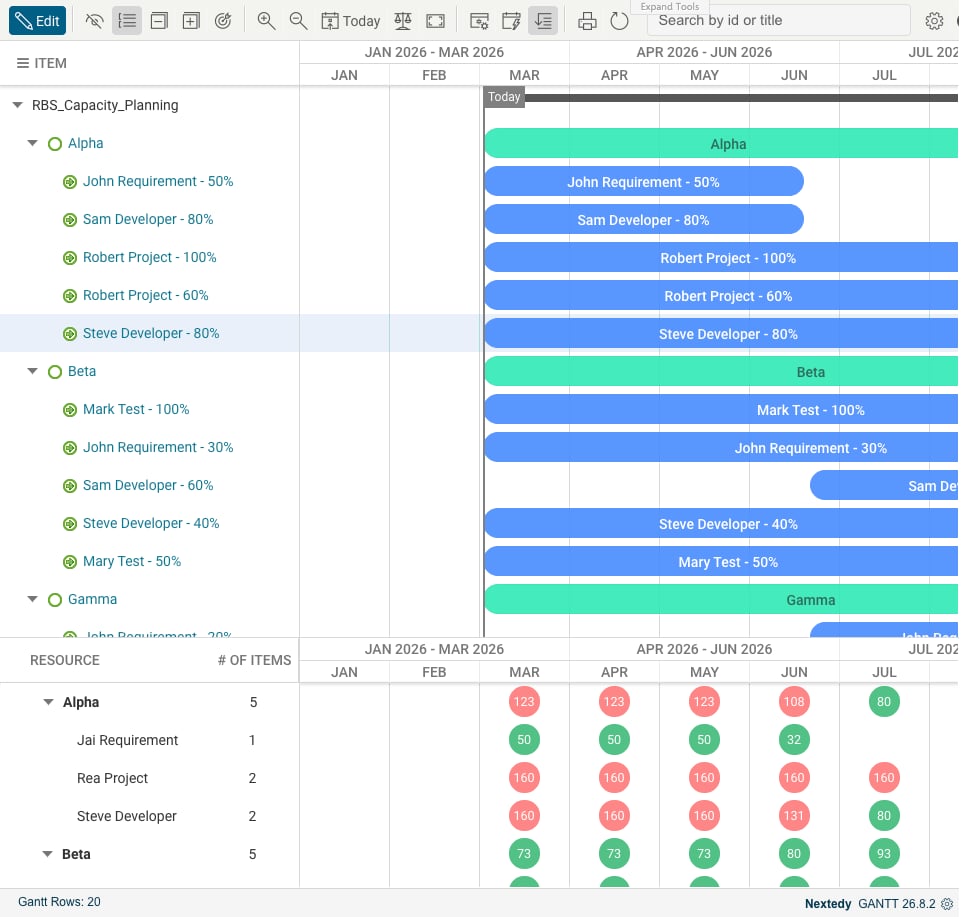
Related Pages
- Team Assignments and Cross-Team Planning — the Team and Team Assignment work item types this builds on
- Working Calendars and Scheduling — the calendar layer that declared capacity overrides
- Resource Hierarchy and Identity Properties — every property named on this page
- Set Up a Hierarchical Resource Picker — stand the tree up
- Map Resources to Polarion Users — configure the identity layer
Related Pages
- Team Assignments and Cross-Team Planning — the Team and Team Assignment work item types this builds on
- Working Calendars and Scheduling — the calendar layer that declared capacity overrides
- Resource Hierarchy and Identity Properties — every property named on this page
- Set Up a Hierarchical Resource Picker — stand the tree up
- Map Resources to Polarion Users — configure the identity layer