

Enforce mandatory items on a transition (DoD / DoR gate)
- Open the workflow configuration for the work item type (or document/test run type) that carries your Definition of Done (
dod) or Definition of Ready (dor) checklist. - On the transition that should be gated, add the workflow function
ChecklistFailIfMandatoryUnchecked. - Set the
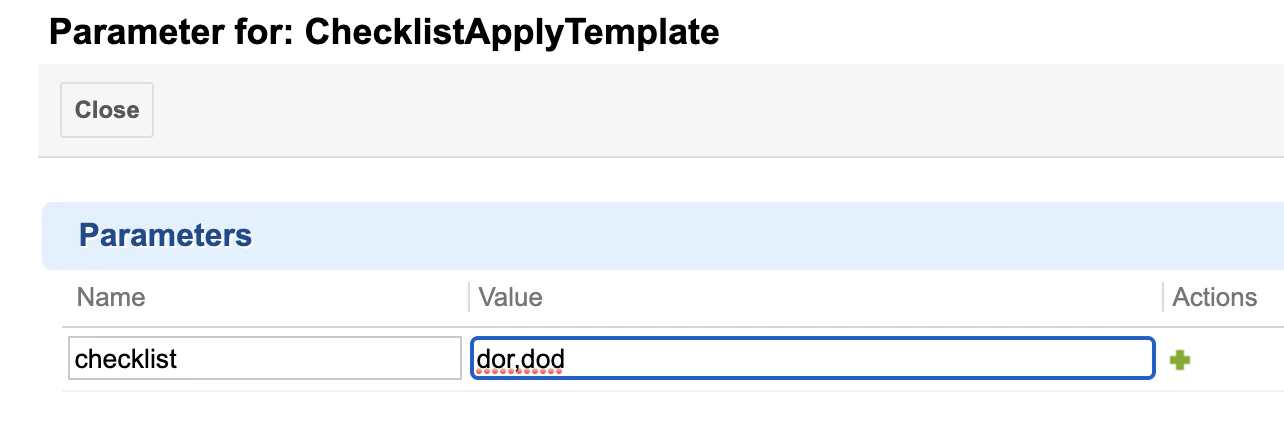
checklistargument to the ID of the checklist custom field. Use a comma-separated list to validate more than one checklist field on the same transition.
Verify in applicationThe exact wording of the blocking error message is not documented here. Check it in your Polarion instance during setup and note it down, so you can add it to your own troubleshooting notes.
Require every item, not just mandatory ones
If a checklist should block the transition unless all items are checked (not only the ones flagged mandatory), enable the checklist’sallMandatory configuration so ChecklistFailIfMandatoryUnchecked treats every item as gating.

Apply or re-apply a template as a gate action
UseChecklistApplyTemplate on a transition to (re)populate a checklist field from its configured template as part of the transition action:
Freeze the checklist definition on a status
By default, a checklist’s structure keeps re-syncing to its template. To stop that once a work item (or document/test run) reaches a specific status — so the checklist “freezes” at whatever content was recorded so far — set:dod checklist once a work item reaches status reviewed:
Restrict who can change the checklist structure while frozen
Freezing the merge behavior stops automatic template re-sync, but users can still edit the checklist manually unless you also restrict who can change its structure. Combine freeze with theadminPermission configuration property:
dor checklist for userstory items can only be changed by anyone while still in draft, then locks down:
Reset the checklist to template on a status change
To make an approval-style transition also guarantee the checklist reflects the latest template before locking it down, attachChecklistApplyTemplate to that transition’s function list, then apply the freeze properties above on the destination status.
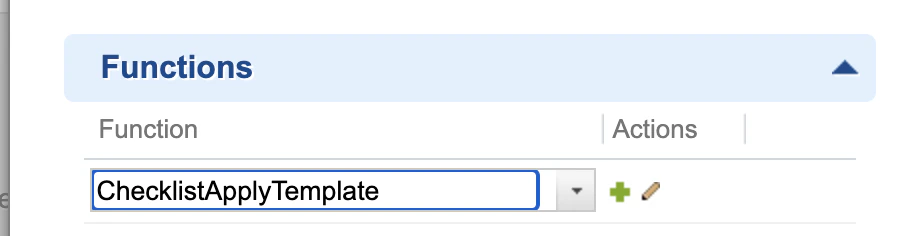
checklist parameter to a comma-separated list of the checklist custom field IDs you want the transition to (re)apply the template to.
Make the checklist field fully read-only
In addition to permission-based structure locking, you can mark the underlying custom field itself as read-only using Administration > Work Items > Readonly Fields, or field-based permissions under Administration > User Management > Permissions Management. A fully read-only field blocks both structure changes and item checking — use this when no further interaction should be possible at all, rather than only blocking structure edits.Verification
You should now see:- The gated transition rejected with an error when mandatory items (or, with
allMandatoryenabled, any item) are left unchecked. - The checklist structure on a work item in the frozen status staying unchanged even after the template is edited, until the freeze status is reverted or the checklist is explicitly re-applied.