

What a baseline captures
A baseline is a frozen checklist snapshot tied to a document revision. Nextedy CHECKLIST identifies baselines by querying for work items of a configurable type and reading a configurable field that stores the revision identifier. Each baseline entry displayed to users carries:- an ID (the revision/baseline value)
- a label (typically the ID combined with the baseline work item’s title)
- the creation date of the baseline work item
- the workflow status of the baseline work item
- a URL linking to the document at that specific revision
Verify in applicationThis guide does not cover the exact steps to create a baseline work item (e.g. via a Polarion document baseline/revision action). Confirm the baseline-creation workflow in your project before relying on this guide for that step.
1
Confirm the baseline item type and field
Baseline tracking is configured per document and looks for baseline records using two configuration properties:Both properties have defaults:
If your project already uses
btask for something unrelated to baselines, override nextedy.checklist.baselines.itemType in Administration > Configuration Properties to point at a dedicated work item type instead.2
Understand the two rendering modes
The baselines feature renders in one of two ways, depending on whether a specific revision is in context: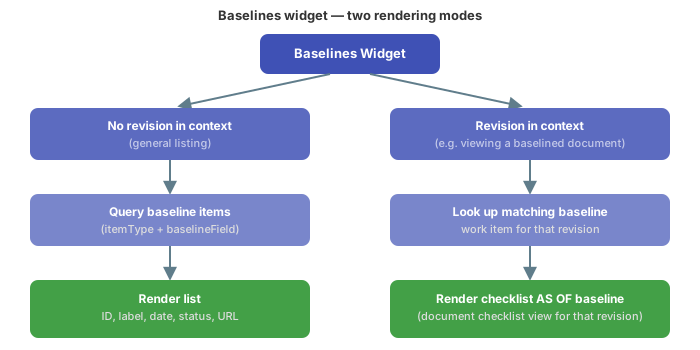
- General listing — queries all work items matching the configured baseline item type and sorts them by the baseline field, producing the list of baseline entries (ID, label, date, status, URL).
- Revision-scoped rendering — when a specific revision is active in the viewing context, the widget instead looks up the one baseline work item matching that revision and renders the checklist as it existed at that baseline.
3
Place the baselines view on the document
The baselines list is rendered as part of a document’s (LiveDoc) checklist tooling, alongside the checklist itself. Because a document can have multiple checklists, the baselines view needs to know which checklist it should reflect.At minimum, confirm the following are set for your document:
- the target document the baselines view is bound to
- the checklist ID within that document, required when the document defines more than one checklist
- an optional title to display above the baselines list
Verify in applicationThis documentation set does not give the exact Velocity/report-page syntax for embedding the baselines widget on a document page — only the equivalent test run checklist embedding syntax. Check your document’s report/page configuration in the application, or consult Set Up a Document (LiveDoc) Checklist, for the precise embedding steps.
4
Exclude the baselines view from PDF export (if needed)
The baselines view supports a flag to hide it when the document is exported or rendered as PDF.
5
Review baseline status and navigate to a revision
Each entry in the baselines list shows:
- the baseline label (falls back to just the ID if the baseline work item has no distinct title)
- the date the baseline work item was created
- the status of the baseline work item (its workflow status, shown as an icon/label)
- a URL linking directly to the document at that revision
Empty, OK, NOK, Pending) as they were recorded at that point in time.Comparing baselines for compliance review
A typical audit or compliance comparison scenario:- Open the document’s baselines list to see every recorded revision, its date, and its workflow status.
- Select an earlier baseline to view the checklist exactly as it stood at that revision (result states for every checklist item, including any mandatory items).
- Select a later baseline (or the current document state) and compare which items changed result state between the two points.
- Cross-reference the workflow status shown on each baseline entry to confirm the checklist was in the expected state (e.g. all mandatory items checked) before the document transitioned to that status.