

Available Workflow Functions and Conditions
Checklist provides the following workflow functions and conditions for gate enforcement: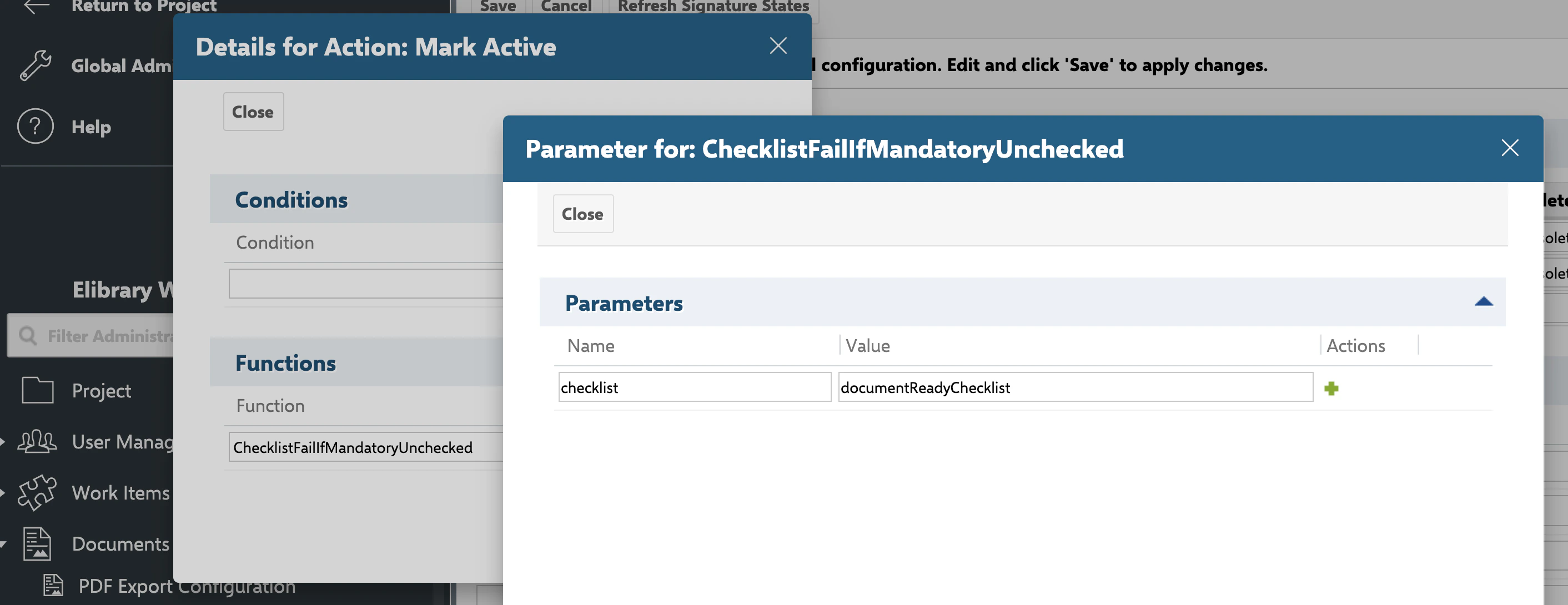
All functions and conditions accept a mandatory
checklist parameter containing the custom field ID(s) to validate.
1
Open the Workflow Designer
- Navigate to Polarion Administration > Work Items > Workflow (or the equivalent for documents/test runs)
- Select the work item type whose workflow you want to configure
- Open the workflow editor
2
Add a Validation Function
To block a transition when checklist items are incomplete, add a workflow function to the target transition.When a user attempts the transition, Checklist validates that every item in the specified field has a result state of OK. If any item is unchecked, the transition is blocked with a user-friendly error message showing the field name.This allows the transition as long as all items flagged as mandatory are checked, even if optional items remain unchecked.
Block if Any Item Is Unchecked
UseChecklistFailIfAnyUnchecked when every checklist item must be completed:- Select the transition (for example, “Mark as Done”)
- Add a workflow function:
ChecklistFailIfAnyUnchecked - Set the
checklistparameter to the custom field ID
Block if Mandatory Items Are Unchecked
UseChecklistFailIfMandatoryUnchecked when only mandatory items must be completed:3
Add a Validation Condition
Conditions control whether a transition appears as available to the user. Unlike functions (which show an error on attempt), conditions hide the transition entirely when not satisfied.The transition button is visible only when every item in the checklist is checked.The transition button appears once all mandatory items are checked.
Require All Items Checked
Add theChecklistAllChecked condition to a transition:Require Mandatory Items Checked
Add theChecklistMandatoryChecked condition:4
Validate Multiple Checklists
You can validate multiple checklist fields in a single function or condition by providing a comma-separated list: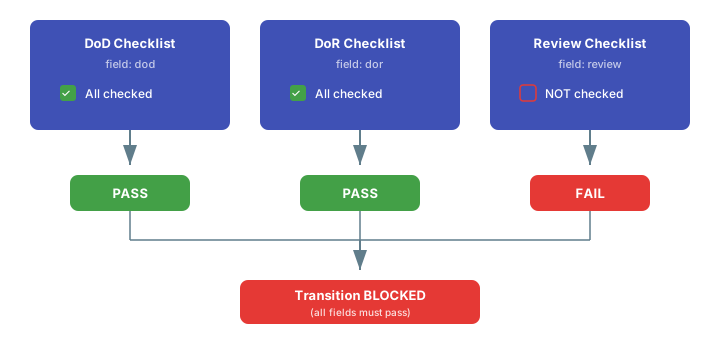
5
Apply Templates on Transition
Use This merges the configured template into each listed field. Template items that already exist are preserved; missing items are added.Common use case: Attach
ChecklistApplyTemplate to populate or refresh checklist items when a transition occurs:ChecklistApplyTemplate to a “Start Work” transition to ensure the checklist is populated when an engineer begins a task.6
Reset Checklists on Transition
Use
ChecklistResetToTemplate to discard all changes and restore the template state:7
Uncheck All Items
Use This sets every item back to Empty, which is useful for “reopen” or “rework” transitions where the user must re-verify all items.
ChecklistUncheckAll to clear all result states without removing items:Object Type Support
All workflow functions and conditions work with:- Work items — requirements, tasks, defects, test cases, and all custom types
- Documents (LiveDocs) — useful for document review and approval gates
- Test runs — enforce pre-execution or post-execution checklists
Verification
After configuring workflow gates:- Open a work item with an incomplete checklist
- Attempt the protected transition
- You should now see an error message (for functions) indicating which checklist field has unchecked items, or the transition button hidden entirely (for conditions)
- Complete all checklist items (or all mandatory items) and retry
- The transition should succeed
See Also
- Creating and Managing Templates — set up templates referenced by workflow functions
- Freezing Checklists by Status — stop template merging at specific statuses
- Controlling Access and Permissions — restrict who can modify checklists
- Read-Only Mode — lock checklists after workflow gates pass