

Predicate Basics
Predicates are conditions placed in thewhere clause of a source query. Powersheet evaluates predicates to determine which entities from Siemens Polarion ALM are included in the sheet. Simple predicates compare a property value to a target; composite predicates combine multiple conditions with AND/OR logic.
1
Use Equality Predicates
The simplest predicate matches a property to an exact value:This returns only
UserNeed entities where severity equals critical.For explicit equality syntax:2
Use Comparison Operators
The following comparison operators are available for filtering:
Numeric comparisonsThe
gt and ge operators work with numeric properties (integer, float). They are not applicable to string or boolean properties.3
Check for Null Values
To filter entities based on whether a property has a value:Null checks are useful for finding incomplete work items or ensuring required fields are populated.
4
Combine Predicates with AND
Use the This returns entities that are both
and operator to require all conditions to match:critical severity AND approved status. AND arrays support any number of sub-predicates:5
Combine Predicates with OR
Use the This returns entities where severity is either
or operator when any condition should match:critical OR major.6
Nest Composite Predicates
AND and OR predicates can be nested for complex filtering logic:This returns approved entities with either critical or major severity.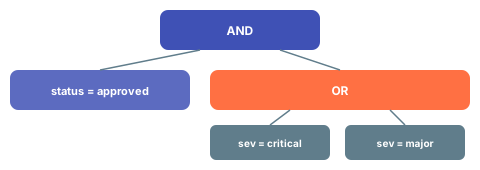
Verification
After updating thewhere clause in your sheet configuration and reloading the document:
- You should now see only entities that match your predicate conditions
- The row count in the sheet should reflect the filtered result set
- Verify that excluded entities are not displayed in the sheet
See Also
- Write an Entity Query — complete source query setup
- Filter by Document — scope predicates to a specific document
- Optimize Queries — performance tips for predicate-heavy queries
- Configure Sources — full source configuration reference