

Prerequisites
- A data model with entity types and
constraintsconfigured - A sheet configuration with at least one data source
- A Polarion LiveDoc containing the work items you want to filter
1
Understand Document Constraint Scoping
Powersheet can automatically scope queries to the current document. This happens through the 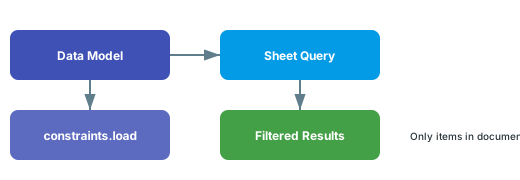
constraints section of your data model, which defines how entity types relate to documents.2
Add Load Constraints to Your Entity Type
In your data model YAML, add a This restricts the
constraints block with a load section that defines document filtering criteria:SystemRequirement entity to only load items from the document at Requirements/System-Requirements.3
Use Dynamic Document Constraints
For more flexible filtering, use
$context.source.document to dynamically reference the current document:4
Filter by Document Type
You can also constrain entity loading by document This loads only
type:Hazard work items from documents whose Polarion type is riskAnalysis.5
Apply Document Constraints to Picker Filters
When creating links between entities, you may want the picker dropdown to show only items from specific documents. Use
pick constraints:6
Combine Document and Type Constraints
For precise scoping, combine document constraints with the
allowedWITypes property:Verify in applicationThe
allowedWITypes property enables document-based routing of entities when multiple work item types map to a single entity type. Verify the exact behavior for your configuration.Verify
After applying document constraints:- Open the powersheet document in Polarion
- You should now see only work items that match the document filter criteria
- If using picker constraints, click a relationship cell and confirm the dropdown only shows items from the constrained documents
- Items from other documents should not appear in the sheet
See Also
- Configure Constraints — full constraint configuration guide
- Write an Entity Query — general query writing
- Use Predicates — query predicate syntax