

Prerequisites
- A working powersheet document with configured data sources
- Familiarity with entity queries and predicates
- Access to Polarion server logs for debug output
1
Understand the Query Processing Pipeline
When Powersheet loads data, each query goes through a processing pipeline that translates your configuration into a query against Polarion. Understanding this pipeline helps you write efficient queries.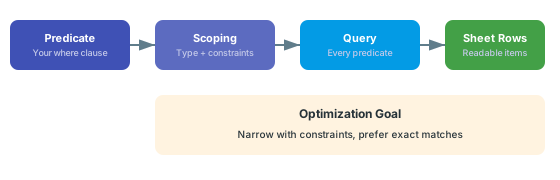
where clause is applied together with the entity type, the project and the data model constraints. If any predicate is not supported for its field, the whole query stops with an error instead of skipping it (see Query Execution). Performance depends on how far your constraints and predicates narrow the result.2
Prefer Exact Comparisons
Equality and comparison operators are the most direct way to narrow the result. Structure your Avoid mixing complex logical groupings when simple predicates will do. Powersheet handles
where clause to use these operators:and at the top level automatically, so flat predicate structures perform best:3
Add Project and Document Constraints
Always define project and document constraints in your data model. Powersheet adds these to the query, dramatically reducing the result set together with your Project and document constraints work together as pre-filters. Powersheet adds them to the same query as your This injects the current document ID as a query parameter, scoping results to the active document context.
where clause:where clause, so they narrow the search scope.For dynamic document scoping, use applyCurrentDocumentTo in your constraints so the sheet automatically filters to the current LiveDoc without hardcoding document paths:4
Limit Navigation Property Expansion Depth
Deeply nested The expand clause is converted internally to dot-notation strings for the query protocol. Each level adds another round of relationship resolution on the server.
expand clauses cause cascading queries. Each expansion level triggers additional database lookups for related entities:5
Optimize Sort Clauses
Sorting interacts with query performance. Inside a Keep sort properties simple and aligned with indexed Polarion fields. Sorting by navigation property paths (e.g.,
query: block, use orderBy to determine the order of returned results. (Note that sortBy is a separate sheet-level option that belongs at the YAML root, not inside query:.)designRequirement.title) requires the server to resolve relationships before sorting, which adds overhead.Default sortingWhen no
orderBy is specified, results come back in Polarion’s default order (typically by work item ID). Specify outlineNumber asc for document-ordered display.6
Scope Enum Sources Efficiently
Powersheet auto-discovers enum properties from metadata and dynamically creates data sources for dropdown pickers. Each enum source generates a query to fetch
EnumOption entities. To avoid unnecessary queries:- Only include enum columns in views where they are needed
- Use constraints on enum queries to limit results to the relevant project and work item type
- The auto-discovery uses
polarionType,projectId, andenumIdmetadata to build targeted queries
7
Enable Query Debug Mode
To identify slow queries, use the
explain query parameter. With explain enabled, the server returns diagnostic details about the executed query along with the response, and writes the query to the server log.Verify in applicationCheck your Polarion server’s logging configuration for the exact log level and category needed to enable query debug output. The
explain parameter in query configuration enables additional diagnostic information.Performance Decision Matrix
Verify
After applying optimization changes:- Open the powersheet document and note the initial load time
- You should now see faster data loading compared to before your changes
- Confirm the sheet loads without a query error
- Test with views that hide deep expansion columns to confirm they load faster
See Also
- Write an Entity Query — query structure fundamentals
- Use Predicates — predicate operator reference
- Filter by Document — document scoping techniques
- Expand Navigation Properties — controlling expansion depth
- Query Baseline or Revision — historical query considerations
- Configure Sources — data source setup