

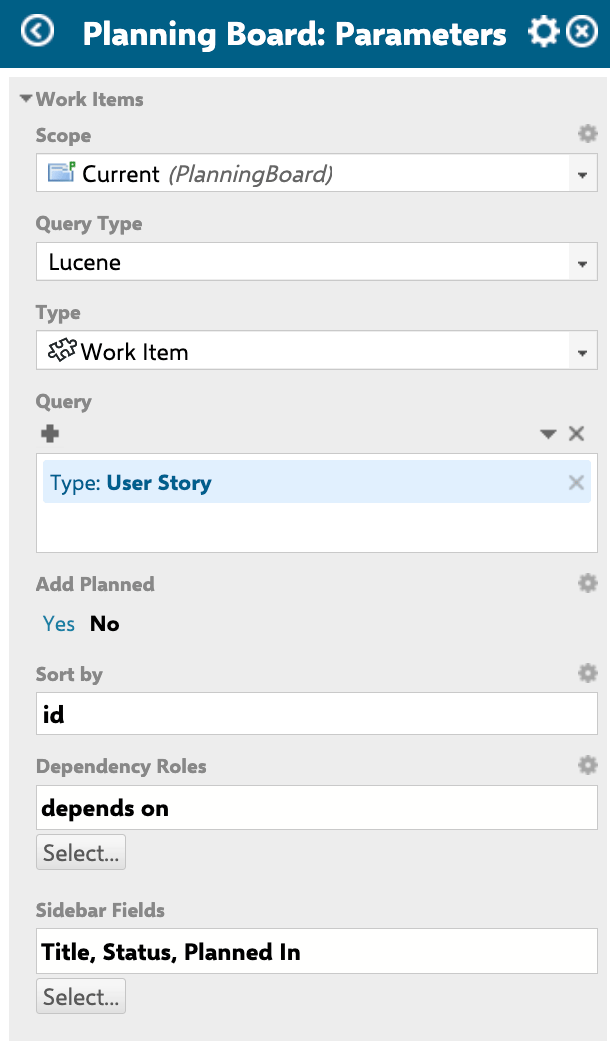
Parameter reference
Scope and query
Query syntaxThe
Query parameter accepts standard Polarion Lucene syntax. An empty or NOT *:* query loads no work items by default. Provide a valid query to populate the board. Example: type:story AND NOT status:done.Sorting
Dependencies
When
Dependency Roles is configured, the Show Dependencies toolbar button becomes active. Clicking it reveals all dependency arrows between cards simultaneously across the board.
Dependency visibility requires configurationThe Show Dependencies toolbar control is only functional when
Dependency Roles is set. Without a configured link role, the toolbar button has no effect.
Sidebar fields
The sidebar opens when a user clicks any card on the board. It displays the fields listed in
Sidebar Fields by default. Users can additionally personalize their own sidebar view using the gear icon (Select Fields button) — these personal additions apply only to that user and affect all work items of the same type.
Common field IDs for sidebar configuration:
Verify in applicationThe exact set of available field IDs depends on your Polarion project’s custom field configuration. Verify field IDs against your project’s work item type definitions.
Unplanned sidebar hierarchy
The unplanned sidebar groups cards by parent hierarchy when these parameters are set. The sidebar header shows a counter of the form “X out of Y work items” reflecting active filters.
Unplanned sidebar filtering
The unplanned sidebar supports several filter modes, all accessible without leaving the board:
Clearing filters (the clear button) removes resource and query filters but does not affect the text search or the resolved-items toggle.
Predefined queries for the sidebarQueries available in the funnel filter are configured in the Queries section of the widget parameters (separate from the main work items
Query parameter). See the Queries section in the Widget Parameters reference for details.Configuration example
The following example shows a representative Work Items parameter configuration for a Scrum project using story-type work items, dependency visualization via ablocks link role, and a custom sidebar showing priority and due date alongside the defaults.
Related parameters
Work Items parameters interact with the following parameter groups:Limitations
- Page parameters not supported in work item queries. Planningboard query parameters (including
ScopeandQuery) do not support Polarion page parameters ($pageParameters.xxx) for dynamic substitution. Use separate Planningboard pages per configuration rather than parameterized page-level filtering. - Work items with status Verified are locked. Cards in a Verified status that have been placed on the board cannot be moved or unplanned via drag-and-drop.
- Sidebar field personalization is per user, per work item type. Fields added by a user via the gear icon in the sidebar apply to that user only and affect all work items of the same type across all boards they access.
Sort byand swimlane sort are coupled. The sort field configured here affects card ordering inside every swimlane simultaneously; independent sort order per swimlane is not available.