

Column Configuration Hierarchy

expand entry in the Sources configuration.
Column Properties Reference
Basic Column Definition
The YAML key undercolumns: is the binding path — a dot-separated path from the root entity to the target property:
Navigation Path Columns
To display properties from related entities, use a navigation path. Each segment alternates between the navigation property name (the relationship) and the entity type name (from the data model):Display vs. Render
Powersheet provides two distinct properties for controlling what a column shows. They serve different purposes and should not be confused.Display Property
Thedisplay property controls which property of a referenced entity appears in the cell. It accepts:
- A property name on the entity object:
title,titleOrName,id,severity, or any custom property path - A dynamic expression starting with
() =>: a JavaScript arrow function that returns the desired display value
Render Property
Therender property references a renderer defined in the renderers section or provides an inline JavaScript expression. The output is display-only HTML and does not affect the data model. This is an important difference from value on a bound column, which does affect the data — see Computed Columns.
context:
item— the current entityvalue— the cell value
Focus and URL Resolution
ThehasFocus and hasUrl properties control which column receives keyboard focus and which column displays the external platform link.
Focus Column (hasFocus)
- Defines the primary focus column for a given entity level. When a new row is created, focus moves to this column.
- If multiple columns at the same level have
hasFocus: true, only the first one found is accepted. - If no column has
hasFocus, the first column withhasUrlis used as the focus column. - If neither
hasFocusnorhasUrlis set, the first editable column at that level receives focus.
URL Column (hasUrl)
- Defines the column that displays a clickable link to the record in Polarion (or other target platform).
- The link is only displayed if the record has a
targetLinkdefined. - Multiple columns can have
hasUrl: trueto show the link in several places. - If no column has
hasUrlbut a column hashasFocusand is valid, the link appears there instead. - If neither is configured, the first valid column for that level displays the link.
Computed Columns
Thevalue property defines a computed column whose content is calculated from an expression instead of read directly from a stored property. It must be a valid JavaScript arrow function starting with () =>.
Whether the result is stored is decided by the binding key, not by value:
A computed column is always read-only to the user, in both forms.
$ binding rules, see Binding Syntax. For the context object and where each expression runs, see Dynamic Value Expressions. For a step-by-step walkthrough, see Add a Computed Column.
value is about data; render is about appearance.value decides what the cell contains — and, on a bound column, what gets saved. render produces display-only HTML from whatever the cell already holds. To show a calculated value without storing it, use an unbound $ column with value, not render.formula is deprecated. Use value.Both names mean the same thing and existing configurations keep working unchanged, but formula is deprecated — use value in new configurations. Declaring both on one column is rejected with declares both 'value' and 'formula'.Unbound Column Constraints
An unbound column stores nothing and resolves no metadata, so these properties are rejected on it:isRequired, multiItem, and list. aggregate requires valueType: number. valueType itself is rejected on a bound column.
render, renderers, format, groupBy, sort, filter, columnGroup, and the styling properties all work normally, and unbound columns take part in grouping, sorting, filtering, sheet search, and Excel export.
Multi-Item Columns
SettingmultiItem: true turns a column into a multi-item picker. This is used for many-to-many relationships where multiple related entities should be displayed and selectable without creating an additional hierarchy level.
Picker Configuration (list)
The list property configures the dropdown picker behavior when a column is bound to a reference (related entity).
Client-Side Filtering (filter)
The filter property defines an initial client-side value filter applied when the sheet loads. Only rows matching the filter values are shown; all other values are hidden.
Interactive sort and filter controls
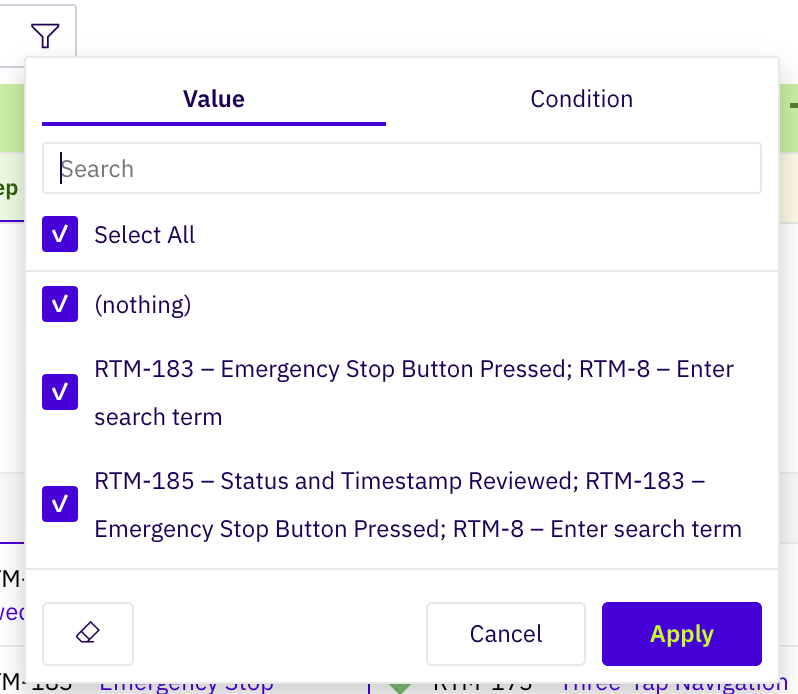
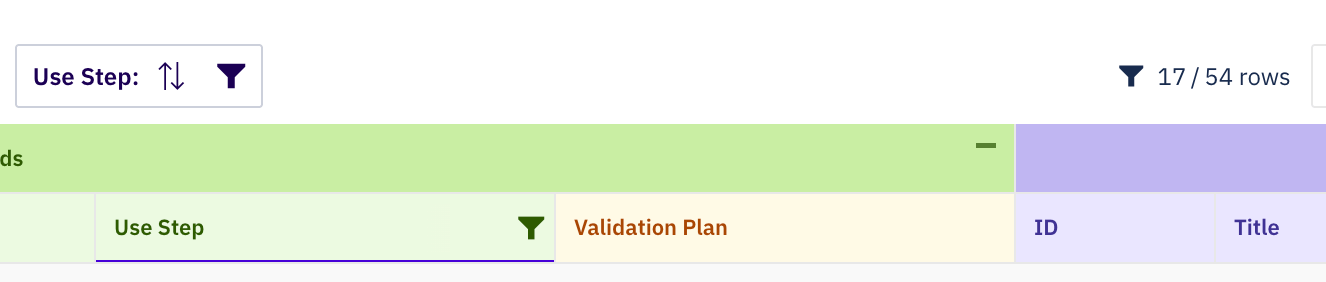
Beyond the configured initial filter, users can sort and filter any column at runtime. Selecting a column in the work items tree reveals sort arrows and a funnel filter icon next to the column title:

Row Grouping (groupBy)
The groupBy property enables grouping rows by the column’s values. It supports two forms:
Boolean (legacy):
hideCounter is true, the item count next to each group header is hidden. By default, the group row counter visibility is controlled by the root-level showGroupRowCounter property.
Header Styling
Theheader property controls the visual appearance of the column header. It references a named style from the styles section.
header.style value can be shared across columns using YAML anchors:
headerStyle value from the column’s columnGroup is applied by default and can be overridden by header.style on the individual column.
For the full style reference, see Styles.
Frozen Columns
Settingfrozen: true freezes the column so it remains visible when scrolling horizontally. If multiple columns have frozen: true, the freeze boundary is placed at the last frozen column — all columns up to and including that column are frozen.
Aggregate Row
Theaggregate property defines a calculation displayed in the aggregate (summary) row at the bottom of the sheet.
Column with Formatter
Reference a formatter to apply conditional styling or enforce read-only behavior:formatters section:
Complete YAML Example
A complete sheet configuration demonstrating the key column properties in a requirements traceability context:Column Property Categories
