

Default Link Display
By default, link columns display the linked item’s ID as a clickable hyperlink. The link URL is provided through a_link postfix property (e.g., a column with binding requirement uses requirement_link for the URL).
1
Show ID and Title Together
To render both the work item ID and another property (such as title) in a single column, use The For full server-side control over the rendered HTML, use the
typeProperties.itemTemplate — a Velocity template string that overrides the default rendering:itemTemplate controls how each linked item is displayed, so you can combine the linked item’s ID and title in one cell. It is evaluated by Polarion’s Velocity rendering engine — reference the linked item’s fields using the syntax documented in Velocity Templates.To display only the linked title (no custom template needed), use the dot-notation binding instead:serverRender option described below instead of itemTemplate.2
Customize Multi-Item Link Display
For Each item in the list displays: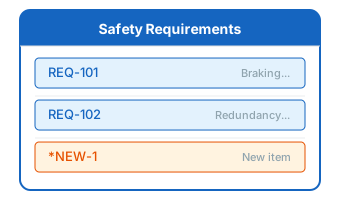
multiItemLink columns, each linked item is rendered as a separate entry with a tooltip showing the full ID and title:- The item label (typically the ID)
- A tooltip with the full ID and title
- An asterisk prefix (*) for newly created items that have not been saved
3
Use Server-Side Link Rendering
For complex link display requirements (such as showing properties from indirectly linked items), use
serverRender to generate HTML via Velocity scripts:4
Style Link Columns
Apply custom CSS classes to link columns using the
cellCss property:Link Rendering in Exports
Link columns are handled differently during export:Verify in applicationFor PDF exports, the
mainSheetCellFormatter strips HTML from link columns and renders them as plain text. Multi-item links display the label property of each linked item.Verification
Save the configuration and reload your Risksheet. You should now see linked items displayed with your custom rendering. Hover over link cells to verify tooltips show the expected information. For multi-item link columns, confirm that all linked items are visible as separate entries in the cell.See Also
- Configure Upstream Traceability Columns — set up link columns
- Show Multiple Linked Items — multiItemLink configuration
- Render Custom Data — cell renderers and decorators
- Display Sub-Columns — show properties of linked items as sub-columns
- Create Clickable Links — add clickable URL links