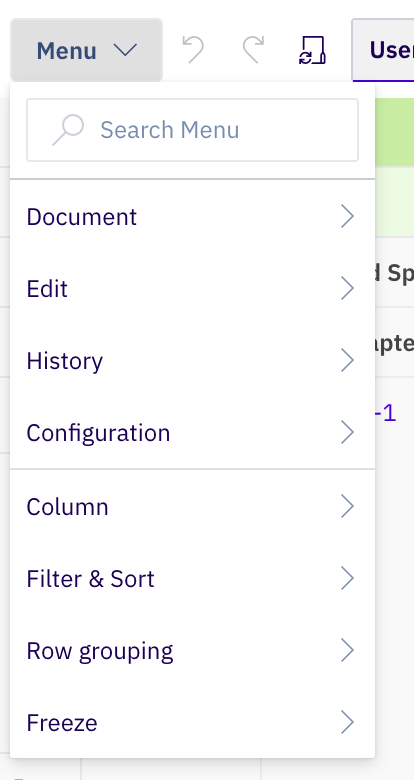
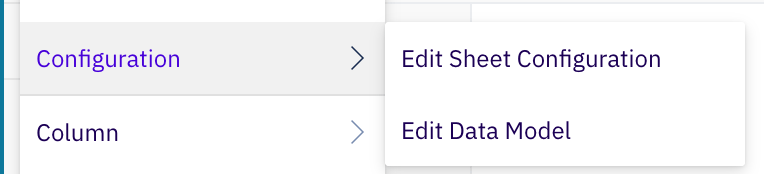
Step 1: Open the Sheet Configuration

  1. Open your powersheet document
  2. Go to Menu > Configuration > Edit Document Configuration
  3. Locate or add a views section in the YAML

Step 2: Define a View

Each view is a named entry under the views section. It specifies which columns to hide by setting their visible property to false:
views:
  Without V&V:
    columns:
      validationTestCases.validationTestCase:
        visible: false
      systemRequirements.systemRequirement.verificationTestCases.verificationTestCase:
        visible: false
This creates a view called “Without V&V” that hides the validation and verification test case columns while keeping all other columns visible.

Step 3: Understand View Properties

PropertyDescription
View name (key)Display name shown in the view switcher (e.g., Without V&V)
columnsObject defining column visibility overrides for this view
columns.<binding>Column identified by its binding path from the columns section
columns.<binding>.visibleSet to false to hide the column in this view
Views control which columns are shown or hidden. They do not change column widths, formatters, or other properties. All columns not mentioned in the view remain visible at their default settings.

Step 4: Create Multiple Views

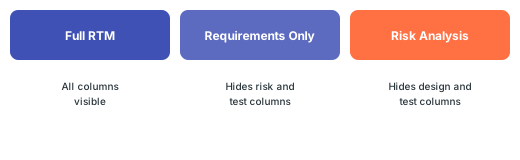
Define several views for different analysis needs:
views:
  Full RTM:
    columns: {}

  Requirements Only:
    columns:
      hazard:
        visible: false
      riskControls.riskControl:
        visible: false
      verificationTestCases.verificationTestCase:
        visible: false
      validationTestCases.validationTestCase:
        visible: false

  Risk Analysis:
    columns:
      systemRequirements.systemRequirement.designRequirements.designRequirement:
        visible: false
      verificationTestCases.verificationTestCase:
        visible: false
      validationTestCases.validationTestCase:
        visible: false
diagram

Step 5: Switch Between Views

In the sheet UI, users switch views using the view selector in the toolbar. When a view is applied:
  1. Column visibility updates immediately based on the view definition
  2. The URL parameter updates to reflect the active view name
  3. To return to the default view, clear the view selection
Views are especially helpful for RTM configurations with 20+ columns spanning requirements, design, risks, and tests. Define task-specific views so users see only what they need for their current work.
The column binding paths in the view definition must match the binding paths used in the columns section exactly. A mismatch will cause the visibility override to be silently ignored.

Complete Example

columns:
  title:
    title: User Need
    width: 200
  systemRequirements.systemRequirement:
    title: System Req
    multiItem: true
    display: title
  hazard:
    title: Hazard
    display: title
  riskControls.riskControl:
    title: Risk Control
    multiItem: true
    display: title

views:
  Requirements Focus:
    columns:
      hazard:
        visible: false
      riskControls.riskControl:
        visible: false

  Risk Focus:
    columns:
      systemRequirements.systemRequirement:
        visible: false

Verify

After saving the sheet configuration, reload the powersheet document. You should now see:
  • The view selector appears in the toolbar with your defined view names
  • Selecting a view hides the specified columns immediately
  • Clearing the view selection restores all columns to their default visibility
  • The URL updates to reflect the active view name

See Also

views-configuration-guide KB article, applyView.ts, PowersheetConfig.d.ts, powersheet.yaml
KB ArticlesSupport TicketsSource Code
  • prod-powersheet-src/com.nextedy.powersheet.client/ltc-repo/packages/common/types/api/document.ts
  • prod-powersheet-src/com.nextedy.powersheet.client/src/modules/ConfigProvider/types/PowersheetConfig.d.ts
  • prod-powersheet-src/com.nextedy.powersheet.client/ltc-repo/packages/sheet/commands/index.ts
  • powersheet.yaml
  • prod-powersheet-src/com.nextedy.powersheet.client/cypress/fixtures/configurations/constraints_composing.template.yaml