Overview

NameTypePurpose
ChecklistAllCheckedConditionBlocks transition unless all items are checked
ChecklistMandatoryCheckedConditionBlocks transition unless all mandatory items are checked
ChecklistFailIfAnyUncheckedFunctionThrows error if any item is unchecked
ChecklistFailIfMandatoryUncheckedFunctionThrows error if any mandatory item is unchecked
ChecklistUncheckAllFunctionUnchecks all items in the specified checklists
ChecklistResetToTemplateFunctionResets checklists to their configured template state
ChecklistApplyTemplateFunctionApplies the configured template to the checklists
diagram All functions and conditions support work items, documents (LiveDocs), and test runs.

Conditions

Conditions are evaluated before a transition executes. If the condition is not met, the transition is blocked and the user sees an error message.

ChecklistAllChecked

Blocks the transition unless all items in the specified checklists are checked.
ParameterRequiredTypeDescription
checklistYesStringComma-separated list of checklist custom field IDs
Validation logic: Returns true only if every active item in every specified checklist has a checked result state (both CHECKED and CONDITIONAL states count as checked). INFORMATION-type items are excluded from validation. Multi-checklist behavior: When multiple field IDs are specified, all checklists must be fully checked (AND logic). The condition does not pass if any single checklist has unchecked items. Error message: When validation fails, the error message identifies which specific checklist has unchecked items, using the field display name. Workflow XML example:
<condition id="ChecklistAllChecked">
  <param name="checklist" value="dod"/>
</condition>
Multiple checklists:
<condition id="ChecklistAllChecked">
  <param name="checklist" value="dod,dor,testChecklist"/>
</condition>
The checklist parameter is mandatory. Omitting it causes a runtime error. Always specify at least one checklist field ID.

ChecklistMandatoryChecked

Blocks the transition unless all mandatory items in the specified checklists are checked.
ParameterRequiredTypeDescription
checklistYesStringComma-separated list of checklist custom field IDs
Validation logic: Returns true if all items flagged as mandatory are checked. Non-mandatory items are ignored. INFORMATION-type items are excluded. Workflow XML example:
<condition id="ChecklistMandatoryChecked">
  <param name="checklist" value="dod"/>
</condition>
If the configuration property nextedy.checklist._TYPEID._FIELDID.allMandatory=true is set, all items are treated as mandatory. In that case, ChecklistMandatoryChecked behaves identically to ChecklistAllChecked. See Configuration Properties.

Functions

Functions execute during a transition. They perform actions on the checklist data as part of the workflow operation.

ChecklistFailIfAnyUnchecked

Throws a user-friendly error and blocks the transition if any item in the specified checklists is unchecked.
ParameterRequiredTypeDescription
checklistYesStringComma-separated list of checklist custom field IDs
Behavior: Parses each specified checklist and calls the all-checked validation. If any item is unchecked, throws an exception with a message showing the field display name. Difference from ChecklistAllChecked condition: This is a workflow function, not a condition. It executes during the transition and throws an exception to abort it, whereas conditions are evaluated before the transition starts. Workflow XML example:
<function id="ChecklistFailIfAnyUnchecked">
  <param name="checklist" value="dod,reviewChecklist"/>
</function>
This function works on work items, documents (LiveDocs), and test runs.

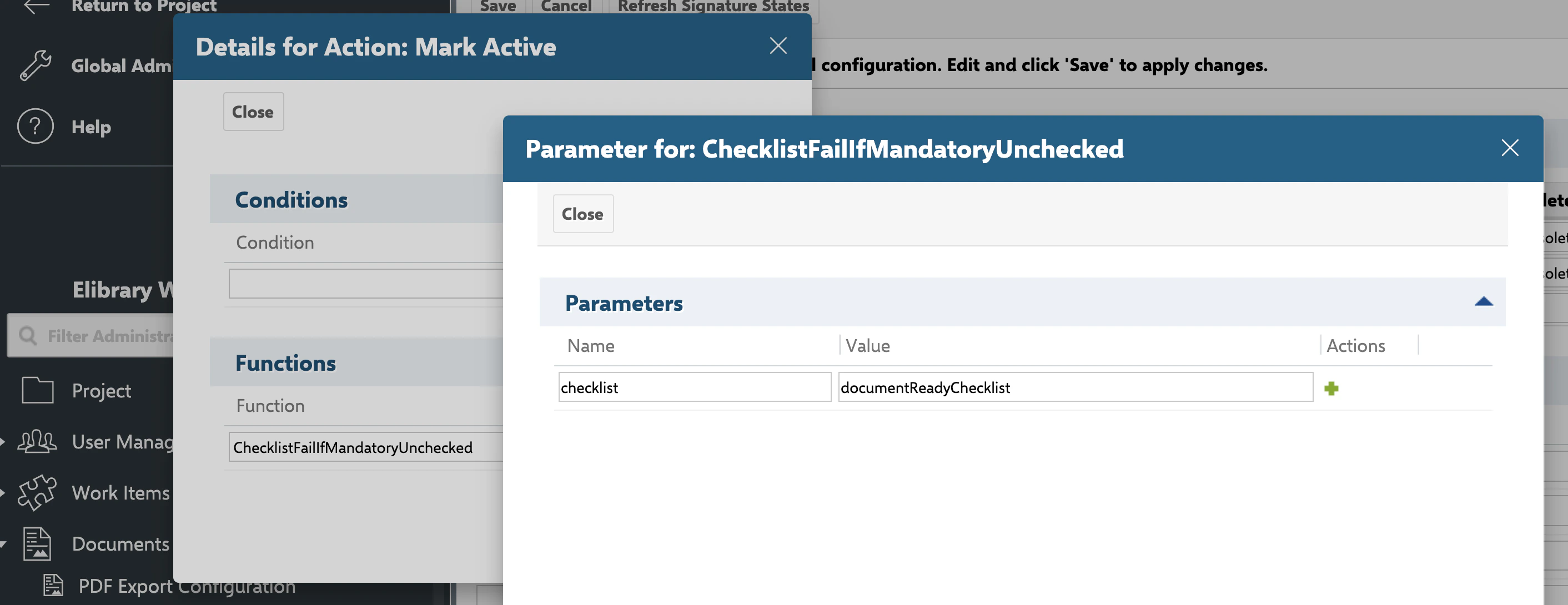
ChecklistFailIfMandatoryUnchecked

Throws a user-friendly error and blocks the transition if any mandatory item is unchecked.
ParameterRequiredTypeDescription
checklistYesStringComma-separated list of checklist custom field IDs
Workflow XML example:
<function id="ChecklistFailIfMandatoryUnchecked">
  <param name="checklist" value="dod"/>
</function>

ChecklistUncheckAll

Unchecks all items in the specified checklists, clearing all result states back to Empty.
ParameterRequiredTypeDescription
checklistYesStringComma-separated list of checklist custom field IDs
Behavior: Parses each checklist, calls the uncheck-all operation, and stores the updated checklist back to the object. All items return to the unchecked state regardless of their previous result state. Notes and other item metadata are preserved. Use cases:
  • Reopening a work item that was previously completed
  • Resetting review cycles when a document returns to draft
  • Clearing test run checklists for re-execution
Workflow XML example:
<function id="ChecklistUncheckAll">
  <param name="checklist" value="dod"/>
</function>
Multiple checklists:
<function id="ChecklistUncheckAll">
  <param name="checklist" value="dod,dor,testChecklist"/>
</function>
ChecklistUncheckAll preserves the checklist items and only clears their result states. ChecklistResetToTemplate discards all items (including manually added ones) and replaces them with the template. Choose based on whether you need to keep custom items.

ChecklistResetToTemplate

Resets the specified checklists to their configured template state, discarding all user changes.
ParameterRequiredTypeDescription
checklistYesStringComma-separated list of checklist custom field IDs
skipForUsersNoStringComma-separated list of user IDs who bypass the reset operation
Behavior: For each specified checklist field, calls the reset operation which clears all checklist data and re-applies the configured template. All user modifications — checked states, notes, manually added items — are discarded. Workflow XML example:
<function id="ChecklistResetToTemplate">
  <param name="checklist" value="dod,dor"/>
</function>
With user bypass for migration:
<function id="ChecklistResetToTemplate">
  <param name="checklist" value="dod"/>
  <param name="skipForUsers" value="admin,migration_user"/>
</function>
The skipForUsers parameter allows specific users to trigger workflow transitions without the reset executing. Use this during data migration or bulk operations where administrators need to move work items through workflows without resetting their checklists. Remove the bypass after migration is complete.

ChecklistApplyTemplate

Applies the configured checklist template to the specified checklists, merging template items into existing data.
ParameterRequiredTypeDescription
checklistYesStringComma-separated list of checklist custom field IDs
Behavior: For each specified field, applies the template configured via workItemTemplateId (or documentTemplateId for documents). Template items are merged into the existing checklist, adding any missing template items without removing user-added items. Workflow XML example:
<function id="ChecklistApplyTemplate">
  <param name="checklist" value="dod"/>
</function>
Common pattern — synchronize before freezing:
<action id="markApproved">
  <function id="ChecklistApplyTemplate">
    <param name="checklist" value="dod"/>
  </function>
</action>
This ensures the checklist contains the latest template items before transitioning to a status where template merging is disabled. See Freezing Checklists by Status.
ChecklistApplyTemplate merges template items into the existing checklist, preserving user modifications and manually added items. ChecklistResetToTemplate replaces the entire checklist with the template, discarding all user changes.

Common Patterns

Definition of Done (DoD) Gate

Block transition to “Done” unless all DoD items are checked:
<action id="markDone">
  <condition id="ChecklistAllChecked">
    <param name="checklist" value="dod"/>
  </condition>
</action>

Definition of Ready (DoR) with Mandatory Items Only

Allow transition to “In Progress” when mandatory DoR items are complete:
<action id="startWork">
  <condition id="ChecklistMandatoryChecked">
    <param name="checklist" value="dor"/>
  </condition>
</action>

Reset on Reopen

Clear all checklist states when reopening a work item:
<action id="reopen">
  <function id="ChecklistUncheckAll">
    <param name="checklist" value="dod,dor"/>
  </function>
</action>

Synchronize Template Before Approval

Apply the latest template version before freezing the checklist at the approved status:
<action id="approve">
  <function id="ChecklistApplyTemplate">
    <param name="checklist" value="dod"/>
  </function>
  <condition id="ChecklistAllChecked">
    <param name="checklist" value="dod"/>
  </condition>
</action>
There are no built-in workflow conditions for rejected (NOK) items. To create workflow logic based on rejected item counts, use the IChecklistService API to implement custom workflow conditions. See IChecklistService API for details.

See Also

  • Configuration Properties — Complete reference for all nextedy.checklist.* properties including template IDs, merge control, mandatory flags, and icon customization
  • IChecklistService API — Programmatic access to parse, store, and reset checklists for custom workflow conditions and scripted automation
  • Workflow Gates and Validation — Step-by-step guide for adding checklist conditions and functions to Polarion workflow transitions
  • Freezing Checklists by Status — Configure status-based template merge control to freeze checklists at approval or review milestones
KB ArticlesSupport TicketsSource Code
  • ChecklistFailIfAnyUnchecked.java
  • ChecklistService.java
  • ChecklistFormExtension.java
  • ChecklistAllChecked.java
  • ChecklistApplyTemplate.java