

Verify in applicationThis page documents the API surface as published in the product’s API documentation. Method behavior for edge cases not explicitly described below should be verified in the application.
Overview

Accessing the service
From Java (workflow functions and conditions)
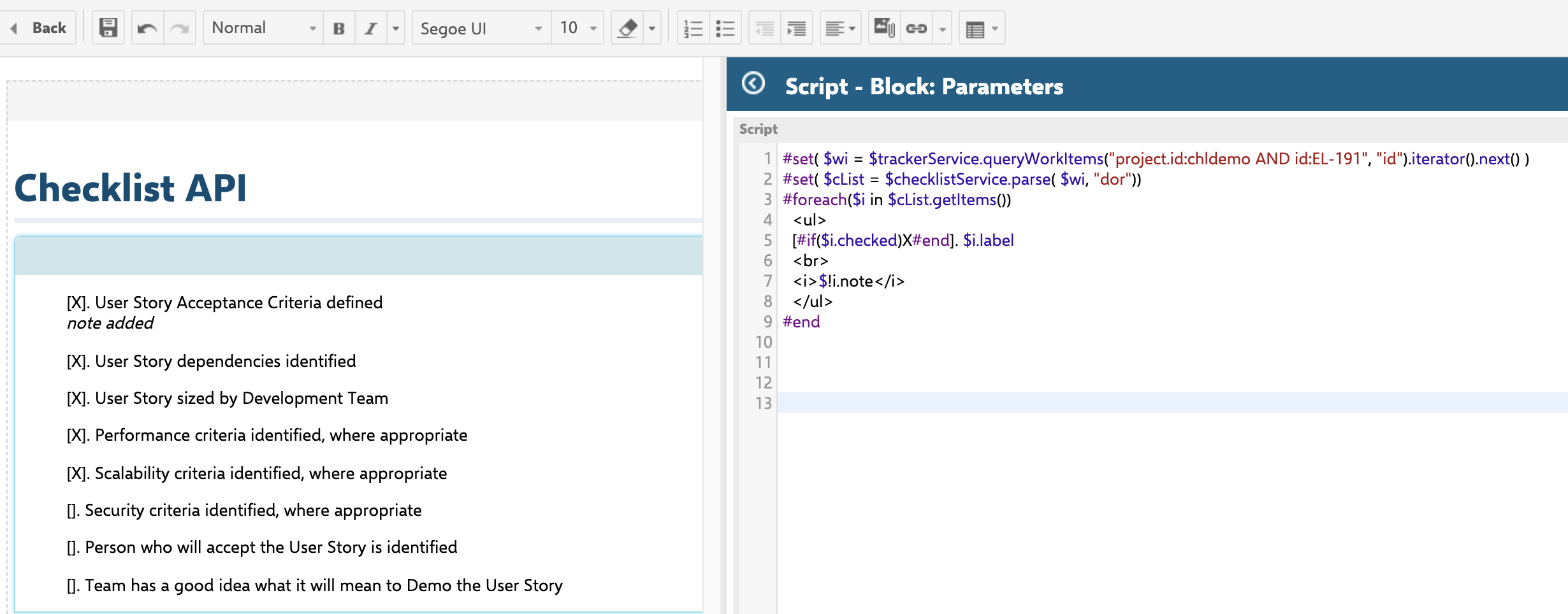
From Velocity (LiveReport / wiki pages)
The service is exposed directly in the Velocity context as$checklistService — no lookup call is required.
Method reference — IChecklistService
All methods below are declared on theIChecklistService interface. Overloads exist per target object type: work item, document (module), test run, and plan — although not every method has an overload for every type (see notes).
parse — full signature list
Test run and plan overloadsThe published IChecklistService API article lists only the
IWorkItem / WorkItem / IModule overloads of parse. The interface also declares parse for ITestRun and IPlan targets, each merging in the target’s own template (test run template via the test run’s template test run; plan template via the plan’s template plan). The field parameter identifies which field on the target stores the checklist markup.store — full signature list
Test run and plan overloadsBoth the
Checklist-typed and the raw-String-typed store overloads exist for ITestRun and IPlan, in addition to IWorkItem/WorkItem/IModule.applyTempate — full signature list
Merge semantics — not destructiveEvery
applyTempate overload behaves as store(parse(target, field), target, field) — it re-parses the field (which merges the template into the currently stored content, exactly like a normal parse call — see Template Merge Behavior) and immediately persists the merged result. Calling applyTempate on a field that already has data does not discard existing progress: items matched by id keep their recorded result, while label/mandatory/description are refreshed from the template. This is different from reset below, which discards all existing content unconditionally.reset — full signature list
Destructive actionResetting a checklist re-parses the template content and saves it, discarding any current checklist progress on that field. There is no undo.
getChecklistConf — full signature list
Test run and plan overloads
getChecklistConf has dedicated ITestRun and IPlan overloads. Each derives readonly/adminPermission from whether the current user may modify that test run or plan, rather than from the Checklist licence authorisation used on the work item path.Worked example — Java workflow function
TheChecklistUncheckAll workflow function demonstrates the full lookup → parse → mutate → store cycle. Its target resolution — context.getTarget() plus an instanceof branch per type — is the same pattern used by every checklist workflow function/condition (see Workflow Functions and Conditions):
Work item, document, and test run — not plan
ChecklistUncheckAll (like the other workflow functions/conditions on the Workflow Functions and Conditions page) branches on IWorkItem, IModule, and ITestRun only — there is no IPlan branch, so it is not available as a workflow action on plan transitions.Worked example — Velocity on a LiveReport or wiki page
dor checklist field, and renders each item’s checked state, label, and note.
Related rendering entry point — checklist form extension
The checklist form extension (the form widget shown on a work item) is wired toIChecklistService internally: it calls parse to read the current checklist state, and getChecklistConf to read the configuration that controls how the widget behaves and renders. The form extension always reflects the current stored checklist state on render — it is a live read, not a cached snapshot.
Full extension-tag attributes documented in the setup guideThe full
<extension> tag — including the id (extension implementation ID, e.g. ChecklistFormExtension) and label (display heading) attributes alongside checklistId — is documented with a worked example in Set Up a Work Item Checklist, not repeated here to avoid duplication.Known limitations
- LiveReport table field / column integration for checklist progress is not confirmed as supported. There is no built-in field that shows progress (e.g.,
1/7 completed) as a LiveReport table field without writing a Velocity script. The Velocity scripting approach shown above is the confirmed workaround. - Direct Lucene-style querying of individual checklist item checked-state is not confirmed as supported. Per-item state must be read by parsing the field via
IChecklistService.parsein a script, not via a query filter. - Access to
IChecklistServicefrom scripted JavaScript workflow conditions is not confirmed. Whether the service can be reached from a JavaScript-based workflow condition — as opposed to Velocity (VTL) or Java — is unconfirmed. Only Java (viaPlatformContext.getPlatform().lookupService) and Velocity (via$checklistService) access are confirmed. Verify JavaScript access in your Polarion instance before relying on it.
See also
- Checklist, ChecklistItem, and CheckItemResult — the data model classes returned by and passed to this service.
- Summary Field Reference — how checklist state is surfaced into a queryable summary field, as an alternative to scripting.
- Workflow Functions and Conditions — workflow-level gate enforcement built on top of this service.