
Prerequisites

  • Your Gantt page must be a LiveReport page (page parameters are a LiveReport feature).
  • The widget query type must be set to Lucene + Velocity (not pure Lucene).
Page parameters only work when the Gantt widget query is configured as Lucene + Velocity. If you use a pure Lucene query, Velocity expressions like $pageParameters are not processed and the filter will not apply.

Step 1: Create Page Parameters

  1. Open your Gantt LiveReport page in Edit mode.
  2. Navigate to the page parameter configuration area.
  3. Add a new page parameter. For example, create a parameter with:
    • ID: department
    • Type: Enum (or any appropriate type for your use case)
    • Label: Department

Step 2: Reference Parameters in the Widget Query

In the Gantt widget configuration, set the Query Type to Lucene + Velocity, then enter a query that uses the page parameter value:
type:task AND department.KEY:($pageParameters.department.toLucene())
The $pageParameters.department.toLucene() expression converts the selected page parameter value into a valid Lucene query fragment.
Always use the .toLucene() method on page parameter values to ensure proper escaping and formatting in the Lucene query string.

Step 3: Use Parameters for Time Range Filtering

Page parameters can also drive the Gantt time range. Create start and end date parameters, then reference them in Advanced > Gantt Config Script:
gantt.config.start_date = new Date($widgetContext.pageParameters.start.value.time);
gantt.config.end_date = new Date($widgetContext.pageParameters.end.value.time);
Replace start and end with your actual parameter IDs if they differ.

Step 4: Load Parent Items for Filtered Results

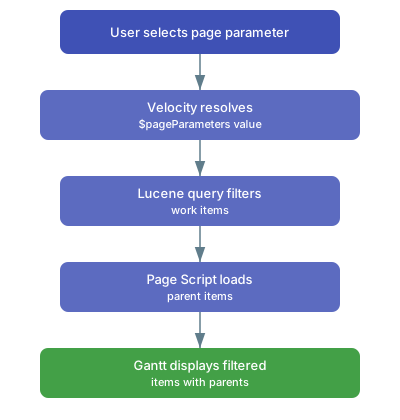
When filtering by a page parameter, you may want to display parent items above the filtered work items for context. Use a Page Script to traverse parent links and include them in the query:
#set($parentLinkRole = "parent")
#set($parents = $objectFactory.newSet())

#foreach($i in $transaction.workItems.search.query(
    "department.KEY:$pageParameters.department.toLucene()").sort(id))
    #if(!$i.isUnresolvable() && $i.can().read())
        #foreach($p in $i.fields.linkedWorkItems.direct)
            #set($pItem = $p.fields.workItem)
            #if(!$pItem.isUnresolvable() && $pItem.can().read()
                && $parentLinkRole.equals($p.fields.role.optionId))
                #set($n = $parents.add($pItem.reference.id))
            #end
        #end
    #end
#end

#set($parentQ = "id:(")
#foreach($id in $parents)
    #set($parentQ = "$parentQ $id")
#end
#set($parentQ = "$parentQ )")
$!pageContext.put("parentQ", $parentQ)
Then include the parent query in the widget query field to add the parent items to the Gantt chart. diagram
Common Use Cases

Use CaseParameter TypeQuery Pattern
Filter by departmentEnumdepartment.KEY:($pageParameters.department.toLucene())
Filter by teamEnumteam.KEY:($pageParameters.team.toLucene())
Filter by date rangeDategantt.config.start_date = new Date(...) in Config Script
Filter by plan levelEnumUse page parameter to select which plan to display

Verification

After configuring dynamic queries, you should now see:
  • A page parameter dropdown or selector on your LiveReport page.
  • Changing the parameter value reloads the Gantt with a filtered set of work items.
  • The funnel icon in the footer reflects any time range filter applied via page parameters.

See Also

KB ArticlesSupport TicketsSource Code
  • prod-gantt-src/com.nextedy.polarion.gantt.client/src/js/pageparams.js
  • prod-gantt-src/com.nextedy.polarion.gantt/src/com/nextedy/polarion/gantt/model/impl/ProjectWorkItemEnumProvider.java
  • prod-gantt-src/com.nextedy.polarion.gantt/src/com/nextedy/polarion/gantt/model/impl/PlannedInFieldFilter.java
  • prod-gantt-src/com.nextedy.polarion.gantt/src/com/nextedy/polarion/gantt/model/impl/web/CustomFieldServlet.java
  • prod-gantt-src/com.nextedy.polarion.gantt/src/com/nextedy/polarion/util/WidgetPropertiesAccess.java