> ## Documentation Index
> Fetch the complete documentation index at: https://learn.nextedy.com/llms.txt
> Use this file to discover all available pages before exploring further.
# Levels Configuration
> Levels define the hierarchical structure of a Nextedy RISKSHEET, controlling how risk items, upstream linked items, and downstream tasks are organized into expandable/collapsible rows with merged cells.
export const LastReviewed = ({date}) => {
if (!date) return null;
const formatted = new Date(`${date}T00:00:00Z`).toLocaleDateString("en-US", {
year: "numeric",
month: "long",
day: "numeric",
timeZone: "UTC"
});
return
Last reviewed on {formatted}
;
};
 ## Data Model Levels vs Visual Levels
Before diving into the `levels` array, it is essential to understand the distinction between the **data model** and the **visual hierarchy** that the `levels` array creates.
| Concept | Count | What It Is |
| --------------------- | ---------------- | --------------------------------------------------------------------------------------------------------------------------------------------------------------------------- |
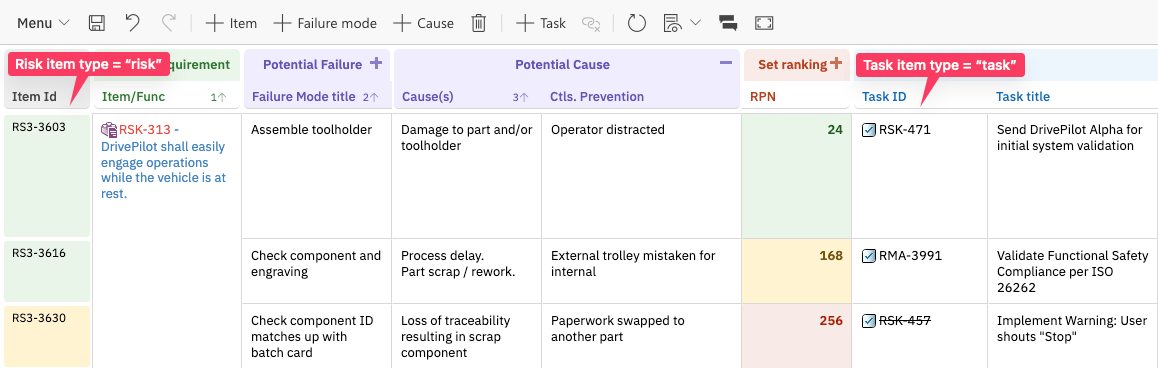
| **Data model levels** | Always exactly 2 | Real Polarion entities: risk items (`dataTypes.risk`) and task items (`dataTypes.task`). These are actual work items stored in Polarion. |
| **Visual levels** | 1, 2, 3, or more | Artificial grouping created by cell merging via the `levels` array. These are NOT separate work items -- they are a presentation effect over the same underlying risk rows. |
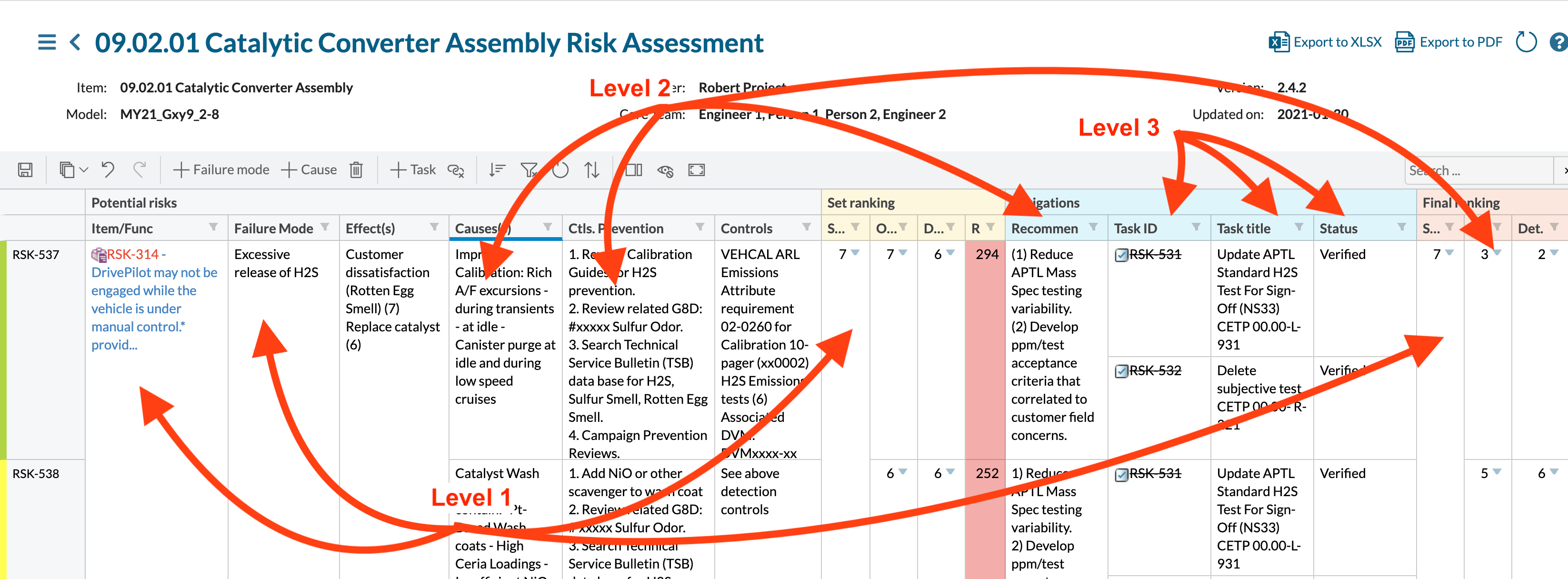
A typical FMEA grid may visually show three columns (Item, Failure Mode, Cause) at three different "levels", but every row is the same Polarion work item type. The three visual levels exist purely because the `levels` array tells Risksheet to merge cells vertically whenever consecutive rows share the same value in a designated control column.
**Columns sharing the same level number receive identical cell merging behavior.** That is the rule that ties columns to levels.
## Data Model Levels vs Visual Levels
Before diving into the `levels` array, it is essential to understand the distinction between the **data model** and the **visual hierarchy** that the `levels` array creates.
| Concept | Count | What It Is |
| --------------------- | ---------------- | --------------------------------------------------------------------------------------------------------------------------------------------------------------------------- |
| **Data model levels** | Always exactly 2 | Real Polarion entities: risk items (`dataTypes.risk`) and task items (`dataTypes.task`). These are actual work items stored in Polarion. |
| **Visual levels** | 1, 2, 3, or more | Artificial grouping created by cell merging via the `levels` array. These are NOT separate work items -- they are a presentation effect over the same underlying risk rows. |
A typical FMEA grid may visually show three columns (Item, Failure Mode, Cause) at three different "levels", but every row is the same Polarion work item type. The three visual levels exist purely because the `levels` array tells Risksheet to merge cells vertically whenever consecutive rows share the same value in a designated control column.
**Columns sharing the same level number receive identical cell merging behavior.** That is the rule that ties columns to levels.
 ## The `levels` Array
The `levels` property is a top-level array in the sheet configuration. Each element defines one visual level in the grid. Every level entry requires three properties: `name`, `controlColumn`, and `zoomColumn`. The `showInMenu` property is optional.
| Property | Type | Required | Description |
| --------------- | ------- | ------------------- | ------------------------------------------------------------------------------------------------------------------------------------------------------------------------ |
| `name` | string | Yes | Display name for the level, shown in the menu bar button for creating new items and in the zoom navigation menu (e.g., `Item`, `Failure mode`). |
| `controlColumn` | string | Yes | Column `id` used as the grouping key for cell merging. Cells in columns assigned to this level merge vertically for items sharing the same value in this control column. |
| `zoomColumn` | string | Yes | Column `id` used as the target for zoom/drill-down navigation when expanding into this level. |
| `showInMenu` | boolean | No (default `true`) | Whether a "New \[name]" button appears in the menu bar for creating items at this level. |
The `controlColumn` and `zoomColumn` values **must exactly match** the `id` property defined in the corresponding column configuration. Mismatched IDs cause row duplication and incorrect cell merging. This is one of the most common configuration errors reported in support.
## Level Indexing
Levels in the `levels` array are accessed by 0-based index, but the column `level` property uses **1-based indexing**.
| `levels` Array Index | Column `level` Value | Typical Usage |
| -------------------- | -------------------- | ----------------------------------------------------------- |
| `levels[0]` | `level: 1` | Primary risk item rows (Failure Mode, Hazard, Item) |
| `levels[1]` | `level: 2` | Second visual level (Failure Mode within Item, Requirement) |
| `levels[2]` | `level: 3` | Third visual level (Cause, Detail) |
| Task level | Not set on column | Downstream task rows (defined in `dataTypes.task`) |
The column `level` property is **1-indexed**. A column with `level: 1` maps to `levels[0]`, `level: 2` maps to `levels[1]`, and `level: 3` maps to `levels[2]`. Task-level columns (those bound to `task.*` fields) have **no level assigned**; their merging is driven by parent risk and task identity.
## `name` Property
The `name` property defines the human-readable label for each level. This value appears in two locations:
1. **Menu bar buttons** -- The "+" buttons at the top of the grid use the level name (e.g., "+ Failure Mode", "+ System Requirement").
2. **Zoom and context menus** -- The zoom navigation menu and right-click context menu reference the level name when offering create/expand actions.
```yaml theme={null}
levels:
- name: Failure Mode
controlColumn: systemItemId
zoomColumn: title
- name: System Requirement
controlColumn: sysReq
zoomColumn: sysReq
```
Use the term your team recognizes. For FMEA, common names include "Item", "Failure Mode", "Cause", and "Effect". For HARA, use "Function", "Hazard", "Hazardous Event", or "Safety Goal".
## `controlColumn` Property
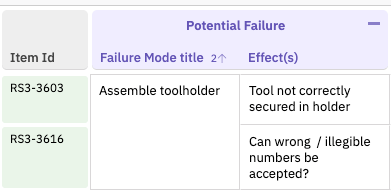
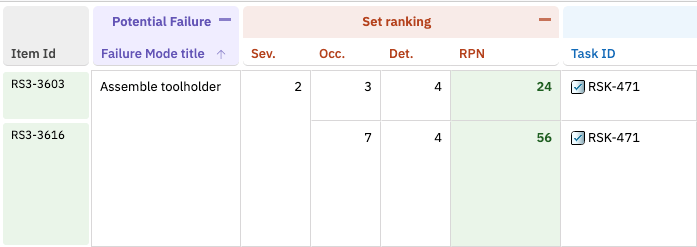
The `controlColumn` specifies which column controls grouping and cell merging for a level. When multiple consecutive rows share the same value in the control column, the cells in columns assigned to that level merge vertically to create the hierarchical visual structure.
| `controlColumn` Value | Behavior |
| -------------------------------------------------- | -------------------------------------------------------------------------- |
| `systemItemId` | Groups by the risk item's Polarion ID. Used for the primary risk level. |
| Custom column `id` (e.g., `sysReq`, `failureMode`) | Groups by the named column. Rows with the same value in that column merge. |
```yaml theme={null}
levels:
- name: Failure Mode
controlColumn: systemItemId
zoomColumn: title
- name: System Requirement
controlColumn: sysReq
zoomColumn: sysReq
```
Two different levels must **never** point to the same `controlColumn`. Doing so causes description values from previous items to auto-populate into new rows and items to merge incorrectly. Each level must reference a unique column.
## The `levels` Array
The `levels` property is a top-level array in the sheet configuration. Each element defines one visual level in the grid. Every level entry requires three properties: `name`, `controlColumn`, and `zoomColumn`. The `showInMenu` property is optional.
| Property | Type | Required | Description |
| --------------- | ------- | ------------------- | ------------------------------------------------------------------------------------------------------------------------------------------------------------------------ |
| `name` | string | Yes | Display name for the level, shown in the menu bar button for creating new items and in the zoom navigation menu (e.g., `Item`, `Failure mode`). |
| `controlColumn` | string | Yes | Column `id` used as the grouping key for cell merging. Cells in columns assigned to this level merge vertically for items sharing the same value in this control column. |
| `zoomColumn` | string | Yes | Column `id` used as the target for zoom/drill-down navigation when expanding into this level. |
| `showInMenu` | boolean | No (default `true`) | Whether a "New \[name]" button appears in the menu bar for creating items at this level. |
The `controlColumn` and `zoomColumn` values **must exactly match** the `id` property defined in the corresponding column configuration. Mismatched IDs cause row duplication and incorrect cell merging. This is one of the most common configuration errors reported in support.
## Level Indexing
Levels in the `levels` array are accessed by 0-based index, but the column `level` property uses **1-based indexing**.
| `levels` Array Index | Column `level` Value | Typical Usage |
| -------------------- | -------------------- | ----------------------------------------------------------- |
| `levels[0]` | `level: 1` | Primary risk item rows (Failure Mode, Hazard, Item) |
| `levels[1]` | `level: 2` | Second visual level (Failure Mode within Item, Requirement) |
| `levels[2]` | `level: 3` | Third visual level (Cause, Detail) |
| Task level | Not set on column | Downstream task rows (defined in `dataTypes.task`) |
The column `level` property is **1-indexed**. A column with `level: 1` maps to `levels[0]`, `level: 2` maps to `levels[1]`, and `level: 3` maps to `levels[2]`. Task-level columns (those bound to `task.*` fields) have **no level assigned**; their merging is driven by parent risk and task identity.
## `name` Property
The `name` property defines the human-readable label for each level. This value appears in two locations:
1. **Menu bar buttons** -- The "+" buttons at the top of the grid use the level name (e.g., "+ Failure Mode", "+ System Requirement").
2. **Zoom and context menus** -- The zoom navigation menu and right-click context menu reference the level name when offering create/expand actions.
```yaml theme={null}
levels:
- name: Failure Mode
controlColumn: systemItemId
zoomColumn: title
- name: System Requirement
controlColumn: sysReq
zoomColumn: sysReq
```
Use the term your team recognizes. For FMEA, common names include "Item", "Failure Mode", "Cause", and "Effect". For HARA, use "Function", "Hazard", "Hazardous Event", or "Safety Goal".
## `controlColumn` Property
The `controlColumn` specifies which column controls grouping and cell merging for a level. When multiple consecutive rows share the same value in the control column, the cells in columns assigned to that level merge vertically to create the hierarchical visual structure.
| `controlColumn` Value | Behavior |
| -------------------------------------------------- | -------------------------------------------------------------------------- |
| `systemItemId` | Groups by the risk item's Polarion ID. Used for the primary risk level. |
| Custom column `id` (e.g., `sysReq`, `failureMode`) | Groups by the named column. Rows with the same value in that column merge. |
```yaml theme={null}
levels:
- name: Failure Mode
controlColumn: systemItemId
zoomColumn: title
- name: System Requirement
controlColumn: sysReq
zoomColumn: sysReq
```
Two different levels must **never** point to the same `controlColumn`. Doing so causes description values from previous items to auto-populate into new rows and items to merge incorrectly. Each level must reference a unique column.
 ## `zoomColumn` Property
The `zoomColumn` specifies which column receives focus when a user expands or navigates into a particular level. This provides a zoom navigation experience where expanding a level scrolls to and highlights the specified column. The `zoomColumn` is a required property on every level entry.
```yaml theme={null}
levels:
- name: Failure Mode
controlColumn: systemItemId
zoomColumn: title
```
In many configurations the `zoomColumn` matches the `controlColumn` (e.g., when grouping and zooming both center on the same item identifier). In other cases the `zoomColumn` points to a descriptive column while `controlColumn` points to an identifier column -- a common pattern in cause/effect analyses where the cause description is in a separate column from the grouping key.
## `zoomColumn` Property
The `zoomColumn` specifies which column receives focus when a user expands or navigates into a particular level. This provides a zoom navigation experience where expanding a level scrolls to and highlights the specified column. The `zoomColumn` is a required property on every level entry.
```yaml theme={null}
levels:
- name: Failure Mode
controlColumn: systemItemId
zoomColumn: title
```
In many configurations the `zoomColumn` matches the `controlColumn` (e.g., when grouping and zooming both center on the same item identifier). In other cases the `zoomColumn` points to a descriptive column while `controlColumn` points to an identifier column -- a common pattern in cause/effect analyses where the cause description is in a separate column from the grouping key.
 ## `showInMenu` Property
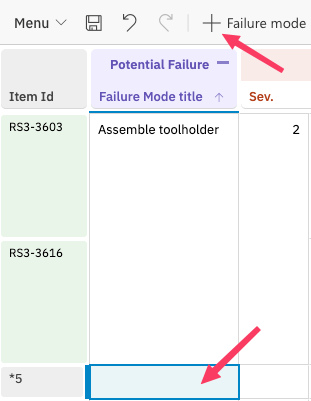
Controls whether the level appears as a creation button in the menu bar and context menu.
| Value | Behavior |
| ---------------- | ------------------------------------------------------------------------------------------------------------------------------------ |
| `true` (default) | A "+ \[name]" button appears in the menu bar. A "New \[name]" option appears in the right-click context menu. |
| `false` | The level is hidden from creation menus. Items at this level can only be created through other means (e.g., linking existing items). |
```yaml theme={null}
levels:
- name: Failure Mode
controlColumn: systemItemId
zoomColumn: title
showInMenu: true
- name: System Requirement
controlColumn: sysReq
zoomColumn: sysReq
showInMenu: false
```
Use `showInMenu: false` when a level represents items that should only be linked from existing work items, not created directly from the Risksheet.
## Interaction with `dataTypes`
The `levels` array works together with the `dataTypes` configuration to define the complete hierarchy. While `levels` controls the visual grouping and menu structure, `dataTypes` defines the work item types and link roles for the two real entities (risk and task).
## `showInMenu` Property
Controls whether the level appears as a creation button in the menu bar and context menu.
| Value | Behavior |
| ---------------- | ------------------------------------------------------------------------------------------------------------------------------------ |
| `true` (default) | A "+ \[name]" button appears in the menu bar. A "New \[name]" option appears in the right-click context menu. |
| `false` | The level is hidden from creation menus. Items at this level can only be created through other means (e.g., linking existing items). |
```yaml theme={null}
levels:
- name: Failure Mode
controlColumn: systemItemId
zoomColumn: title
showInMenu: true
- name: System Requirement
controlColumn: sysReq
zoomColumn: sysReq
showInMenu: false
```
Use `showInMenu: false` when a level represents items that should only be linked from existing work items, not created directly from the Risksheet.
## Interaction with `dataTypes`
The `levels` array works together with the `dataTypes` configuration to define the complete hierarchy. While `levels` controls the visual grouping and menu structure, `dataTypes` defines the work item types and link roles for the two real entities (risk and task).
 | Configuration Area | Controls |
| --------------------------- | -------------------------------------------------- |
| `levels[].name` | Button label in the menu bar and zoom menu |
| `levels[].controlColumn` | Which column drives cell merging for the level |
| `levels[].zoomColumn` | Which column receives focus during zoom navigation |
| `dataTypes.risk.type` | Polarion work item type for the main risk rows |
| `dataTypes.risk.role` | Link role used when connecting risk items |
| `dataTypes.task.type` | Polarion work item type for downstream tasks |
| `dataTypes.task.role` | Link role used when connecting task items |
| `dataTypes.task.name` | Display name for task creation in toolbar/menus |
| `dataTypes.task.zoomColumn` | Column for zoom navigation after task creation |
| Configuration Area | Controls |
| --------------------------- | -------------------------------------------------- |
| `levels[].name` | Button label in the menu bar and zoom menu |
| `levels[].controlColumn` | Which column drives cell merging for the level |
| `levels[].zoomColumn` | Which column receives focus during zoom navigation |
| `dataTypes.risk.type` | Polarion work item type for the main risk rows |
| `dataTypes.risk.role` | Link role used when connecting risk items |
| `dataTypes.task.type` | Polarion work item type for downstream tasks |
| `dataTypes.task.role` | Link role used when connecting task items |
| `dataTypes.task.name` | Display name for task creation in toolbar/menus |
| `dataTypes.task.zoomColumn` | Column for zoom navigation after task creation |
 ## Interaction with `sortBy`
The `sortBy` property works with levels to determine the display order of items. Column IDs referenced in `sortBy` must match the column `id` values used in the configuration, just as with `controlColumn`.
```yaml theme={null}
sortBy:
- sysReq
- systemItemId
levels:
- name: Failure Mode
controlColumn: systemItemId
zoomColumn: title
- name: System Requirement
controlColumn: sysReq
zoomColumn: sysReq
```
Column IDs used in `sortBy` must exactly match the `id` property defined in column configurations. The same requirement applies to `controlColumn` and `zoomColumn` values in `levels`. A mismatch between any of these IDs causes row duplication and incorrect merging.
## Interaction with Column `level` Property
Each column definition includes a `level` property that determines which visual level it belongs to. The column `level` value is **1-based**: `level: 1` maps to `levels[0]`, `level: 2` maps to `levels[1]`, and so on. Columns assigned to the same level share identical cell merging behavior.
| Column `level` | Levels Array Index | Typical Content |
| ---------------------- | --------------------------- | --------------------------------------------------------------- |
| `1` | `levels[0]` | Risk item fields (title, description, severity, occurrence) |
| `2` | `levels[1]` | Upstream linked item fields (requirement title, system element) |
| `3` | `levels[2]` | Additional hierarchy fields (cause, detail) |
| Not set (task columns) | Defined by `dataTypes.task` | Downstream task fields (mitigation action, assignee) |
```yaml theme={null}
columns:
- id: title
header: Failure Mode
bindings: title
level: 1
- id: sysReq
header: System Requirement
bindings: linkedItem.title
type: itemLink
level: 2
```
In the example above, the `title` column belongs to the first visual level (`levels[0]`, "Failure Mode") and the `sysReq` column belongs to the second visual level (`levels[1]`, "System Requirement"). Task columns bound to `task.*` fields have no `level` assigned -- their merging is driven by parent risk identity and task linkage.
## Complete Example
The following sheet configuration excerpt demonstrates a two-level FMEA configuration with a risk item level and an upstream system requirement level, plus downstream mitigation tasks.
```yaml theme={null}
levels:
- name: Failure Mode
controlColumn: systemItemId
zoomColumn: title
showInMenu: true
- name: System Requirement
controlColumn: sysReq
zoomColumn: sysReq
showInMenu: true
dataTypes:
risk:
type: failureMode
role: relates_to
task:
type: task
role: relates_to
name: Task
zoomColumn: taskTitle
sortBy:
- sysReq
- systemItemId
columns:
- id: systemItemId
header: ID
bindings: id
level: 1
readOnly: true
- id: title
header: Failure Mode
bindings: title
level: 1
- id: sev
header: Severity
bindings: severity
type: enum
level: 1
- id: occ
header: Occurrence
bindings: occurrence
type: enum
level: 1
- id: det
header: Detection
bindings: detection
type: enum
level: 1
- id: rpn
header: RPN
formula: commonRpn
level: 1
- id: sysReq
header: System Requirement
bindings: linkedItem.title
type: itemLink
level: 2
- id: taskTitle
header: Mitigation Task
bindings: task.title
type: taskLink
formulas:
commonRpn: "function(info){ var value = info.item['occ']*info.item['det']*info.item['sev']; return value?value:null; }"
```
This configuration produces a grid where:
* **`levels[0]` ("Failure Mode")** rows display Failure Mode fields (title, severity, occurrence, detection, RPN). Cells in columns with `level: 1` merge vertically when consecutive rows share the same `systemItemId`.
* **`levels[1]` ("System Requirement")** rows display linked System Requirements. Cells in columns with `level: 2` merge so multiple Failure Modes linked to the same Requirement group together (controlled by `sysReq`).
* **Task rows** display downstream mitigation tasks linked to each Failure Mode. Task columns have no `level` assigned; merging is by parent risk and task identity.
* The menu bar shows three creation buttons: "+ Failure Mode", "+ System Requirement", and "+ Task".
## Common Configuration Errors
| Error | Cause | Fix |
| ----------------------------------------- | ------------------------------------------------------------------------------------------------- | ----------------------------------------------------------------------------------------------------------- |
| Rows appear duplicated | `controlColumn` ID does not match an actual column `id` | Verify that `controlColumn` values exactly match a column `id` in the `columns` array |
| Values auto-populate from previous items | Two levels reference the same `controlColumn` | Assign a unique `controlColumn` to each level |
| Zoom navigation lands on the wrong column | `zoomColumn` ID does not match an actual column `id`, or the column is hidden in the current view | Use an existing, visible column `id` for `zoomColumn` |
| Menu button missing for a level | `showInMenu` set to `false` or `dataTypes` entry missing | Set `showInMenu: true` and verify `dataTypes` configuration |
| Cells do not merge | Column `level` property does not align with `levels` array | Ensure column `level` values (1-based) map to the intended `levels` array entry (`level: 1` -> `levels[0]`) |
| Sort order incorrect | `sortBy` column IDs do not match column configuration | Use exact column `id` values in the `sortBy` array |
## See Also
* [Configuration Properties Index](/risksheet/reference/configuration/properties-index) -- Full list of all sheet configuration properties
* [Sheet Configuration Format](/risksheet/reference/configuration/risksheet-json-format) -- Overall configuration file structure
* [Column Type Reference](/risksheet/reference/columns/column-types) -- Column `type` and `level` property details
* [Item Link Columns](/risksheet/reference/columns/item-link-columns) -- Configuring upstream link columns used in levels
* [Task Link Columns](/risksheet/reference/columns/task-link-columns) -- Configuring downstream task columns
## Interaction with `sortBy`
The `sortBy` property works with levels to determine the display order of items. Column IDs referenced in `sortBy` must match the column `id` values used in the configuration, just as with `controlColumn`.
```yaml theme={null}
sortBy:
- sysReq
- systemItemId
levels:
- name: Failure Mode
controlColumn: systemItemId
zoomColumn: title
- name: System Requirement
controlColumn: sysReq
zoomColumn: sysReq
```
Column IDs used in `sortBy` must exactly match the `id` property defined in column configurations. The same requirement applies to `controlColumn` and `zoomColumn` values in `levels`. A mismatch between any of these IDs causes row duplication and incorrect merging.
## Interaction with Column `level` Property
Each column definition includes a `level` property that determines which visual level it belongs to. The column `level` value is **1-based**: `level: 1` maps to `levels[0]`, `level: 2` maps to `levels[1]`, and so on. Columns assigned to the same level share identical cell merging behavior.
| Column `level` | Levels Array Index | Typical Content |
| ---------------------- | --------------------------- | --------------------------------------------------------------- |
| `1` | `levels[0]` | Risk item fields (title, description, severity, occurrence) |
| `2` | `levels[1]` | Upstream linked item fields (requirement title, system element) |
| `3` | `levels[2]` | Additional hierarchy fields (cause, detail) |
| Not set (task columns) | Defined by `dataTypes.task` | Downstream task fields (mitigation action, assignee) |
```yaml theme={null}
columns:
- id: title
header: Failure Mode
bindings: title
level: 1
- id: sysReq
header: System Requirement
bindings: linkedItem.title
type: itemLink
level: 2
```
In the example above, the `title` column belongs to the first visual level (`levels[0]`, "Failure Mode") and the `sysReq` column belongs to the second visual level (`levels[1]`, "System Requirement"). Task columns bound to `task.*` fields have no `level` assigned -- their merging is driven by parent risk identity and task linkage.
## Complete Example
The following sheet configuration excerpt demonstrates a two-level FMEA configuration with a risk item level and an upstream system requirement level, plus downstream mitigation tasks.
```yaml theme={null}
levels:
- name: Failure Mode
controlColumn: systemItemId
zoomColumn: title
showInMenu: true
- name: System Requirement
controlColumn: sysReq
zoomColumn: sysReq
showInMenu: true
dataTypes:
risk:
type: failureMode
role: relates_to
task:
type: task
role: relates_to
name: Task
zoomColumn: taskTitle
sortBy:
- sysReq
- systemItemId
columns:
- id: systemItemId
header: ID
bindings: id
level: 1
readOnly: true
- id: title
header: Failure Mode
bindings: title
level: 1
- id: sev
header: Severity
bindings: severity
type: enum
level: 1
- id: occ
header: Occurrence
bindings: occurrence
type: enum
level: 1
- id: det
header: Detection
bindings: detection
type: enum
level: 1
- id: rpn
header: RPN
formula: commonRpn
level: 1
- id: sysReq
header: System Requirement
bindings: linkedItem.title
type: itemLink
level: 2
- id: taskTitle
header: Mitigation Task
bindings: task.title
type: taskLink
formulas:
commonRpn: "function(info){ var value = info.item['occ']*info.item['det']*info.item['sev']; return value?value:null; }"
```
This configuration produces a grid where:
* **`levels[0]` ("Failure Mode")** rows display Failure Mode fields (title, severity, occurrence, detection, RPN). Cells in columns with `level: 1` merge vertically when consecutive rows share the same `systemItemId`.
* **`levels[1]` ("System Requirement")** rows display linked System Requirements. Cells in columns with `level: 2` merge so multiple Failure Modes linked to the same Requirement group together (controlled by `sysReq`).
* **Task rows** display downstream mitigation tasks linked to each Failure Mode. Task columns have no `level` assigned; merging is by parent risk and task identity.
* The menu bar shows three creation buttons: "+ Failure Mode", "+ System Requirement", and "+ Task".
## Common Configuration Errors
| Error | Cause | Fix |
| ----------------------------------------- | ------------------------------------------------------------------------------------------------- | ----------------------------------------------------------------------------------------------------------- |
| Rows appear duplicated | `controlColumn` ID does not match an actual column `id` | Verify that `controlColumn` values exactly match a column `id` in the `columns` array |
| Values auto-populate from previous items | Two levels reference the same `controlColumn` | Assign a unique `controlColumn` to each level |
| Zoom navigation lands on the wrong column | `zoomColumn` ID does not match an actual column `id`, or the column is hidden in the current view | Use an existing, visible column `id` for `zoomColumn` |
| Menu button missing for a level | `showInMenu` set to `false` or `dataTypes` entry missing | Set `showInMenu: true` and verify `dataTypes` configuration |
| Cells do not merge | Column `level` property does not align with `levels` array | Ensure column `level` values (1-based) map to the intended `levels` array entry (`level: 1` -> `levels[0]`) |
| Sort order incorrect | `sortBy` column IDs do not match column configuration | Use exact column `id` values in the `sortBy` array |
## See Also
* [Configuration Properties Index](/risksheet/reference/configuration/properties-index) -- Full list of all sheet configuration properties
* [Sheet Configuration Format](/risksheet/reference/configuration/risksheet-json-format) -- Overall configuration file structure
* [Column Type Reference](/risksheet/reference/columns/column-types) -- Column `type` and `level` property details
* [Item Link Columns](/risksheet/reference/columns/item-link-columns) -- Configuring upstream link columns used in levels
* [Task Link Columns](/risksheet/reference/columns/task-link-columns) -- Configuring downstream task columns