> ## Documentation Index
> Fetch the complete documentation index at: https://learn.nextedy.com/llms.txt
> Use this file to discover all available pages before exploring further.
# Sheet Configuration Format
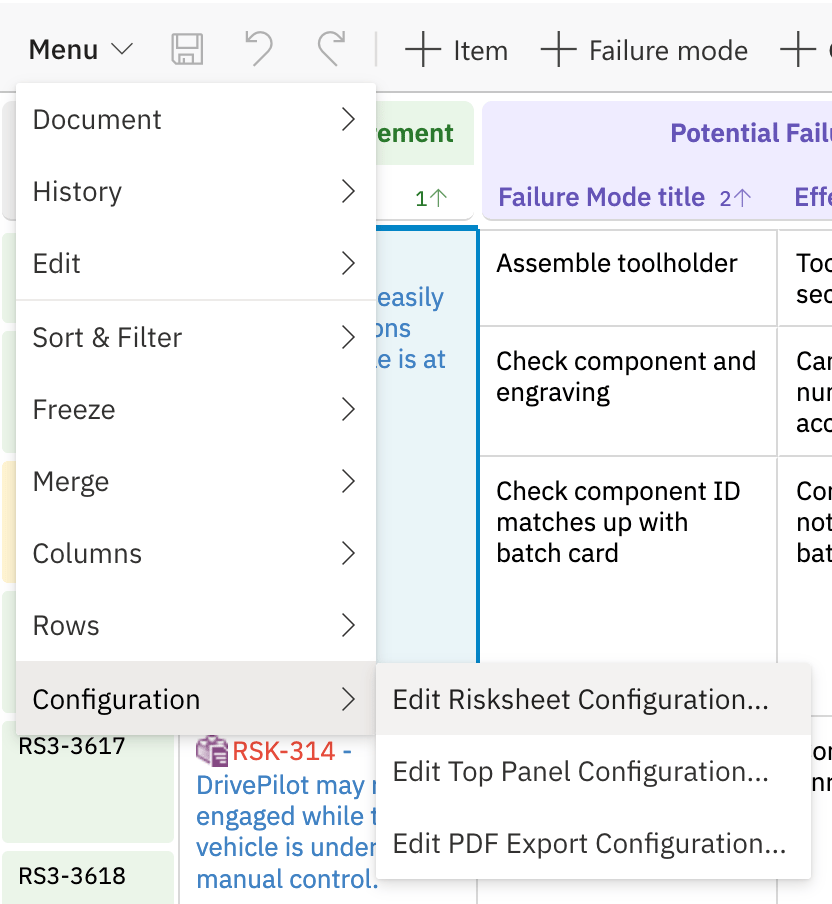
> The sheet configuration file (`risksheet.json`) is the primary configuration file for Nextedy RISKSHEET.
export const LastReviewed = ({date}) => {
if (!date) return null;
const formatted = new Date(`${date}T00:00:00Z`).toLocaleDateString("en-US", {
year: "numeric",
month: "long",
day: "numeric",
timeZone: "UTC"
});
return
Last reviewed on {formatted}
;
};
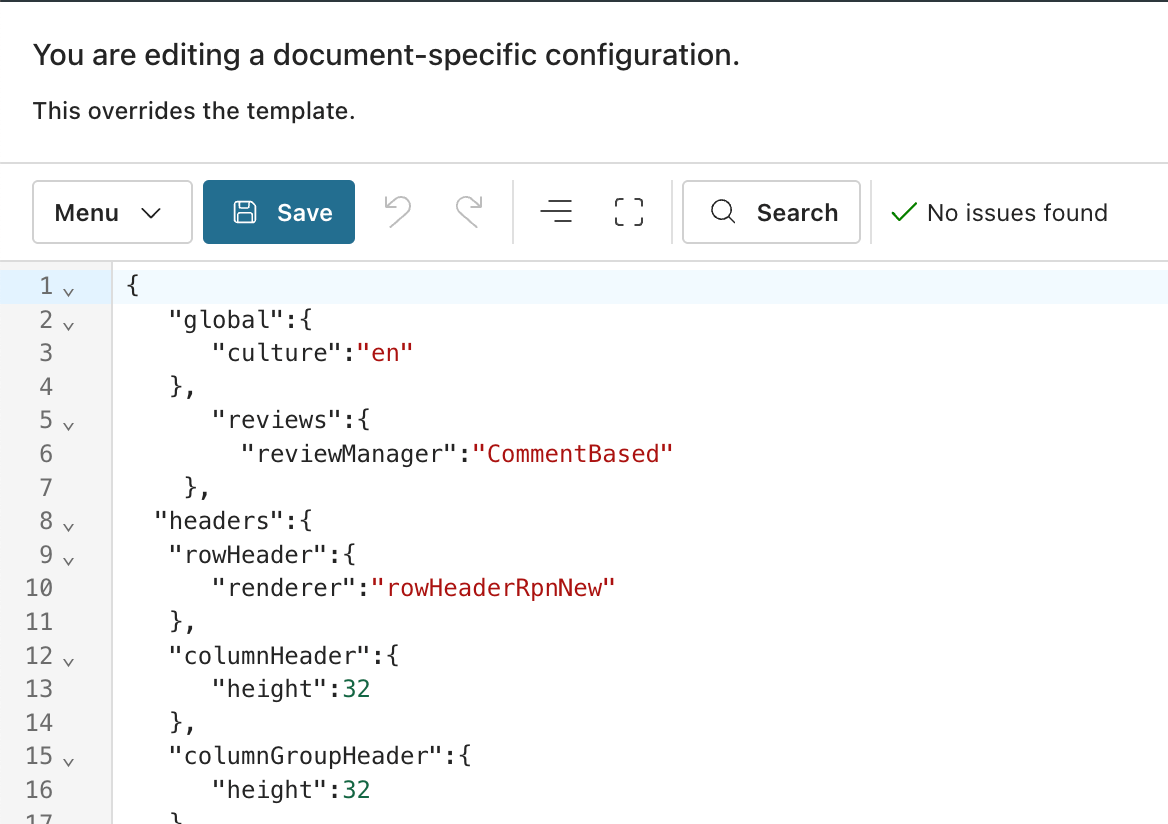
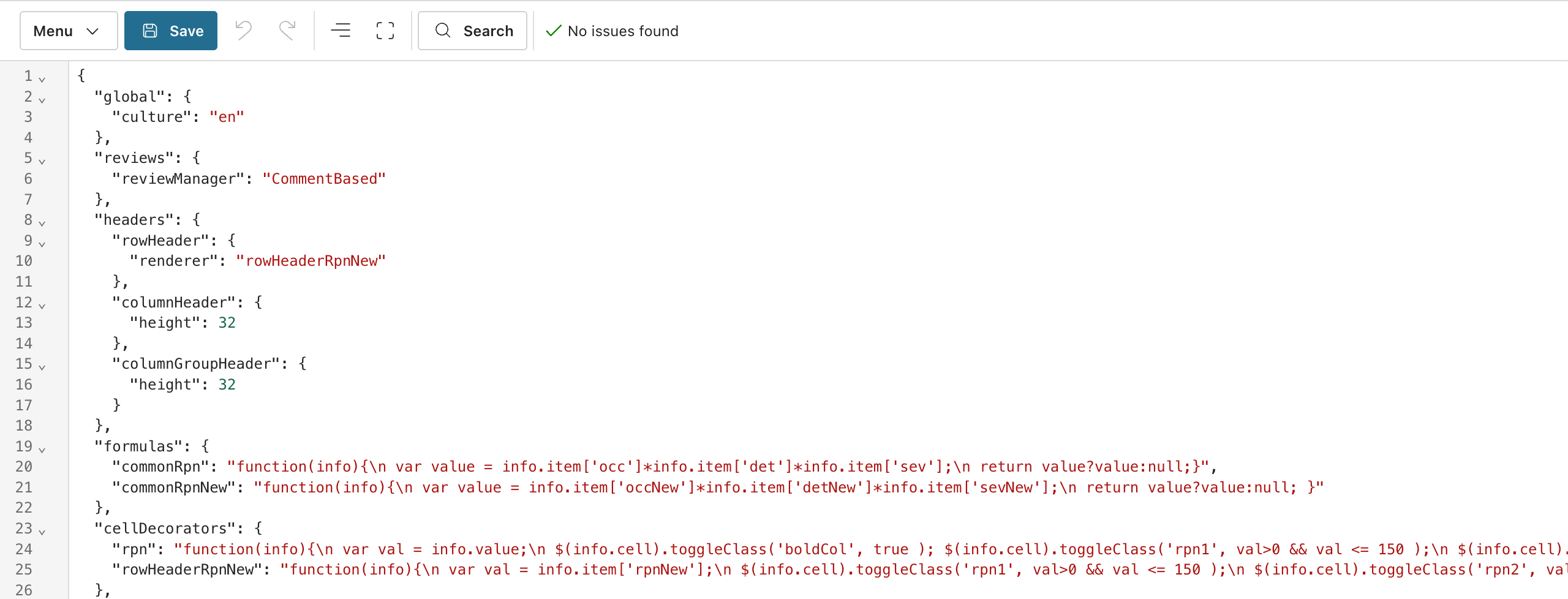
Since v25.5.0, the configuration editor supports YAML editing with syntax highlighting and validation. All examples in this reference use YAML; the underlying file remains JSON in Polarion storage.
## File Location
| Location | Description |
| --------------------------- | -------------------------------------------------------------------------------------------- |
| LiveDoc document attachment | Attached directly to the Polarion LiveDoc as the sheet configuration. |
| Document template | Defined in a Polarion document template. Applied to all documents created from the template. |
| Global template path | Configured via Risksheet project properties. Default path: `Risks/Risk Specification`. |
Use template-based configuration for consistent settings across multiple documents. Override specific properties at the document level when individual documents need customization. See [Template Path Configuration](/risksheet/reference/configuration/template-path-configuration) and [Document Configuration Override](/risksheet/reference/configuration/document-config-override).
See [Configuration Examples](/risksheet/reference/examples/index) for annotated, end-to-end sheet configurations from real-world TARA and FMEA projects.
Do not create a sheet configuration from scratch. When you create a sheet, pick the closest solution template for your industry/methodology, understand its configuration, and modify it to match your process. The functional safety template is a good entry point for evaluation.
## Top-Level Structure
The sheet configuration has these verified top-level sections:
```yaml theme={null}
global: {}
reviews: {}
headers: {}
queryFactories: {}
formulas: {}
cellDecorators: {}
styles: {}
columns: []
levels: []
dataTypes: {}
sortBy: []
views: []
```
## Top-Level Properties
| Property | Type | Description |
| ---------------- | ------ | ------------------------------------------------------------------------------------------------------------------------------------------------------------ |
| `global` | object | Global settings: culture/locale, help URL, refresh behavior, menu organization. |
| `columns` | array | Column definitions for the grid. Each entry defines a column's binding, type, header, and behavior. |
| `levels` | array | Visual hierarchy definitions for cell merging (e.g., item / failure mode / cause). |
| `dataTypes` | object | Risk and task work item type definitions. |
| `formulas` | object | Named JavaScript formula functions referenced by column `formula` properties. |
| `styles` | object | Named CSS class definitions referenced by `cellDecorators`. |
| `cellDecorators` | object | Named JavaScript functions that apply conditional CSS classes to cells. |
| `headers` | object | Row header and column header configuration (heights, renderers). |
| `reviews` | object | Review workflow configuration. |
| `sortBy` | array | Default sort order as an array of column ID strings. Prefix a column ID with `~` for descending order (for example, `~severity` sorts severity high-to-low). |
| `views` | array | Saved column visibility presets for staged or role-based workflows. |
| `queryFactories` | object | Named Lucene query functions for `itemLink` autocomplete filtering. |
Rating scales (severity, occurrence, detection) and enumerations are **not** declared inside the sheet configuration. They are defined as Polarion enumerations under **Administration > Enumerations**. A custom field on the work item type binds to the enumeration, and the sheet configuration column references it via `type: rating:` or `type: enum:` together with `bindings: `. The server loads the enumeration values automatically.
Dependent enumerations (where the available options of one enum depend on the value of another) are a **column-level** feature available since v25.3.1, not a top-level configuration section.
## columns
Each entry in the `columns` array defines one grid column.
### Column Properties
| Property | Type | Description |
| ---------------- | ------- | -------------------------------------------------------------------------------------------------------------------------------------------------------------------------------------------------------------------------------------------- |
| `id` | string | Unique column identifier. Referenced by `cellDecorators`, `views`, `sortBy.` |
| `bindings` | string | Polarion work item field ID that this column reads from and writes to. Supports `fieldId`, `linkedItem.fieldId`, and `linkedItem.$item` patterns. |
| `header` | string | Display text in the column header. |
| `type` | string | Column data type (e.g., `string`, `enum:`, `rating:`, `itemLink`, `taskLink`). See [Data Types](/risksheet/reference/columns/data-types). |
| `level` | number | Visual hierarchy level for cell merging. **1-indexed** (`level: 1` maps to `levels[0]`). An unleveled risk-item column defaults to level 1 and merges into the first level. Downstream/task columns are a separate axis and are not leveled. |
| `width` | number | Column width in pixels. |
| `minWidth` | number | Minimum column width in pixels for resizing. |
| `readOnly` | boolean | Prevents cell editing. Automatically `true` for `formula`, `serverRender`, reference columns, and system fields. |
| `canCreate` | boolean | For `itemLink`, `multiItemLink`, and `taskLink` columns: controls whether users can create new linked items. |
| `filterable` | boolean | Enables column-level filtering. |
| `formula` | string | Named formula reference from the `formulas` section. When set, column becomes read-only. |
| `serverRender` | string | Velocity template for server-side rendering. When set, column becomes read-only. |
| `cellRenderer` | string | Name of a function defined in `cellDecorators` that customizes cell rendering. |
| `headerGroup` | string | Header group name for multi-level column headers. |
| `collapseTo` | boolean | When `true`, this column remains visible when its header group is collapsed. |
| `headerTooltip` | string | Tooltip text displayed when hovering over the column header. |
| `headerCss` | string | CSS class name applied to the column header. |
| `headerGroupCss` | string | CSS class name applied to the header group row. |
| `cellCss` | string | CSS class name applied to cells in this column. |
| `format` | string | Display format string (date format, number format). |
| `typeProperties` | object | Type-specific properties (e.g., for `itemLink` columns). See [typeProperties](#typeproperties-for-itemlink-columns). |
### typeProperties for itemLink Columns
For `itemLink` and `multiItemLink` columns, `typeProperties` defines the link semantics and autocomplete behavior:
| Property | Type | Description |
| ------------------------- | ------- | ---------------------------------------------------------------------------------------------------- |
| `linkRole` | string | Link role name (Polarion link role ID). |
| `linkTypes` | string | Comma-separated work item type IDs that the column can link to. |
| `linkDirection` | string | Use `"back"` for reverse-direction link traversal. |
| `backLink` | boolean | Enables back-link rendering. |
| `itemTemplate` | string | Velocity template for custom item display in the dropdown. |
| `queryFactory` | string | Reference to a named function in `queryFactories` for dynamic autocomplete filtering. |
| `createInCurrentDocument` | boolean | When `true`, new items are created in the current document. |
| `document` | string | Restricts autocomplete to items from a specific LiveDoc (upstream "library" pattern). |
| `project` | string | Cross-project item loading. Supports `$projectId` (current project) and space-separated project IDs. |
### Column Example
```yaml theme={null}
columns:
- id: systemItemId
bindings: systemItemId
header: ID
type: string
readOnly: true
level: 1
width: 80
- id: title
bindings: title
header: Failure Mode Description
type: string
level: 1
width: 250
headerTooltip: Describe the potential failure mode
- id: severity
bindings: severity
header: S
type: rating:severityEnum
level: 1
width: 60
headerGroup: Initial Risk Assessment
headerTooltip: Severity rating
- id: rpn
bindings: rpn
header: RPN
formula: commonRpn
cellRenderer: rpn
level: 1
width: 70
headerGroup: Initial Risk Assessment
collapseTo: true
- id: measure
bindings: measure
header: Mitigation
type: taskLink
canCreate: true
```
## levels
Defines the visual hierarchy for cell merging. The number of `levels` entries determines how many visual tiers the grid renders; the underlying data model still has only two entity types (risk items and task items).
| Property | Type | Description |
| --------------- | ------- | ---------------------------------------------------------------------------------------------------------- |
| `name` | string | Display name in the navigation/zoom menu (e.g., "Item", "Failure mode"). |
| `controlColumn` | string | Used as the grouping key for cell merging. Consecutive rows with the same value in this column are merged. |
| `zoomColumn` | string | Defines in which column a highlighted cell will appear. |
| `showInMenu` | boolean | Controls level visibility in the navigation menu. Default: `true`. |
```yaml theme={null}
levels:
- name: Item
controlColumn: item
zoomColumn: item
- name: Failure mode
controlColumn: failureMode
zoomColumn: failureMode
- name: Cause
controlColumn: systemItemId
zoomColumn: causes
```
In this DFMEA example, all rows are the same Polarion work item type. The three visual levels are created purely through cell merging: the "Item" column values merge when consecutive rows share the same item, and "Failure mode" values merge when they share the same failure mode.
## dataTypes
Defines the work item types that participate in the sheet. The data model always has exactly two entities: `risk` (the row work item) and `task` (downstream linked items). The names are conventions only — any Polarion work item types can be used.
### dataTypes.risk Properties
| Property | Type | Default | Description |
| -------------------- | ------- | ------------------- | ------------------------------------------------------------------------------------------------------------ |
| `type` | string | None (**required**) | Polarion work item type ID. Supports expression evaluation for dynamic resolution. |
| `role` | string | None | Link role for relationships. |
| `removeStrategy` | string | `delete` | Removal strategy: `delete`, `rejected`, `recycle_bin`, or `hide` (v23.7.7+). |
| `rejectedAction` | string | `reject` | Workflow action for rejection. Must be available from the work item's current state. |
| `rejectedStatus` | string | `rejected` | Target status after rejection. |
| `rejectedResolution` | string | `invalid` | Resolution value after rejection. |
| `showInMenu` | boolean | `true` | Controls toolbar menu visibility for item creation. |
| `document` | string | None | Restricts loaded items to a specific LiveDoc path. |
| `createInDocument` | string | None | Target document path (`folder/documentId`) for new items. Without this, new items go to the project tracker. |
### dataTypes.task Properties
| Property | Type | Description |
| ------------------------- | ------- | -------------------------------------------------------------------------------------------------------------------------------------------------------- |
| `type` | string | Task work item type ID. Since v25.3.1, comma-separated for multiple types. |
| `role` | string | Link role connecting risk to task (e.g., `mitigates`). |
| `name` | string | Display name in the toolbar/menus (e.g., "Task", "Safety Requirement"). |
| `zoomColumn` | string | Column for zoom navigation after task creation. |
| `document` | string | Restricts tasks to a specific LiveDoc path. |
| `createInCurrentDocument` | boolean | When `true`, new tasks are created in the current document. |
| `createInDocument` | string | Target document path (`folder/documentId`) for new tasks (v24.8.1+). |
| `project` | string | Single project ID for task items. |
| `projects` | array | Array of project IDs for multi-project task loading (v23.7.0+). |
| `query` | string | Lucene query for additional task filtering. |
| `canCreate` | boolean | Global switch for all task creation. When `false`, users can only link to existing tasks. |
| `linkToRisksheet` | boolean | When `true`, the task link column becomes a clickable hyperlink to the downstream risksheet document defined by `document`. Enables subsheet navigation. |
| `showInMenu` | boolean | Controls menu visibility for task creation. |
### dataTypes Example
```yaml theme={null}
dataTypes:
risk:
type: failureMode
role: relates_to
removeStrategy: delete
rejectedAction: reject
rejectedStatus: rejected
rejectedResolution: invalid
showInMenu: true
task:
type: mitigationTask
role: mitigates
name: Mitigation
zoomColumn: measureTitle
createInDocument: Risks/Tasks
```
Use the `folder/documentId` path format. Example: `Risks/Tasks` creates items in the Tasks document within the Risks folder. Without `createInDocument`, new items go to the project tracker instead of a document.
### Dynamic Type Resolution
Data type properties support dynamic resolution from Risksheet Configuration Properties using expression evaluation:
```yaml theme={null}
dataTypes:
risk:
type: $config.getRisksheetProjectProperties().getProperties().getProperty('riskType', 'failureMode')
role: $config.getRisksheetProjectProperties().getProperties().getProperty('riskRole', 'relates_to')
```
This pattern makes configurations portable across projects by reading project-specific values with fallback defaults.
## headers
| Property | Type | Default | Description |
| ---------------------------------- | ------ | ------- | -------------------------------------------------------------------- |
| `headers.rowHeader.renderer` | string | None | Named cell decorator function for row header rendering. |
| `headers.columnHeader.height` | number | `32` | Column header height in pixels. Increase for multi-line header text. |
| `headers.columnGroupHeader.height` | number | `32` | Column group header height in pixels. |
```yaml theme={null}
headers:
rowHeader:
renderer: rowHeaderRpnNew
columnHeader:
height: 48
columnGroupHeader:
height: 32
```
## formulas
Named JavaScript functions for calculated columns. Each formula receives an `info` object with `info.item` containing the current row's field values.
```yaml theme={null}
formulas:
commonRpn: "function(info){ var value = info.item['occ']*info.item['det']*info.item['sev']; return value?value:null; }"
commonRpnNew: "function(info){ var value = info.item['occNew']*info.item['detNew']*info.item['sevNew']; return value?value:null; }"
```
Always check for null/undefined values. If any input is `null`, arithmetic operations return `NaN`. Use the pattern `return value ? value : null;` to convert falsy results to null.
For complex risk-matrix logic, externalize functions to `risksheetTopPanel.vm` and call them from thin wrappers in `formulas`. This narrows the validation scope of the sheet configuration in regulated environments. See [Top Panel Template](/risksheet/reference/templates/top-panel-template).
## cellDecorators
Named JavaScript functions that apply conditional CSS classes based on cell values. Each function receives an `info` object with `info.value` (cell value), `info.item` (row data), and `info.cell` (DOM element).
Cell decorators **must** use `toggleClass` rather than inline styles, because grid cells are reused as rows scroll. Inline styles persist across reuses and produce stale formatting.
RPN thresholds are user-configurable; the example below uses the common `150 / 250` split (green / amber / red). Different deployments use different bands.
```yaml theme={null}
cellDecorators:
rpn: "function(info){ var val = info.value; $(info.cell).toggleClass('boldCol', true); $(info.cell).toggleClass('rpn1', val>0 && val<=150); $(info.cell).toggleClass('rpn2', val>150 && val<=250); $(info.cell).toggleClass('rpn3', val>250); }"
rowHeaderRpnNew: "function(info){ var val = info.item['rpnNew']; $(info.cell).toggleClass('rpn1', val>0 && val<=150); $(info.cell).toggleClass('rpn2', val>150 && val<=250); $(info.cell).toggleClass('rpn3', val>250); }"
```
## styles
CSS class definitions referenced by `cellDecorators`. Style values **must** be wrapped in curly braces `{}`. Use `!important` to override grid default styles.
```yaml theme={null}
styles:
".boldCol": "{font-weight: 600;}"
".rpn1": "{background-color: #eaf5e9 !important; color: #1d5f20 !important;}"
".rpn2": "{background-color: #fff3d2 !important; color: #735602 !important;}"
".rpn3": "{background-color: #f8eae7 !important; color: #ab1c00 !important;}"
```
Styles can target specific row positions within header groups:
```yaml theme={null}
styles:
".firstRow .headSysReq": "{background-color: rgba(62, 175, 63, 0.12) !important; color: #2A792D !important;}"
".lastRow .headSysReq": "{background-color: #FFF !important; color: #2A792D !important;}"
```
## views
Saved column visibility presets that support staged risk assessment workflows.
| Property | Type | Description |
| ------------- | ------- | --------------------------------------------------- |
| `name` | string | Display name in the view switcher. |
| `columnIds` | array | Column IDs to show in this view. |
| `defaultView` | boolean | When `true`, this view loads by default (v24.1.0+). |
Special tokens inside `columnIds`:
* `"@all"` — includes every defined column.
* `"-columnId"` — excludes the named column (typically combined with `"@all"`).
```yaml theme={null}
views:
- name: Full Analysis
defaultView: true
columnIds:
- "@all"
- name: Classification Summary
columnIds:
- function
- failureCondTitle
- classification
- name: No Up/Down Risks
columnIds:
- "@all"
- "-upstreamRisks"
- "-downstreamRisks"
```
## queryFactories
Named Lucene query functions used by `typeProperties.queryFactory` on `itemLink` and `multiItemLink` columns. Each function receives an `info` object with context data and returns a Lucene query string for filtering autocomplete suggestions.
```yaml theme={null}
queryFactories:
functionQuery: "function(info){ return 'type:function AND document.id:' + info.documentId; }"
hazardQuery: "function(info){ var sel = $('#classification').val(); if (sel === 'all') return ''; return 'hazardClassification:' + sel; }"
```
The advanced `hazardQuery` example reads a user selection from a `
 ## File Location
| Location | Description |
| --------------------------- | -------------------------------------------------------------------------------------------- |
| LiveDoc document attachment | Attached directly to the Polarion LiveDoc as the sheet configuration. |
| Document template | Defined in a Polarion document template. Applied to all documents created from the template. |
| Global template path | Configured via Risksheet project properties. Default path: `Risks/Risk Specification`. |
## File Location
| Location | Description |
| --------------------------- | -------------------------------------------------------------------------------------------- |
| LiveDoc document attachment | Attached directly to the Polarion LiveDoc as the sheet configuration. |
| Document template | Defined in a Polarion document template. Applied to all documents created from the template. |
| Global template path | Configured via Risksheet project properties. Default path: `Risks/Risk Specification`. |