> ## Documentation Index
> Fetch the complete documentation index at: https://learn.nextedy.com/llms.txt
> Use this file to discover all available pages before exploring further.
# Configuration Properties (context.properties)
> Reference for Nextedy RISKSHEET server-side configuration properties set in Polarion's `context.properties` file (also known as project administration properties).
export const LastReviewed = ({date}) => {
if (!date) return null;
const formatted = new Date(`${date}T00:00:00Z`).toLocaleDateString("en-US", {
year: "numeric",
month: "long",
day: "numeric",
timeZone: "UTC"
});
return
Last reviewed on {formatted}
;
};
The properties on this page are configured at the Polarion **project administration** layer, not in the per-document sheet configuration file. They are read by Risksheet at server startup and on project-property changes. Configuration of grid behavior (columns, levels, formulas, styles) lives in the sheet configuration — see the [Sheet Configuration Format](/risksheet/reference/configuration/risksheet-json-format).
## Property Domains
 ## Property Format
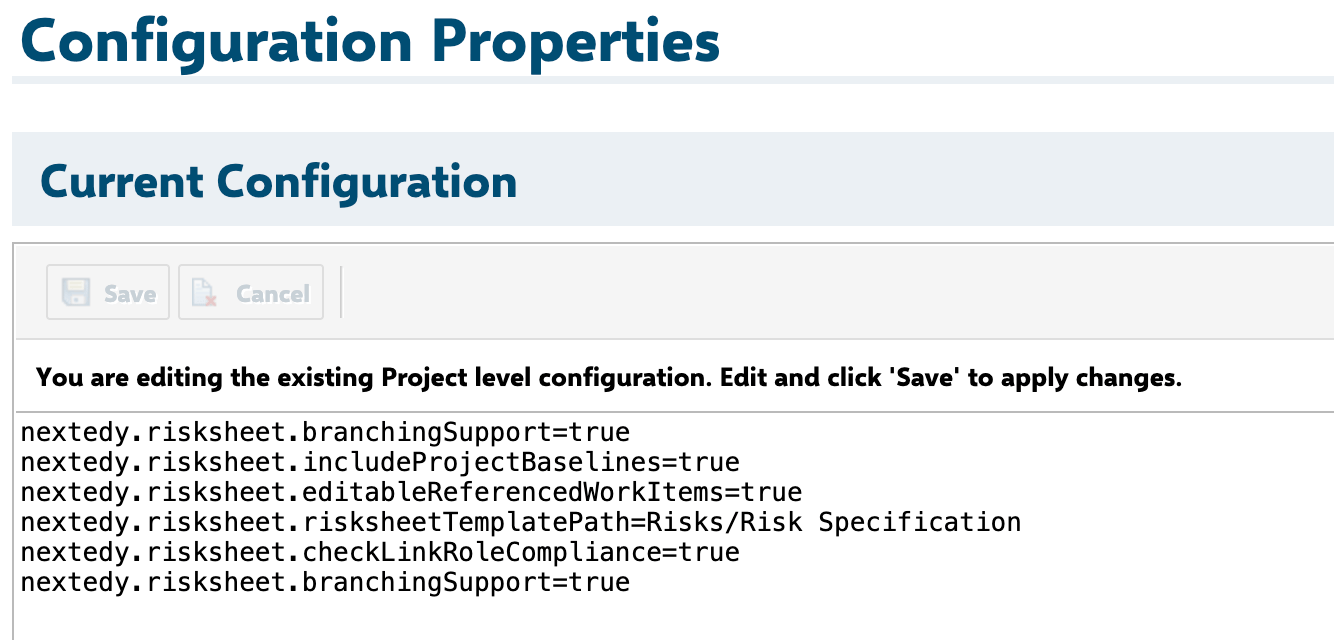
Properties live in Polarion's `context.properties` file. Each property is a `key=value` pair on a single line. Comments start with `#`.
```
# Example context.properties entries
nextedy.risksheet.risksheetTemplatePath=GlobalLibrary:Risks/Risk Specification
nextedy.risksheet.upstreamSubColumnsReadonly=true
nextedy.risksheet.checkPrototypePermissions=true
risksheet.pdf.additionalFonts=chinese,japanese
```
Edit `context.properties` through **Polarion Administration > Configuration Properties** at the project level. Changes typically apply after a project context reload; some properties (PDF export font detection) apply on next export run.
## Property Format
Properties live in Polarion's `context.properties` file. Each property is a `key=value` pair on a single line. Comments start with `#`.
```
# Example context.properties entries
nextedy.risksheet.risksheetTemplatePath=GlobalLibrary:Risks/Risk Specification
nextedy.risksheet.upstreamSubColumnsReadonly=true
nextedy.risksheet.checkPrototypePermissions=true
risksheet.pdf.additionalFonts=chinese,japanese
```
Edit `context.properties` through **Polarion Administration > Configuration Properties** at the project level. Changes typically apply after a project context reload; some properties (PDF export font detection) apply on next export run.
 ## PDF Export Properties
### `risksheet.pdf.additionalFonts`
Defines which additional font detection areas are enabled during PDF export. The value is passed as a list of font area names. Items can be separated by spaces, commas, or semicolons.
| Attribute | Value |
| ---------------------- | ------------------------------- |
| **Name** | `risksheet.pdf.additionalFonts` |
| **Type** | `string` (delimited list) |
| **Default** | empty string |
| **Allowed delimiters** | space, comma, semicolon |
**Supported font area values:**
| Value | Coverage |
| ---------- | --------------------------------------------------------------------------------------- |
| `latin` | Latin scripts (always enabled, also covers math font fallback for mathematical symbols) |
| `chinese` | Chinese script |
| `korean` | Korean script |
| `japanese` | Japanese script |
| `hebrew` | Hebrew script |
| `thai` | Thai script |
| `arabic` | Arabic script |
**Behavior:**
* When the value is empty, contains only whitespace, or the setting is missing, only the latin font area is detected.
* `latin` is always enabled, even if it is not listed explicitly. The latin area also covers the math font fallback used for mathematical symbols.
* Unsupported values are ignored for font detection and are logged to the browser console during PDF export.
**Examples:**
```
risksheet.pdf.additionalFonts=
```
Latin only (default — empty value).
```
risksheet.pdf.additionalFonts=latin chinese korean japanese hebrew thai arabic
```
Enables all supported font areas.
```
risksheet.pdf.additionalFonts=chinese,japanese
```
Enables `latin`, `chinese`, and `japanese`.
```
risksheet.pdf.additionalFonts=hebrew;thai;arabic
```
Enables `latin`, `hebrew`, `thai`, and `arabic` (semicolon delimiter).
```
risksheet.pdf.additionalFonts=chinese japanese korean
```
Enables `latin`, `chinese`, `japanese`, and `korean` (space delimiter).
Each enabled font area increases PDF export font detection cost. Enable only the scripts present in your risk content.
Unsupported entries (typos, removed scripts) are silently ignored at detection time. Open the browser console during PDF export to see ignored values.
## Permission and Visibility Properties
These properties control read/write visibility of work items and fields in the Risksheet grid. All are prefixed `nextedy.risksheet.`.
### `nextedy.risksheet.upstreamSubColumnsReadonly`
| Attribute | Value |
| ----------- | ---------------------------------------------- |
| **Name** | `nextedy.risksheet.upstreamSubColumnsReadonly` |
| **Type** | `boolean` |
| **Default** | `true` |
Controls whether sub-columns derived from upstream linked items (e.g., `bindings: harm.title`) are rendered as read-only. When `true`, the grid prevents editing of fields that belong to upstream work items reached through an itemLink or multiItemLink column.
```
nextedy.risksheet.upstreamSubColumnsReadonly=true
```
### `nextedy.risksheet.checkPrototypePermissions`
| Attribute | Value |
| ----------- | --------------------------------------------- |
| **Name** | `nextedy.risksheet.checkPrototypePermissions` |
| **Type** | `boolean` |
| **Default** | `true` |
Controls whether the grid checks the user's permissions against the **prototype** (work item type definition) when rendering editable cells. When `true`, fields the user cannot edit at the prototype level are rendered read-only.
```
nextedy.risksheet.checkPrototypePermissions=true
```
### `nextedy.risksheet.editableReferencedWorkItems`
| Attribute | Value |
| ------------------- | ----------------------------------------------- |
| **Name** | `nextedy.risksheet.editableReferencedWorkItems` |
| **Type** | `boolean` |
| **Default** | `false` |
| **Available since** | v23.3.3 |
When `true`, allows editing of fields belonging to upstream/downstream referenced work items directly in the grid (subject to user permissions).
```
nextedy.risksheet.editableReferencedWorkItems=false
```
This property is a **project administration** setting, not a sheet configuration property. It cannot be set in the sheet configuration file.
### `nextedy.risksheet.checkInstanceFieldPermissions`
| Attribute | Value |
| ----------- | ------------------------------------------------- |
| **Name** | `nextedy.risksheet.checkInstanceFieldPermissions` |
| **Type** | `boolean` |
| **Default** | `false` |
When `true`, the grid checks per-instance field permissions in addition to prototype permissions. Cells that the user cannot edit on a specific work item instance are rendered read-only.
```
nextedy.risksheet.checkInstanceFieldPermissions=false
```
### `nextedy.risksheet.moduleOnlyPermissions`
| Attribute | Value |
| ------------------- | ----------------------------------------- |
| **Name** | `nextedy.risksheet.moduleOnlyPermissions` |
| **Type** | `boolean` |
| **Default** | `false` |
| **Available since** | v24.8.5 |
When `true`, permission checks consider only the module (LiveDoc) context, not the global project context.
```
nextedy.risksheet.moduleOnlyPermissions=false
```
## Workflow and Compliance Properties
### `nextedy.risksheet.checkLinkRoleCompliance`
| Attribute | Value |
| ------------------- | ------------------------------------------- |
| **Name** | `nextedy.risksheet.checkLinkRoleCompliance` |
| **Type** | `boolean` |
| **Default** | `false` |
| **Available since** | v24.2.2 |
When `true`, the grid validates that link roles used in itemLink and multiItemLink columns comply with the Polarion link role definitions. Non-compliant links are flagged.
```
nextedy.risksheet.checkLinkRoleCompliance=true
```
### `nextedy.risksheet.branchingSupport`
| Attribute | Value |
| ----------- | ------------------------------------ |
| **Name** | `nextedy.risksheet.branchingSupport` |
| **Type** | `boolean` |
| **Default** | `false` |
When `true`, enables Risksheet behavior compatible with Polarion's branching feature. Risk items in branched documents are handled with branch-aware loading.
```
nextedy.risksheet.branchingSupport=false
```
### `nextedy.risksheet.downstreamFromRevision`
| Attribute | Value |
| ----------- | ------------------------------------------ |
| **Name** | `nextedy.risksheet.downstreamFromRevision` |
| **Type** | `boolean` |
| **Default** | `false` |
When `true`, downstream task items are loaded as of a specific revision (used together with revision-based document viewing).
```
nextedy.risksheet.downstreamFromRevision=false
```
### `nextedy.risksheet.loadTasksFromDocument`
| Attribute | Value |
| ------------------- | ----------------------------------------- |
| **Name** | `nextedy.risksheet.loadTasksFromDocument` |
| **Type** | `boolean` |
| **Default** | `false` |
| **Available since** | v23.8.3 |
When `true`, downstream task items are loaded from documents (LiveDocs) rather than from a free-form query. Use together with `dataTypes.task.document` in the sheet configuration to scope task loading to a specific document. See [Document Configuration Override](/risksheet/reference/configuration/document-config-override).
```
nextedy.risksheet.loadTasksFromDocument=false
```
## Template Path Properties
### `nextedy.risksheet.risksheetTemplatePath`
| Attribute | Value |
| ----------- | ----------------------------------------- |
| **Name** | `nextedy.risksheet.risksheetTemplatePath` |
| **Type** | `string` |
| **Default** | `Risks/Risk Specification` |
Specifies the default template document path used when creating a new Risksheet document. Format is `PROJECTID:TEMPLATE_PATH` to point at a template located in another Polarion project (typically a global library), or a plain path (`Risks/Risk Specification`) for the current project.
```
nextedy.risksheet.risksheetTemplatePath=GlobalLibrary:Risks/Risk Specification
```
The template path is associated with the `templateDoc` custom field on documents, which holds the connection between a Risksheet document and its template. See [Template Path Configuration](/risksheet/reference/configuration/template-path-configuration).
Always pick the closest solution template for your industry/methodology and modify to match your process. Do not start from a blank sheet configuration.
## Suggester (Autocomplete) Properties
These properties tune the behavior of autocomplete suggestions used by itemLink and multiItemLink columns.
### `nextedy.risksheet.isSuggesterFuzzySearching`
| Attribute | Value |
| ----------- | --------------------------------------------- |
| **Name** | `nextedy.risksheet.isSuggesterFuzzySearching` |
| **Type** | `boolean` |
| **Default** | `true` |
When `true`, the suggester applies fuzzy matching so close-but-imperfect typos still return matching items.
```
nextedy.risksheet.isSuggesterFuzzySearching=true
```
### `nextedy.risksheet.isSuggesterWildcardSearching`
| Attribute | Value |
| ----------- | ------------------------------------------------ |
| **Name** | `nextedy.risksheet.isSuggesterWildcardSearching` |
| **Type** | `boolean` |
| **Default** | `true` |
When `true`, the suggester treats user input as a wildcard pattern, expanding the search to match anywhere in the indexed field.
```
nextedy.risksheet.isSuggesterWildcardSearching=true
```
### `nextedy.risksheet.isSuggesterKeywordsMandatory`
| Attribute | Value |
| ----------- | ------------------------------------------------ |
| **Name** | `nextedy.risksheet.isSuggesterKeywordsMandatory` |
| **Type** | `boolean` |
| **Default** | `false` |
When `true`, every entered keyword must match (logical AND). When `false`, any match is acceptable (logical OR).
```
nextedy.risksheet.isSuggesterKeywordsMandatory=false
```
## Property Decision Reference
Use this matrix to pick the right behavior knob for common requirements.
| Goal | Property | Set to |
| -------------------------------------------------- | ------------------------------------------------- | ---------------------------------------- |
| Lock all upstream sub-columns from editing | `nextedy.risksheet.upstreamSubColumnsReadonly` | `true` |
| Allow editing upstream/downstream fields inline | `nextedy.risksheet.editableReferencedWorkItems` | `true` |
| Enforce per-instance field permissions in the grid | `nextedy.risksheet.checkInstanceFieldPermissions` | `true` |
| Limit permission scope to the LiveDoc only | `nextedy.risksheet.moduleOnlyPermissions` | `true` |
| Validate link role compliance | `nextedy.risksheet.checkLinkRoleCompliance` | `true` |
| Branching-aware risk loading | `nextedy.risksheet.branchingSupport` | `true` |
| Load downstream tasks scoped to a document | `nextedy.risksheet.loadTasksFromDocument` | `true` |
| Point new Risksheet documents at a global template | `nextedy.risksheet.risksheetTemplatePath` | `GlobalLibrary:Risks/Risk Specification` |
| Strict keyword matching in autocomplete | `nextedy.risksheet.isSuggesterKeywordsMandatory` | `true` |
| Enable Chinese + Japanese PDF font detection | `risksheet.pdf.additionalFonts` | `chinese,japanese` |
## Versioned Property Summary
| Property | Type | Default | Since |
| ------------------------------------------------- | ------- | -------------------------- | ------- |
| `risksheet.pdf.additionalFonts` | string | empty | All |
| `nextedy.risksheet.upstreamSubColumnsReadonly` | boolean | `true` | All |
| `nextedy.risksheet.checkPrototypePermissions` | boolean | `true` | All |
| `nextedy.risksheet.editableReferencedWorkItems` | boolean | `false` | v23.3.3 |
| `nextedy.risksheet.checkInstanceFieldPermissions` | boolean | `false` | All |
| `nextedy.risksheet.downstreamFromRevision` | boolean | `false` | All |
| `nextedy.risksheet.branchingSupport` | boolean | `false` | All |
| `nextedy.risksheet.checkLinkRoleCompliance` | boolean | `false` | v24.2.2 |
| `nextedy.risksheet.moduleOnlyPermissions` | boolean | `false` | v24.8.5 |
| `nextedy.risksheet.loadTasksFromDocument` | boolean | `false` | v23.8.3 |
| `nextedy.risksheet.risksheetTemplatePath` | string | `Risks/Risk Specification` | All |
| `nextedy.risksheet.isSuggesterFuzzySearching` | boolean | `true` | All |
| `nextedy.risksheet.isSuggesterWildcardSearching` | boolean | `true` | All |
| `nextedy.risksheet.isSuggesterKeywordsMandatory` | boolean | `false` | All |
## Complete Example
A full `context.properties` block configuring a multi-script regulated environment (medical devices ISO 14971) with a global template library, strict permission checks, and Chinese/Japanese/Korean PDF export support:
```
# --- Risksheet PDF export ---
risksheet.pdf.additionalFonts=chinese,japanese,korean
# --- Risksheet template path ---
nextedy.risksheet.risksheetTemplatePath=GlobalLibrary:Risks/Risk Specification
# --- Permission and visibility ---
nextedy.risksheet.upstreamSubColumnsReadonly=true
nextedy.risksheet.checkPrototypePermissions=true
nextedy.risksheet.editableReferencedWorkItems=false
nextedy.risksheet.checkInstanceFieldPermissions=true
nextedy.risksheet.moduleOnlyPermissions=false
# --- Workflow and compliance ---
nextedy.risksheet.checkLinkRoleCompliance=true
nextedy.risksheet.branchingSupport=false
nextedy.risksheet.downstreamFromRevision=false
nextedy.risksheet.loadTasksFromDocument=true
# --- Suggester (autocomplete) ---
nextedy.risksheet.isSuggesterFuzzySearching=true
nextedy.risksheet.isSuggesterWildcardSearching=true
nextedy.risksheet.isSuggesterKeywordsMandatory=false
```
`context.properties` is loaded at project context refresh. Some properties (PDF font detection, suggester behavior) take effect on the next operation. Permission-related properties may require users to reload their LiveDoc view to see updated read-only states.
## Related Topics
* [Configuration Properties Index](/risksheet/reference/configuration/properties-index) — alphabetical index of all configuration properties
* [Default Configuration Values](/risksheet/reference/configuration/default-values) — defaults for sheet configuration sections
* [Sheet Configuration Format](/risksheet/reference/configuration/risksheet-json-format) — per-document configuration (columns, levels, formulas)
* [Template Path Configuration](/risksheet/reference/configuration/template-path-configuration) — template document resolution
* [Document Configuration Override](/risksheet/reference/configuration/document-config-override) — document-level configuration override
* [Configuration Reference Index](/risksheet/reference/configuration/index) — entry point for all configuration topics
## PDF Export Properties
### `risksheet.pdf.additionalFonts`
Defines which additional font detection areas are enabled during PDF export. The value is passed as a list of font area names. Items can be separated by spaces, commas, or semicolons.
| Attribute | Value |
| ---------------------- | ------------------------------- |
| **Name** | `risksheet.pdf.additionalFonts` |
| **Type** | `string` (delimited list) |
| **Default** | empty string |
| **Allowed delimiters** | space, comma, semicolon |
**Supported font area values:**
| Value | Coverage |
| ---------- | --------------------------------------------------------------------------------------- |
| `latin` | Latin scripts (always enabled, also covers math font fallback for mathematical symbols) |
| `chinese` | Chinese script |
| `korean` | Korean script |
| `japanese` | Japanese script |
| `hebrew` | Hebrew script |
| `thai` | Thai script |
| `arabic` | Arabic script |
**Behavior:**
* When the value is empty, contains only whitespace, or the setting is missing, only the latin font area is detected.
* `latin` is always enabled, even if it is not listed explicitly. The latin area also covers the math font fallback used for mathematical symbols.
* Unsupported values are ignored for font detection and are logged to the browser console during PDF export.
**Examples:**
```
risksheet.pdf.additionalFonts=
```
Latin only (default — empty value).
```
risksheet.pdf.additionalFonts=latin chinese korean japanese hebrew thai arabic
```
Enables all supported font areas.
```
risksheet.pdf.additionalFonts=chinese,japanese
```
Enables `latin`, `chinese`, and `japanese`.
```
risksheet.pdf.additionalFonts=hebrew;thai;arabic
```
Enables `latin`, `hebrew`, `thai`, and `arabic` (semicolon delimiter).
```
risksheet.pdf.additionalFonts=chinese japanese korean
```
Enables `latin`, `chinese`, `japanese`, and `korean` (space delimiter).
Each enabled font area increases PDF export font detection cost. Enable only the scripts present in your risk content.
Unsupported entries (typos, removed scripts) are silently ignored at detection time. Open the browser console during PDF export to see ignored values.
## Permission and Visibility Properties
These properties control read/write visibility of work items and fields in the Risksheet grid. All are prefixed `nextedy.risksheet.`.
### `nextedy.risksheet.upstreamSubColumnsReadonly`
| Attribute | Value |
| ----------- | ---------------------------------------------- |
| **Name** | `nextedy.risksheet.upstreamSubColumnsReadonly` |
| **Type** | `boolean` |
| **Default** | `true` |
Controls whether sub-columns derived from upstream linked items (e.g., `bindings: harm.title`) are rendered as read-only. When `true`, the grid prevents editing of fields that belong to upstream work items reached through an itemLink or multiItemLink column.
```
nextedy.risksheet.upstreamSubColumnsReadonly=true
```
### `nextedy.risksheet.checkPrototypePermissions`
| Attribute | Value |
| ----------- | --------------------------------------------- |
| **Name** | `nextedy.risksheet.checkPrototypePermissions` |
| **Type** | `boolean` |
| **Default** | `true` |
Controls whether the grid checks the user's permissions against the **prototype** (work item type definition) when rendering editable cells. When `true`, fields the user cannot edit at the prototype level are rendered read-only.
```
nextedy.risksheet.checkPrototypePermissions=true
```
### `nextedy.risksheet.editableReferencedWorkItems`
| Attribute | Value |
| ------------------- | ----------------------------------------------- |
| **Name** | `nextedy.risksheet.editableReferencedWorkItems` |
| **Type** | `boolean` |
| **Default** | `false` |
| **Available since** | v23.3.3 |
When `true`, allows editing of fields belonging to upstream/downstream referenced work items directly in the grid (subject to user permissions).
```
nextedy.risksheet.editableReferencedWorkItems=false
```
This property is a **project administration** setting, not a sheet configuration property. It cannot be set in the sheet configuration file.
### `nextedy.risksheet.checkInstanceFieldPermissions`
| Attribute | Value |
| ----------- | ------------------------------------------------- |
| **Name** | `nextedy.risksheet.checkInstanceFieldPermissions` |
| **Type** | `boolean` |
| **Default** | `false` |
When `true`, the grid checks per-instance field permissions in addition to prototype permissions. Cells that the user cannot edit on a specific work item instance are rendered read-only.
```
nextedy.risksheet.checkInstanceFieldPermissions=false
```
### `nextedy.risksheet.moduleOnlyPermissions`
| Attribute | Value |
| ------------------- | ----------------------------------------- |
| **Name** | `nextedy.risksheet.moduleOnlyPermissions` |
| **Type** | `boolean` |
| **Default** | `false` |
| **Available since** | v24.8.5 |
When `true`, permission checks consider only the module (LiveDoc) context, not the global project context.
```
nextedy.risksheet.moduleOnlyPermissions=false
```
## Workflow and Compliance Properties
### `nextedy.risksheet.checkLinkRoleCompliance`
| Attribute | Value |
| ------------------- | ------------------------------------------- |
| **Name** | `nextedy.risksheet.checkLinkRoleCompliance` |
| **Type** | `boolean` |
| **Default** | `false` |
| **Available since** | v24.2.2 |
When `true`, the grid validates that link roles used in itemLink and multiItemLink columns comply with the Polarion link role definitions. Non-compliant links are flagged.
```
nextedy.risksheet.checkLinkRoleCompliance=true
```
### `nextedy.risksheet.branchingSupport`
| Attribute | Value |
| ----------- | ------------------------------------ |
| **Name** | `nextedy.risksheet.branchingSupport` |
| **Type** | `boolean` |
| **Default** | `false` |
When `true`, enables Risksheet behavior compatible with Polarion's branching feature. Risk items in branched documents are handled with branch-aware loading.
```
nextedy.risksheet.branchingSupport=false
```
### `nextedy.risksheet.downstreamFromRevision`
| Attribute | Value |
| ----------- | ------------------------------------------ |
| **Name** | `nextedy.risksheet.downstreamFromRevision` |
| **Type** | `boolean` |
| **Default** | `false` |
When `true`, downstream task items are loaded as of a specific revision (used together with revision-based document viewing).
```
nextedy.risksheet.downstreamFromRevision=false
```
### `nextedy.risksheet.loadTasksFromDocument`
| Attribute | Value |
| ------------------- | ----------------------------------------- |
| **Name** | `nextedy.risksheet.loadTasksFromDocument` |
| **Type** | `boolean` |
| **Default** | `false` |
| **Available since** | v23.8.3 |
When `true`, downstream task items are loaded from documents (LiveDocs) rather than from a free-form query. Use together with `dataTypes.task.document` in the sheet configuration to scope task loading to a specific document. See [Document Configuration Override](/risksheet/reference/configuration/document-config-override).
```
nextedy.risksheet.loadTasksFromDocument=false
```
## Template Path Properties
### `nextedy.risksheet.risksheetTemplatePath`
| Attribute | Value |
| ----------- | ----------------------------------------- |
| **Name** | `nextedy.risksheet.risksheetTemplatePath` |
| **Type** | `string` |
| **Default** | `Risks/Risk Specification` |
Specifies the default template document path used when creating a new Risksheet document. Format is `PROJECTID:TEMPLATE_PATH` to point at a template located in another Polarion project (typically a global library), or a plain path (`Risks/Risk Specification`) for the current project.
```
nextedy.risksheet.risksheetTemplatePath=GlobalLibrary:Risks/Risk Specification
```
The template path is associated with the `templateDoc` custom field on documents, which holds the connection between a Risksheet document and its template. See [Template Path Configuration](/risksheet/reference/configuration/template-path-configuration).
Always pick the closest solution template for your industry/methodology and modify to match your process. Do not start from a blank sheet configuration.
## Suggester (Autocomplete) Properties
These properties tune the behavior of autocomplete suggestions used by itemLink and multiItemLink columns.
### `nextedy.risksheet.isSuggesterFuzzySearching`
| Attribute | Value |
| ----------- | --------------------------------------------- |
| **Name** | `nextedy.risksheet.isSuggesterFuzzySearching` |
| **Type** | `boolean` |
| **Default** | `true` |
When `true`, the suggester applies fuzzy matching so close-but-imperfect typos still return matching items.
```
nextedy.risksheet.isSuggesterFuzzySearching=true
```
### `nextedy.risksheet.isSuggesterWildcardSearching`
| Attribute | Value |
| ----------- | ------------------------------------------------ |
| **Name** | `nextedy.risksheet.isSuggesterWildcardSearching` |
| **Type** | `boolean` |
| **Default** | `true` |
When `true`, the suggester treats user input as a wildcard pattern, expanding the search to match anywhere in the indexed field.
```
nextedy.risksheet.isSuggesterWildcardSearching=true
```
### `nextedy.risksheet.isSuggesterKeywordsMandatory`
| Attribute | Value |
| ----------- | ------------------------------------------------ |
| **Name** | `nextedy.risksheet.isSuggesterKeywordsMandatory` |
| **Type** | `boolean` |
| **Default** | `false` |
When `true`, every entered keyword must match (logical AND). When `false`, any match is acceptable (logical OR).
```
nextedy.risksheet.isSuggesterKeywordsMandatory=false
```
## Property Decision Reference
Use this matrix to pick the right behavior knob for common requirements.
| Goal | Property | Set to |
| -------------------------------------------------- | ------------------------------------------------- | ---------------------------------------- |
| Lock all upstream sub-columns from editing | `nextedy.risksheet.upstreamSubColumnsReadonly` | `true` |
| Allow editing upstream/downstream fields inline | `nextedy.risksheet.editableReferencedWorkItems` | `true` |
| Enforce per-instance field permissions in the grid | `nextedy.risksheet.checkInstanceFieldPermissions` | `true` |
| Limit permission scope to the LiveDoc only | `nextedy.risksheet.moduleOnlyPermissions` | `true` |
| Validate link role compliance | `nextedy.risksheet.checkLinkRoleCompliance` | `true` |
| Branching-aware risk loading | `nextedy.risksheet.branchingSupport` | `true` |
| Load downstream tasks scoped to a document | `nextedy.risksheet.loadTasksFromDocument` | `true` |
| Point new Risksheet documents at a global template | `nextedy.risksheet.risksheetTemplatePath` | `GlobalLibrary:Risks/Risk Specification` |
| Strict keyword matching in autocomplete | `nextedy.risksheet.isSuggesterKeywordsMandatory` | `true` |
| Enable Chinese + Japanese PDF font detection | `risksheet.pdf.additionalFonts` | `chinese,japanese` |
## Versioned Property Summary
| Property | Type | Default | Since |
| ------------------------------------------------- | ------- | -------------------------- | ------- |
| `risksheet.pdf.additionalFonts` | string | empty | All |
| `nextedy.risksheet.upstreamSubColumnsReadonly` | boolean | `true` | All |
| `nextedy.risksheet.checkPrototypePermissions` | boolean | `true` | All |
| `nextedy.risksheet.editableReferencedWorkItems` | boolean | `false` | v23.3.3 |
| `nextedy.risksheet.checkInstanceFieldPermissions` | boolean | `false` | All |
| `nextedy.risksheet.downstreamFromRevision` | boolean | `false` | All |
| `nextedy.risksheet.branchingSupport` | boolean | `false` | All |
| `nextedy.risksheet.checkLinkRoleCompliance` | boolean | `false` | v24.2.2 |
| `nextedy.risksheet.moduleOnlyPermissions` | boolean | `false` | v24.8.5 |
| `nextedy.risksheet.loadTasksFromDocument` | boolean | `false` | v23.8.3 |
| `nextedy.risksheet.risksheetTemplatePath` | string | `Risks/Risk Specification` | All |
| `nextedy.risksheet.isSuggesterFuzzySearching` | boolean | `true` | All |
| `nextedy.risksheet.isSuggesterWildcardSearching` | boolean | `true` | All |
| `nextedy.risksheet.isSuggesterKeywordsMandatory` | boolean | `false` | All |
## Complete Example
A full `context.properties` block configuring a multi-script regulated environment (medical devices ISO 14971) with a global template library, strict permission checks, and Chinese/Japanese/Korean PDF export support:
```
# --- Risksheet PDF export ---
risksheet.pdf.additionalFonts=chinese,japanese,korean
# --- Risksheet template path ---
nextedy.risksheet.risksheetTemplatePath=GlobalLibrary:Risks/Risk Specification
# --- Permission and visibility ---
nextedy.risksheet.upstreamSubColumnsReadonly=true
nextedy.risksheet.checkPrototypePermissions=true
nextedy.risksheet.editableReferencedWorkItems=false
nextedy.risksheet.checkInstanceFieldPermissions=true
nextedy.risksheet.moduleOnlyPermissions=false
# --- Workflow and compliance ---
nextedy.risksheet.checkLinkRoleCompliance=true
nextedy.risksheet.branchingSupport=false
nextedy.risksheet.downstreamFromRevision=false
nextedy.risksheet.loadTasksFromDocument=true
# --- Suggester (autocomplete) ---
nextedy.risksheet.isSuggesterFuzzySearching=true
nextedy.risksheet.isSuggesterWildcardSearching=true
nextedy.risksheet.isSuggesterKeywordsMandatory=false
```
`context.properties` is loaded at project context refresh. Some properties (PDF font detection, suggester behavior) take effect on the next operation. Permission-related properties may require users to reload their LiveDoc view to see updated read-only states.
## Related Topics
* [Configuration Properties Index](/risksheet/reference/configuration/properties-index) — alphabetical index of all configuration properties
* [Default Configuration Values](/risksheet/reference/configuration/default-values) — defaults for sheet configuration sections
* [Sheet Configuration Format](/risksheet/reference/configuration/risksheet-json-format) — per-document configuration (columns, levels, formulas)
* [Template Path Configuration](/risksheet/reference/configuration/template-path-configuration) — template document resolution
* [Document Configuration Override](/risksheet/reference/configuration/document-config-override) — document-level configuration override
* [Configuration Reference Index](/risksheet/reference/configuration/index) — entry point for all configuration topics