> ## Documentation Index
> Fetch the complete documentation index at: https://learn.nextedy.com/llms.txt
> Use this file to discover all available pages before exploring further.
# Approval Columns
> Reference for the approvals and approvers column types of Nextedy RISKSHEET, which show Polarion work item approvals and invite approvers from the grid, and for the approval section of the sheet configuration.
export const LastReviewed = ({date, state}) => {
if (!date) return null;
const formatted = new Date(`${date}T00:00:00Z`).toLocaleDateString("en-US", {
year: "numeric",
month: "long",
day: "numeric",
timeZone: "UTC"
});
const label = state === "reviewed" ? `Last reviewed and confirmed up to date on ${formatted}` : `Last updated on ${formatted}`;
return
{label}
;
};
Two column types bring Polarion work item approvals into the grid: `approvals` shows the approval state of an item, and `approvers` lists and edits who is asked to approve it. The `approval` section of the sheet configuration controls the Approvals sidebar and approval comments. For the concepts, see [Work Item Approvals](/risksheet/concepts/work-item-approvals); for a walkthrough, see [Set Up Work Item Approvals](/risksheet/guides/reviews/set-up-work-item-approvals).
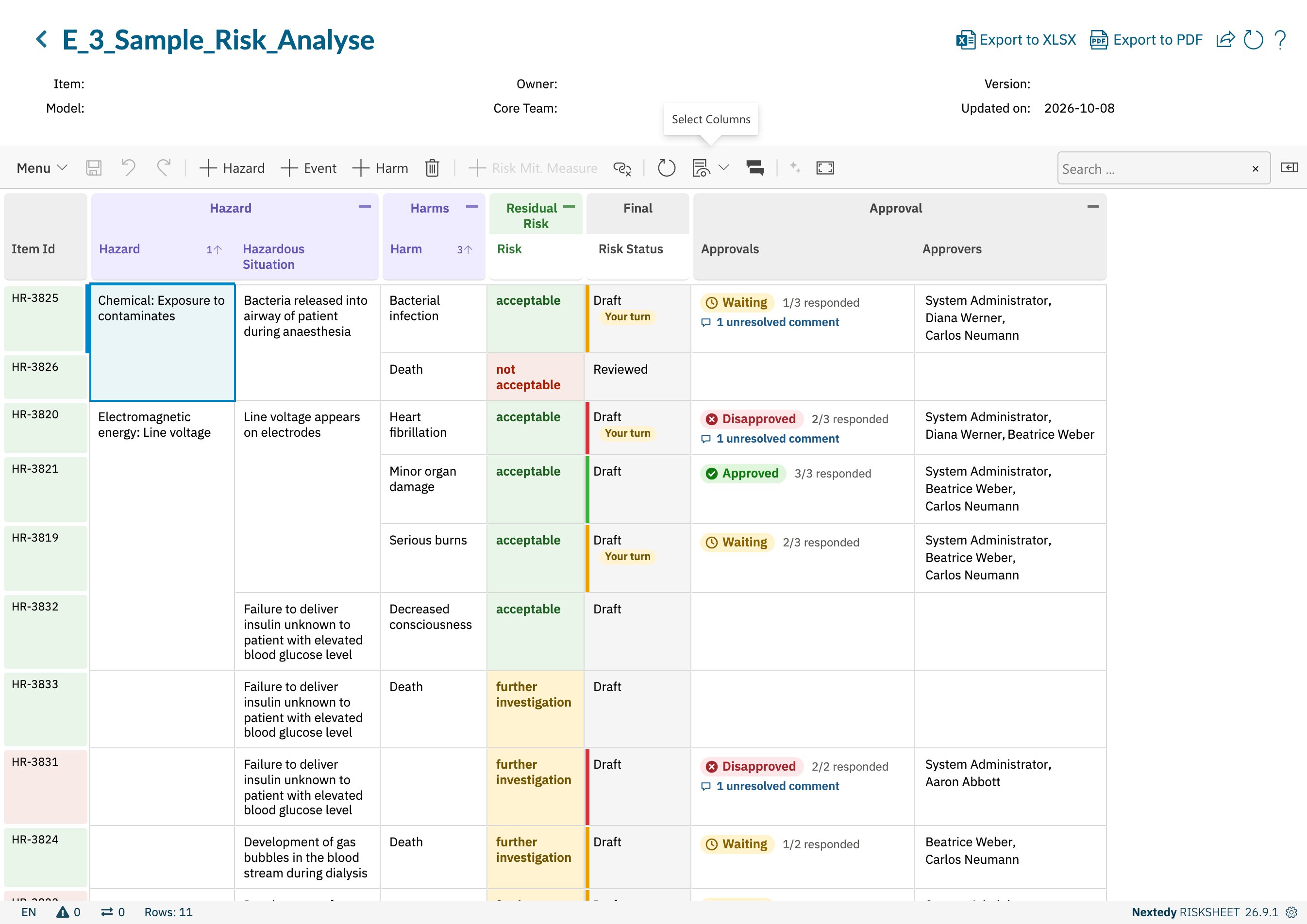 ## Approvals Column
| Property | Value | Description |
| - | - | - |
| `type` | `approvals` | Required. |
| `bindings` | none, `task.approvals` or `.approvals` | Which item's approvals the column shows. Without `bindings`, the row's own risk record. `task.approvals` shows the approvals of the row's risk control. `.approvals` shows those of the item linked in the `itemLink` or `multiItemLink` column with that ID, for example `hazard.approvals`. |
| `readOnly` | always `true` | The column never writes. A `readOnly: false` setting is ignored. |
Other column properties such as `header`, `headerGroup`, `width` and `level` work as for any column; see [Column Types](/risksheet/reference/columns/column-types).
```yaml theme={null}
columns:
- id: approvals
header: Approvals
type: approvals
level: 3
- id: controlApprovals
header: Risk Control Approvals
type: approvals
bindings: task.approvals
```
## Approvals Column
| Property | Value | Description |
| - | - | - |
| `type` | `approvals` | Required. |
| `bindings` | none, `task.approvals` or `.approvals` | Which item's approvals the column shows. Without `bindings`, the row's own risk record. `task.approvals` shows the approvals of the row's risk control. `.approvals` shows those of the item linked in the `itemLink` or `multiItemLink` column with that ID, for example `hazard.approvals`. |
| `readOnly` | always `true` | The column never writes. A `readOnly: false` setting is ignored. |
Other column properties such as `header`, `headerGroup`, `width` and `level` work as for any column; see [Column Types](/risksheet/reference/columns/column-types).
```yaml theme={null}
columns:
- id: approvals
header: Approvals
type: approvals
level: 3
- id: controlApprovals
header: Risk Control Approvals
type: approvals
bindings: task.approvals
```
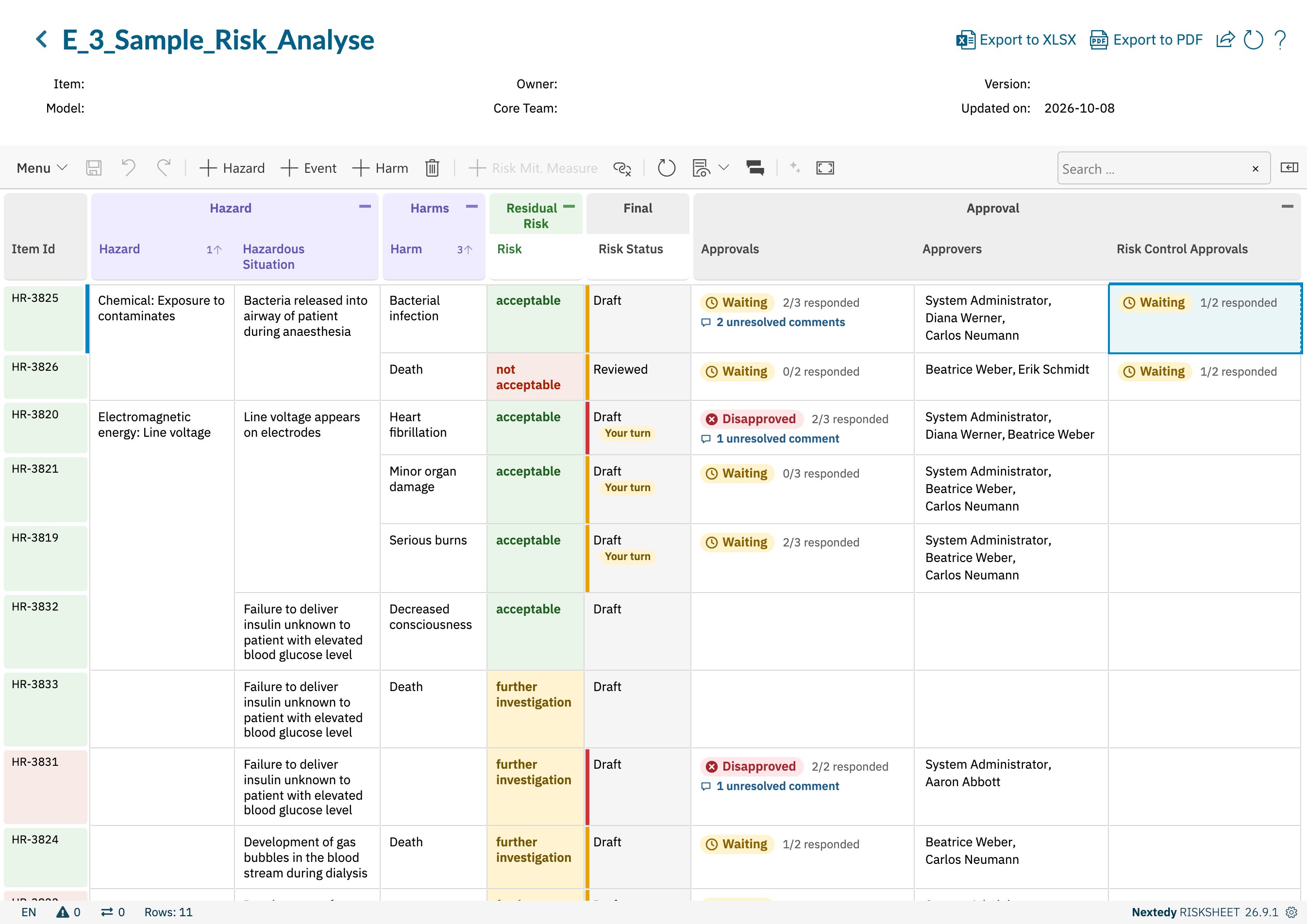 ### What the Cell Shows
| Part | Meaning |
| - | - |
| Status pill | The item's overall state: *Disapproved* when any approver disapproved, *Approved* when every approver approved, otherwise *Waiting*. |
| *N/M responded* | *M* approvers in total, *N* of them no longer *Waiting*. |
| *N unresolved comments* | Shown when approvers left approval comments that are not resolved. With `approval.showResolved: true`, resolved comments are included in this count. |
The cell names no approvers; hover it for a tooltip with the reason for the state and the number of approvers in each state. A cell that shows the items of a `multiItemLink` column lists one block per linked item that has approvers, headed by the item's ID. An item with no approvers leaves the cell empty.
Clicking a cell of an Approvals column for the row's own item opens the Approvals sidebar. Cells showing a risk control's or a linked item's approvals do not.
### Filter, Export and Decorators
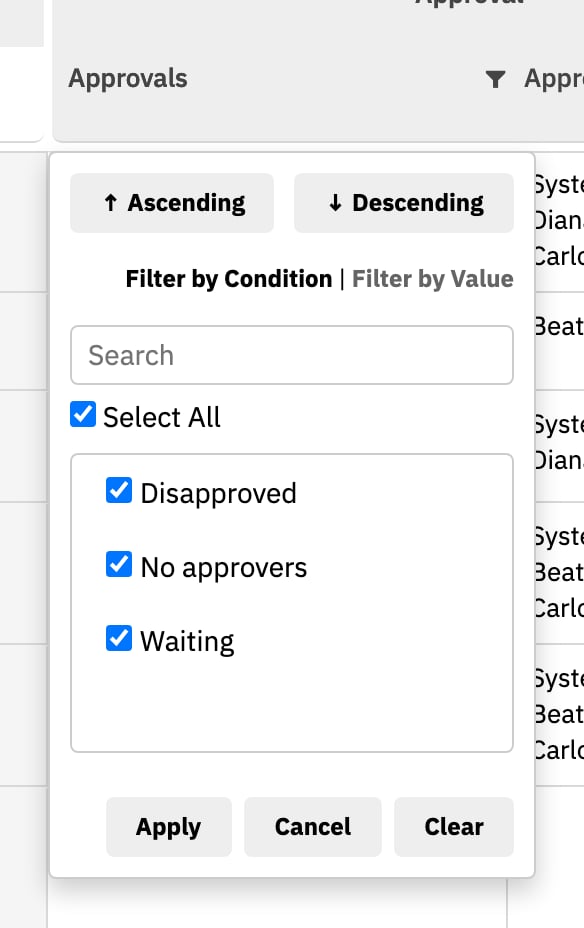
* **Filter** — the column filter lists the overall states, *Disapproved*, *Waiting*, *Approved* and *No approvers*, instead of the cell content. A multi-item cell counts as disapproved when any of its items is.
* **Excel and PDF export** — the cell is exported as text: the status line, then one line per approver with their verdict.
```text theme={null}
Disapproved · 2/3 responded · 1 unresolved comment
Disapproved: Diana Werner
Waiting: System Administrator
Approved: Beatrice Weber
```
* **Cell decorators** — the approvals of the row's own item reach every decorator as `info.approvals`, read from the first Approvals column that is not bound to a linked item. A sheet without that column gives decorators no approval state. See [Cell Decorators](/risksheet/reference/styling/cell-decorators#approval-state-in-decorators).
### What the Cell Shows
| Part | Meaning |
| - | - |
| Status pill | The item's overall state: *Disapproved* when any approver disapproved, *Approved* when every approver approved, otherwise *Waiting*. |
| *N/M responded* | *M* approvers in total, *N* of them no longer *Waiting*. |
| *N unresolved comments* | Shown when approvers left approval comments that are not resolved. With `approval.showResolved: true`, resolved comments are included in this count. |
The cell names no approvers; hover it for a tooltip with the reason for the state and the number of approvers in each state. A cell that shows the items of a `multiItemLink` column lists one block per linked item that has approvers, headed by the item's ID. An item with no approvers leaves the cell empty.
Clicking a cell of an Approvals column for the row's own item opens the Approvals sidebar. Cells showing a risk control's or a linked item's approvals do not.
### Filter, Export and Decorators
* **Filter** — the column filter lists the overall states, *Disapproved*, *Waiting*, *Approved* and *No approvers*, instead of the cell content. A multi-item cell counts as disapproved when any of its items is.
* **Excel and PDF export** — the cell is exported as text: the status line, then one line per approver with their verdict.
```text theme={null}
Disapproved · 2/3 responded · 1 unresolved comment
Disapproved: Diana Werner
Waiting: System Administrator
Approved: Beatrice Weber
```
* **Cell decorators** — the approvals of the row's own item reach every decorator as `info.approvals`, read from the first Approvals column that is not bound to a linked item. A sheet without that column gives decorators no approval state. See [Cell Decorators](/risksheet/reference/styling/cell-decorators#approval-state-in-decorators).
 ## Approvers Column
| Property | Value | Description |
| - | - | - |
| `type` | `approvers` | Required. Takes no parameter. |
| `bindings` | none or `task.approvers` | Whose approvers the column edits. Without `bindings`, the row's own risk record. `task.approvers` edits the approvers of the row's risk control. A column bound to a `multiItemLink` stays empty: one picker cannot say which of the linked items an invitation is for. |
```yaml theme={null}
columns:
- id: approvers
header: Approvers
type: approvers
level: 3
```
| Behaviour | Detail |
| - | - |
| Cell content | The names of the item's approvers. |
| Editor | A searchable multi-select list of the users who hold the global `approver` role or the project's `project_approver` role, sorted by name. |
| Adding a user | Invites the user with status *Waiting* when the sheet is saved. |
| Removing a user | Takes the user off the item when the sheet is saved. |
| Unchanged approvers | Keep the verdict they filed. |
| Permissions | Changing the approvers needs the Polarion permission to manage other users' approvals. Removing an approver who has already approved or disapproved also needs the permission to reset approvals. |
## approval Section
Sheet-level settings for approvals, under the top-level `approval` key.
| Property | Type | Default | Description |
| - | - | - | - |
| `approval.enabled` | boolean | `true` | `false` switches the Approvals sidebar off for the sheet. Its menu entries stay visible but disabled, with a tooltip saying approvals are turned off. Approval columns still show. |
| `approval.requireComment.approved` | boolean | `false` | `true` refuses an approval filed without an approval comment. |
| `approval.requireComment.disapproved` | boolean | `false` | `true` refuses a disapproval filed without an approval comment. |
| `approval.showResolved` | boolean | `false` | Whether resolved approval comment threads are shown by default. `true` keeps them visible in the sidebar and in the approval-based review column, marked as resolved; Approvals cells and their export then count resolved comments in *N unresolved comments* too. It does not hide them for good: the sidebar offers a **Show resolved** link either way. |
```yaml theme={null}
approval:
requireComment:
disapproved: true
showResolved: false
```
The comment requirement is enforced twice: the sidebar asks for the comment before filing, and the save checks the document's own configuration again.
## See Also
* [Work Item Approvals](/risksheet/concepts/work-item-approvals)
* [Set Up Work Item Approvals](/risksheet/guides/reviews/set-up-work-item-approvals)
* [User Reference Columns](/risksheet/reference/columns/user-reference-columns)
* [Sheet Configuration Format](/risksheet/reference/configuration/risksheet-json-format)
This documentation is built and hosted on [Mintlify](https://mintlify.com), a developer documentation platform.
## Approvers Column
| Property | Value | Description |
| - | - | - |
| `type` | `approvers` | Required. Takes no parameter. |
| `bindings` | none or `task.approvers` | Whose approvers the column edits. Without `bindings`, the row's own risk record. `task.approvers` edits the approvers of the row's risk control. A column bound to a `multiItemLink` stays empty: one picker cannot say which of the linked items an invitation is for. |
```yaml theme={null}
columns:
- id: approvers
header: Approvers
type: approvers
level: 3
```
| Behaviour | Detail |
| - | - |
| Cell content | The names of the item's approvers. |
| Editor | A searchable multi-select list of the users who hold the global `approver` role or the project's `project_approver` role, sorted by name. |
| Adding a user | Invites the user with status *Waiting* when the sheet is saved. |
| Removing a user | Takes the user off the item when the sheet is saved. |
| Unchanged approvers | Keep the verdict they filed. |
| Permissions | Changing the approvers needs the Polarion permission to manage other users' approvals. Removing an approver who has already approved or disapproved also needs the permission to reset approvals. |
## approval Section
Sheet-level settings for approvals, under the top-level `approval` key.
| Property | Type | Default | Description |
| - | - | - | - |
| `approval.enabled` | boolean | `true` | `false` switches the Approvals sidebar off for the sheet. Its menu entries stay visible but disabled, with a tooltip saying approvals are turned off. Approval columns still show. |
| `approval.requireComment.approved` | boolean | `false` | `true` refuses an approval filed without an approval comment. |
| `approval.requireComment.disapproved` | boolean | `false` | `true` refuses a disapproval filed without an approval comment. |
| `approval.showResolved` | boolean | `false` | Whether resolved approval comment threads are shown by default. `true` keeps them visible in the sidebar and in the approval-based review column, marked as resolved; Approvals cells and their export then count resolved comments in *N unresolved comments* too. It does not hide them for good: the sidebar offers a **Show resolved** link either way. |
```yaml theme={null}
approval:
requireComment:
disapproved: true
showResolved: false
```
The comment requirement is enforced twice: the sidebar asks for the comment before filing, and the save checks the document's own configuration again.
## See Also
* [Work Item Approvals](/risksheet/concepts/work-item-approvals)
* [Set Up Work Item Approvals](/risksheet/guides/reviews/set-up-work-item-approvals)
* [User Reference Columns](/risksheet/reference/columns/user-reference-columns)
* [Sheet Configuration Format](/risksheet/reference/configuration/risksheet-json-format)
This documentation is built and hosted on [Mintlify](https://mintlify.com), a developer documentation platform.