> ## Documentation Index
> Fetch the complete documentation index at: https://learn.nextedy.com/llms.txt
> Use this file to discover all available pages before exploring further.
# Configure Multiple Downstream Types
> Configure a single downstream task data type that spans multiple work item types to support stepwise risk mitigation workflows such as ISO 12100 three-step risk reduction.
export const LastReviewed = ({date}) => {
if (!date) return null;
const formatted = new Date(`${date}T00:00:00Z`).toLocaleDateString("en-US", {
year: "numeric",
month: "long",
day: "numeric",
timeZone: "UTC"
});
return
Last reviewed on {formatted}
;
};
## Prerequisites
* A working Nextedy RISKSHEET with basic downstream tasks configured (see [Configure Downstream Tasks](/risksheet/guides/risk-management/downstream-tasks))
* Separate Siemens Polarion ALM work item types defined for each mitigation category
* A Polarion link role connecting risk items to their downstream measures
Determine the distinct mitigation categories your workflow requires. For example, ISO 12100 machinery safety defines three risk reduction steps, each backed by its own Polarion work item type:
| Step | Mitigation Category | Work Item Type |
| ---- | ---------------------- | -------------------- |
| 1 | Inherently safe design | `designMeasure` |
| 2 | Safeguarding measures | `safeguardMeasure` |
| 3 | Information for use | `informationMeasure` |
All three types are downstream measures reached through the **same** link role (for example, `mitigates`). They are listed together in the comma-separated `dataTypes.task.type` and distinguished in the grid by per-type `taskLink` columns (see the column step below).
Risksheet recognizes a single `task` data type slot for downstream items. To support multiple downstream work item types, set `dataTypes.task.type` to a **comma-separated list** of Polarion work item type IDs (supported since v25.3.1):
```yaml theme={null}
dataTypes:
task:
type: designMeasure,safeguardMeasure,informationMeasure
role: mitigates
name: Mitigation Measure
zoomColumn: measureId
```
The `type` property lists every downstream work item type the sheet may create or link. The `role` property is the Polarion link role connecting the risk item to its downstream measures. The `name` property sets the display label shown in the toolbar and creation menus. The `zoomColumn` property names the column used for zoom/drill-down navigation after a task is created.
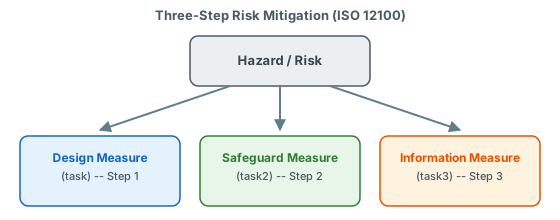 The engine recognizes only the `risk` and `task` data type slots. Extra keys such as `task2` or `task3` are **silently dropped** from the parsed configuration and have no effect. Express multiple downstream types through the comma-separated `dataTypes.task.type` shown above -- a single `task` entry that lists all downstream types.
The comma-separated `type` mechanism applies the **same** link role (`dataTypes.task.role`) to every listed downstream type. If your methodology requires a genuinely different link role per downstream category (for example, a distinct role for design vs. safeguard vs. information measures), that is not expressible through this single `task` data type -- see the note in the next step before designing around it.
The single `task` data type is surfaced by one task-link column plus nested task-attribute columns that read fields from the linked measure. Add the linked item's own `type` as an attribute column so readers can tell design, safeguard, and information measures apart in the grid:
```yaml theme={null}
columns:
- bindings: measureId
header: Measure
type: taskLink
headerGroup: "Mitigation Measures"
- bindings: task.type
header: Category
headerGroup: "Mitigation Measures"
- bindings: task.title
header: Title
headerGroup: "Mitigation Measures"
- bindings: task.status
header: Status
headerGroup: "Mitigation Measures"
```
The task-link column (`measureId`) stores the link to the downstream measure; the nested `task.*` columns use the `linkedItem.fieldId` binding pattern to display read-only fields from whichever measure is linked. The `task.type` column shows the work item type (`designMeasure`, `safeguardMeasure`, or `informationMeasure`), so all three categories share one column group but remain individually identifiable. Make sure each `task.` binding matches a Polarion field ID present on the downstream measure types.
A single `task` data type produces a single task-link column group. Splitting the measures into **separate, type-dedicated** column groups (one taskLink per downstream type, as an earlier version of this page showed) relied on the unsupported `task2` / `task3` keys and does not work. If your workflow genuinely requires per-type columns -- or a different link role per category -- those are not expressible through the comma-separated `dataTypes.task.type`; treat that as an open configuration question rather than copying the multi-key pattern.
For workflows that require recalculating risk after each mitigation step (common in ISO 12100), add intermediate RPN columns with formulas referencing post-mitigation ratings:
```yaml theme={null}
formulas:
rpnAfterDesign: "function(info){ var val = info.item['sevAfterDesign'] * info.item['occAfterDesign']; return val ? val : null; }"
rpnAfterSafeguard: "function(info){ var val = info.item['sevAfterSafeguard'] * info.item['occAfterSafeguard']; return val ? val : null; }"
```
This lets you track residual risk at each stage and demonstrate the cumulative effect of your mitigation strategy.
When configuring fields like specification or status for each mitigation type, verify that the column `bindings` reference the correct downstream work item type. Field assignment is controlled by the column configuration -- misconfiguring this causes fields to be stored on the wrong item type (e.g., a countermeasure specification appearing on the risk item instead).
Column IDs used in `levels` and `sortBy` parameters must exactly match the `id` property defined in column configurations. Mismatched IDs cause row duplication in multi-level configurations. Double-check that all references are consistent.
If mitigation items are distributed across projects, use the `projects` property (v23.7.0+) on the `task` data type:
```yaml theme={null}
dataTypes:
task:
type: designMeasure,safeguardMeasure,informationMeasure
role: mitigates
name: Mitigation Measure
zoomColumn: measureId
projects:
- DesignProject
- SharedMitigations
```
The `projects` property accepts an array of project IDs and enables cross-project autocomplete for the task link column.
## Verification
After saving the sheet configuration:
1. Open the risksheet in the configured LiveDoc document.
2. Verify that the mitigation-measure column group appears, including the `Category` column that shows each linked item's work item type.
3. Right-click a risk item -- the context menu should show a creation option for the task type, labeled with the `name` you defined.
4. Create a new measure of each downstream type and confirm the correct work item type and the shared link role are applied.
5. Confirm that the `Category` column correctly reports the type of each linked measure (design, safeguard, or information).
6. Use the zoom navigation to drill into a newly created item -- it should focus the column named in `zoomColumn`.
You should now see one downstream measure section in your grid that spans all configured work item types, sharing a common link role, display name, and zoom target, with each measure's category identified by its `type` field.
## See Also
* [Configure Downstream Tasks](/risksheet/guides/risk-management/downstream-tasks) -- basic task data type setup
* [Configure FMEA Workflows](/risksheet/guides/risk-management/fmea-configuration) -- FMEA mitigation patterns
* [Configure HARA Workflows](/risksheet/guides/risk-management/hara-configuration) -- HARA with countermeasure types
* [Display Sub-Columns](/risksheet/guides/columns/sub-columns) -- sub-column display for linked items
* [Configure Cross-Project Linking](/risksheet/guides/advanced/cross-project-linking) -- cross-project downstream items
The engine recognizes only the `risk` and `task` data type slots. Extra keys such as `task2` or `task3` are **silently dropped** from the parsed configuration and have no effect. Express multiple downstream types through the comma-separated `dataTypes.task.type` shown above -- a single `task` entry that lists all downstream types.
The comma-separated `type` mechanism applies the **same** link role (`dataTypes.task.role`) to every listed downstream type. If your methodology requires a genuinely different link role per downstream category (for example, a distinct role for design vs. safeguard vs. information measures), that is not expressible through this single `task` data type -- see the note in the next step before designing around it.
The single `task` data type is surfaced by one task-link column plus nested task-attribute columns that read fields from the linked measure. Add the linked item's own `type` as an attribute column so readers can tell design, safeguard, and information measures apart in the grid:
```yaml theme={null}
columns:
- bindings: measureId
header: Measure
type: taskLink
headerGroup: "Mitigation Measures"
- bindings: task.type
header: Category
headerGroup: "Mitigation Measures"
- bindings: task.title
header: Title
headerGroup: "Mitigation Measures"
- bindings: task.status
header: Status
headerGroup: "Mitigation Measures"
```
The task-link column (`measureId`) stores the link to the downstream measure; the nested `task.*` columns use the `linkedItem.fieldId` binding pattern to display read-only fields from whichever measure is linked. The `task.type` column shows the work item type (`designMeasure`, `safeguardMeasure`, or `informationMeasure`), so all three categories share one column group but remain individually identifiable. Make sure each `task.` binding matches a Polarion field ID present on the downstream measure types.
A single `task` data type produces a single task-link column group. Splitting the measures into **separate, type-dedicated** column groups (one taskLink per downstream type, as an earlier version of this page showed) relied on the unsupported `task2` / `task3` keys and does not work. If your workflow genuinely requires per-type columns -- or a different link role per category -- those are not expressible through the comma-separated `dataTypes.task.type`; treat that as an open configuration question rather than copying the multi-key pattern.
For workflows that require recalculating risk after each mitigation step (common in ISO 12100), add intermediate RPN columns with formulas referencing post-mitigation ratings:
```yaml theme={null}
formulas:
rpnAfterDesign: "function(info){ var val = info.item['sevAfterDesign'] * info.item['occAfterDesign']; return val ? val : null; }"
rpnAfterSafeguard: "function(info){ var val = info.item['sevAfterSafeguard'] * info.item['occAfterSafeguard']; return val ? val : null; }"
```
This lets you track residual risk at each stage and demonstrate the cumulative effect of your mitigation strategy.
When configuring fields like specification or status for each mitigation type, verify that the column `bindings` reference the correct downstream work item type. Field assignment is controlled by the column configuration -- misconfiguring this causes fields to be stored on the wrong item type (e.g., a countermeasure specification appearing on the risk item instead).
Column IDs used in `levels` and `sortBy` parameters must exactly match the `id` property defined in column configurations. Mismatched IDs cause row duplication in multi-level configurations. Double-check that all references are consistent.
If mitigation items are distributed across projects, use the `projects` property (v23.7.0+) on the `task` data type:
```yaml theme={null}
dataTypes:
task:
type: designMeasure,safeguardMeasure,informationMeasure
role: mitigates
name: Mitigation Measure
zoomColumn: measureId
projects:
- DesignProject
- SharedMitigations
```
The `projects` property accepts an array of project IDs and enables cross-project autocomplete for the task link column.
## Verification
After saving the sheet configuration:
1. Open the risksheet in the configured LiveDoc document.
2. Verify that the mitigation-measure column group appears, including the `Category` column that shows each linked item's work item type.
3. Right-click a risk item -- the context menu should show a creation option for the task type, labeled with the `name` you defined.
4. Create a new measure of each downstream type and confirm the correct work item type and the shared link role are applied.
5. Confirm that the `Category` column correctly reports the type of each linked measure (design, safeguard, or information).
6. Use the zoom navigation to drill into a newly created item -- it should focus the column named in `zoomColumn`.
You should now see one downstream measure section in your grid that spans all configured work item types, sharing a common link role, display name, and zoom target, with each measure's category identified by its `type` field.
## See Also
* [Configure Downstream Tasks](/risksheet/guides/risk-management/downstream-tasks) -- basic task data type setup
* [Configure FMEA Workflows](/risksheet/guides/risk-management/fmea-configuration) -- FMEA mitigation patterns
* [Configure HARA Workflows](/risksheet/guides/risk-management/hara-configuration) -- HARA with countermeasure types
* [Display Sub-Columns](/risksheet/guides/columns/sub-columns) -- sub-column display for linked items
* [Configure Cross-Project Linking](/risksheet/guides/advanced/cross-project-linking) -- cross-project downstream items