> ## Documentation Index
> Fetch the complete documentation index at: https://learn.nextedy.com/llms.txt
> Use this file to discover all available pages before exploring further.
# Embed Risksheet in LiveDoc
> Add a styled hyperlink to a Polarion LiveDoc page that opens the corresponding Nextedy RISKSHEET risk analysis grid.
export const LastReviewed = ({date}) => {
if (!date) return null;
const formatted = new Date(`${date}T00:00:00Z`).toLocaleDateString("en-US", {
year: "numeric",
month: "long",
day: "numeric",
timeZone: "UTC"
});
return
Last reviewed on {formatted}
;
};
Risksheet supports any risk management methodology — Failure Mode and Effects Analysis (FMEA), Hazard Analysis and Risk Assessment (HARA), Threat Analysis and Risk Assessment (TARA), STRIDE, and CVSS — so this guide applies to any LiveDoc that introduces or references a risksheet document.
## Prerequisites
* A Risksheet document with a valid sheet configuration
* A target LiveDoc page where you want the entry point to appear
* Polarion editing permissions for the LiveDoc page
Navigate to the LiveDoc page where you want the entry point. Open it in edit mode and place the cursor where the hyperlink block should appear (typically at the top of a chapter or section that describes the risk analysis).
Paste the following Velocity snippet into the page. It builds a deep link to the Risksheet view for the current document, including the document revision when one is in effect:
```velocity theme={null}
#set($revisionPar = "")
#if($document.getRevision())
#set($revisionPar = "&revision=" + $document.getRevision())
#end
Open Risksheet
```
This pattern is documented in the Nextedy Support Portal article *Open Risksheet from LiveDoc* (KB #48001199473). It uses standard Polarion Velocity context variables — `$document.getProjectId()`, `$document.getRelativePath()`, `$document.getRevision()` — so no additional setup is required.
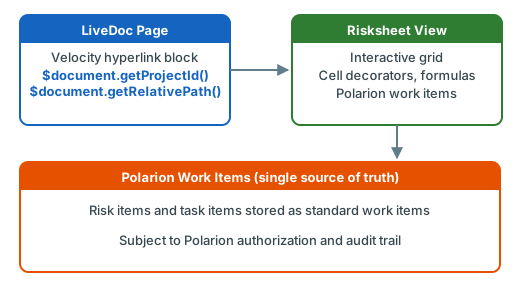 Save the LiveDoc page and switch to read mode. Click the **Open Risksheet** button — Polarion navigates to the interactive Risksheet view for the current document, with the full grid, all configured columns, levels, and styling.
When a historical revision of the LiveDoc is open, the link automatically includes the `&revision=...` parameter, so the Risksheet view opens at the same revision.
If the sheet configuration loads downstream tasks (for example, mitigations or safety requirements), restrict the task scope to a specific LiveDoc using the `document` property under `dataTypes.task`. Without it, every matching work item in the project becomes a candidate, which is rarely what you want in projects with many risk documents:
```yaml theme={null}
dataTypes:
task:
type: mitigationAction
role: mitigates
document: Risks/FMEA Analysis
```
The same pattern works for upstream item libraries through `typeProperties.document` on an `itemLink` column — for example, restricting an autocomplete to a shared harms library document.
Risksheet does not maintain a separate data store: every value you see is a Polarion work item, queried live. Scoping by `document` keeps suggestion lists relevant and avoids accidental cross-document linking.
## Alternative: PDF for Static Distribution
The hyperlink approach is the right pattern whenever the reader has Polarion access. If you need a self-contained snapshot — for an external auditor, a customer deliverable, or a controlled archive — export each artifact to PDF and combine them externally:
1. Open the Risksheet view and use the **Export to PDF** function to produce a styled PDF of the grid, including cell decorators and headers.
2. Export the LiveDoc to PDF separately from Polarion.
3. Merge the two PDFs with an external tool.
The PDF export preserves the visual formatting that a static inline render cannot reproduce, while the live hyperlink remains the canonical interactive entry point.
## Working with Templates
Configuration changes scale best when they live on a LiveDoc template:
* **Template approach**: Attach the sheet configuration to a LiveDoc template. Documents created from that template inherit the configuration, and updates to the template propagate.
* **Polarion Reuse**: Nextedy does not recommend using Polarion's Reuse function for risksheet documents — it duplicates the configuration attachment and complicates updates (KB #48001219133).
Do not assemble a sheet configuration from scratch. Pick the closest Nextedy solution template (functional safety, automotive HARA, medical risk file, cybersecurity TARA), then adapt its columns, levels, and formulas to your process.
## See Also
* [Navigate to Risksheet from LiveDoc](/risksheet/guides/integration/livedoc-navigation) — variants of the deep-link pattern
* [Export to PDF](/risksheet/guides/export/pdf-export) — produce a styled PDF for distribution
* [Set Up Global Templates](/risksheet/guides/configuration/global-templates) — template-based configuration management
* [Override Template Configuration](/risksheet/guides/configuration/document-config-override) — per-document configuration overrides
Save the LiveDoc page and switch to read mode. Click the **Open Risksheet** button — Polarion navigates to the interactive Risksheet view for the current document, with the full grid, all configured columns, levels, and styling.
When a historical revision of the LiveDoc is open, the link automatically includes the `&revision=...` parameter, so the Risksheet view opens at the same revision.
If the sheet configuration loads downstream tasks (for example, mitigations or safety requirements), restrict the task scope to a specific LiveDoc using the `document` property under `dataTypes.task`. Without it, every matching work item in the project becomes a candidate, which is rarely what you want in projects with many risk documents:
```yaml theme={null}
dataTypes:
task:
type: mitigationAction
role: mitigates
document: Risks/FMEA Analysis
```
The same pattern works for upstream item libraries through `typeProperties.document` on an `itemLink` column — for example, restricting an autocomplete to a shared harms library document.
Risksheet does not maintain a separate data store: every value you see is a Polarion work item, queried live. Scoping by `document` keeps suggestion lists relevant and avoids accidental cross-document linking.
## Alternative: PDF for Static Distribution
The hyperlink approach is the right pattern whenever the reader has Polarion access. If you need a self-contained snapshot — for an external auditor, a customer deliverable, or a controlled archive — export each artifact to PDF and combine them externally:
1. Open the Risksheet view and use the **Export to PDF** function to produce a styled PDF of the grid, including cell decorators and headers.
2. Export the LiveDoc to PDF separately from Polarion.
3. Merge the two PDFs with an external tool.
The PDF export preserves the visual formatting that a static inline render cannot reproduce, while the live hyperlink remains the canonical interactive entry point.
## Working with Templates
Configuration changes scale best when they live on a LiveDoc template:
* **Template approach**: Attach the sheet configuration to a LiveDoc template. Documents created from that template inherit the configuration, and updates to the template propagate.
* **Polarion Reuse**: Nextedy does not recommend using Polarion's Reuse function for risksheet documents — it duplicates the configuration attachment and complicates updates (KB #48001219133).
Do not assemble a sheet configuration from scratch. Pick the closest Nextedy solution template (functional safety, automotive HARA, medical risk file, cybersecurity TARA), then adapt its columns, levels, and formulas to your process.
## See Also
* [Navigate to Risksheet from LiveDoc](/risksheet/guides/integration/livedoc-navigation) — variants of the deep-link pattern
* [Export to PDF](/risksheet/guides/export/pdf-export) — produce a styled PDF for distribution
* [Set Up Global Templates](/risksheet/guides/configuration/global-templates) — template-based configuration management
* [Override Template Configuration](/risksheet/guides/configuration/document-config-override) — per-document configuration overrides