> ## Documentation Index
> Fetch the complete documentation index at: https://learn.nextedy.com/llms.txt
> Use this file to discover all available pages before exploring further.
# Create Saved Views
> Define named column visibility presets so users can switch between different analysis perspectives without manually hiding and showing columns.
export const LastReviewed = ({date}) => {
if (!date) return null;
const formatted = new Date(`${date}T00:00:00Z`).toLocaleDateString("en-US", {
year: "numeric",
month: "long",
day: "numeric",
timeZone: "UTC"
});
return
Last reviewed on {formatted}
;
};
Open the sheet configuration file (`risksheet.json`) in the YAML editor and add a `views` section. Each entry specifies a display name and the list of column IDs to show:
```yaml theme={null}
views:
- name: Full Analysis
defaultView: true
columnIds:
- "@all"
- name: Risk Overview
columnIds:
- systemItemId
- title
- sev
- rpn
- name: Mitigation Focus
columnIds:
- "@all"
- "-upstreamRisks"
- "-occ"
- "-det"
```
Each view entry accepts these properties:
| Property | Type | Description |
| ------------- | ------- | ------------------------------------------------------------------------------- |
| `name` | string | Display label shown in the view selector dropdown |
| `columnIds` | array | List of column `id` values to make visible when this view is active |
| `defaultView` | boolean | Optional (v24.1.0+). Marks which view loads by default when the risksheet opens |
The `columnIds` array supports two special tokens: `"@all"` includes every column defined in the `columns` section, and `"-columnId"` excludes the named column from the active set. Combine them to express a view as "everything except these columns" — useful when most columns should stay visible and only a handful need to be hidden for a given stage.
Ensure every column referenced in `columnIds` has an explicit `id` in the `columns` section. If you omit `id`, the system auto-generates one from `header` or `bindings`, which may not match your view references.
```yaml theme={null}
columns:
- id: sev
bindings: severity
header: S
type: enum:severity
- id: rpn
bindings: rpn
header: RPN
formula: commonRpn
```
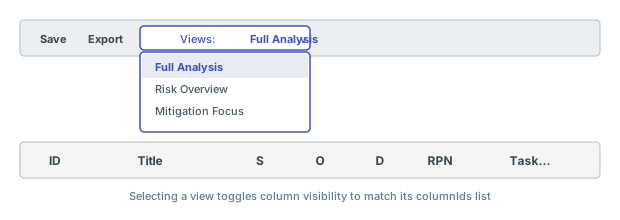
After loading the risksheet, use the view selector in the toolbar to switch between defined views. The grid immediately updates to show only the columns listed in the selected view, and hides every other column — saved views override all other column visibility settings.
 The `collapseTo` column group state resets on every page reload. If users need consistent column visibility without manual re-collapsing, use saved views instead of relying on column group collapsing.
Define a dedicated view for PDF or Excel exports that hides formula helper columns. Switch to the export view before exporting, then switch back. Do not set the export view as the default, because formulas only execute when their column is visible on sheet load.
Users can further refine which columns appear using the **Select visible columns** feature, which persists on the user's local machine. However, saved views take precedence over every other visibility setting: switching to a different saved view resets any personal column visibility selections, and the grid snaps back to the columns listed in the newly selected view's `columnIds`.
Saved views are configured in the sheet configuration by administrators. Individual users cannot create personal saved views through the UI. The **Select visible columns** feature provides per-user customization that persists locally but resets the moment a different saved view is selected.
## Verification
You should now see a view selector dropdown in the Nextedy RISKSHEET toolbar listing each view by its `name`. The view marked `defaultView: true` loads first. Selecting any view immediately toggles column visibility to match the defined `columnIds` list — columns not listed (or explicitly excluded via the `-columnId` prefix) are hidden from the grid, and any earlier personal visibility tweaks are discarded.
## See Also
* [Configure Column Visibility](/risksheet/guides/customization/column-visibility) -- control visibility per column in the configuration
* [Control Column Visibility in Exports](/risksheet/guides/export/column-visibility-export) -- manage which columns appear in exports
* [Configure Calculated Columns](/risksheet/guides/columns/calculated-columns) -- set up formulas referenced in views
* [Consolidate Multiple Link Columns](/risksheet/guides/columns/consolidate-link-columns) -- combine link columns with saved views for cleaner layouts
The `collapseTo` column group state resets on every page reload. If users need consistent column visibility without manual re-collapsing, use saved views instead of relying on column group collapsing.
Define a dedicated view for PDF or Excel exports that hides formula helper columns. Switch to the export view before exporting, then switch back. Do not set the export view as the default, because formulas only execute when their column is visible on sheet load.
Users can further refine which columns appear using the **Select visible columns** feature, which persists on the user's local machine. However, saved views take precedence over every other visibility setting: switching to a different saved view resets any personal column visibility selections, and the grid snaps back to the columns listed in the newly selected view's `columnIds`.
Saved views are configured in the sheet configuration by administrators. Individual users cannot create personal saved views through the UI. The **Select visible columns** feature provides per-user customization that persists locally but resets the moment a different saved view is selected.
## Verification
You should now see a view selector dropdown in the Nextedy RISKSHEET toolbar listing each view by its `name`. The view marked `defaultView: true` loads first. Selecting any view immediately toggles column visibility to match the defined `columnIds` list — columns not listed (or explicitly excluded via the `-columnId` prefix) are hidden from the grid, and any earlier personal visibility tweaks are discarded.
## See Also
* [Configure Column Visibility](/risksheet/guides/customization/column-visibility) -- control visibility per column in the configuration
* [Control Column Visibility in Exports](/risksheet/guides/export/column-visibility-export) -- manage which columns appear in exports
* [Configure Calculated Columns](/risksheet/guides/columns/calculated-columns) -- set up formulas referenced in views
* [Consolidate Multiple Link Columns](/risksheet/guides/columns/consolidate-link-columns) -- combine link columns with saved views for cleaner layouts