> ## Documentation Index
> Fetch the complete documentation index at: https://learn.nextedy.com/llms.txt
> Use this file to discover all available pages before exploring further.
# Configure Dropdown Categories
> Set up enumeration dropdowns, rating scales, and dependent filtering to guide users through structured data entry in Nextedy RISKSHEET columns.
export const LastReviewed = ({date}) => {
if (!date) return null;
const formatted = new Date(`${date}T00:00:00Z`).toLocaleDateString("en-US", {
year: "numeric",
month: "long",
day: "numeric",
timeZone: "UTC"
});
return
Last reviewed on {formatted}
;
};
In Risksheet, dropdown categories are **not defined inside the sheet configuration file**. Rating scales and enumerations are managed in Polarion's standard enumeration system, then referenced by columns through their `type` property. This means dropdown values are governed by Polarion administration, reuse existing custom fields, and remain consistent across projects and documents.
Rating scales (severity, occurrence, detection) and category lists (hazard type, classification, impact area) are defined as **Polarion enumerations**, not as a section inside the sheet configuration.
To define a new enumeration, open Polarion Administration:
**Administration > Enumerations**
Create the enumeration file (for example, `severity-enum.xml`) and add the option entries. Each option has an `id` (stored value) and a `name` (display label). Optional `description` text appears as secondary information in the dropdown.
Example enumeration entries for a severity scale used by ISO 14971 risk analysis:
| id | name | description |
| --- | ------------ | -------------------------------------- |
| `1` | Negligible | No injury or minor discomfort |
| `2` | Minor | Reversible injury, first aid treatment |
| `3` | Serious | Hospitalization required |
| `4` | Critical | Life-threatening or permanent injury |
| `5` | Catastrophic | Death or multiple fatalities |
The enumeration is now available to every project that inherits this Administration context. Once Risksheet loads the sheet configuration, the server reads enum options directly from Polarion — no copy of the option list is stored in the sheet configuration.
For FMEA and HARA workflows, include enumeration descriptions that match your organization's severity and occurrence scale definitions (for example, the ISO 26262 ASIL classification or the ISO 14971 risk acceptability scale). The description text appears in the dropdown, giving analysts an inline reference and providing a built-in audit trail for the chosen value.
Once the enumeration exists, create or reuse a Polarion **custom field** on the risk work item type and set its data type to the enumeration you just defined.
**Administration > Work Items > Custom Fields**
For a severity column, you might define:
| Custom field | Data type | Source enumeration |
| ------------------ | --------- | ---------------------- |
| `severityRating` | Enum | `severity-enum` |
| `occurrenceRating` | Enum | `occurrence-enum` |
| `detectionRating` | Enum | `detection-enum` |
| `hazardCategory` | Enum | `hazard-category-enum` |
The custom field is what holds the selected value on every risk item. The Risksheet column simply binds to this field and renders the appropriate dropdown editor.
Open the sheet configuration (`risksheet.json`) through the configuration editor and add a column entry. The column connects the Polarion custom field to the dropdown editor through two properties:
* `bindings` — the custom field ID
* `type` — the editor type plus the enumeration ID
The recommended pattern for rating scales uses `type: rating:`. For non-rating category lists, use `type: enum:`. Both forms tell Risksheet to render a dropdown populated from the named Polarion enumeration.
```yaml theme={null}
columns:
- id: sev
bindings: severityRating
header: Severity (S)
type: rating:severity-enum
level: 1
- id: occ
bindings: occurrenceRating
header: Occurrence (O)
type: rating:occurrence-enum
level: 1
- id: hazardCategory
bindings: hazardCategory
header: Hazard Category
type: enum:hazard-category-enum
level: 1
```
The `type` value follows the pattern `enum:` or `rating:`, where `` matches the enumeration ID configured in Polarion Administration. The dropdown editor is activated automatically — there is no separate enum or rating definition inside the sheet configuration.
The `rating:` form is semantically distinct from `enum:` and is used by the risk parameter system (RPN calculation, severity colouring, risk matrices in the top panel configuration). Use `rating:` for severity, occurrence, and detection scales, and `enum:` for general category fields.
For columns that accept multiple selections (such as a list of impact categories), use `type: multiEnum:`. The column binds to a Polarion multi-enum custom field — the same pattern as a single-select enum, but the field stores an array of option IDs.
```yaml theme={null}
columns:
- id: impactCategories
bindings: impactCategories
header: Impact Categories
type: multiEnum:impact-type-enum
level: 1
```
Multi-enum cells display up to two selected items inline, then collapse the remainder behind a count indicator (for example, `+3 more`). Selected values are stored as an array of enum IDs on the work item.
Set `showEnumDescription: true` on the column to display the enumeration's description text beneath each option name inside the dropdown. This helps analysts pick the correct rating without leaving the grid.
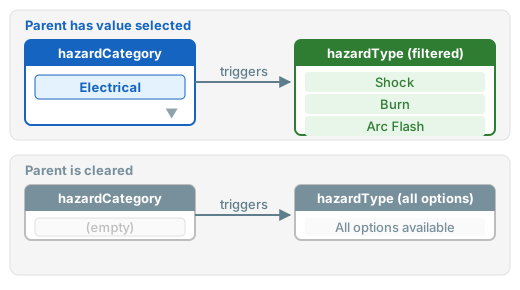
Risksheet supports **dependent enumerations** (v25.3.1+) so that the value chosen in a parent column filters the options available in a child column. Dependent enums are configured at the **column level** on the child column — they are not a top-level section in the sheet configuration.
The child column declares which parent column controls its filtering. The mapping between parent values and allowed child values is held in Polarion through the enumeration relationship configured during enumeration setup, or through a `queryFactory` function for dynamic filtering.
Typical pattern in the sheet configuration:
```yaml theme={null}
columns:
- id: hazardCategory
bindings: hazardCategory
header: Hazard Category
type: enum:hazard-category-enum
level: 1
- id: hazardType
bindings: hazardType
header: Hazard Type
type: enum:hazard-type-enum
level: 1
typeProperties:
dependsOn: hazardCategory
```
The runtime filtering behaviour follows these rules:
| Parent column state | Child dropdown behaviour |
| ---------------------------------- | ----------------------------------- |
| Empty (no selection) | All child options are shown |
| Has a value with a defined mapping | Only mapped child options are shown |
| Has a value mapped to an empty set | No child options are available |
| Has a value not in the mapping | All child options are shown |
 For more advanced filtering — for example, restricting the child enumeration based on a value picked in the top panel — define a `queryFactory` function and reference it from the child column's `typeProperties.queryFactory`.
When dependent enumerations cannot capture the filtering rule (for example, the allowed values depend on a top panel input or a related work item field), use a `queryFactory` function to compute the Lucene query at runtime.
Define the function under the top-level `queryFactories` section, then reference it from the column's `typeProperties.queryFactory`:
```yaml theme={null}
queryFactories:
hazardTypeQuery: "function(info){
var category = info.item['hazardCategory'];
if (!category) return '';
return 'parentCategory:' + category;
}"
columns:
- id: hazardType
bindings: hazardType
header: Hazard Type
type: enum:hazard-type-enum
typeProperties:
queryFactory: hazardTypeQuery
```
The function receives an `info` object holding the current row context and returns a Lucene query string that filters the dropdown suggestions. This pattern is the recommended approach for cascading dropdowns that depend on values from multiple sources.
The values returned by a queryFactory must match the enumeration option IDs defined in Polarion exactly. Mismatched casing (`"electrical"` versus `"Electrical"`) will cause the filter to return no results and the child dropdown to appear empty.
To retire an enumeration option without losing historical data, mark it inactive in the Polarion enumeration definition. Risksheet honours the Polarion enumeration's visibility setting:
* Active options appear in the dropdown for new entries.
* Inactive options remain visible on existing cells that already hold that value, so historical records still display the correct label.
* Inactive options are not offered as new selections.
This avoids deleting an option (which would break existing data) while preventing it from being chosen going forward. Configure visibility from **Administration > Enumerations** rather than through the sheet configuration.
## Verification
After configuring the enumeration in Polarion, binding the custom field, and updating the sheet configuration, you should see dropdown fields in your Risksheet columns showing the configured options. Selecting a value in a parent column should automatically filter the available options in the dependent child column. Multi-enum columns should display multiple selections as a compact list with a count indicator once more than two items are selected.
If the dropdown is empty, confirm that:
* The Polarion enumeration ID in the column `type` value matches the enumeration filename in Administration.
* The Polarion custom field referenced by `bindings` exists on the risk work item type and has the correct enumeration as its data type.
* For dependent enums, the parent column's enumeration option IDs match the values used in the queryFactory or dependent enumeration mapping.
## See Also
* [Configure Enum Columns](/risksheet/guides/columns/enum-columns) — detailed enum column setup
* [Configure Multi-Enum Columns](/risksheet/guides/columns/multi-enum-columns) — multi-select enumeration columns
* [Configure Dependent Enums](/risksheet/guides/advanced/dependent-enums) — advanced cascading dropdown patterns
* [Configure Multi-Select Enums](/risksheet/guides/advanced/enum-multiselect) — multi-select behaviour and display
* [Add a Basic Column](/risksheet/guides/columns/add-basic-column) — column type configuration basics
For more advanced filtering — for example, restricting the child enumeration based on a value picked in the top panel — define a `queryFactory` function and reference it from the child column's `typeProperties.queryFactory`.
When dependent enumerations cannot capture the filtering rule (for example, the allowed values depend on a top panel input or a related work item field), use a `queryFactory` function to compute the Lucene query at runtime.
Define the function under the top-level `queryFactories` section, then reference it from the column's `typeProperties.queryFactory`:
```yaml theme={null}
queryFactories:
hazardTypeQuery: "function(info){
var category = info.item['hazardCategory'];
if (!category) return '';
return 'parentCategory:' + category;
}"
columns:
- id: hazardType
bindings: hazardType
header: Hazard Type
type: enum:hazard-type-enum
typeProperties:
queryFactory: hazardTypeQuery
```
The function receives an `info` object holding the current row context and returns a Lucene query string that filters the dropdown suggestions. This pattern is the recommended approach for cascading dropdowns that depend on values from multiple sources.
The values returned by a queryFactory must match the enumeration option IDs defined in Polarion exactly. Mismatched casing (`"electrical"` versus `"Electrical"`) will cause the filter to return no results and the child dropdown to appear empty.
To retire an enumeration option without losing historical data, mark it inactive in the Polarion enumeration definition. Risksheet honours the Polarion enumeration's visibility setting:
* Active options appear in the dropdown for new entries.
* Inactive options remain visible on existing cells that already hold that value, so historical records still display the correct label.
* Inactive options are not offered as new selections.
This avoids deleting an option (which would break existing data) while preventing it from being chosen going forward. Configure visibility from **Administration > Enumerations** rather than through the sheet configuration.
## Verification
After configuring the enumeration in Polarion, binding the custom field, and updating the sheet configuration, you should see dropdown fields in your Risksheet columns showing the configured options. Selecting a value in a parent column should automatically filter the available options in the dependent child column. Multi-enum columns should display multiple selections as a compact list with a count indicator once more than two items are selected.
If the dropdown is empty, confirm that:
* The Polarion enumeration ID in the column `type` value matches the enumeration filename in Administration.
* The Polarion custom field referenced by `bindings` exists on the risk work item type and has the correct enumeration as its data type.
* For dependent enums, the parent column's enumeration option IDs match the values used in the queryFactory or dependent enumeration mapping.
## See Also
* [Configure Enum Columns](/risksheet/guides/columns/enum-columns) — detailed enum column setup
* [Configure Multi-Enum Columns](/risksheet/guides/columns/multi-enum-columns) — multi-select enumeration columns
* [Configure Dependent Enums](/risksheet/guides/advanced/dependent-enums) — advanced cascading dropdown patterns
* [Configure Multi-Select Enums](/risksheet/guides/advanced/enum-multiselect) — multi-select behaviour and display
* [Add a Basic Column](/risksheet/guides/columns/add-basic-column) — column type configuration basics