> ## Documentation Index
> Fetch the complete documentation index at: https://learn.nextedy.com/llms.txt
> Use this file to discover all available pages before exploring further.
# Use the Configuration Editor
> Open the built-in Nextedy RISKSHEET configuration editor to modify columns, levels, data types, and global settings directly in the built-in JSON editor.
export const LastReviewed = ({date}) => {
if (!date) return null;
const formatted = new Date(`${date}T00:00:00Z`).toLocaleDateString("en-US", {
year: "numeric",
month: "long",
day: "numeric",
timeZone: "UTC"
});
return
Last reviewed on {formatted}
;
};
## Prerequisites
* You have administrator privileges for the Polarion project (the configuration option appears only when your account is authorized to edit Risksheet configuration)
* The Risksheet document is open in your browser
* You are viewing the current revision (not a historical baseline), since configuration editing is disabled in read-only mode
If you see a read-only view or the configuration option is not available, contact your project administrator. Modifying Risksheet configuration requires the Admin role for the project. Authorization is managed through standard Polarion roles — Risksheet does not maintain its own permission store.
1. Open your Risksheet document in Polarion.
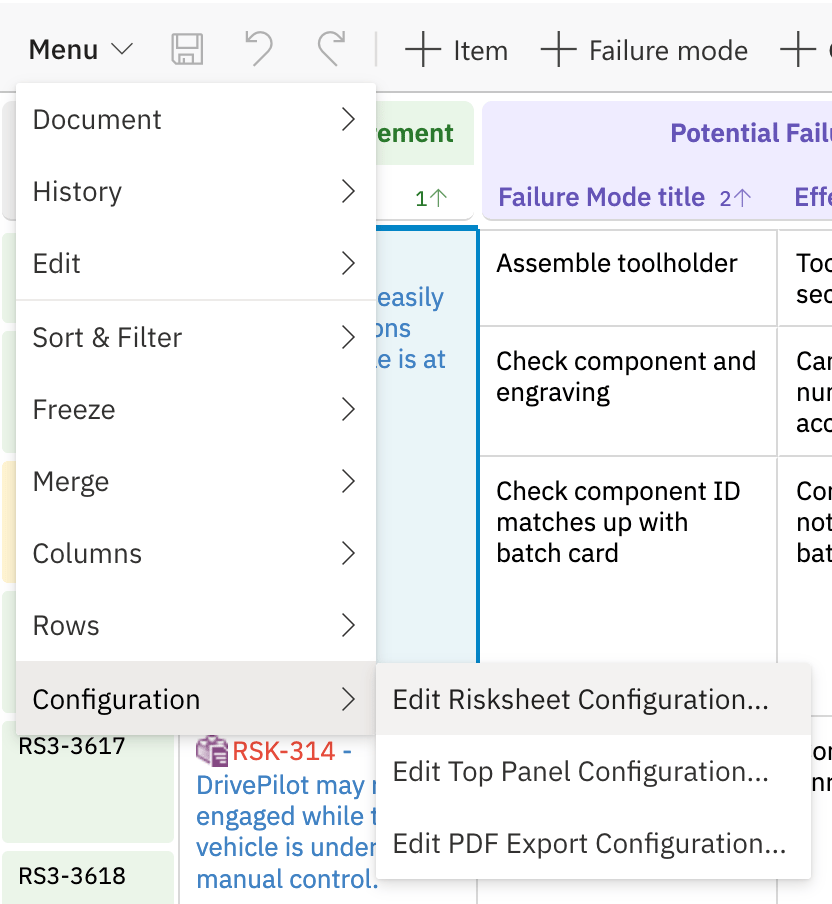
2. Click the **Menu** button in the Risksheet grid toolbar.
3. Hover **Configuration** to open its submenu, then choose **Edit Risksheet Configuration**
4. The full path is **Menu → Configuration → Edit Risksheet Configuration**
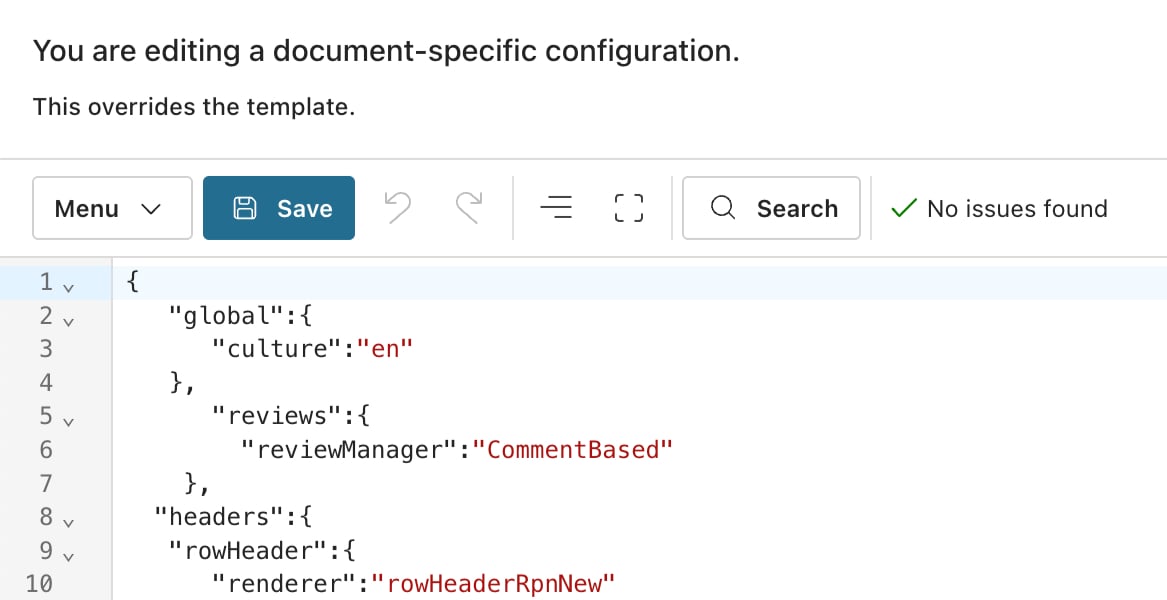
 4. The configuration editor opens in a new browser window with the project and document context automatically loaded.
 The editor URL follows this pattern:
```text theme={null}
/risksheet/configuration/?project=&document=&type=
```
The `type` parameter determines which section of the configuration opens first. Valid values include `columns`, `settings`, and `levels`.
The configuration editor organizes your sheet configuration into the following sections:
| Section | What You Can Edit |
| ------------------- | ---------------------------------------------------------------------------------------------- |
| **Columns** | Column definitions: `bindings`, `type`, `header`, `width`, `level`, visibility, ordering |
| **Levels** | Level definitions: `name`, `controlColumn`, `zoomColumn` for the visual cell-merging hierarchy |
| **Data Types** | Risk and task work item type definitions (`dataTypes.risk`, `dataTypes.task`) and link roles |
| **Global Settings** | Culture/locale (`global.culture`), help URL, refresh behavior, default sort |
| **Formulas** | Named JavaScript formula functions for calculated columns |
| **Styles** | CSS class definitions referenced by cell decorators |
| **Cell Decorators** | Conditional formatting functions that map cell values to CSS classes |
| **Views** | Saved column visibility presets (`columnIds`, `defaultView`, `@all`) |
| **Reviews** | Review workflow configuration (`reviews.reviewManager`) |
| **Query Factories** | Named Lucene query functions used by `itemLink` autocomplete (advanced) |
Risk severity, occurrence, and detection scales — as well as any dropdown options — are not defined inside the sheet configuration. They are managed as standard Polarion enumerations under **Administration > Enumerations**, and referenced from columns using `type: rating:` or `type: enum:`. The editor does not contain a separate "Ratings" or "Enums" tab.
1. Navigate to the appropriate section in the editor.
2. Locate the property you want to modify.
3. Make your changes in the editor form fields, or switch to the YAML view (v25.5.0+) for structural edits.
4. Click **Save** to apply the changes.
## Template vs. Document Configuration
When you open the editor, Risksheet determines whether the current configuration comes from a **global template** or a **document-specific attachment**:
* **Template-linked configuration** — The editor shows the inherited template configuration. Changes update the template and affect all documents that inherit from it.
* **Document-specific configuration** — The editor shows the configuration attached directly to the current document. Changes affect only this document.
The editor displays the source clearly at the top of the screen. If a template is in use, its name appears as the source label.
To create a document-specific configuration that is independent of the global template, see [Override Template Configuration](/risksheet/guides/configuration/document-config-override).
## Common Configuration Tasks
| Task | Editor Section | Key Properties |
| ------------------------------- | --------------- | ------------------------------------------------------------------------- |
| Add a new column | Columns | `bindings`, `header`, `type`, `level` |
| Change risk item type | Data Types | `dataTypes.risk.type` |
| Use a severity/occurrence scale | Columns | `type: rating:`, `bindings: ` (enum defined in Polarion) |
| Enable review workflow | Reviews | `reviews.reviewManager` |
| Define calculated field | Formulas | `formulas.` with JavaScript function |
| Set default sort order | Global Settings | `sortBy` array with column IDs |
| Customize help URL | Global Settings | `global.help` |
| Save a column preset | Views | `columnIds`, `defaultView`, `@all`, `-` to exclude |
## Troubleshooting
* **"Error while reading configuration"** — The sheet configuration may contain a syntax error. Switch to the YAML view (v25.5.0+) to see error highlighting, or download the attachment and validate it externally.
* **Editor opens but shows empty fields** — Verify that you have read access to the project where the template configuration is stored.
* **Browser console errors during editing** — Check the browser console on non-Risksheet Polarion pages first. Some errors (such as "Uncaught Positive number expected") may originate from Polarion itself rather than from the Risksheet configuration.
* **My changes did not take effect** — Confirm that you saved the configuration and that you are viewing the current revision, not a baseline. A hard refresh of the browser page forces the grid to reload from the latest configuration.
## Verification
After saving your configuration changes and returning to the document view, the Risksheet grid should display the updated settings. All changes are stored in Polarion and tracked under the standard Polarion document history — Risksheet does not maintain a separate change log.
## See Also
* [Find Configuration Files](/risksheet/guides/configuration/finding-config-files) — understand where your sheet configuration is stored
* [Set Up Global Templates](/risksheet/guides/configuration/global-templates) — create shared configurations
* [Override Template Configuration](/risksheet/guides/configuration/document-config-override) — create document-specific settings
* [Configure Permissions](/risksheet/guides/administration/permissions) — manage admin access for configuration editing
The editor URL follows this pattern:
```text theme={null}
/risksheet/configuration/?project=&document=&type=
```
The `type` parameter determines which section of the configuration opens first. Valid values include `columns`, `settings`, and `levels`.
The configuration editor organizes your sheet configuration into the following sections:
| Section | What You Can Edit |
| ------------------- | ---------------------------------------------------------------------------------------------- |
| **Columns** | Column definitions: `bindings`, `type`, `header`, `width`, `level`, visibility, ordering |
| **Levels** | Level definitions: `name`, `controlColumn`, `zoomColumn` for the visual cell-merging hierarchy |
| **Data Types** | Risk and task work item type definitions (`dataTypes.risk`, `dataTypes.task`) and link roles |
| **Global Settings** | Culture/locale (`global.culture`), help URL, refresh behavior, default sort |
| **Formulas** | Named JavaScript formula functions for calculated columns |
| **Styles** | CSS class definitions referenced by cell decorators |
| **Cell Decorators** | Conditional formatting functions that map cell values to CSS classes |
| **Views** | Saved column visibility presets (`columnIds`, `defaultView`, `@all`) |
| **Reviews** | Review workflow configuration (`reviews.reviewManager`) |
| **Query Factories** | Named Lucene query functions used by `itemLink` autocomplete (advanced) |
Risk severity, occurrence, and detection scales — as well as any dropdown options — are not defined inside the sheet configuration. They are managed as standard Polarion enumerations under **Administration > Enumerations**, and referenced from columns using `type: rating:` or `type: enum:`. The editor does not contain a separate "Ratings" or "Enums" tab.
1. Navigate to the appropriate section in the editor.
2. Locate the property you want to modify.
3. Make your changes in the editor form fields, or switch to the YAML view (v25.5.0+) for structural edits.
4. Click **Save** to apply the changes.
## Template vs. Document Configuration
When you open the editor, Risksheet determines whether the current configuration comes from a **global template** or a **document-specific attachment**:
* **Template-linked configuration** — The editor shows the inherited template configuration. Changes update the template and affect all documents that inherit from it.
* **Document-specific configuration** — The editor shows the configuration attached directly to the current document. Changes affect only this document.
The editor displays the source clearly at the top of the screen. If a template is in use, its name appears as the source label.
To create a document-specific configuration that is independent of the global template, see [Override Template Configuration](/risksheet/guides/configuration/document-config-override).
## Common Configuration Tasks
| Task | Editor Section | Key Properties |
| ------------------------------- | --------------- | ------------------------------------------------------------------------- |
| Add a new column | Columns | `bindings`, `header`, `type`, `level` |
| Change risk item type | Data Types | `dataTypes.risk.type` |
| Use a severity/occurrence scale | Columns | `type: rating:`, `bindings: ` (enum defined in Polarion) |
| Enable review workflow | Reviews | `reviews.reviewManager` |
| Define calculated field | Formulas | `formulas.` with JavaScript function |
| Set default sort order | Global Settings | `sortBy` array with column IDs |
| Customize help URL | Global Settings | `global.help` |
| Save a column preset | Views | `columnIds`, `defaultView`, `@all`, `-` to exclude |
## Troubleshooting
* **"Error while reading configuration"** — The sheet configuration may contain a syntax error. Switch to the YAML view (v25.5.0+) to see error highlighting, or download the attachment and validate it externally.
* **Editor opens but shows empty fields** — Verify that you have read access to the project where the template configuration is stored.
* **Browser console errors during editing** — Check the browser console on non-Risksheet Polarion pages first. Some errors (such as "Uncaught Positive number expected") may originate from Polarion itself rather than from the Risksheet configuration.
* **My changes did not take effect** — Confirm that you saved the configuration and that you are viewing the current revision, not a baseline. A hard refresh of the browser page forces the grid to reload from the latest configuration.
## Verification
After saving your configuration changes and returning to the document view, the Risksheet grid should display the updated settings. All changes are stored in Polarion and tracked under the standard Polarion document history — Risksheet does not maintain a separate change log.
## See Also
* [Find Configuration Files](/risksheet/guides/configuration/finding-config-files) — understand where your sheet configuration is stored
* [Set Up Global Templates](/risksheet/guides/configuration/global-templates) — create shared configurations
* [Override Template Configuration](/risksheet/guides/configuration/document-config-override) — create document-specific settings
* [Configure Permissions](/risksheet/guides/administration/permissions) — manage admin access for configuration editing