> ## Documentation Index
> Fetch the complete documentation index at: https://learn.nextedy.com/llms.txt
> Use this file to discover all available pages before exploring further.
# Configure Downstream Traceability Columns
> Add columns that display downstream mitigation tasks, verification activities, or test cases linked to your risk items, enabling full traceability from risks to their controls.
export const LastReviewed = ({date}) => {
if (!date) return null;
const formatted = new Date(`${date}T00:00:00Z`).toLocaleDateString("en-US", {
year: "numeric",
month: "long",
day: "numeric",
timeZone: "UTC"
});
return
Last reviewed on {formatted}
;
};
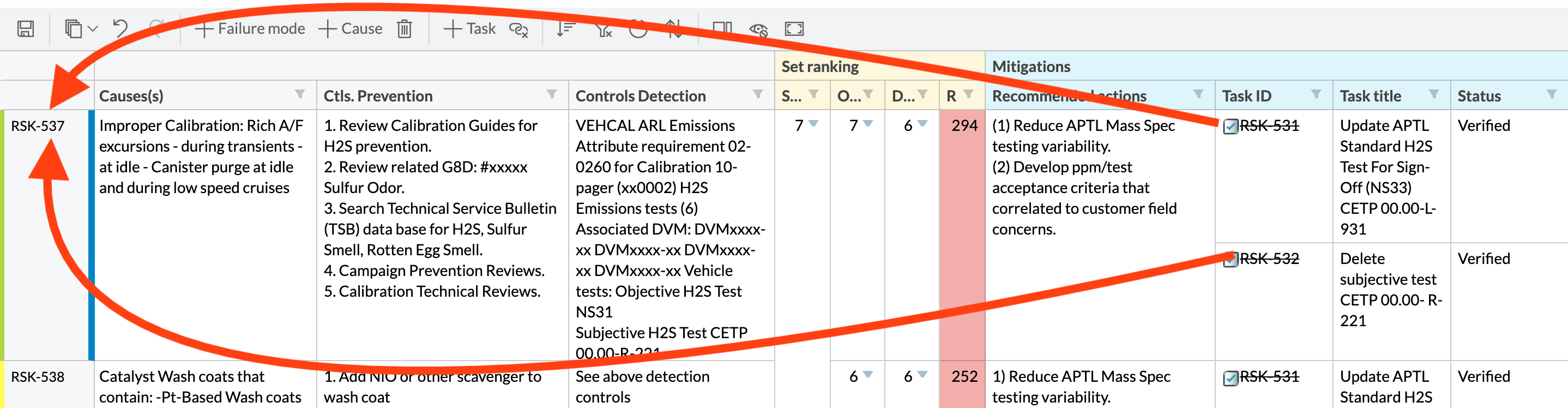
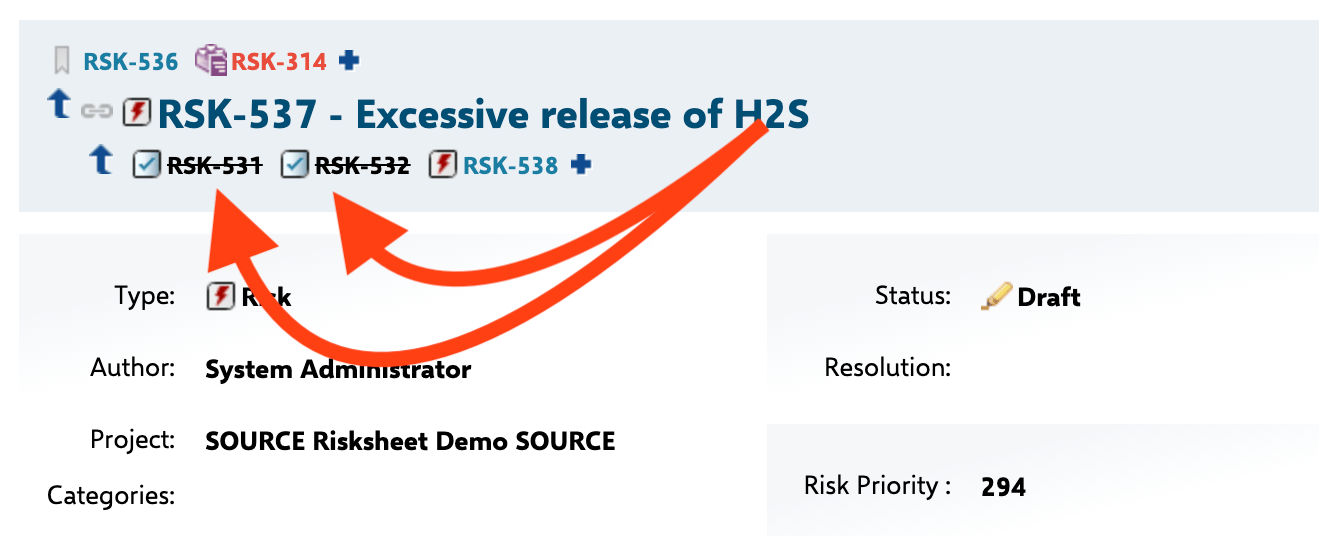 In the `dataTypes` section of the sheet configuration, configure the downstream item type. Provide the work item type, the link role, a display name for menus and toolbars, and the column used for zoom navigation after task creation:
```yaml theme={null}
dataTypes:
task:
type: mitigationAction
role: mitigates
name: Mitigation
zoomColumn: taskTitle
```
| Property | Description |
| ------------ | --------------------------------------------------------------------------------------------------------------------- |
| `type` | Polarion work item type for downstream items. Since v25.3.1, comma-separated values are supported for multiple types. |
| `role` | Link role connecting the risk item to the downstream item (for example, `mitigates`). |
| `name` | Display name shown in toolbar and context menus (for example, "Mitigation", "Safety Requirement"). |
| `zoomColumn` | Column ID that receives focus when the user zooms into a newly created task. |
In the `dataTypes` section of the sheet configuration, configure the downstream item type. Provide the work item type, the link role, a display name for menus and toolbars, and the column used for zoom navigation after task creation:
```yaml theme={null}
dataTypes:
task:
type: mitigationAction
role: mitigates
name: Mitigation
zoomColumn: taskTitle
```
| Property | Description |
| ------------ | --------------------------------------------------------------------------------------------------------------------- |
| `type` | Polarion work item type for downstream items. Since v25.3.1, comma-separated values are supported for multiple types. |
| `role` | Link role connecting the risk item to the downstream item (for example, `mitigates`). |
| `name` | Display name shown in toolbar and context menus (for example, "Mitigation", "Safety Requirement"). |
| `zoomColumn` | Column ID that receives focus when the user zooms into a newly created task. |
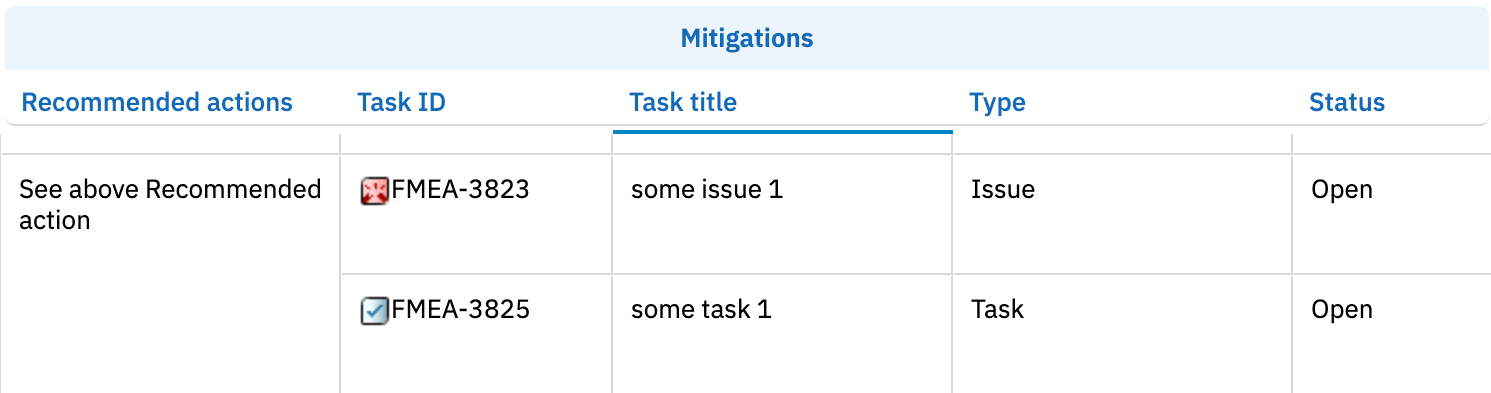 Add columns that bind to downstream task properties using the `task.` binding prefix. The link column itself uses `type: taskLink`; additional columns display task fields read-only via dotted bindings such as `task.title` or `task.status`:
```yaml theme={null}
columns:
- id: taskId
bindings: task
header: Mitigation
type: taskLink
width: 120
- id: taskTitle
bindings: task.title
header: Action Title
width: 250
- id: taskStatus
bindings: task.status
header: Status
width: 100
```
Add columns that bind to downstream task properties using the `task.` binding prefix. The link column itself uses `type: taskLink`; additional columns display task fields read-only via dotted bindings such as `task.title` or `task.status`:
```yaml theme={null}
columns:
- id: taskId
bindings: task
header: Mitigation
type: taskLink
width: 120
- id: taskTitle
bindings: task.title
header: Action Title
width: 250
- id: taskStatus
bindings: task.status
header: Status
width: 100
```
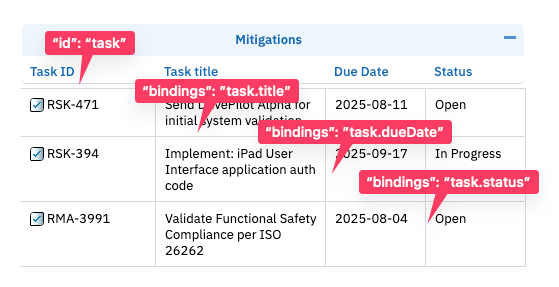 The `task.status` binding displays the Polarion workflow status field as plain text. Risksheet does not have a dedicated workflow column type — status data is shown through standard bindings on the underlying field.
Set `canCreate: false` on the `taskLink` column to allow linking existing tasks but prevent creating new ones from the grid. The default is `true` for link columns. To disable task creation globally across all link columns, set `canCreate: false` on `dataTypes.task` instead.
Downstream items are automatically filtered by the configured `type` in `dataTypes.task`. Only work items matching this type appear as downstream items.
To apply additional Lucene-based filtering, configure the `query` property on the task data type:
```yaml theme={null}
dataTypes:
task:
type: mitigationAction
role: mitigates
name: Mitigation
zoomColumn: taskTitle
query: "NOT status:closed"
```
The query is applied to task loading when the `nextedy.risksheet.applyQueryOnTasks` project property is set to `true` (default).
To restrict downstream tasks to a specific LiveDoc document path, configure the `document` property on the task data type. This is the recommended pattern when tasks are organized in a dedicated mitigation plan or risk control document rather than scattered across the project:
```yaml theme={null}
dataTypes:
task:
type: mitigationAction
role: mitigates
name: Mitigation
zoomColumn: taskTitle
document: Risks/Mitigation Plan
```
When `document` is set, only tasks living in that document are loaded and displayed in the grid. The path uses the Polarion space and document name (for example, `Risks/FHA-SYS-001`).
To load downstream tasks from projects other than the current one, use either `project` (single project) or `projects` (multi-project, v23.7.0+):
```yaml theme={null}
dataTypes:
task:
type: mitigationAction
role: mitigates
name: Mitigation
zoomColumn: taskTitle
projects:
- SharedMitigations
- QualityControls
```
Use `project` when all tasks live in a single project, and `projects` when they may originate from several projects (for example, a shared library plus a project-specific repository).
By default, new tasks created from the grid are added wherever the configured `role` link points. Two properties let you target task creation explicitly:
```yaml theme={null}
dataTypes:
task:
type: mitigationAction
role: mitigates
name: Mitigation
zoomColumn: taskTitle
createInCurrentDocument: true
createInDocument: Risks/Mitigation Plan
```
| Property | Version | Description |
| ------------------------- | ------------ | --------------------------------------------------------------------------------------------------------------------------------------------------------------------------------------------- |
| `createInCurrentDocument` | All versions | When `true`, new tasks are inserted into the document that holds the current risksheet. |
| `createInDocument` | v24.8.1+ | Target document path for new task creation (for example, `Risks/Mitigation Plan`). Useful when mitigations must be collected in a dedicated document regardless of where the risk item lives. |
The `task.status` binding displays the Polarion workflow status field as plain text. Risksheet does not have a dedicated workflow column type — status data is shown through standard bindings on the underlying field.
Set `canCreate: false` on the `taskLink` column to allow linking existing tasks but prevent creating new ones from the grid. The default is `true` for link columns. To disable task creation globally across all link columns, set `canCreate: false` on `dataTypes.task` instead.
Downstream items are automatically filtered by the configured `type` in `dataTypes.task`. Only work items matching this type appear as downstream items.
To apply additional Lucene-based filtering, configure the `query` property on the task data type:
```yaml theme={null}
dataTypes:
task:
type: mitigationAction
role: mitigates
name: Mitigation
zoomColumn: taskTitle
query: "NOT status:closed"
```
The query is applied to task loading when the `nextedy.risksheet.applyQueryOnTasks` project property is set to `true` (default).
To restrict downstream tasks to a specific LiveDoc document path, configure the `document` property on the task data type. This is the recommended pattern when tasks are organized in a dedicated mitigation plan or risk control document rather than scattered across the project:
```yaml theme={null}
dataTypes:
task:
type: mitigationAction
role: mitigates
name: Mitigation
zoomColumn: taskTitle
document: Risks/Mitigation Plan
```
When `document` is set, only tasks living in that document are loaded and displayed in the grid. The path uses the Polarion space and document name (for example, `Risks/FHA-SYS-001`).
To load downstream tasks from projects other than the current one, use either `project` (single project) or `projects` (multi-project, v23.7.0+):
```yaml theme={null}
dataTypes:
task:
type: mitigationAction
role: mitigates
name: Mitigation
zoomColumn: taskTitle
projects:
- SharedMitigations
- QualityControls
```
Use `project` when all tasks live in a single project, and `projects` when they may originate from several projects (for example, a shared library plus a project-specific repository).
By default, new tasks created from the grid are added wherever the configured `role` link points. Two properties let you target task creation explicitly:
```yaml theme={null}
dataTypes:
task:
type: mitigationAction
role: mitigates
name: Mitigation
zoomColumn: taskTitle
createInCurrentDocument: true
createInDocument: Risks/Mitigation Plan
```
| Property | Version | Description |
| ------------------------- | ------------ | --------------------------------------------------------------------------------------------------------------------------------------------------------------------------------------------- |
| `createInCurrentDocument` | All versions | When `true`, new tasks are inserted into the document that holds the current risksheet. |
| `createInDocument` | v24.8.1+ | Target document path for new task creation (for example, `Risks/Mitigation Plan`). Useful when mitigations must be collected in a dedicated document regardless of where the risk item lives. |
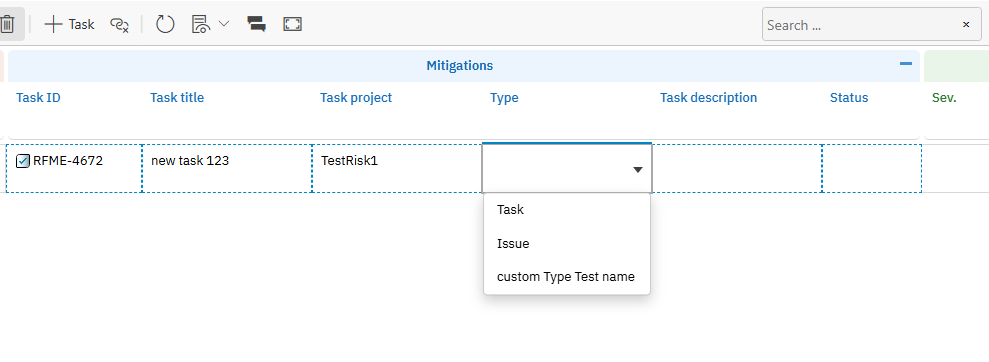 Downstream tasks are always sorted by local ID in ascending order (for example, MIT-1, MIT-2, MIT-10), regardless of link creation order. This provides a predictable display across sessions.
## Verification
Save the sheet configuration and reload your Risksheet. You should see the downstream columns in the grid. Right-click a risk item row and select the option to create a new mitigation task — the new task should appear in the downstream columns linked to the risk item. If you configured `document`, `projects`, or `query`, verify that only matching tasks are loaded.
## See Also
* [Configure Upstream Traceability Columns](/risksheet/guides/columns/upstream-traceability) -- add upstream link columns
* [Configure Downstream Tasks](/risksheet/guides/risk-management/downstream-tasks) -- risk management workflows
* [Configure Multiple Downstream Types](/risksheet/guides/risk-management/multiple-downstream-types) -- multiple task types
* [Show Multiple Linked Items](/risksheet/guides/columns/multiple-linked-items) -- display multiple items per cell
* [Export to PDF](/risksheet/guides/export/pdf-export) -- export downstream tables to PDF
Downstream tasks are always sorted by local ID in ascending order (for example, MIT-1, MIT-2, MIT-10), regardless of link creation order. This provides a predictable display across sessions.
## Verification
Save the sheet configuration and reload your Risksheet. You should see the downstream columns in the grid. Right-click a risk item row and select the option to create a new mitigation task — the new task should appear in the downstream columns linked to the risk item. If you configured `document`, `projects`, or `query`, verify that only matching tasks are loaded.
## See Also
* [Configure Upstream Traceability Columns](/risksheet/guides/columns/upstream-traceability) -- add upstream link columns
* [Configure Downstream Tasks](/risksheet/guides/risk-management/downstream-tasks) -- risk management workflows
* [Configure Multiple Downstream Types](/risksheet/guides/risk-management/multiple-downstream-types) -- multiple task types
* [Show Multiple Linked Items](/risksheet/guides/columns/multiple-linked-items) -- display multiple items per cell
* [Export to PDF](/risksheet/guides/export/pdf-export) -- export downstream tables to PDF