> ## Documentation Index
> Fetch the complete documentation index at: https://learn.nextedy.com/llms.txt
> Use this file to discover all available pages before exploring further.
# Add Assignee Column
> Add a user reference column to your Nextedy RISKSHEET grid so analysts can assign risk items or mitigation tasks to team members.
export const LastReviewed = ({date}) => {
if (!date) return null;
const formatted = new Date(`${date}T00:00:00Z`).toLocaleDateString("en-US", {
year: "numeric",
month: "long",
day: "numeric",
timeZone: "UTC"
});
return
Last reviewed on {formatted}
;
};
Open sheet configuration and add a column entry with `type` set to `ref:user`:
```json theme={null}
{
"columns": [
{
"id": "riskAssignee",
"bindings": "assignee",
"header": "Assignee",
"type": "ref:user",
"width": 140
}
]
}
```
The `ref:user` type renders the column as a user selection dropdown, displaying Polarion user IDs and allowing single-user assignment. This allows user to display/select assignee for the main risk item.
To restrict which users appear in the dropdown, set a `userRole` property **inside the column's `typeProperties` block** to control the list of selectable users:
```json theme={null}
{
"id": "riskAssignee",
"bindings": "assignee",
"header": "Assignee",
"type": "ref:user",
"typeProperties": {
"userRole": "project_assignable"
},
"width": 140
}
```
Always nest `userRole` inside the column's `typeProperties` block. Placing it as a **top-level** column property (a sibling of `type`) makes the **entire Risksheet fail to load** -- not just the column -- with a fatal configuration error:
```text theme={null}
Cannot invoke "com.nextedy.risksheet.config.AppConfig$TypeProperties.getUserRole()" because "typeProperties" is null
```
| userRole Value | Users Shown |
| -------------------- | -------------------------------------------- |
| `project_assignable` | Users assignable in the current project |
| *(global role name)* | Users belonging to the specified global role |
When mitigation tasks reside in a different project than the Risksheet document, the `userRole: "project_assignable"` property fetches users from the Risksheet's project context -- not the task's project. If your tasks are in a separate project, use a global role instead so that users from the target project appear in the dropdown.
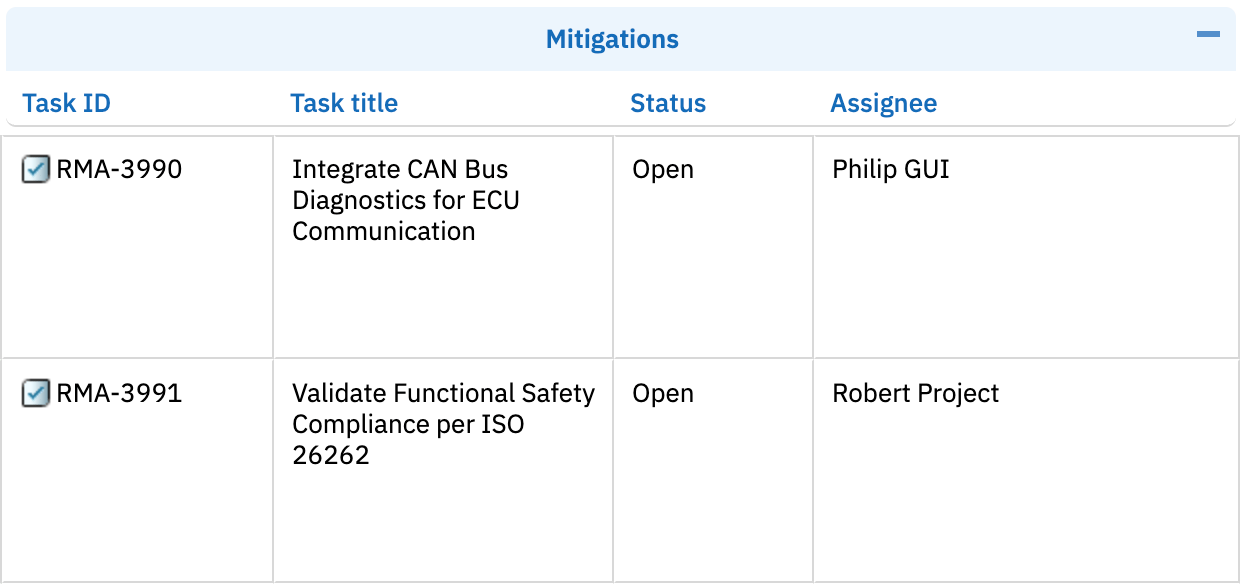
To add an assignee column for downstream mitigation tasks rather than the main risk item, nest the column under the task configuration:
```json theme={null}
{
"id": "taskAssignee",
"bindings": "task.assignee",
"header": "Task Assignee",
"type": "ref:user",
"typeProperties": {
"userRole": "project_assignable"
},
"width": 140
}
```
The `task.` prefix in the binding indicates this column maps to the downstream task work item (column with the "id": task), not the main risk item. Use the singular `task.assignee` (matching the other downstream bindings `task.title`, `task.type`, `task.status`).
 User reference columns are editable by default for main risk items. For upstream linked item columns, you must explicitly set `readOnly` to `false`:
```json theme={null}
{
"id": "upstreamAssignee",
"bindings": "requirement.assignee",
"header": "Req. Assignee",
"type": "ref:user",
"readOnly": false,
"width": 140
}
```
User reference columns support single-user assignment only. Selecting a new user replaces the previous assignee. The column displays the Polarion user ID of the assigned person.
## Verification
Save the configuration and reload your Risksheet. You should now see the Assignee column in the grid. Click on a cell in the column to open the user selection dropdown. Select a user and verify the assignment is saved correctly by refreshing the page.
## See Also
* [Add a Basic Column](/risksheet/guides/columns/add-basic-column) -- general column configuration
* [Enable Editing of Upstream Columns](/risksheet/guides/columns/edit-upstream-columns) -- make linked columns editable
* [Configure Permissions](/risksheet/guides/administration/permissions) -- control who can edit assignments
* [Configure Enum Columns](/risksheet/guides/columns/enum-columns) -- set up dropdown selection columns
User reference columns are editable by default for main risk items. For upstream linked item columns, you must explicitly set `readOnly` to `false`:
```json theme={null}
{
"id": "upstreamAssignee",
"bindings": "requirement.assignee",
"header": "Req. Assignee",
"type": "ref:user",
"readOnly": false,
"width": 140
}
```
User reference columns support single-user assignment only. Selecting a new user replaces the previous assignee. The column displays the Polarion user ID of the assigned person.
## Verification
Save the configuration and reload your Risksheet. You should now see the Assignee column in the grid. Click on a cell in the column to open the user selection dropdown. Select a user and verify the assignment is saved correctly by refreshing the page.
## See Also
* [Add a Basic Column](/risksheet/guides/columns/add-basic-column) -- general column configuration
* [Enable Editing of Upstream Columns](/risksheet/guides/columns/edit-upstream-columns) -- make linked columns editable
* [Configure Permissions](/risksheet/guides/administration/permissions) -- control who can edit assignments
* [Configure Enum Columns](/risksheet/guides/columns/enum-columns) -- set up dropdown selection columns