> ## Documentation Index
> Fetch the complete documentation index at: https://learn.nextedy.com/llms.txt
> Use this file to discover all available pages before exploring further.
# Use Query Factory
> Create named query factory functions that dynamically filter autocomplete suggestions in `itemLink` and `multiItemLink` columns.
export const LastReviewed = ({date}) => {
if (!date) return null;
const formatted = new Date(`${date}T00:00:00Z`).toLocaleDateString("en-US", {
year: "numeric",
month: "long",
day: "numeric",
timeZone: "UTC"
});
return
Last reviewed on {formatted}
;
};
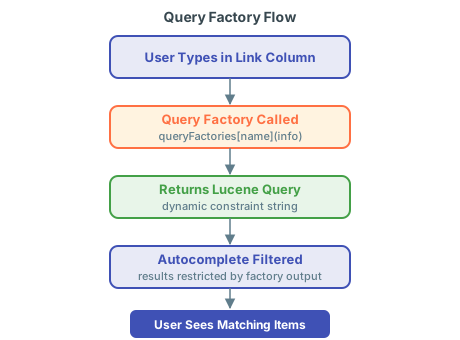
A query factory is a JavaScript function that returns a Lucene query string. When a user edits an `itemLink` or `multiItemLink` column, Nextedy RISKSHEET calls the factory function and appends its returned query to the autocomplete search, restricting which items appear in the dropdown.
Query factories are defined under a top-level `queryFactories` section in the sheet configuration (the `risksheet.json` file, editable as YAML since v25.5.0) and referenced by name from an `itemLink` column's `typeProperties.queryFactory` property.
Add a named function to the `queryFactories` section of the sheet configuration, then reference it from a column via `typeProperties.queryFactory`:
```yaml theme={null}
queryFactories:
filterByLinkedElement: "function(info){ return 'type:requirement AND linkedElement:' + info.item['systemElement']; }"
columns:
- id: requirement
header: Requirement
bindings: linkedRequirement
type: itemLink
typeProperties:
linkRole: implements
linkTypes: requirement
queryFactory: filterByLinkedElement
```
The factory function receives an `info` object describing the current row and context. It returns a Lucene query string that the server appends to the autocomplete search.
A common pattern is filtering one upstream column based on the value selected in another. For example, restrict the Requirements autocomplete to requirements that are already linked to the row's selected System Element:
1. Define the first column (System Element) as a standard `itemLink` column.
2. Define the second column (Requirement) with `typeProperties.queryFactory` pointing to a factory that reads the System Element value from `info.item`.
3. The factory returns a Lucene query that restricts results to requirements related to that element.
```yaml theme={null}
queryFactories:
byElement: "function(info){ var el = info.item['systemElement']; return el ? 'linkedElement:' + el : ''; }"
```
Combine `queryFactory` with `canCreate: false` on the dependent column so users can only link to pre-existing items in the tracker. This keeps the cell active for linking and unlinking, while preventing accidental creation of new items that bypass the upstream filter.
Control whether users can create new items inline from the link editor:
```yaml theme={null}
columns:
- id: hazardousSituation
header: Hazardous Situation
bindings: linkedHazSit
type: itemLink
canCreate: false
typeProperties:
linkRole: relates_to
linkTypes: hazard
queryFactory: filterBySequenceOfEvents
```
Setting `canCreate: false` lets users select and unlink existing items but disables inline creation from the autocomplete editor. The default is `true`. The flag can also be set globally for all task columns via `dataTypes.task.canCreate`.
Query factories work identically with `multiItemLink` columns. Reference the factory through `typeProperties.queryFactory`; the function shape and `info` parameter are the same.
Column IDs used in `levels` (as `controlColumn` or `zoomColumn`) and `sortBy` must exactly match the `id` of a defined column. Mismatched IDs can cause row duplication and unexpected query behavior in factories that read `info.item['someColumn']`.
Query factory functions are plain JavaScript and run in the browser, so they can read live values from DOM elements that the top panel template (`risksheetTopPanel.vm`) renders. This turns the top panel from a passive display into an interactive filter for the grid.
The pattern:
1. Render an interactive control in the top panel template, for example a `
For filters driven by document-level metadata rather than runtime UI, render the value into the top panel template with Velocity and read it from the factory:
1. In `risksheetTopPanel.vm`, write a document custom field into a hidden element or a JavaScript variable.
2. In the factory, read the rendered value (via jQuery or a global variable) and include it in the returned Lucene query.
This allows the same column configuration to filter differently per document — for example, restricting linked items to a particular project, release, or domain encoded as a document custom field.
## Verification
1. Open a Risksheet document with the `queryFactories` section configured and at least one column referencing a factory via `typeProperties.queryFactory`.
2. Click into a cell in that column and type at least three characters.
3. Confirm the autocomplete dropdown shows only items that match both the user input and the Lucene query returned by your factory.
4. If the factory depends on another column, change that column's value and verify the dropdown updates accordingly.
5. If the factory reads top panel controls, change the control and verify the next autocomplete reflects the new selection.
## See Also
* [Configure Queries](/risksheet/guides/advanced/query-configuration) — static Lucene query configuration
* [Enable Conditional Linking](/risksheet/guides/columns/conditional-linking) — alternative approach to link filtering
* [Configure Upstream Traceability Columns](/risksheet/guides/columns/upstream-traceability) — set up the link columns that use query factories
* [Customize the Top Panel](/risksheet/guides/customization/top-panel) — Velocity templates and DOM controls for document-level data
 Query factories are defined under a top-level `queryFactories` section in the sheet configuration (the `risksheet.json` file, editable as YAML since v25.5.0) and referenced by name from an `itemLink` column's `typeProperties.queryFactory` property.