> ## Documentation Index
> Fetch the complete documentation index at: https://learn.nextedy.com/llms.txt
> Use this file to discover all available pages before exploring further.
# Integration Questions
> This FAQ answers common questions about integrating Nextedy RISKSHEET with Siemens Polarion ALM and the broader engineering toolchain.
Risksheet does not have its own data store. Every cell you see in the grid is a Polarion work item field. All integration points use Polarion's own infrastructure, which means authorization, audit, and traceability are inherited automatically.
Risksheet is a Polarion server app that renders an interactive grid inside Polarion LiveDoc documents. Each row in a risksheet is a standard Polarion work item, and each column maps to a field on that work item via the `bindings` property. Because the data lives in Polarion, you can mix risksheet pages with normal LiveDoc content in the same document and reuse Polarion features such as workflows, baselines, and reports.
See [Concepts](/risksheet/concepts/index) for the architectural overview and [Reference](/risksheet/reference/index) for the configuration details.
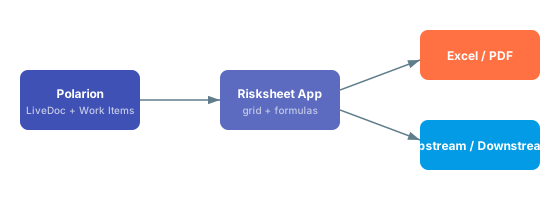 Risksheet uses Polarion's standard link roles to connect risk items to upstream requirements and downstream mitigation tasks. You configure upstream traceability in the sheet configuration so that linked requirements appear as columns in the grid, and the same mechanism feeds downstream traceability for tasks and verification items. Because links are normal Polarion links, they are visible in Polarion's traceability matrices and impact analysis views.
See [Integration](/risksheet/guides/integration/index) for step-by-step configuration and [Configuration Examples](/risksheet/reference/examples/index) for upstream and downstream snippets.
Yes. Risksheet supports export of the grid to Excel and PDF using the export configuration, and the exported tables preserve formatting such as severity colors and merged cells where applicable. There is no direct round-trip import — Polarion remains the system of record — but you can use Polarion's standard Excel round-trip on the underlying work items if your process requires it. See [Export](/risksheet/guides/export/index) for the supported export options.
Severity, occurrence, detection, ASIL levels, and similar pick-lists are defined as standard Polarion enumerations under **Administration > Enumerations**. A custom field on the relevant work item type binds to the enum, and the column in the risksheet uses `type: rating:` or `type: enum:` with `bindings: ` to reference it. The server loads enum values automatically, so the grid stays in sync with whatever the Polarion administrator configures.
The severity/occurrence/detection scales are not defined inside the sheet configuration. Define them as Polarion enumerations and reference them by id from the column — that way the same scales are reusable across documents and reports.
Yes, through Polarion's standard configuration inheritance and template documents. A LiveDoc template can carry a sheet configuration, and documents created from that template inherit and can extend it. For cross-project sharing, place the template in a shared project or use Polarion's global configuration mechanisms. See [Templates](/risksheet/reference/templates/index) and [Configuration Management](/risksheet/guides/configuration/index) for the recommended patterns.
Risksheet provides a server-side API surface that can be used from Velocity scripts and Polarion's existing extension points to render content, compute values, or assemble reports. For most automation needs — bulk updates, reporting, or integrations with external systems — the recommended approach is to use Polarion's REST or SOAP APIs against the underlying work items, since that is where the data actually lives. See [API](/risksheet/reference/api/index) for the available Velocity context entries.
Because every risk item is a Polarion work item, you can build Polarion LiveReport widgets and queries against the same data the grid displays. Typical patterns include displaying top-RPN risks, counting open mitigation tasks, or charting risk distribution by severity. There is no special Risksheet widget — use the standard LiveReport widgets with Lucene queries against the work item type used for risk items.
Yes. Risksheet supports cross-project linking through Polarion's normal cross-project link roles, which makes it possible to share generic failure modes, threat libraries, or component-level risks across multiple project risksheets. The column definition simply needs to allow the appropriate work item types and projects through its picker configuration. See the [Integration](/risksheet/guides/integration/index) guide for examples.
Risksheet provides three review styles: comment-based review, work-item-based review, and approval review. The approval review records approval-tagged comments on the relevant work items, which is useful for audit evidence and ISO 26262 / ISO 14971 review records.
Risksheet's approval review does NOT trigger Polarion's formal approval state transitions (draft → reviewed → approved). If your process requires a state transition, drive it from a Polarion workflow action on the work item or document rather than from the risksheet approval review alone.
See [Review Management](/risksheet/guides/reviews/index) for the recommended setup.
Risksheet is a generic tool that supports any risk management methodology, including FMEA, HARA, TARA, STRIDE, and CVSS. Nextedy provides solution templates for typical methodologies across automotive (ISO 26262), medical devices (ISO 14971), industrial (IEC 61508), and cybersecurity (ISO/SAE 21434, IEC 62443) industries. Pick the closest solution template for your industry, understand its configuration, then modify it to match your process — never start from a blank configuration.
| Methodology | Typical scales | Common standards |
| ----------- | ------------------------------------------ | --------------------- |
| FMEA | severity, occurrence, detection (RPN) | AIAG & VDA, ISO 14971 |
| HARA | severity, exposure, controllability (ASIL) | ISO 26262 |
| TARA | impact, attack feasibility | ISO/SAE 21434 |
| CVSS | base, temporal, environmental | CVSS v3.1 / v4.0 |
| STRIDE | threat category, impact | Microsoft SDL |
Start with the [Integration](/risksheet/guides/integration/index) guide for end-to-end setup, then consult [Configuration Examples](/risksheet/reference/examples/index) for ready-to-adapt sheet configurations. For questions about feature scope see [Feature Questions](/risksheet/faq/features), and for environment/version questions see [Compatibility](/risksheet/reference/compatibility/index). If something behaves unexpectedly, check [Common Troubleshooting](/risksheet/faq/troubleshooting-faq) first.
Risksheet uses Polarion's standard link roles to connect risk items to upstream requirements and downstream mitigation tasks. You configure upstream traceability in the sheet configuration so that linked requirements appear as columns in the grid, and the same mechanism feeds downstream traceability for tasks and verification items. Because links are normal Polarion links, they are visible in Polarion's traceability matrices and impact analysis views.
See [Integration](/risksheet/guides/integration/index) for step-by-step configuration and [Configuration Examples](/risksheet/reference/examples/index) for upstream and downstream snippets.
Yes. Risksheet supports export of the grid to Excel and PDF using the export configuration, and the exported tables preserve formatting such as severity colors and merged cells where applicable. There is no direct round-trip import — Polarion remains the system of record — but you can use Polarion's standard Excel round-trip on the underlying work items if your process requires it. See [Export](/risksheet/guides/export/index) for the supported export options.
Severity, occurrence, detection, ASIL levels, and similar pick-lists are defined as standard Polarion enumerations under **Administration > Enumerations**. A custom field on the relevant work item type binds to the enum, and the column in the risksheet uses `type: rating:` or `type: enum:` with `bindings: ` to reference it. The server loads enum values automatically, so the grid stays in sync with whatever the Polarion administrator configures.
The severity/occurrence/detection scales are not defined inside the sheet configuration. Define them as Polarion enumerations and reference them by id from the column — that way the same scales are reusable across documents and reports.
Yes, through Polarion's standard configuration inheritance and template documents. A LiveDoc template can carry a sheet configuration, and documents created from that template inherit and can extend it. For cross-project sharing, place the template in a shared project or use Polarion's global configuration mechanisms. See [Templates](/risksheet/reference/templates/index) and [Configuration Management](/risksheet/guides/configuration/index) for the recommended patterns.
Risksheet provides a server-side API surface that can be used from Velocity scripts and Polarion's existing extension points to render content, compute values, or assemble reports. For most automation needs — bulk updates, reporting, or integrations with external systems — the recommended approach is to use Polarion's REST or SOAP APIs against the underlying work items, since that is where the data actually lives. See [API](/risksheet/reference/api/index) for the available Velocity context entries.
Because every risk item is a Polarion work item, you can build Polarion LiveReport widgets and queries against the same data the grid displays. Typical patterns include displaying top-RPN risks, counting open mitigation tasks, or charting risk distribution by severity. There is no special Risksheet widget — use the standard LiveReport widgets with Lucene queries against the work item type used for risk items.
Yes. Risksheet supports cross-project linking through Polarion's normal cross-project link roles, which makes it possible to share generic failure modes, threat libraries, or component-level risks across multiple project risksheets. The column definition simply needs to allow the appropriate work item types and projects through its picker configuration. See the [Integration](/risksheet/guides/integration/index) guide for examples.
Risksheet provides three review styles: comment-based review, work-item-based review, and approval review. The approval review records approval-tagged comments on the relevant work items, which is useful for audit evidence and ISO 26262 / ISO 14971 review records.
Risksheet's approval review does NOT trigger Polarion's formal approval state transitions (draft → reviewed → approved). If your process requires a state transition, drive it from a Polarion workflow action on the work item or document rather than from the risksheet approval review alone.
See [Review Management](/risksheet/guides/reviews/index) for the recommended setup.
Risksheet is a generic tool that supports any risk management methodology, including FMEA, HARA, TARA, STRIDE, and CVSS. Nextedy provides solution templates for typical methodologies across automotive (ISO 26262), medical devices (ISO 14971), industrial (IEC 61508), and cybersecurity (ISO/SAE 21434, IEC 62443) industries. Pick the closest solution template for your industry, understand its configuration, then modify it to match your process — never start from a blank configuration.
| Methodology | Typical scales | Common standards |
| ----------- | ------------------------------------------ | --------------------- |
| FMEA | severity, occurrence, detection (RPN) | AIAG & VDA, ISO 14971 |
| HARA | severity, exposure, controllability (ASIL) | ISO 26262 |
| TARA | impact, attack feasibility | ISO/SAE 21434 |
| CVSS | base, temporal, environmental | CVSS v3.1 / v4.0 |
| STRIDE | threat category, impact | Microsoft SDL |
Start with the [Integration](/risksheet/guides/integration/index) guide for end-to-end setup, then consult [Configuration Examples](/risksheet/reference/examples/index) for ready-to-adapt sheet configurations. For questions about feature scope see [Feature Questions](/risksheet/faq/features), and for environment/version questions see [Compatibility](/risksheet/reference/compatibility/index). If something behaves unexpectedly, check [Common Troubleshooting](/risksheet/faq/troubleshooting-faq) first.