> ## Documentation Index
> Fetch the complete documentation index at: https://learn.nextedy.com/llms.txt
> Use this file to discover all available pages before exploring further.
# Frequently Asked Questions
> Find answers to common questions about Nextedy RISKSHEET. This section organizes questions by topic so you can quickly locate information about product capabilities, configuration, licensing, and troubleshooting.
export const LastReviewed = ({date}) => {
if (!date) return null;
const formatted = new Date(`${date}T00:00:00Z`).toLocaleDateString("en-US", {
year: "numeric",
month: "long",
day: "numeric",
timeZone: "UTC"
});
return
Last reviewed on {formatted}
;
};
Risksheet is a risk analysis app for Siemens Polarion ALM that provides an interactive Excel-like grid for structured risk assessment. It supports FMEA, HARA, TARA, STRIDE, and CVSS risk analysis workflows directly within Polarion LiveDoc documents, with full traceability to requirements and design elements.
Risksheet supports multiple risk analysis frameworks: FMEA (Failure Mode and Effects Analysis), HARA (Hazard Analysis and Risk Assessment), TARA (Threat Analysis and Risk Assessment), STRIDE (cybersecurity threat analysis), and CVSS scoring (v3.1/v4.0). You configure the tool to match any of these methodologies through the sheet configuration.
Risksheet supports workflows aligned with the following standards:
| Standard | Domain |
| ------------------------ | --------------------- |
| ISO 26262 | Automotive safety |
| ISO 14971 | Medical devices |
| IEC 61508 | Industrial safety |
| ISO/SAE 21434 | Cybersecurity |
| IEC 62443 | Industrial security |
| AIAG & VDA FMEA Handbook | Automotive FMEA |
| CVSS v3.1/v4.0 | Vulnerability scoring |
All risk data is stored as standard Polarion work items with custom fields. This means your risk data benefits from Polarion's built-in version control, baseline management, and traceability features. Configuration is stored in a sheet configuration file attached to each LiveDoc document, with optional template inheritance for consistency across projects.
Yes. Risksheet does not require specific work item types or mandatory fields. You configure the risk and task types through the `dataTypes` section of sheet configuration, specifying your custom work item type IDs. See [Configuration Questions](/risksheet/faq/configuration) for more details.
No. Risksheet is deployed as a Polarion server plugin. It uses Polarion's existing data storage and runs within the Polarion server environment. The client-side grid renders within LiveDoc pages in the browser, requiring no additional infrastructure.
Yes. You can create multiple Risksheet documents within a single Polarion project, each with its own sheet configuration. This allows different risk analysis types (for example, FMEA and HARA) to coexist in the same project with independent column layouts, severity scales, and review workflows.
Risksheet supports export to Excel (.xlsx) and PDF formats with formatted risk tables. You can use saved views to control which columns appear in exports. See [Feature Questions](/risksheet/faq/features) for details on export capabilities.
This page provides general orientation based on the product brief. For specific configuration details and property references, refer to the [Reference](/risksheet/reference/index) section.
## See Also
* [Feature Questions](/risksheet/faq/features) -- specific capability details
* [Configuration Questions](/risksheet/faq/configuration) -- setup and customization
* [Getting Started](/risksheet/getting-started/index) -- initial setup tutorials
This page documents both currently supported features and known limitations. Feature availability may change with new releases. Check your installed version's release notes for the latest status.
***
## Column and Data Entry
Dependent enums — where the available options in one dropdown column are filtered based on the selection in a parent column — are supported as a column-level feature in recent releases (v25.3.1+). They are configured directly on the dependent enum column (typically through a `queryFactory` or column-level dependency declaration), not as a top-level configuration section. The available options in the child column are filtered at runtime based on the value selected in the parent enum column.
Note that severity, occurrence, and detection scales use integer IDs (for example, 1 through 10 for an FMEA severity scale), unlike regular Polarion enumerations which use string IDs. This distinction is important when configuring risk parameter columns: define the scale as a Polarion enumeration with integer IDs and bind a custom field on the work item type to it, then reference it from the column with `type: rating:` and `bindings: `.
Cascading dropdown behaviour depends on the installed Risksheet version. Check your current release notes for the exact column-level syntax supported in your build.
No. Drag and drop is not supported for inserting existing work items into the Risksheet grid. To link existing Polarion work items, use the item link column editor which provides autocomplete-based search. Type at least 3 characters to trigger a search that matches work items by ID and type. The editor also prevents duplicate selections — if you attempt to link an item that is already present, you receive a notification.
For multi-item link columns, the same autocomplete behavior applies, with additional support for selecting multiple items in a single cell.
No. Risksheet intentionally does not enforce Polarion mandatory fields during item creation. This is a deliberate design decision to simplify data entry — the assumption is that mandatory fields are enforced at later workflow statuses via Polarion's built-in workflow validation rules, not at the point of initial data entry.
To visually indicate which fields are required, use `cellDecorators` and `styles` in the sheet configuration to highlight mandatory column backgrounds with conditional formatting:
```yaml theme={null}
cellDecorators:
requiredHighlight: |
function(info){
if(!info.value){
$(info.cell).addClass('required-empty');
}
}
styles:
.required-empty: "background-color: #fff3e0 !important; border-left: 3px solid #e65100 !important;"
```
Use conditional formatting via `cellDecorators` to apply a colored background or left border to mandatory columns when they are empty. This gives users a visual cue about required data without blocking their data entry workflow. See [Apply Conditional Formatting](/risksheet/guides/styling/conditional-formatting) for detailed setup instructions.
No. The first "Item Id" column in the Risksheet grid cannot be renamed. This is a known limitation of the column configuration system. The `systemItemId` binding is a reserved system column that always displays as "Item Id" in the grid header.
***
## Risk Analysis Workflows
Yes. Risksheet is a generic risk analysis tool and can be configured for Safety FMEA (SFMEA), Design FMEA (DFMEA), Process FMEA (PFMEA), and other FMEA variants. The column layout, risk parameters, and hierarchy levels are fully configurable through the sheet configuration. Each FMEA type uses the same underlying structure but with different column `bindings`, severity/occurrence/detection scales, and formula definitions appropriate to the analysis type.
You can maintain multiple Risksheet configurations within a single Polarion project — each LiveDoc document can have its own sheet configuration with an independent column layout and risk parameter setup. Rather than starting from a blank configuration, pick the closest Nextedy solution template for your industry and methodology and modify it to match your process. See [Configure FMEA Workflows](/risksheet/guides/risk-management/fmea-configuration) for setup details.
Yes. Risksheet is methodology-agnostic and supports any risk analysis approach, including Failure Mode and Effects Analysis (FMEA), Hazard Analysis and Risk Assessment (HARA), Threat Analysis and Risk Assessment (TARA), STRIDE, and Common Vulnerability Scoring System (CVSS). Because Risksheet has no mandatory fields or hard-coded work item types, you can configure custom column layouts, threat categories, and severity scales that align with the STRIDE methodology (Spoofing, Tampering, Repudiation, Information Disclosure, Denial of Service, Elevation of Privilege). Start from the closest solution template and adapt the columns and scales to STRIDE. See [Implement STRIDE Analysis](/risksheet/guides/risk-management/stride-analysis) for configuration guidance.
Yes. Multiple Risksheet configurations per project are fully supported. Each Polarion LiveDoc document that contains a Risksheet has its own sheet configuration attached as a document attachment. This means you can have separate FMEA, HARA, and TARA analyses in the same project, each with completely independent column layouts, risk parameters, and styling.
Additionally, you can use template-based configuration inheritance where a global template provides shared settings and each document overrides only the properties that differ. See [Set Up Global Templates](/risksheet/guides/configuration/global-templates) for details.
***
## Document and Integration Scope
Yes. Risksheet is designed as a visual representation of a single Polarion LiveDoc document. It cannot aggregate or route work items from multiple documents based on naming patterns or other criteria. Each Risksheet instance corresponds to one document. All risk items are stored as standard Polarion work items belonging to that document — Risksheet visualises and edits Polarion data, it does not maintain a separate data store.
However, you can create multiple Risksheet documents per project with independent configurations, and use cross-project linking to reference items across documents and projects. The `createInCurrentDocument` parameter controls whether newly created items are stored in the current document.
 Collection awareness — filtering work items by collection membership and displaying correct revisions — is not currently available in Risksheet. This is a recognized feature request from enterprise customers who use Polarion collections for release management. The feature is under consideration and may appear in a future release.
Collection support is being prioritized. Check the latest release notes for current status. As a workaround, use document-level filtering to restrict the scope of displayed work items.
Electronic signatures are not supported directly in Risksheet because the Polarion API does not expose electronic signature capabilities for programmatic access. If your regulatory process requires signatures when rejecting items, the recommended workaround is to split the action into two steps:
1. **In Risksheet**: Execute the rejection workflow action (without signature)
2. **In Polarion**: Execute a separate workflow action that requires the electronic signature
This separation ensures the signature requirement is met through Polarion's native signature mechanism while allowing the initial rejection to be performed efficiently within the Risksheet grid.
***
## Approval and Review Workflows
Review columns are available for three review modes via the `reviews` section of the sheet configuration: comment-based reviews, work-item-based reviews, and approval reviews. You can set `reviews.reviewManager` to `"CommentBased"` for comment-based reviews, or configure the approval review variant to capture approver decisions inline in the grid.
Risksheet approval review creates approval-tagged comments on the reviewed work items but does **not** trigger Polarion's formal approval workflow (draft → reviewed → approved). Status transitions still have to be performed through Polarion's own workflow actions. For full approval workflows that require status transitions, navigate to the individual work item or use the Polarion document view. Workflow approval actions executed from within the Risksheet grid are planned for a future release.
See [Set Up Review Process](/risksheet/guides/reviews/setup-review-process) for current review capabilities and configuration details.
Risksheet supports **freeze columns** (keeping left-side columns visible during horizontal scrolling) but does not currently support **freeze rows** (pinning specific rows at the top during vertical scrolling). Column freezing is available through the right-click context menu or sheet configuration. Freeze rows is a recognized feature request and may be implemented in a future release.
For freeze column configuration, see [Configure Freeze Panes](/risksheet/guides/visualization/freeze-panes).
***
## Feature Availability Summary
| Feature | Status | Notes |
| ----------------------------------------- | -------------------------- | ------------------------------------------------------------------------- |
| Dependent enums (cascading dropdowns) | ✅ Supported (column-level) | Configured per column in recent versions; not a top-level config section |
| Drag and drop | ❌ Not supported | Use autocomplete link editor instead |
| Mandatory field enforcement | ❌ Not enforced (by design) | Use `cellDecorators` for visual highlighting |
| Item Id column rename | ❌ Not supported | `systemItemId` is a reserved system column |
| Electronic signatures | ❌ Not supported | Polarion API limitation; use split workflow |
| Multi-document aggregation | ❌ Not supported | One document per Risksheet instance |
| Collection awareness | Planned | High-priority feature request |
| Full Polarion approval workflow from grid | Planned | Approval review tags comments only; status transitions happen in Polarion |
| Freeze rows | Planned | Freeze columns currently supported |
| Freeze columns | ✅ Supported | Via context menu or configuration |
| Review columns | ✅ Supported | Comment-based, work-item-based, and approval-based |
| SFMEA/DFMEA/PFMEA | ✅ Supported | Fully configurable per FMEA type |
| STRIDE, HARA, TARA, CVSS | ✅ Supported | Risksheet is methodology-agnostic |
| Multiple configs per project | ✅ Supported | Each document has its own sheet configuration |
| `createInCurrentDocument` | ✅ Supported | Controls where new items are stored |
## See Also
* [Configuration Questions](/risksheet/faq/configuration) -- setting up columns and properties
* [General Questions](/risksheet/faq/general) -- product overview and methodology support
* [Licensing Model](/risksheet/faq/licensing-model) -- license types and entitlements
Risksheet includes two default project templates that can be installed via **Administration > Nextedy Risksheet > Setup**: a standard `risksheet_template` for general FMEA risk analysis and a `risksheet_templateHara` for HARA workflows. These templates provide starting configurations with pre-built columns, formulas, and risk scales. However, most organizations customize the configuration to match their specific work item types, custom fields, and risk methodologies. Risksheet does not require specific work item types or mandatory Polarion fields -- it adapts to your existing Polarion setup through the sheet configuration.
The configuration is stored in a file named `risksheet.json` attached to each Polarion LiveDoc document. If a document does not have its own sheet configuration, it inherits the configuration from its Polarion document template hierarchy. You can also define global templates that multiple documents inherit from. The sheet configuration file contains the complete configuration including `columns`, `dataTypes`, `levels`, `formulas`, `styles`, `cellDecorators`, `views`, `global`, `reviews`, and `sortBy`. Rating and enumerated values are not stored as top-level sections in the file -- they are defined as Polarion enumerations and referenced from columns (for example via `type: rating:`). You can edit it using the built-in configuration editor (accessible to users with `canAdmin` privileges) or by modifying the JSON attachment directly.
Collection awareness — filtering work items by collection membership and displaying correct revisions — is not currently available in Risksheet. This is a recognized feature request from enterprise customers who use Polarion collections for release management. The feature is under consideration and may appear in a future release.
Collection support is being prioritized. Check the latest release notes for current status. As a workaround, use document-level filtering to restrict the scope of displayed work items.
Electronic signatures are not supported directly in Risksheet because the Polarion API does not expose electronic signature capabilities for programmatic access. If your regulatory process requires signatures when rejecting items, the recommended workaround is to split the action into two steps:
1. **In Risksheet**: Execute the rejection workflow action (without signature)
2. **In Polarion**: Execute a separate workflow action that requires the electronic signature
This separation ensures the signature requirement is met through Polarion's native signature mechanism while allowing the initial rejection to be performed efficiently within the Risksheet grid.
***
## Approval and Review Workflows
Review columns are available for three review modes via the `reviews` section of the sheet configuration: comment-based reviews, work-item-based reviews, and approval reviews. You can set `reviews.reviewManager` to `"CommentBased"` for comment-based reviews, or configure the approval review variant to capture approver decisions inline in the grid.
Risksheet approval review creates approval-tagged comments on the reviewed work items but does **not** trigger Polarion's formal approval workflow (draft → reviewed → approved). Status transitions still have to be performed through Polarion's own workflow actions. For full approval workflows that require status transitions, navigate to the individual work item or use the Polarion document view. Workflow approval actions executed from within the Risksheet grid are planned for a future release.
See [Set Up Review Process](/risksheet/guides/reviews/setup-review-process) for current review capabilities and configuration details.
Risksheet supports **freeze columns** (keeping left-side columns visible during horizontal scrolling) but does not currently support **freeze rows** (pinning specific rows at the top during vertical scrolling). Column freezing is available through the right-click context menu or sheet configuration. Freeze rows is a recognized feature request and may be implemented in a future release.
For freeze column configuration, see [Configure Freeze Panes](/risksheet/guides/visualization/freeze-panes).
***
## Feature Availability Summary
| Feature | Status | Notes |
| ----------------------------------------- | -------------------------- | ------------------------------------------------------------------------- |
| Dependent enums (cascading dropdowns) | ✅ Supported (column-level) | Configured per column in recent versions; not a top-level config section |
| Drag and drop | ❌ Not supported | Use autocomplete link editor instead |
| Mandatory field enforcement | ❌ Not enforced (by design) | Use `cellDecorators` for visual highlighting |
| Item Id column rename | ❌ Not supported | `systemItemId` is a reserved system column |
| Electronic signatures | ❌ Not supported | Polarion API limitation; use split workflow |
| Multi-document aggregation | ❌ Not supported | One document per Risksheet instance |
| Collection awareness | Planned | High-priority feature request |
| Full Polarion approval workflow from grid | Planned | Approval review tags comments only; status transitions happen in Polarion |
| Freeze rows | Planned | Freeze columns currently supported |
| Freeze columns | ✅ Supported | Via context menu or configuration |
| Review columns | ✅ Supported | Comment-based, work-item-based, and approval-based |
| SFMEA/DFMEA/PFMEA | ✅ Supported | Fully configurable per FMEA type |
| STRIDE, HARA, TARA, CVSS | ✅ Supported | Risksheet is methodology-agnostic |
| Multiple configs per project | ✅ Supported | Each document has its own sheet configuration |
| `createInCurrentDocument` | ✅ Supported | Controls where new items are stored |
## See Also
* [Configuration Questions](/risksheet/faq/configuration) -- setting up columns and properties
* [General Questions](/risksheet/faq/general) -- product overview and methodology support
* [Licensing Model](/risksheet/faq/licensing-model) -- license types and entitlements
Risksheet includes two default project templates that can be installed via **Administration > Nextedy Risksheet > Setup**: a standard `risksheet_template` for general FMEA risk analysis and a `risksheet_templateHara` for HARA workflows. These templates provide starting configurations with pre-built columns, formulas, and risk scales. However, most organizations customize the configuration to match their specific work item types, custom fields, and risk methodologies. Risksheet does not require specific work item types or mandatory Polarion fields -- it adapts to your existing Polarion setup through the sheet configuration.
The configuration is stored in a file named `risksheet.json` attached to each Polarion LiveDoc document. If a document does not have its own sheet configuration, it inherits the configuration from its Polarion document template hierarchy. You can also define global templates that multiple documents inherit from. The sheet configuration file contains the complete configuration including `columns`, `dataTypes`, `levels`, `formulas`, `styles`, `cellDecorators`, `views`, `global`, `reviews`, and `sortBy`. Rating and enumerated values are not stored as top-level sections in the file -- they are defined as Polarion enumerations and referenced from columns (for example via `type: rating:`). You can edit it using the built-in configuration editor (accessible to users with `canAdmin` privileges) or by modifying the JSON attachment directly.
 For more details, see [Configuration Questions](/risksheet/faq/configuration) and the [Getting Started](/risksheet/getting-started/basic-configuration) tutorial.
Risksheet supports multiple configurations per project. Each Risksheet document has its own sheet configuration, so you can create separate documents for each risk analysis type (e.g., one for FMEA, one for HARA, and one for STRIDE) and configure each independently. The `dataTypes` section determines which Polarion work item types appear as risk items and mitigation tasks:
```yaml theme={null}
dataTypes:
risk:
type: fmea_risk
role: has_cause
task:
type: mitigation_action
role: mitigates
showInMenu: true
```
The template path configuration supports multiple paths separated by commas (default: `Risks/Risk Specification`), allowing you to organize different risk document types in different folders within your project.
No. Risksheet does not mandate specific Polarion work item types or custom fields. You configure which work item types to use through the `dataTypes.risk.type` and `dataTypes.task.type` properties in sheet configuration. Columns are bound to any Polarion field using the `bindings` property. The system supports all standard Polarion field types: text, integer, float, date, datetime, time, boolean, enum, multiEnum, duration, currency, rating, and user references. Custom fields are accessed the same way as built-in fields.
You can use any custom work item type as your risk or task type. Configure color coding via `cellDecorators`, merged cells via `levels` configuration, and risk scales via Polarion enumerations referenced from columns with `type: rating:` -- all without requiring predefined Polarion fields.
Use project-level properties in Polarion administration to rebrand Risksheet for your organization:
| Property | Default | Description |
| ------------------------ | --------------- | ----------------------------------------------------------------------------------------------------------------------------------- |
| Tool name | `Risksheet` | Display name in the Polarion navigation UI. Change to match your methodology (e.g., "FMEA Tool", "Risk Matrix", "Safety Analysis"). |
| Document name (singular) | `Risk Analysis` | Singular form used in document creation dialogs and labels |
| Document name (plural) | `Risk Analyses` | Plural form used in document list headers and navigation |
These properties are set at the project level and affect all Risksheet documents within that project.
The item suggester provides autocomplete when linking work items in item link and multi-item link columns. Several project-level properties control its behavior:
| Setting | Default | Purpose |
| ----------------- | ------- | --------------------------------------------------------------------------------------------------------- |
| Fuzzy search | `true` | Allows approximate matches to help find items with slight spelling variations or typos |
| Wildcard search | `true` | Supports `*` and `?` wildcard patterns in search queries |
| Keyword mandatory | `false` | When `true`, requires keyword input before searching; when `false`, all matching items are shown |
| Result limit | `20` | Maximum number of suggestions displayed. Higher values may impact performance. |
| All-field search | `false` | When `true`, searches all fields of linked items rather than just primary fields. May impact performance. |
You must type at least **3 characters** to trigger the autocomplete search. Shorter input produces no results by design. Duplicate items cannot be selected -- the system prevents adding an item that is already linked and shows a notification if you attempt to add a duplicate. You can further customize suggestions using `queryFactory` functions on individual columns or data types.
Use the `createInCurrentDocument` parameter to store newly created upstream items within the same LiveDoc document rather than in a separate location. This is configured in the `dataTypes` section of sheet configuration and reduces context switching when building traceability chains.
The exact parameter name and behavior should be verified against your Risksheet version's configuration reference, as this feature may have additional options or constraints.
Yes. Risksheet supports Polarion branched documents. Enable branching support by setting the project property:
```
nextedy.risksheet.branchingSupport = true
```
The property name uses a **lowercase** `n` in `nextedy`. This is case-sensitive -- using an uppercase `N` (e.g., `Nextedy.risksheet.branchingSupport`) will not enable branching support. Double-check the exact casing in your project properties configuration.
Yes. By default, changes made through Risksheet trigger Polarion's automatic suspect link marking on traceability relationships. To disable this behavior, set the auto-suspect disabling property to `true` in project administration. When enabled, edits made in Risksheet will not flag upstream or downstream linked items as suspect. This may be desirable in workflows where Risksheet edits are considered routine updates that should not require re-verification of linked items.
Yes. Item protection for approved or verified work items is supported through a combination of Polarion permission management and Risksheet configuration properties. Certain system fields (`id`, `status`, `type`, `project`, `outlineNumber`, `author`, `resolution`, `created`, `updated`) are always read-only in Risksheet. Additionally, any column can be marked as `readOnly` in the column configuration, and the entire grid can be set to read-only using the top-level `readonly` property.
The specific configuration for protecting items based on workflow status (e.g., approved, verified) should be verified against your Risksheet version's permission management documentation.
Catalogs used with Risksheet must be work item collections, not plain text in documents. Risksheet operates on Polarion work items, so any catalog data must be stored as work items that can be queried and linked through the standard Polarion data model.
## See Also
* [General Questions](/risksheet/faq/general) -- overview and general product questions
* [Feature Questions](/risksheet/faq/features) -- capability details and limitations
* [Licensing Model](/risksheet/faq/licensing-model) -- license types and user management
* [Getting Started](/risksheet/getting-started/basic-configuration) -- initial configuration tutorial
* [Performance Troubleshooting](/risksheet/troubleshooting/performance-slow-loading) -- optimization and performance
Risksheet does not have its own data store. Every cell you see in the grid is a Polarion work item field. All integration points use Polarion's own infrastructure, which means authorization, audit, and traceability are inherited automatically.
Risksheet is a Polarion server app that renders an interactive grid inside Polarion LiveDoc documents. Each row in a risksheet is a standard Polarion work item, and each column maps to a field on that work item via the `bindings` property. Because the data lives in Polarion, you can mix risksheet pages with normal LiveDoc content in the same document and reuse Polarion features such as workflows, baselines, and reports.
See [Concepts](/risksheet/concepts/index) for the architectural overview and [Reference](/risksheet/reference/index) for the configuration details.
For more details, see [Configuration Questions](/risksheet/faq/configuration) and the [Getting Started](/risksheet/getting-started/basic-configuration) tutorial.
Risksheet supports multiple configurations per project. Each Risksheet document has its own sheet configuration, so you can create separate documents for each risk analysis type (e.g., one for FMEA, one for HARA, and one for STRIDE) and configure each independently. The `dataTypes` section determines which Polarion work item types appear as risk items and mitigation tasks:
```yaml theme={null}
dataTypes:
risk:
type: fmea_risk
role: has_cause
task:
type: mitigation_action
role: mitigates
showInMenu: true
```
The template path configuration supports multiple paths separated by commas (default: `Risks/Risk Specification`), allowing you to organize different risk document types in different folders within your project.
No. Risksheet does not mandate specific Polarion work item types or custom fields. You configure which work item types to use through the `dataTypes.risk.type` and `dataTypes.task.type` properties in sheet configuration. Columns are bound to any Polarion field using the `bindings` property. The system supports all standard Polarion field types: text, integer, float, date, datetime, time, boolean, enum, multiEnum, duration, currency, rating, and user references. Custom fields are accessed the same way as built-in fields.
You can use any custom work item type as your risk or task type. Configure color coding via `cellDecorators`, merged cells via `levels` configuration, and risk scales via Polarion enumerations referenced from columns with `type: rating:` -- all without requiring predefined Polarion fields.
Use project-level properties in Polarion administration to rebrand Risksheet for your organization:
| Property | Default | Description |
| ------------------------ | --------------- | ----------------------------------------------------------------------------------------------------------------------------------- |
| Tool name | `Risksheet` | Display name in the Polarion navigation UI. Change to match your methodology (e.g., "FMEA Tool", "Risk Matrix", "Safety Analysis"). |
| Document name (singular) | `Risk Analysis` | Singular form used in document creation dialogs and labels |
| Document name (plural) | `Risk Analyses` | Plural form used in document list headers and navigation |
These properties are set at the project level and affect all Risksheet documents within that project.
The item suggester provides autocomplete when linking work items in item link and multi-item link columns. Several project-level properties control its behavior:
| Setting | Default | Purpose |
| ----------------- | ------- | --------------------------------------------------------------------------------------------------------- |
| Fuzzy search | `true` | Allows approximate matches to help find items with slight spelling variations or typos |
| Wildcard search | `true` | Supports `*` and `?` wildcard patterns in search queries |
| Keyword mandatory | `false` | When `true`, requires keyword input before searching; when `false`, all matching items are shown |
| Result limit | `20` | Maximum number of suggestions displayed. Higher values may impact performance. |
| All-field search | `false` | When `true`, searches all fields of linked items rather than just primary fields. May impact performance. |
You must type at least **3 characters** to trigger the autocomplete search. Shorter input produces no results by design. Duplicate items cannot be selected -- the system prevents adding an item that is already linked and shows a notification if you attempt to add a duplicate. You can further customize suggestions using `queryFactory` functions on individual columns or data types.
Use the `createInCurrentDocument` parameter to store newly created upstream items within the same LiveDoc document rather than in a separate location. This is configured in the `dataTypes` section of sheet configuration and reduces context switching when building traceability chains.
The exact parameter name and behavior should be verified against your Risksheet version's configuration reference, as this feature may have additional options or constraints.
Yes. Risksheet supports Polarion branched documents. Enable branching support by setting the project property:
```
nextedy.risksheet.branchingSupport = true
```
The property name uses a **lowercase** `n` in `nextedy`. This is case-sensitive -- using an uppercase `N` (e.g., `Nextedy.risksheet.branchingSupport`) will not enable branching support. Double-check the exact casing in your project properties configuration.
Yes. By default, changes made through Risksheet trigger Polarion's automatic suspect link marking on traceability relationships. To disable this behavior, set the auto-suspect disabling property to `true` in project administration. When enabled, edits made in Risksheet will not flag upstream or downstream linked items as suspect. This may be desirable in workflows where Risksheet edits are considered routine updates that should not require re-verification of linked items.
Yes. Item protection for approved or verified work items is supported through a combination of Polarion permission management and Risksheet configuration properties. Certain system fields (`id`, `status`, `type`, `project`, `outlineNumber`, `author`, `resolution`, `created`, `updated`) are always read-only in Risksheet. Additionally, any column can be marked as `readOnly` in the column configuration, and the entire grid can be set to read-only using the top-level `readonly` property.
The specific configuration for protecting items based on workflow status (e.g., approved, verified) should be verified against your Risksheet version's permission management documentation.
Catalogs used with Risksheet must be work item collections, not plain text in documents. Risksheet operates on Polarion work items, so any catalog data must be stored as work items that can be queried and linked through the standard Polarion data model.
## See Also
* [General Questions](/risksheet/faq/general) -- overview and general product questions
* [Feature Questions](/risksheet/faq/features) -- capability details and limitations
* [Licensing Model](/risksheet/faq/licensing-model) -- license types and user management
* [Getting Started](/risksheet/getting-started/basic-configuration) -- initial configuration tutorial
* [Performance Troubleshooting](/risksheet/troubleshooting/performance-slow-loading) -- optimization and performance
Risksheet does not have its own data store. Every cell you see in the grid is a Polarion work item field. All integration points use Polarion's own infrastructure, which means authorization, audit, and traceability are inherited automatically.
Risksheet is a Polarion server app that renders an interactive grid inside Polarion LiveDoc documents. Each row in a risksheet is a standard Polarion work item, and each column maps to a field on that work item via the `bindings` property. Because the data lives in Polarion, you can mix risksheet pages with normal LiveDoc content in the same document and reuse Polarion features such as workflows, baselines, and reports.
See [Concepts](/risksheet/concepts/index) for the architectural overview and [Reference](/risksheet/reference/index) for the configuration details.
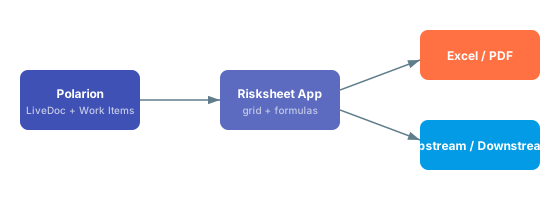 Risksheet uses Polarion's standard link roles to connect risk items to upstream requirements and downstream mitigation tasks. You configure upstream traceability in the sheet configuration so that linked requirements appear as columns in the grid, and the same mechanism feeds downstream traceability for tasks and verification items. Because links are normal Polarion links, they are visible in Polarion's traceability matrices and impact analysis views.
See [Integration](/risksheet/guides/integration/index) for step-by-step configuration and [Configuration Examples](/risksheet/reference/examples/index) for upstream and downstream snippets.
Yes. Risksheet supports export of the grid to Excel and PDF using the export configuration, and the exported tables preserve formatting such as severity colors and merged cells where applicable. There is no direct round-trip import — Polarion remains the system of record — but you can use Polarion's standard Excel round-trip on the underlying work items if your process requires it. See [Export](/risksheet/guides/export/index) for the supported export options.
Severity, occurrence, detection, ASIL levels, and similar pick-lists are defined as standard Polarion enumerations under **Administration > Enumerations**. A custom field on the relevant work item type binds to the enum, and the column in the risksheet uses `type: rating:` or `type: enum:` with `bindings: ` to reference it. The server loads enum values automatically, so the grid stays in sync with whatever the Polarion administrator configures.
The severity/occurrence/detection scales are not defined inside the sheet configuration. Define them as Polarion enumerations and reference them by id from the column — that way the same scales are reusable across documents and reports.
Yes, through Polarion's standard configuration inheritance and template documents. A LiveDoc template can carry a sheet configuration, and documents created from that template inherit and can extend it. For cross-project sharing, place the template in a shared project or use Polarion's global configuration mechanisms. See [Templates](/risksheet/reference/templates/index) and [Configuration Management](/risksheet/guides/configuration/index) for the recommended patterns.
Risksheet provides a server-side API surface that can be used from Velocity scripts and Polarion's existing extension points to render content, compute values, or assemble reports. For most automation needs — bulk updates, reporting, or integrations with external systems — the recommended approach is to use Polarion's REST or SOAP APIs against the underlying work items, since that is where the data actually lives. See [API](/risksheet/reference/api/index) for the available Velocity context entries.
Because every risk item is a Polarion work item, you can build Polarion LiveReport widgets and queries against the same data the grid displays. Typical patterns include displaying top-RPN risks, counting open mitigation tasks, or charting risk distribution by severity. There is no special Risksheet widget — use the standard LiveReport widgets with Lucene queries against the work item type used for risk items.
Yes. Risksheet supports cross-project linking through Polarion's normal cross-project link roles, which makes it possible to share generic failure modes, threat libraries, or component-level risks across multiple project risksheets. The column definition simply needs to allow the appropriate work item types and projects through its picker configuration. See the [Integration](/risksheet/guides/integration/index) guide for examples.
Risksheet provides three review styles: comment-based review, work-item-based review, and approval review. The approval review records approval-tagged comments on the relevant work items, which is useful for audit evidence and ISO 26262 / ISO 14971 review records.
Risksheet's approval review does NOT trigger Polarion's formal approval state transitions (draft → reviewed → approved). If your process requires a state transition, drive it from a Polarion workflow action on the work item or document rather than from the risksheet approval review alone.
See [Review Management](/risksheet/guides/reviews/index) for the recommended setup.
Risksheet is a generic tool that supports any risk management methodology, including FMEA, HARA, TARA, STRIDE, and CVSS. Nextedy provides solution templates for typical methodologies across automotive (ISO 26262), medical devices (ISO 14971), industrial (IEC 61508), and cybersecurity (ISO/SAE 21434, IEC 62443) industries. Pick the closest solution template for your industry, understand its configuration, then modify it to match your process — never start from a blank configuration.
| Methodology | Typical scales | Common standards |
| ----------- | ------------------------------------------ | --------------------- |
| FMEA | severity, occurrence, detection (RPN) | AIAG & VDA, ISO 14971 |
| HARA | severity, exposure, controllability (ASIL) | ISO 26262 |
| TARA | impact, attack feasibility | ISO/SAE 21434 |
| CVSS | base, temporal, environmental | CVSS v3.1 / v4.0 |
| STRIDE | threat category, impact | Microsoft SDL |
Start with the [Integration](/risksheet/guides/integration/index) guide for end-to-end setup, then consult [Configuration Examples](/risksheet/reference/examples/index) for ready-to-adapt sheet configurations. For questions about feature scope see [Feature Questions](/risksheet/faq/features), and for environment/version questions see [Compatibility](/risksheet/reference/compatibility/index). If something behaves unexpectedly, check [Common Troubleshooting](/risksheet/faq/troubleshooting-faq) first.
Load time is driven far more by the **number of linked-item columns** (especially `multiItemLink`) than by the number of rows. If a sheet feels slow, look at column count and broken cross-project links **before** worrying about row count.
## Performance Profile at a Glance
The diagram below shows the main factors that drive risksheet load time, in rough order of impact. Use it to decide where to focus when investigating a slow sheet.
Risksheet uses Polarion's standard link roles to connect risk items to upstream requirements and downstream mitigation tasks. You configure upstream traceability in the sheet configuration so that linked requirements appear as columns in the grid, and the same mechanism feeds downstream traceability for tasks and verification items. Because links are normal Polarion links, they are visible in Polarion's traceability matrices and impact analysis views.
See [Integration](/risksheet/guides/integration/index) for step-by-step configuration and [Configuration Examples](/risksheet/reference/examples/index) for upstream and downstream snippets.
Yes. Risksheet supports export of the grid to Excel and PDF using the export configuration, and the exported tables preserve formatting such as severity colors and merged cells where applicable. There is no direct round-trip import — Polarion remains the system of record — but you can use Polarion's standard Excel round-trip on the underlying work items if your process requires it. See [Export](/risksheet/guides/export/index) for the supported export options.
Severity, occurrence, detection, ASIL levels, and similar pick-lists are defined as standard Polarion enumerations under **Administration > Enumerations**. A custom field on the relevant work item type binds to the enum, and the column in the risksheet uses `type: rating:` or `type: enum:` with `bindings: ` to reference it. The server loads enum values automatically, so the grid stays in sync with whatever the Polarion administrator configures.
The severity/occurrence/detection scales are not defined inside the sheet configuration. Define them as Polarion enumerations and reference them by id from the column — that way the same scales are reusable across documents and reports.
Yes, through Polarion's standard configuration inheritance and template documents. A LiveDoc template can carry a sheet configuration, and documents created from that template inherit and can extend it. For cross-project sharing, place the template in a shared project or use Polarion's global configuration mechanisms. See [Templates](/risksheet/reference/templates/index) and [Configuration Management](/risksheet/guides/configuration/index) for the recommended patterns.
Risksheet provides a server-side API surface that can be used from Velocity scripts and Polarion's existing extension points to render content, compute values, or assemble reports. For most automation needs — bulk updates, reporting, or integrations with external systems — the recommended approach is to use Polarion's REST or SOAP APIs against the underlying work items, since that is where the data actually lives. See [API](/risksheet/reference/api/index) for the available Velocity context entries.
Because every risk item is a Polarion work item, you can build Polarion LiveReport widgets and queries against the same data the grid displays. Typical patterns include displaying top-RPN risks, counting open mitigation tasks, or charting risk distribution by severity. There is no special Risksheet widget — use the standard LiveReport widgets with Lucene queries against the work item type used for risk items.
Yes. Risksheet supports cross-project linking through Polarion's normal cross-project link roles, which makes it possible to share generic failure modes, threat libraries, or component-level risks across multiple project risksheets. The column definition simply needs to allow the appropriate work item types and projects through its picker configuration. See the [Integration](/risksheet/guides/integration/index) guide for examples.
Risksheet provides three review styles: comment-based review, work-item-based review, and approval review. The approval review records approval-tagged comments on the relevant work items, which is useful for audit evidence and ISO 26262 / ISO 14971 review records.
Risksheet's approval review does NOT trigger Polarion's formal approval state transitions (draft → reviewed → approved). If your process requires a state transition, drive it from a Polarion workflow action on the work item or document rather than from the risksheet approval review alone.
See [Review Management](/risksheet/guides/reviews/index) for the recommended setup.
Risksheet is a generic tool that supports any risk management methodology, including FMEA, HARA, TARA, STRIDE, and CVSS. Nextedy provides solution templates for typical methodologies across automotive (ISO 26262), medical devices (ISO 14971), industrial (IEC 61508), and cybersecurity (ISO/SAE 21434, IEC 62443) industries. Pick the closest solution template for your industry, understand its configuration, then modify it to match your process — never start from a blank configuration.
| Methodology | Typical scales | Common standards |
| ----------- | ------------------------------------------ | --------------------- |
| FMEA | severity, occurrence, detection (RPN) | AIAG & VDA, ISO 14971 |
| HARA | severity, exposure, controllability (ASIL) | ISO 26262 |
| TARA | impact, attack feasibility | ISO/SAE 21434 |
| CVSS | base, temporal, environmental | CVSS v3.1 / v4.0 |
| STRIDE | threat category, impact | Microsoft SDL |
Start with the [Integration](/risksheet/guides/integration/index) guide for end-to-end setup, then consult [Configuration Examples](/risksheet/reference/examples/index) for ready-to-adapt sheet configurations. For questions about feature scope see [Feature Questions](/risksheet/faq/features), and for environment/version questions see [Compatibility](/risksheet/reference/compatibility/index). If something behaves unexpectedly, check [Common Troubleshooting](/risksheet/faq/troubleshooting-faq) first.
Load time is driven far more by the **number of linked-item columns** (especially `multiItemLink`) than by the number of rows. If a sheet feels slow, look at column count and broken cross-project links **before** worrying about row count.
## Performance Profile at a Glance
The diagram below shows the main factors that drive risksheet load time, in rough order of impact. Use it to decide where to focus when investigating a slow sheet.
 ## Load Time and Sizing
Multi-minute load times are almost always caused by one of two issues: **unresolvable linked work items** (broken cross-project references) or **too many item-link columns** in a single sheet. Both make the server do disproportionate work for every row when building the grid. Check the Polarion server log first for stack traces around the time of a slow load; if you see exceptions related to resolving linked items, that is your root cause. See [Common Troubleshooting](/risksheet/faq/troubleshooting-faq) for diagnostic steps.
Column count, specifically item-link and `multiItemLink` columns, has a much larger impact than row count. A sheet with 250 rows and 17 linked-item columns (7 of them `multiItemLink`) can be noticeably slower than a sheet with several times more rows and fewer link columns. Each linked-item column triggers additional work item lookups per row, and that cost compounds.
There is no hard limit, but performance scales much better when you keep sheets focused. Sheets in the low hundreds of rows generally load quickly when columns are well chosen. If you find yourself well above that and the sheet is also column-heavy, splitting by methodology or scope is usually a bigger win than trying to optimize row count.
## Sheet Design for Performance
It can be. Combining multiple Failure Mode and Effects Analysis (FMEA) variants — for example usability FMEA and design FMEA — in a single sheet tends to push the column count high, because each variant adds its own columns and links. The recommended optimization is to **split one large sheet into dedicated sheets per FMEA type**. Each sheet ends up smaller, faster, and easier to review. See [Risk Management](/risksheet/guides/risk-management/index) for guidance on structuring methodology-specific sheets.
There is no fixed threshold, but if a sheet has many item-link columns and several `multiItemLink` columns, expect load time to grow noticeably. Treat each `multiItemLink` column as a significant cost, and ask whether the relationship truly needs to be visible in this sheet or whether it can live on an upstream document. See [Column Configuration](/risksheet/guides/columns/index) for column-design patterns.
Sometimes, yes. A saved view limits which columns are displayed for a given workflow stage, which can reduce client-side rendering work. However, saved views do not reduce the underlying data the server must assemble — if the slowness comes from resolving links, switching views will not help. Use views for workflow staging; use sheet splitting for true performance relief. See [Reference: Configuration Examples](/risksheet/reference/examples/index).
## Concurrency and Multi-User Use
A risksheet is editable by multiple users at the same time, but each open instance pulls its own data from Polarion. With heavy sheets (high column count, many linked items), concurrent users compound the load on the Polarion server. If you see slowdowns only when several users are active, the bottleneck is more likely on the Polarion server side than in Risksheet itself.
Risksheet does not maintain a separate data store. Every read and write is against Polarion work items, subject to Polarion authorization. That means Polarion server health, indexing state, and authorization checks all directly affect risksheet load time.
## Diagnosing Slowness
Start with the Polarion server log. If you see exceptions related to unresolvable work item references occurring during grid load, the cause is broken cross-project links rather than the sheet itself. If you see general Polarion slowness — database reindexing in progress, long-running queries on unrelated documents, high CPU — then Risksheet is downstream of a server issue and tuning the sheet will not help. See [Common Troubleshooting](/risksheet/faq/troubleshooting-faq).
Yes. Historical database reindexing and similar Polarion server maintenance operations can make every work item read slower, which Risksheet feels acutely because it reads many work items per page load. In documented cases, what looked like a Risksheet performance problem turned out to be a Polarion server misconfiguration. Always check whether scheduled maintenance is running before drilling into sheet configuration.
Find them and fix them. Unresolvable linked work items — items that no longer exist or are inaccessible to the current user — cause expensive exceptions every time the grid tries to assemble that row, and the cost can dominate page load. Review item-link columns for stale references, clean up links to removed work items, and verify cross-project access for users who report slowness.
A single unresolvable reference may not be noticeable, but dozens across many rows can turn a sub-second page load into a multi-minute wait. Sweep stale links periodically, especially after project moves or work item deletions.
## Optimization Checklist
| Action | When to apply | Expected benefit |
| ----------------------------------------- | ------------------------------------------------------- | ---------------------------------- |
| Split combined FMEA sheets by methodology | Sheet mixes multiple analysis types | High — fewer columns per sheet |
| Reduce `multiItemLink` columns | Several multi-link columns in one sheet | High — fewer per-row lookups |
| Clean up broken cross-project links | Server log shows resolve errors | High — removes per-row exceptions |
| Use saved views for staged workflows | Different users need different columns | Medium — less client rendering |
| Check Polarion server maintenance state | Slowness coincides with admin tasks | Diagnostic — rule out server cause |
| Reduce row count | Sheet is very large and column count is already minimal | Low — usually not the bottleneck |
The optimal split point between sheets, the right number of `multiItemLink` columns, and acceptable load times all depend on your Polarion deployment, hardware, and user load. Treat the guidance above as starting points and measure in your own environment.
Whether you are adopting Risksheet for the first time or moving an existing analysis to a new version, begin from one of the Nextedy solution templates that matches your methodology (FMEA, HARA, TARA, STRIDE, CVSS). Templates carry verified `columns`, `levels`, `dataTypes`, `formulas`, `cellDecorators`, and `styles` sections. Modify a template to match your process rather than authoring a sheet configuration from a blank file. See [Configuration Examples](/risksheet/reference/examples/index) and the [Templates](/risksheet/reference/templates/index) reference.
A Risksheet upgrade replaces the server-side Polarion plugin and the client-side grid renderer. Your existing sheet configurations, top panel templates, PDF export templates, and Polarion work items are not modified by the upgrade. New configuration properties become *available* to use, but documents continue to function with their existing configuration until you opt in.
In most cases no. Risksheet upgrades aim to be backwards-compatible — existing `columns`, `levels`, `dataTypes`, `formulas`, `cellDecorators`, and `styles` continue to work. Migration is typically needed only when you want to adopt a new property (for example `createInDocument` or `linkToRisksheet`) or fix a property name that was previously misspelled. See [Configuration Management](/risksheet/guides/configuration/index) for the recommended workflow.
From version 25.5.0 onward, the configuration editor supports YAML editing with syntax highlighting, error detection, and history. Open the document menu and choose **Menu > Configuration > Edit Risksheet Configuration**. The underlying file remains the sheet configuration (`risksheet.json`) — the editor presents it as YAML so the file is easier to read and review.
## Load Time and Sizing
Multi-minute load times are almost always caused by one of two issues: **unresolvable linked work items** (broken cross-project references) or **too many item-link columns** in a single sheet. Both make the server do disproportionate work for every row when building the grid. Check the Polarion server log first for stack traces around the time of a slow load; if you see exceptions related to resolving linked items, that is your root cause. See [Common Troubleshooting](/risksheet/faq/troubleshooting-faq) for diagnostic steps.
Column count, specifically item-link and `multiItemLink` columns, has a much larger impact than row count. A sheet with 250 rows and 17 linked-item columns (7 of them `multiItemLink`) can be noticeably slower than a sheet with several times more rows and fewer link columns. Each linked-item column triggers additional work item lookups per row, and that cost compounds.
There is no hard limit, but performance scales much better when you keep sheets focused. Sheets in the low hundreds of rows generally load quickly when columns are well chosen. If you find yourself well above that and the sheet is also column-heavy, splitting by methodology or scope is usually a bigger win than trying to optimize row count.
## Sheet Design for Performance
It can be. Combining multiple Failure Mode and Effects Analysis (FMEA) variants — for example usability FMEA and design FMEA — in a single sheet tends to push the column count high, because each variant adds its own columns and links. The recommended optimization is to **split one large sheet into dedicated sheets per FMEA type**. Each sheet ends up smaller, faster, and easier to review. See [Risk Management](/risksheet/guides/risk-management/index) for guidance on structuring methodology-specific sheets.
There is no fixed threshold, but if a sheet has many item-link columns and several `multiItemLink` columns, expect load time to grow noticeably. Treat each `multiItemLink` column as a significant cost, and ask whether the relationship truly needs to be visible in this sheet or whether it can live on an upstream document. See [Column Configuration](/risksheet/guides/columns/index) for column-design patterns.
Sometimes, yes. A saved view limits which columns are displayed for a given workflow stage, which can reduce client-side rendering work. However, saved views do not reduce the underlying data the server must assemble — if the slowness comes from resolving links, switching views will not help. Use views for workflow staging; use sheet splitting for true performance relief. See [Reference: Configuration Examples](/risksheet/reference/examples/index).
## Concurrency and Multi-User Use
A risksheet is editable by multiple users at the same time, but each open instance pulls its own data from Polarion. With heavy sheets (high column count, many linked items), concurrent users compound the load on the Polarion server. If you see slowdowns only when several users are active, the bottleneck is more likely on the Polarion server side than in Risksheet itself.
Risksheet does not maintain a separate data store. Every read and write is against Polarion work items, subject to Polarion authorization. That means Polarion server health, indexing state, and authorization checks all directly affect risksheet load time.
## Diagnosing Slowness
Start with the Polarion server log. If you see exceptions related to unresolvable work item references occurring during grid load, the cause is broken cross-project links rather than the sheet itself. If you see general Polarion slowness — database reindexing in progress, long-running queries on unrelated documents, high CPU — then Risksheet is downstream of a server issue and tuning the sheet will not help. See [Common Troubleshooting](/risksheet/faq/troubleshooting-faq).
Yes. Historical database reindexing and similar Polarion server maintenance operations can make every work item read slower, which Risksheet feels acutely because it reads many work items per page load. In documented cases, what looked like a Risksheet performance problem turned out to be a Polarion server misconfiguration. Always check whether scheduled maintenance is running before drilling into sheet configuration.
Find them and fix them. Unresolvable linked work items — items that no longer exist or are inaccessible to the current user — cause expensive exceptions every time the grid tries to assemble that row, and the cost can dominate page load. Review item-link columns for stale references, clean up links to removed work items, and verify cross-project access for users who report slowness.
A single unresolvable reference may not be noticeable, but dozens across many rows can turn a sub-second page load into a multi-minute wait. Sweep stale links periodically, especially after project moves or work item deletions.
## Optimization Checklist
| Action | When to apply | Expected benefit |
| ----------------------------------------- | ------------------------------------------------------- | ---------------------------------- |
| Split combined FMEA sheets by methodology | Sheet mixes multiple analysis types | High — fewer columns per sheet |
| Reduce `multiItemLink` columns | Several multi-link columns in one sheet | High — fewer per-row lookups |
| Clean up broken cross-project links | Server log shows resolve errors | High — removes per-row exceptions |
| Use saved views for staged workflows | Different users need different columns | Medium — less client rendering |
| Check Polarion server maintenance state | Slowness coincides with admin tasks | Diagnostic — rule out server cause |
| Reduce row count | Sheet is very large and column count is already minimal | Low — usually not the bottleneck |
The optimal split point between sheets, the right number of `multiItemLink` columns, and acceptable load times all depend on your Polarion deployment, hardware, and user load. Treat the guidance above as starting points and measure in your own environment.
Whether you are adopting Risksheet for the first time or moving an existing analysis to a new version, begin from one of the Nextedy solution templates that matches your methodology (FMEA, HARA, TARA, STRIDE, CVSS). Templates carry verified `columns`, `levels`, `dataTypes`, `formulas`, `cellDecorators`, and `styles` sections. Modify a template to match your process rather than authoring a sheet configuration from a blank file. See [Configuration Examples](/risksheet/reference/examples/index) and the [Templates](/risksheet/reference/templates/index) reference.
A Risksheet upgrade replaces the server-side Polarion plugin and the client-side grid renderer. Your existing sheet configurations, top panel templates, PDF export templates, and Polarion work items are not modified by the upgrade. New configuration properties become *available* to use, but documents continue to function with their existing configuration until you opt in.
In most cases no. Risksheet upgrades aim to be backwards-compatible — existing `columns`, `levels`, `dataTypes`, `formulas`, `cellDecorators`, and `styles` continue to work. Migration is typically needed only when you want to adopt a new property (for example `createInDocument` or `linkToRisksheet`) or fix a property name that was previously misspelled. See [Configuration Management](/risksheet/guides/configuration/index) for the recommended workflow.
From version 25.5.0 onward, the configuration editor supports YAML editing with syntax highlighting, error detection, and history. Open the document menu and choose **Menu > Configuration > Edit Risksheet Configuration**. The underlying file remains the sheet configuration (`risksheet.json`) — the editor presents it as YAML so the file is easier to read and review.
 Newer properties can be added incrementally to an existing sheet configuration once the server has been upgraded to the required version. Examples include `createInDocument` for choosing where new tasks are created, `linkToRisksheet` on `dataTypes.task` for subsheet navigation, and dependent enums at the column level. Add only the properties you need and leave the rest of the configuration unchanged.
After adding a new property, open the document in Polarion and confirm the grid behaves as expected before rolling the change out to templates and child documents.
By far the most common is the column property `bindings` (plural). Some older or hand-edited configurations contain `binding` (singular), which silently fails because the column never resolves a Polarion field. When you migrate, search every `columns` entry and confirm the property is `bindings: `. The reference for column properties is in [Column Types](/risksheet/reference/columns/index) and [Fields](/risksheet/reference/fields/index).
Remove them. Those three top-level sections do not exist in the real Risksheet engine — the engine ignores them entirely. Rating scales and enumerated values are defined as Polarion enumerations in **Administration > Nextedy Risksheet > Setup** and referenced from columns via `type: rating:`, `type: enum:`, or `type: multiEnum:`. Dependent enums are a column-level feature available from v25.3.1, not a top-level configuration section.
| Section in old config | What to do | Replacement mechanism |
| --------------------- | ---------- | --------------------------------------------------------------------------------------------------------- |
| `ratings: {}` | Delete | Define ratings as Polarion enumerations; reference with `type: rating:` |
| `enums: {}` | Delete | Define enums as Polarion enumerations; reference with `type: enum:` or `type: multiEnum:` |
| `relations: []` | Delete | Configure dependent enums at the column level (v25.3.1+) |
A document inherits configuration from its template at the point of creation and on subsequent **Refresh from Template** actions. After an upgrade, you can update a template first, validate it on a sandbox document, and then propagate the change to existing documents at your own pace. Because all data lives in Polarion work items and not in a Risksheet-private store, refreshing a configuration never moves or rewrites your risk items. See [Templates](/risksheet/reference/templates/index) and [Configuration Management](/risksheet/guides/configuration/index).
The licensing tier affects what users can do, not how Risksheet is configured. Three tiers are supported: ALM, Requirements, and QA licenses provide full create-and-modify access; the PRO license can modify existing Risksheet rows but cannot create new ones; the REVIEWER license is read-only. See [Licensing](/risksheet/guides/licensing/index) and the [Licensing Model](/risksheet/faq/licensing-model) FAQ for details.
Older generated documentation sometimes used the property name `columns` for saved views — the real property name is `columnIds`. When migrating a `views` entry, rename the array to `columnIds` and check whether you want to use the `@all` shorthand or the `-columnId` exclude prefix:
```yaml theme={null}
views:
- name: Full Analysis
defaultView: true
columnIds:
- "@all"
- name: Initial Risk Ranking
columnIds:
- failureMode
- severity
- occurrence
- name: No Up/Down Risks
columnIds:
- "@all"
- "-upstreamRisks"
```
The `defaultView` property (v24.1.0+) marks which view loads first when the document opens. See [Saved Views](/risksheet/guides/columns/index) under column configuration guides.
Yes — `formulas` and `cellDecorators` are evaluated client-side and are not transformed by upgrades. The recommended pattern, especially in regulated industries, is to keep `formulas` thin and define the heavy logic (risk matrices, multi-field conditional formatting) in the top panel configuration (`risksheetTopPanel.vm`). This separation keeps the sheet configuration auditable while custom logic stays under code review. See [Formulas](/risksheet/reference/formulas/index) and [Styling](/risksheet/reference/styling/index).
The configuration reference for each property notes the minimum version where applicable. Examples include `editableReferencedWorkItems` (v23.3.3+), `checkLinkRoleCompliance` (v24.2.2+), `createInDocument` (v24.8.1+), `moduleOnlyPermissions` (v24.8.5+), the dependent enum column feature (v25.3.1+), and YAML editing in the configuration editor (v25.5.0+). Before adopting a property, confirm your server is at least at the listed version. See [Compatibility](/risksheet/reference/compatibility/index) and [Configuration](/risksheet/reference/configuration/index).
Risksheet runs inside Polarion ALM. Always verify the Polarion version your environment runs and the Risksheet plugin version are compatible before upgrading either component. Your Polarion administrator should perform the upgrade and run a sandbox validation before changing production templates.
## Related pages
* [Configuration Questions](/risksheet/faq/configuration) — general configuration questions
* [Licensing Questions](/risksheet/faq/licensing) — license tiers and entitlement
* [Common Troubleshooting](/risksheet/faq/troubleshooting-faq) — issues seen during and after upgrades
* [Configuration Management](/risksheet/guides/configuration/index) — how to roll configuration changes safely
* [Compatibility](/risksheet/reference/compatibility/index) — version requirements per property
Newer properties can be added incrementally to an existing sheet configuration once the server has been upgraded to the required version. Examples include `createInDocument` for choosing where new tasks are created, `linkToRisksheet` on `dataTypes.task` for subsheet navigation, and dependent enums at the column level. Add only the properties you need and leave the rest of the configuration unchanged.
After adding a new property, open the document in Polarion and confirm the grid behaves as expected before rolling the change out to templates and child documents.
By far the most common is the column property `bindings` (plural). Some older or hand-edited configurations contain `binding` (singular), which silently fails because the column never resolves a Polarion field. When you migrate, search every `columns` entry and confirm the property is `bindings: `. The reference for column properties is in [Column Types](/risksheet/reference/columns/index) and [Fields](/risksheet/reference/fields/index).
Remove them. Those three top-level sections do not exist in the real Risksheet engine — the engine ignores them entirely. Rating scales and enumerated values are defined as Polarion enumerations in **Administration > Nextedy Risksheet > Setup** and referenced from columns via `type: rating:`, `type: enum:`, or `type: multiEnum:`. Dependent enums are a column-level feature available from v25.3.1, not a top-level configuration section.
| Section in old config | What to do | Replacement mechanism |
| --------------------- | ---------- | --------------------------------------------------------------------------------------------------------- |
| `ratings: {}` | Delete | Define ratings as Polarion enumerations; reference with `type: rating:` |
| `enums: {}` | Delete | Define enums as Polarion enumerations; reference with `type: enum:` or `type: multiEnum:` |
| `relations: []` | Delete | Configure dependent enums at the column level (v25.3.1+) |
A document inherits configuration from its template at the point of creation and on subsequent **Refresh from Template** actions. After an upgrade, you can update a template first, validate it on a sandbox document, and then propagate the change to existing documents at your own pace. Because all data lives in Polarion work items and not in a Risksheet-private store, refreshing a configuration never moves or rewrites your risk items. See [Templates](/risksheet/reference/templates/index) and [Configuration Management](/risksheet/guides/configuration/index).
The licensing tier affects what users can do, not how Risksheet is configured. Three tiers are supported: ALM, Requirements, and QA licenses provide full create-and-modify access; the PRO license can modify existing Risksheet rows but cannot create new ones; the REVIEWER license is read-only. See [Licensing](/risksheet/guides/licensing/index) and the [Licensing Model](/risksheet/faq/licensing-model) FAQ for details.
Older generated documentation sometimes used the property name `columns` for saved views — the real property name is `columnIds`. When migrating a `views` entry, rename the array to `columnIds` and check whether you want to use the `@all` shorthand or the `-columnId` exclude prefix:
```yaml theme={null}
views:
- name: Full Analysis
defaultView: true
columnIds:
- "@all"
- name: Initial Risk Ranking
columnIds:
- failureMode
- severity
- occurrence
- name: No Up/Down Risks
columnIds:
- "@all"
- "-upstreamRisks"
```
The `defaultView` property (v24.1.0+) marks which view loads first when the document opens. See [Saved Views](/risksheet/guides/columns/index) under column configuration guides.
Yes — `formulas` and `cellDecorators` are evaluated client-side and are not transformed by upgrades. The recommended pattern, especially in regulated industries, is to keep `formulas` thin and define the heavy logic (risk matrices, multi-field conditional formatting) in the top panel configuration (`risksheetTopPanel.vm`). This separation keeps the sheet configuration auditable while custom logic stays under code review. See [Formulas](/risksheet/reference/formulas/index) and [Styling](/risksheet/reference/styling/index).
The configuration reference for each property notes the minimum version where applicable. Examples include `editableReferencedWorkItems` (v23.3.3+), `checkLinkRoleCompliance` (v24.2.2+), `createInDocument` (v24.8.1+), `moduleOnlyPermissions` (v24.8.5+), the dependent enum column feature (v25.3.1+), and YAML editing in the configuration editor (v25.5.0+). Before adopting a property, confirm your server is at least at the listed version. See [Compatibility](/risksheet/reference/compatibility/index) and [Configuration](/risksheet/reference/configuration/index).
Risksheet runs inside Polarion ALM. Always verify the Polarion version your environment runs and the Risksheet plugin version are compatible before upgrading either component. Your Polarion administrator should perform the upgrade and run a sandbox validation before changing production templates.
## Related pages
* [Configuration Questions](/risksheet/faq/configuration) — general configuration questions
* [Licensing Questions](/risksheet/faq/licensing) — license tiers and entitlement
* [Common Troubleshooting](/risksheet/faq/troubleshooting-faq) — issues seen during and after upgrades
* [Configuration Management](/risksheet/guides/configuration/index) — how to roll configuration changes safely
* [Compatibility](/risksheet/reference/compatibility/index) — version requirements per property
 ***
Risksheet distinguishes between two categories of users. **Server users** are all registered users on the Siemens Polarion ALM server, regardless of whether they hold a Polarion license or use Risksheet. **Active users** are users explicitly assigned to Risksheet through a special user group, and they can create, edit, and manage risk items. All other server users receive **read-only access** through the Connect license, allowing them to view risk analysis data without editing.
Risksheet counts **all registered users on the Polarion server** as server users -- not just users who hold Polarion licenses. If your Polarion server has 203 registered users but only 50 Polarion license holders, the Risksheet server user count is 203. This distinction frequently causes confusion during initial licensing.
Active users are managed by adding user email addresses to a special user group in Polarion Administration. When you assign users to this group, they gain full editing capabilities in Risksheet including creating risk items, editing cell values, and saving changes. Users not in the group retain read-only viewing access. The specific group name depends on your product configuration:
* **Risksheet only**: Assign users to the `nextedy_risksheet_users` group
* **Risksheet + Powersheet**: Assign users to the `nextedy_powersheet_users` group (see the migration question below)
You must have an active Risksheet license before you can assign active users to the group. The user group assignment feature is only available with a valid production license.
Risksheet is available in tiered licensing based on the number of active users:
| Tier | Active Users | Server Users | Notes |
| ----------- | ---------------------- | -------------------------- | --------------------------------------- |
| Small team | 20 active users | Unlimited (read-only view) | Suitable for departmental risk teams |
| Medium team | 50 active users | Unlimited (read-only view) | Cross-functional deployment |
| Unlimited | Unlimited active users | Unlimited | Cost-effective above 60-70 active users |
| Active Users Needed | Recommended Tier | Notes |
| ------------------- | ---------------------- | ------------------------------------ |
| \< 20 | Small team (20 users) | Suitable for departmental risk teams |
| 20 -- 50 | Medium team (50 users) | Cross-functional deployment |
| 50 -- 70 | Compare tier pricing | Unlimited may be more cost-effective |
| > 70 | Unlimited | Best value above 60-70 active users |
The unlimited licensing tier becomes cost-effective when your organization has more than 60-70 active users who need editing capabilities. If you anticipate growth beyond 50 active users, evaluate the unlimited tier during your initial purchase. For current pricing details, see the [Risksheet pricing FAQ](https://www.nextedy.com/product/nextedy-risksheet/#faq).
The Connect license provides **read-only access** to Risksheet for all Polarion server users who are not assigned as active users. With the Connect license, non-active users can view risk analysis data, browse risk tables, and see all column values, but they cannot create new risk items, edit cell values, or save changes. This ensures that stakeholders, auditors, and reviewers can access risk data without consuming active user slots.
The SMB (small and medium business) discount is a reduced pricing tier available to organizations that stay within 50 server users on the Polarion server. Since server users count all registered accounts regardless of license type, exceeding the 50 server user threshold disqualifies the SMB pricing. Regularly audit your Polarion server for inactive or deprovisioned user accounts to maintain eligibility.
Contact Nextedy sales for current SMB pricing details and eligibility requirements -- see the [Risksheet pricing FAQ](https://www.nextedy.com/product/nextedy-risksheet/#faq) for the latest information. The 50 server user threshold is based on all registered accounts on the Polarion server.
Risksheet counts **all registered server users** on the Polarion server, not Polarion license holders. This is a critical distinction. For example, if you have 7 named Risksheet licenses and 203 registered accounts on the server, the system counts 203 server users. To stay within license limits, you can either clean up inactive server accounts or upgrade your Risksheet license tier. Common sources of unexpected server user counts include:
* Service accounts used by integrations
* Deactivated users who were never removed from the server
* Test accounts from previous deployments
* Integration accounts for CI/CD systems
When both Risksheet and Powersheet are installed with valid production licenses, Risksheet automatically detects the Powersheet installation and switches to an enhanced configuration that unlocks additional features. This integration is transparent -- no manual configuration is required. However, the **user group assignment changes**:
* Risksheet reads active user assignments from the `nextedy_powersheet_users` group instead of `nextedy_risksheet_users`
* This change is automatic when Powersheet has a valid production license
* Evaluation or trial Powersheet licenses do not trigger this switch
* The dual license system tracks user counts for both products independently
When updating Risksheet across major versions where Powersheet is also installed, verify that your active users are assigned to the correct group (`nextedy_powersheet_users`). The automatic switch from `nextedy_risksheet_users` to `nextedy_powersheet_users` can cause access issues if users are only configured in the old group. Review user group membership before and after the upgrade.
Yes. Evaluation licenses allow you to trial Risksheet with full functionality before purchasing a production license. During evaluation, all Risksheet features are available for assessment. Note that evaluation Powersheet licenses do **not** enable the enhanced Risksheet features that require a production Powersheet license -- the automatic feature unlocking only occurs with a valid production Powersheet license. Evaluation licenses are time-limited and designed for proof-of-concept and capability assessment.
See [Evaluate Risksheet](/risksheet/getting-started/evaluation) for details on starting an evaluation.
Risksheet supports dynamic license revalidation that automatically checks both Risksheet and Powersheet license status. When a license status changes -- for example, when a Powersheet license is activated, expires, or is upgraded from evaluation to production -- Risksheet adjusts available features accordingly without requiring a server restart. The system maintains separate license managers for Risksheet and Powersheet, each tracking server users, configured named users, and configured concurrent users. License changes are detected automatically and the configuration adapts in real time.
If you have a valid Risksheet license but cannot save changes, the most common causes are:
1. **Server user count exceeded**: Your Polarion server has more registered users than your license allows. Risksheet counts all registered server accounts, not just Polarion license holders. Clean up inactive server accounts or upgrade your license tier.
2. **Not assigned as active user**: Your user account is not in the active user group (`nextedy_risksheet_users` or `nextedy_powersheet_users`). Ask your administrator to add your email to the appropriate group.
3. **Read-only Connect access**: You are accessing Risksheet through the Connect license (read-only mode). Contact your administrator to be assigned as an active user.
4. **License group mismatch**: If both Risksheet and Powersheet are installed, ensure you are in the `nextedy_powersheet_users` group rather than the `nextedy_risksheet_users` group.
5. **Polarion ALM license restriction**: Risksheet honors your underlying Polarion ALM license capability (see the next question). If your Polarion license is PRO, you can modify existing risk items but cannot create new lines; if it is REVIEWER, you have read-only access.
6. **Document-level permissions**: The Polarion document itself may have restricted write access. Verify your project role and document permissions.
Risksheet honors the capability of your underlying Polarion ALM license. Three Polarion license tiers map to Risksheet behavior as follows:
| Polarion License | Risksheet Capability |
| --------------------------- | ------------------------------------------------------------- |
| **ALM / Requirements / QA** | Full access -- create new risk items and modify existing ones |
| **PRO** | Modify existing risk items only -- cannot create new lines |
| **REVIEWER** | Read-only access |
This is independent of the Risksheet active-user assignment: a user must be both (a) in the active user group (or accessing read-only via the Connect license) and (b) holding a Polarion license that permits the action they want to perform. For example, an active user with a PRO Polarion license can edit existing failure modes but cannot add a new row to the risk table. To create new risk items, the user must hold an ALM, Requirements, or QA license.
For pricing details on each tier, see the [Risksheet pricing FAQ](https://www.nextedy.com/product/nextedy-risksheet/#faq).
Yes. You can upgrade your licensing tier at any time to increase the number of active users. When you upgrade, the license revalidation mechanism detects the change and adjusts the available active user slots without requiring a server restart. To downgrade, contact Nextedy support to discuss your options. Active user changes take effect immediately once the new license is applied.
The server user count is the total number of registered user accounts on your Polarion server. You can check this through Polarion Administration under user management. Remember that this count includes all accounts -- active users, inactive users, service accounts, and integration accounts. Compare this number against your Risksheet license tier to ensure compliance.
***
For current pricing, custom licensing arrangements, or questions about your specific deployment, see the [Risksheet pricing FAQ](https://www.nextedy.com/product/nextedy-risksheet/#faq) or contact Nextedy sales directly. Pricing tiers, SMB discount eligibility, and unlimited license breakpoints may vary based on your organization's needs.
## Related Pages
* [Evaluate Risksheet](/risksheet/getting-started/evaluation) -- starting a Risksheet evaluation
* [Understanding Licenses](/risksheet/guides/licensing/understanding-licenses) -- in-depth licensing guide
* [General Questions](/risksheet/faq/general) -- general product questions
* [Installation](/risksheet/getting-started/installation) -- installing Risksheet on your Polarion server
This page explains how the **licensing model** works (Active Users, Server Users, Connect, PRO, REVIEWER). For pricing tiers and quote-related questions, see [Pricing Questions](/risksheet/faq/pricing).
## How the Licensing Model Fits Together
The diagram below summarizes the three categories of users that can interact with a risksheet, and what each can do.
***
Risksheet distinguishes between two categories of users. **Server users** are all registered users on the Siemens Polarion ALM server, regardless of whether they hold a Polarion license or use Risksheet. **Active users** are users explicitly assigned to Risksheet through a special user group, and they can create, edit, and manage risk items. All other server users receive **read-only access** through the Connect license, allowing them to view risk analysis data without editing.
Risksheet counts **all registered users on the Polarion server** as server users -- not just users who hold Polarion licenses. If your Polarion server has 203 registered users but only 50 Polarion license holders, the Risksheet server user count is 203. This distinction frequently causes confusion during initial licensing.
Active users are managed by adding user email addresses to a special user group in Polarion Administration. When you assign users to this group, they gain full editing capabilities in Risksheet including creating risk items, editing cell values, and saving changes. Users not in the group retain read-only viewing access. The specific group name depends on your product configuration:
* **Risksheet only**: Assign users to the `nextedy_risksheet_users` group
* **Risksheet + Powersheet**: Assign users to the `nextedy_powersheet_users` group (see the migration question below)
You must have an active Risksheet license before you can assign active users to the group. The user group assignment feature is only available with a valid production license.
Risksheet is available in tiered licensing based on the number of active users:
| Tier | Active Users | Server Users | Notes |
| ----------- | ---------------------- | -------------------------- | --------------------------------------- |
| Small team | 20 active users | Unlimited (read-only view) | Suitable for departmental risk teams |
| Medium team | 50 active users | Unlimited (read-only view) | Cross-functional deployment |
| Unlimited | Unlimited active users | Unlimited | Cost-effective above 60-70 active users |
| Active Users Needed | Recommended Tier | Notes |
| ------------------- | ---------------------- | ------------------------------------ |
| \< 20 | Small team (20 users) | Suitable for departmental risk teams |
| 20 -- 50 | Medium team (50 users) | Cross-functional deployment |
| 50 -- 70 | Compare tier pricing | Unlimited may be more cost-effective |
| > 70 | Unlimited | Best value above 60-70 active users |
The unlimited licensing tier becomes cost-effective when your organization has more than 60-70 active users who need editing capabilities. If you anticipate growth beyond 50 active users, evaluate the unlimited tier during your initial purchase. For current pricing details, see the [Risksheet pricing FAQ](https://www.nextedy.com/product/nextedy-risksheet/#faq).
The Connect license provides **read-only access** to Risksheet for all Polarion server users who are not assigned as active users. With the Connect license, non-active users can view risk analysis data, browse risk tables, and see all column values, but they cannot create new risk items, edit cell values, or save changes. This ensures that stakeholders, auditors, and reviewers can access risk data without consuming active user slots.
The SMB (small and medium business) discount is a reduced pricing tier available to organizations that stay within 50 server users on the Polarion server. Since server users count all registered accounts regardless of license type, exceeding the 50 server user threshold disqualifies the SMB pricing. Regularly audit your Polarion server for inactive or deprovisioned user accounts to maintain eligibility.
Contact Nextedy sales for current SMB pricing details and eligibility requirements -- see the [Risksheet pricing FAQ](https://www.nextedy.com/product/nextedy-risksheet/#faq) for the latest information. The 50 server user threshold is based on all registered accounts on the Polarion server.
Risksheet counts **all registered server users** on the Polarion server, not Polarion license holders. This is a critical distinction. For example, if you have 7 named Risksheet licenses and 203 registered accounts on the server, the system counts 203 server users. To stay within license limits, you can either clean up inactive server accounts or upgrade your Risksheet license tier. Common sources of unexpected server user counts include:
* Service accounts used by integrations
* Deactivated users who were never removed from the server
* Test accounts from previous deployments
* Integration accounts for CI/CD systems
When both Risksheet and Powersheet are installed with valid production licenses, Risksheet automatically detects the Powersheet installation and switches to an enhanced configuration that unlocks additional features. This integration is transparent -- no manual configuration is required. However, the **user group assignment changes**:
* Risksheet reads active user assignments from the `nextedy_powersheet_users` group instead of `nextedy_risksheet_users`
* This change is automatic when Powersheet has a valid production license
* Evaluation or trial Powersheet licenses do not trigger this switch
* The dual license system tracks user counts for both products independently
When updating Risksheet across major versions where Powersheet is also installed, verify that your active users are assigned to the correct group (`nextedy_powersheet_users`). The automatic switch from `nextedy_risksheet_users` to `nextedy_powersheet_users` can cause access issues if users are only configured in the old group. Review user group membership before and after the upgrade.
Yes. Evaluation licenses allow you to trial Risksheet with full functionality before purchasing a production license. During evaluation, all Risksheet features are available for assessment. Note that evaluation Powersheet licenses do **not** enable the enhanced Risksheet features that require a production Powersheet license -- the automatic feature unlocking only occurs with a valid production Powersheet license. Evaluation licenses are time-limited and designed for proof-of-concept and capability assessment.
See [Evaluate Risksheet](/risksheet/getting-started/evaluation) for details on starting an evaluation.
Risksheet supports dynamic license revalidation that automatically checks both Risksheet and Powersheet license status. When a license status changes -- for example, when a Powersheet license is activated, expires, or is upgraded from evaluation to production -- Risksheet adjusts available features accordingly without requiring a server restart. The system maintains separate license managers for Risksheet and Powersheet, each tracking server users, configured named users, and configured concurrent users. License changes are detected automatically and the configuration adapts in real time.
If you have a valid Risksheet license but cannot save changes, the most common causes are:
1. **Server user count exceeded**: Your Polarion server has more registered users than your license allows. Risksheet counts all registered server accounts, not just Polarion license holders. Clean up inactive server accounts or upgrade your license tier.
2. **Not assigned as active user**: Your user account is not in the active user group (`nextedy_risksheet_users` or `nextedy_powersheet_users`). Ask your administrator to add your email to the appropriate group.
3. **Read-only Connect access**: You are accessing Risksheet through the Connect license (read-only mode). Contact your administrator to be assigned as an active user.
4. **License group mismatch**: If both Risksheet and Powersheet are installed, ensure you are in the `nextedy_powersheet_users` group rather than the `nextedy_risksheet_users` group.
5. **Polarion ALM license restriction**: Risksheet honors your underlying Polarion ALM license capability (see the next question). If your Polarion license is PRO, you can modify existing risk items but cannot create new lines; if it is REVIEWER, you have read-only access.
6. **Document-level permissions**: The Polarion document itself may have restricted write access. Verify your project role and document permissions.
Risksheet honors the capability of your underlying Polarion ALM license. Three Polarion license tiers map to Risksheet behavior as follows:
| Polarion License | Risksheet Capability |
| --------------------------- | ------------------------------------------------------------- |
| **ALM / Requirements / QA** | Full access -- create new risk items and modify existing ones |
| **PRO** | Modify existing risk items only -- cannot create new lines |
| **REVIEWER** | Read-only access |
This is independent of the Risksheet active-user assignment: a user must be both (a) in the active user group (or accessing read-only via the Connect license) and (b) holding a Polarion license that permits the action they want to perform. For example, an active user with a PRO Polarion license can edit existing failure modes but cannot add a new row to the risk table. To create new risk items, the user must hold an ALM, Requirements, or QA license.
For pricing details on each tier, see the [Risksheet pricing FAQ](https://www.nextedy.com/product/nextedy-risksheet/#faq).
Yes. You can upgrade your licensing tier at any time to increase the number of active users. When you upgrade, the license revalidation mechanism detects the change and adjusts the available active user slots without requiring a server restart. To downgrade, contact Nextedy support to discuss your options. Active user changes take effect immediately once the new license is applied.
The server user count is the total number of registered user accounts on your Polarion server. You can check this through Polarion Administration under user management. Remember that this count includes all accounts -- active users, inactive users, service accounts, and integration accounts. Compare this number against your Risksheet license tier to ensure compliance.
***
For current pricing, custom licensing arrangements, or questions about your specific deployment, see the [Risksheet pricing FAQ](https://www.nextedy.com/product/nextedy-risksheet/#faq) or contact Nextedy sales directly. Pricing tiers, SMB discount eligibility, and unlimited license breakpoints may vary based on your organization's needs.
## Related Pages
* [Evaluate Risksheet](/risksheet/getting-started/evaluation) -- starting a Risksheet evaluation
* [Understanding Licenses](/risksheet/guides/licensing/understanding-licenses) -- in-depth licensing guide
* [General Questions](/risksheet/faq/general) -- general product questions
* [Installation](/risksheet/getting-started/installation) -- installing Risksheet on your Polarion server
This page explains how the **licensing model** works (Active Users, Server Users, Connect, PRO, REVIEWER). For pricing tiers and quote-related questions, see [Pricing Questions](/risksheet/faq/pricing).
## How the Licensing Model Fits Together
The diagram below summarizes the three categories of users that can interact with a risksheet, and what each can do.
 ## Active Users and Server Users
An **Active User** can create and edit risk items, change the sheet configuration, and run formulas inside a risksheet. A **Server User** is any Polarion user on the server who can open and read risksheets but cannot modify risk data; this read-only access is granted through the **Connect** license that ships with Risksheet. Active Users count against your purchased tier (for example, 20, 50, or unlimited); Server Users are unlimited. See [Licensing Model](/risksheet/faq/licensing-model) for the full breakdown.
Active Users are **explicitly assigned by a Polarion administrator** through a Polarion user group — they are not calculated automatically based on activity. The administrator creates a group, assigns the Active User role to specific users, and adds those users to the group by their account. This is distinct from the default Polarion user role: every Polarion user can open a risksheet read-only, but only members of the Active User group can edit. For the exact administrator workflow, see [Licensing](/risksheet/guides/licensing/index).
A user does not become an Active User simply by opening or editing a risksheet. Until an administrator adds them to the Active User group, they fall back to the Connect (read-only) access level — regardless of their Polarion ALM license.
Risksheet tracks user counts for both server users and configured named users against your purchased tier. The administrator can review the assignment by opening the user group used for Active Users and counting its members. If you need help auditing the assignment or comparing it to your purchased seats, contact Nextedy support.
As a rule of thumb, **unlimited Active User licensing becomes more cost-effective above roughly 60 to 70 Active Users**. Below that threshold, named tiers (typically 20 or 50 Active Users) are usually a better fit. The crossover point depends on your specific quote — see [Pricing Questions](/risksheet/faq/pricing) for how to request a quote that compares tiers side by side.
## Relationship to Polarion ALM Licenses
Yes. Risksheet builds on top of Polarion ALM, and Polarion's license tier determines what a given user can do **inside the risksheet grid**, in addition to the Risksheet Active User assignment.
| Polarion license | What the user can do in a risksheet |
| ------------------------------------ | ------------------------------------------------------------- |
| ALM / Requirements / QA (full named) | Full access: create new risk items, modify existing ones |
| PRO | **Modify existing risk items only** — cannot create new lines |
| REVIEWER | Read-only with comment and approval rights |
A common misconception is that Risksheet operates independently of Polarion ALM licensing. It does not. PRO-licensed users see the grid and can edit cells in existing rows, but **the action to add a new row is disabled**. If your team needs to create risk items, the user must hold an ALM/Requirements/QA-class Polarion license **and** be an Active User in Risksheet.
No. REVIEWER users get read-only access through the Connect license that comes with Risksheet, so they do not consume Active User seats. They can read the grid, leave comments, and participate in approval-based reviews (see [Review Management](/risksheet/guides/reviews/index)).
The exact set of UI actions available to a REVIEWER inside the grid depends on the configured review workflow. Verify your specific scenario against your installed version before final sign-off.
## Risksheet and Powersheet Together
When a valid Powersheet **production** license is present alongside Risksheet, Risksheet automatically switches to an enhanced configuration that unlocks additional features. This switch is **transparent and automatic** — there is no manual setting to toggle. If the Powersheet license is removed or expires, Risksheet reverts to its standard feature set on the next license revalidation.
No. Only a valid **production** Powersheet license activates the enhanced Risksheet configuration. Evaluation or trial Powersheet licenses do not trigger the feature unlock. If you are testing Powersheet alongside Risksheet, expect Risksheet to behave as if Powersheet were not installed until a production license is applied.
No. Risksheet supports dynamic license revalidation and checks both the Risksheet and Powersheet licenses periodically. When the Powersheet status changes — activated, expired, or upgraded from evaluation to production — Risksheet adjusts the available features automatically without a restart.
Yes. Each product has its own license manager and its own user counts (server users, named users, concurrent users where applicable). You can license Risksheet on its own, Powersheet on its own, or both together; the products do not require each other to function.
## Configurations, Documents, and Reuse
The Risksheet license is **server-wide** — it covers all projects on the Polarion server, not just one. A single Risksheet license entitles you to run any number of risksheet documents across any number of projects, subject only to the Active User count tied to your tier.
Yes. A project can contain multiple risksheets, each with its own sheet configuration (the file commonly referred to as `risksheet.json`). This means a single project can run an FMEA, a HARA, and a TARA in parallel, each driven by its own sheet configuration. See [Configuration Management](/risksheet/guides/configuration/index) for how to manage multiple configurations in one project.
Yes. Risk analyses can be reused across product variants through standard Polarion mechanisms — there is no separate per-variant license. The Active User count is what is licensed, not the number of variants or analyses.
The specific reuse mechanism depends on your Polarion setup (branching, document templates, or copy workflows). The Risksheet license does not restrict any of these patterns.
## Trial, Evaluation, and Support
Nextedy provides evaluation builds of Risksheet that include a time-limited license. During evaluation you have access to the same features as a production install, except that any Powersheet-dependent enhancements require a **production** Powersheet license (an evaluation Powersheet license does not unlock them). For a quote, see [Pricing Questions](/risksheet/faq/pricing).
Risksheet ships with starter templates for typical risk analysis methodologies (FMEA, HARA, TARA, STRIDE). The recommended way to evaluate the tool is to pick the closest solution template for your industry, run through its sheet configuration, and adjust it to your process. See [Templates](/risksheet/reference/templates/index) for the available starting points and [Getting Started](/risksheet/getting-started/index) for the end-to-end walkthrough.
Licensing questions, quotes (including comparisons between 20, 50, and unlimited Active User tiers), and quote-for-resale requests are handled by Nextedy sales. Reach out through your reseller or the Nextedy contact channels on the support portal. For technical questions about applying or revalidating an already-issued license, contact Nextedy support and reference your server installation.
If you expect **fewer than \~60 people to actively edit risk items**, a tiered license (20 or 50 Active Users) is usually the most cost-effective choice. Above 60–70 Active Users, the **unlimited** tier typically becomes cheaper than buying additional tier expansions. All other Polarion users can still read risksheets at no extra Risksheet cost through the Connect license.
Risksheet is sold in tiers based on the number of **Active Users** — people who create, edit, or manage risk items in the grid. Standard quote tiers are **20 Active Users**, **50 Active Users**, and **Unlimited Active Users**. All other Siemens Polarion ALM users on the same server get read-only access through the bundled **Connect** license, at no additional Risksheet cost. See [Licensing Model](/risksheet/faq/licensing-model) for the full breakdown of user types.
Choose the tier by counting people who **interactively work in the grid** — entering failure modes, scoring severity/occurrence/detection, assigning mitigation tasks, or running review workflows. Read-only viewers do not consume Active User seats. The diagram below shows the typical decision flow.
## Active Users and Server Users
An **Active User** can create and edit risk items, change the sheet configuration, and run formulas inside a risksheet. A **Server User** is any Polarion user on the server who can open and read risksheets but cannot modify risk data; this read-only access is granted through the **Connect** license that ships with Risksheet. Active Users count against your purchased tier (for example, 20, 50, or unlimited); Server Users are unlimited. See [Licensing Model](/risksheet/faq/licensing-model) for the full breakdown.
Active Users are **explicitly assigned by a Polarion administrator** through a Polarion user group — they are not calculated automatically based on activity. The administrator creates a group, assigns the Active User role to specific users, and adds those users to the group by their account. This is distinct from the default Polarion user role: every Polarion user can open a risksheet read-only, but only members of the Active User group can edit. For the exact administrator workflow, see [Licensing](/risksheet/guides/licensing/index).
A user does not become an Active User simply by opening or editing a risksheet. Until an administrator adds them to the Active User group, they fall back to the Connect (read-only) access level — regardless of their Polarion ALM license.
Risksheet tracks user counts for both server users and configured named users against your purchased tier. The administrator can review the assignment by opening the user group used for Active Users and counting its members. If you need help auditing the assignment or comparing it to your purchased seats, contact Nextedy support.
As a rule of thumb, **unlimited Active User licensing becomes more cost-effective above roughly 60 to 70 Active Users**. Below that threshold, named tiers (typically 20 or 50 Active Users) are usually a better fit. The crossover point depends on your specific quote — see [Pricing Questions](/risksheet/faq/pricing) for how to request a quote that compares tiers side by side.
## Relationship to Polarion ALM Licenses
Yes. Risksheet builds on top of Polarion ALM, and Polarion's license tier determines what a given user can do **inside the risksheet grid**, in addition to the Risksheet Active User assignment.
| Polarion license | What the user can do in a risksheet |
| ------------------------------------ | ------------------------------------------------------------- |
| ALM / Requirements / QA (full named) | Full access: create new risk items, modify existing ones |
| PRO | **Modify existing risk items only** — cannot create new lines |
| REVIEWER | Read-only with comment and approval rights |
A common misconception is that Risksheet operates independently of Polarion ALM licensing. It does not. PRO-licensed users see the grid and can edit cells in existing rows, but **the action to add a new row is disabled**. If your team needs to create risk items, the user must hold an ALM/Requirements/QA-class Polarion license **and** be an Active User in Risksheet.
No. REVIEWER users get read-only access through the Connect license that comes with Risksheet, so they do not consume Active User seats. They can read the grid, leave comments, and participate in approval-based reviews (see [Review Management](/risksheet/guides/reviews/index)).
The exact set of UI actions available to a REVIEWER inside the grid depends on the configured review workflow. Verify your specific scenario against your installed version before final sign-off.
## Risksheet and Powersheet Together
When a valid Powersheet **production** license is present alongside Risksheet, Risksheet automatically switches to an enhanced configuration that unlocks additional features. This switch is **transparent and automatic** — there is no manual setting to toggle. If the Powersheet license is removed or expires, Risksheet reverts to its standard feature set on the next license revalidation.
No. Only a valid **production** Powersheet license activates the enhanced Risksheet configuration. Evaluation or trial Powersheet licenses do not trigger the feature unlock. If you are testing Powersheet alongside Risksheet, expect Risksheet to behave as if Powersheet were not installed until a production license is applied.
No. Risksheet supports dynamic license revalidation and checks both the Risksheet and Powersheet licenses periodically. When the Powersheet status changes — activated, expired, or upgraded from evaluation to production — Risksheet adjusts the available features automatically without a restart.
Yes. Each product has its own license manager and its own user counts (server users, named users, concurrent users where applicable). You can license Risksheet on its own, Powersheet on its own, or both together; the products do not require each other to function.
## Configurations, Documents, and Reuse
The Risksheet license is **server-wide** — it covers all projects on the Polarion server, not just one. A single Risksheet license entitles you to run any number of risksheet documents across any number of projects, subject only to the Active User count tied to your tier.
Yes. A project can contain multiple risksheets, each with its own sheet configuration (the file commonly referred to as `risksheet.json`). This means a single project can run an FMEA, a HARA, and a TARA in parallel, each driven by its own sheet configuration. See [Configuration Management](/risksheet/guides/configuration/index) for how to manage multiple configurations in one project.
Yes. Risk analyses can be reused across product variants through standard Polarion mechanisms — there is no separate per-variant license. The Active User count is what is licensed, not the number of variants or analyses.
The specific reuse mechanism depends on your Polarion setup (branching, document templates, or copy workflows). The Risksheet license does not restrict any of these patterns.
## Trial, Evaluation, and Support
Nextedy provides evaluation builds of Risksheet that include a time-limited license. During evaluation you have access to the same features as a production install, except that any Powersheet-dependent enhancements require a **production** Powersheet license (an evaluation Powersheet license does not unlock them). For a quote, see [Pricing Questions](/risksheet/faq/pricing).
Risksheet ships with starter templates for typical risk analysis methodologies (FMEA, HARA, TARA, STRIDE). The recommended way to evaluate the tool is to pick the closest solution template for your industry, run through its sheet configuration, and adjust it to your process. See [Templates](/risksheet/reference/templates/index) for the available starting points and [Getting Started](/risksheet/getting-started/index) for the end-to-end walkthrough.
Licensing questions, quotes (including comparisons between 20, 50, and unlimited Active User tiers), and quote-for-resale requests are handled by Nextedy sales. Reach out through your reseller or the Nextedy contact channels on the support portal. For technical questions about applying or revalidating an already-issued license, contact Nextedy support and reference your server installation.
If you expect **fewer than \~60 people to actively edit risk items**, a tiered license (20 or 50 Active Users) is usually the most cost-effective choice. Above 60–70 Active Users, the **unlimited** tier typically becomes cheaper than buying additional tier expansions. All other Polarion users can still read risksheets at no extra Risksheet cost through the Connect license.
Risksheet is sold in tiers based on the number of **Active Users** — people who create, edit, or manage risk items in the grid. Standard quote tiers are **20 Active Users**, **50 Active Users**, and **Unlimited Active Users**. All other Siemens Polarion ALM users on the same server get read-only access through the bundled **Connect** license, at no additional Risksheet cost. See [Licensing Model](/risksheet/faq/licensing-model) for the full breakdown of user types.
Choose the tier by counting people who **interactively work in the grid** — entering failure modes, scoring severity/occurrence/detection, assigning mitigation tasks, or running review workflows. Read-only viewers do not consume Active User seats. The diagram below shows the typical decision flow.
 A common pattern: pilot with the 20-user tier during evaluation, then move up to 50 or Unlimited when the program rolls out across multiple teams.
Based on customer purchasing patterns, **Unlimited becomes the cheaper option once you exceed roughly 60–70 Active Users**. Below that, the 20- or 50-user tiers are usually less expensive than adding incremental seats up to unlimited. Above that, the math reverses — adding seats one tier at a time costs more than going straight to Unlimited. Request quotes for the tiers near your expected user count to confirm for your specific situation.
Polarion server users who do **not** create or edit risk items are **not** counted against your Active User quota. They access risksheet content read-only through the Connect license that is bundled with Risksheet. There is no per-seat charge for these read-only users — they can be **unlimited** in number, regardless of which tier you buy. This is why customers with large Polarion installations can keep Risksheet cost predictable even when hundreds of stakeholders need to view risk analyses.
| User type | What they can do | Counts toward tier? |
| ---------------------------------- | ---------------------------------------------------- | ------------------- |
| Active User | Create, edit, score, link, run reviews on risk items | Yes |
| Polarion server user (via Connect) | View risksheets, open risk items read-only | No — unlimited |
| Polarion reviewer-only user | Read-only access to documents and risk items | No — unlimited |
Contact your Nextedy partner or Nextedy directly with: (1) approximate number of Active Users, (2) Polarion deployment size, (3) target start date, and (4) any partner/reseller channel involved. Quotes are typically provided for the standard tiers (20, 50, unlimited) so you can compare. For procurement planning, budgeting in the **fiscal year before deployment** is common — many customers plan Risksheet purchases as part of next year's Polarion budget cycle.
Yes. Risksheet is available through Nextedy partners and resellers, including Polarion solution partners. Partners can request quotes on behalf of end customers and bundle Risksheet with Polarion ALM licenses, integration services, or solution templates. The license model and tiers are the same regardless of channel.
Yes. If your Active User count grows beyond the tier you originally purchased, you can upgrade to a higher tier (for example, from 20 to 50, or from 50 to Unlimited). Contact Nextedy or your reseller to arrange the upgrade. There is no need to reinstall the app — only the license entitlement changes. For activation and license file handling, see [Licensing Questions](/risksheet/faq/licensing).
Active User assignment is performed by a Polarion administrator after the license is activated on your server. Until then, the assignment screen is not available. The administrator selects specific Polarion users as Active Users, up to the tier limit. Unassigned users automatically fall back to read-only access via Connect. For step-by-step instructions, see the [Licensing](/risksheet/guides/licensing/index) guide.
Exact menu paths and screens for Active User assignment may vary by Risksheet version. Confirm the current procedure in your Polarion **Administration > Nextedy Risksheet > Setup** area after activating the license.
Yes. Risksheet is a generic tool that supports any risk management methodology — FMEA, HARA, TARA, STRIDE, CVSS, and others — within a single license. There is no separate purchase for each methodology. Nextedy provides solution templates for typical industry workflows (automotive ISO 26262, medical ISO 14971, industrial IEC 61508, cybersecurity ISO/SAE 21434), and all of them run on the same Risksheet license. See [Concepts](/risksheet/concepts/index) for an overview of methodology support.
Pricing for renewals and tier upgrades may change over time. When planning a multi-year procurement, ask Nextedy or your reseller for written quotes that specify validity periods, and confirm whether maintenance/support renewals are tied to original tier pricing or current list pricing. Budgeting one fiscal year ahead and locking in quotes during that planning cycle is the most common approach customers use to manage this.
* [Licensing Model](/risksheet/faq/licensing-model) — Active Users, Server Users, Connect license, and how seats are counted.
* [Licensing Questions](/risksheet/faq/licensing) — activation, license files, renewals, and support entitlement.
* [Licensing Guide](/risksheet/guides/licensing/index) — step-by-step administrator tasks for assigning Active Users.
* [General Questions](/risksheet/faq/general) — high-level questions about what Risksheet is and who uses it.
Locate the symptom that matches what you see in your Risksheet document, read the short answer, then jump to the linked detailed page if you need configuration examples or root-cause explanations.
## Diagnostic Decision Path
A common pattern: pilot with the 20-user tier during evaluation, then move up to 50 or Unlimited when the program rolls out across multiple teams.
Based on customer purchasing patterns, **Unlimited becomes the cheaper option once you exceed roughly 60–70 Active Users**. Below that, the 20- or 50-user tiers are usually less expensive than adding incremental seats up to unlimited. Above that, the math reverses — adding seats one tier at a time costs more than going straight to Unlimited. Request quotes for the tiers near your expected user count to confirm for your specific situation.
Polarion server users who do **not** create or edit risk items are **not** counted against your Active User quota. They access risksheet content read-only through the Connect license that is bundled with Risksheet. There is no per-seat charge for these read-only users — they can be **unlimited** in number, regardless of which tier you buy. This is why customers with large Polarion installations can keep Risksheet cost predictable even when hundreds of stakeholders need to view risk analyses.
| User type | What they can do | Counts toward tier? |
| ---------------------------------- | ---------------------------------------------------- | ------------------- |
| Active User | Create, edit, score, link, run reviews on risk items | Yes |
| Polarion server user (via Connect) | View risksheets, open risk items read-only | No — unlimited |
| Polarion reviewer-only user | Read-only access to documents and risk items | No — unlimited |
Contact your Nextedy partner or Nextedy directly with: (1) approximate number of Active Users, (2) Polarion deployment size, (3) target start date, and (4) any partner/reseller channel involved. Quotes are typically provided for the standard tiers (20, 50, unlimited) so you can compare. For procurement planning, budgeting in the **fiscal year before deployment** is common — many customers plan Risksheet purchases as part of next year's Polarion budget cycle.
Yes. Risksheet is available through Nextedy partners and resellers, including Polarion solution partners. Partners can request quotes on behalf of end customers and bundle Risksheet with Polarion ALM licenses, integration services, or solution templates. The license model and tiers are the same regardless of channel.
Yes. If your Active User count grows beyond the tier you originally purchased, you can upgrade to a higher tier (for example, from 20 to 50, or from 50 to Unlimited). Contact Nextedy or your reseller to arrange the upgrade. There is no need to reinstall the app — only the license entitlement changes. For activation and license file handling, see [Licensing Questions](/risksheet/faq/licensing).
Active User assignment is performed by a Polarion administrator after the license is activated on your server. Until then, the assignment screen is not available. The administrator selects specific Polarion users as Active Users, up to the tier limit. Unassigned users automatically fall back to read-only access via Connect. For step-by-step instructions, see the [Licensing](/risksheet/guides/licensing/index) guide.
Exact menu paths and screens for Active User assignment may vary by Risksheet version. Confirm the current procedure in your Polarion **Administration > Nextedy Risksheet > Setup** area after activating the license.
Yes. Risksheet is a generic tool that supports any risk management methodology — FMEA, HARA, TARA, STRIDE, CVSS, and others — within a single license. There is no separate purchase for each methodology. Nextedy provides solution templates for typical industry workflows (automotive ISO 26262, medical ISO 14971, industrial IEC 61508, cybersecurity ISO/SAE 21434), and all of them run on the same Risksheet license. See [Concepts](/risksheet/concepts/index) for an overview of methodology support.
Pricing for renewals and tier upgrades may change over time. When planning a multi-year procurement, ask Nextedy or your reseller for written quotes that specify validity periods, and confirm whether maintenance/support renewals are tied to original tier pricing or current list pricing. Budgeting one fiscal year ahead and locking in quotes during that planning cycle is the most common approach customers use to manage this.
* [Licensing Model](/risksheet/faq/licensing-model) — Active Users, Server Users, Connect license, and how seats are counted.
* [Licensing Questions](/risksheet/faq/licensing) — activation, license files, renewals, and support entitlement.
* [Licensing Guide](/risksheet/guides/licensing/index) — step-by-step administrator tasks for assigning Active Users.
* [General Questions](/risksheet/faq/general) — high-level questions about what Risksheet is and who uses it.
Locate the symptom that matches what you see in your Risksheet document, read the short answer, then jump to the linked detailed page if you need configuration examples or root-cause explanations.
## Diagnostic Decision Path
 ## Configuration Issues
The most common cause is a mismatch between `dataTypes.risk.type` in the sheet configuration and the actual Polarion work item type used in your LiveDoc. Confirm the work item type ID matches exactly (case-sensitive), and verify that the document contains items of that type. See [Configuration Management](/risksheet/guides/configuration/index) for verification steps.
The sheet configuration is attached to the document, but the page may still be showing a cached version. Reload the LiveDoc (full browser refresh, not just navigation) and confirm you edited the right configuration — the document configuration takes priority over the template configuration. See [Configuration Hierarchy](/risksheet/guides/configuration/index) for the inheritance rules.
Formula errors most often come from referencing a property that does not exist on the row object. Use `info.item['columnId']` syntax with the exact column `id`, not the column header. Also confirm the column you are reading from has `bindings` set (plural — `bindings`, not `binding`) so values are actually loaded. See the [Formulas reference](/risksheet/reference/formulas/index) for parameter conventions and the `info` object structure.
## Column and Data Issues
This is almost always caused by an incorrect `bindings` value. The property is `bindings` (plural) and must contain the exact Polarion field ID — not the field label. Field IDs are case-sensitive. For linked-item bindings such as `task.title` or `harm.title`, the prefix must match the configured `dataTypes` key. See [Column Configuration](/risksheet/guides/columns/index).
Writing `binding: severityRating` (singular) instead of `bindings: severityRating` (plural) silently produces empty columns — no error is thrown, the column just renders blank.
Visual cell merging is controlled by the `levels` configuration. Each level must declare three properties: `name`, `controlColumn`, and `zoomColumn`. Columns merge when consecutive rows share the same value in the level's `controlColumn`. Also remember that the column `level` property is **1-indexed** — `level: 1` corresponds to `levels[0]`. See [Risk Management Guides](/risksheet/guides/risk-management/index).
Calculated columns rely on the formula being re-evaluated when source cells change. Confirm your formula returns a value (not undefined), reads from the right `info.item[...]` properties, and that the source columns have `bindings` configured. If the formula calls a function from the top panel template, also verify the top panel configuration loads correctly. See the [Formulas reference](/risksheet/reference/formulas/index).
## Styling and Conditional Formatting
A cellDecorator MUST use `toggleClass` to apply visual styling, because grid cells are reused across rows. The canonical form is jQuery `$(info.cell).toggleClass(...)`, as used in the product's reference templates (`wijmo.toggleClass(...)` is a non-canonical equivalent). Setting inline styles directly produces inconsistent results as cells scroll. Also confirm the CSS class name you toggle exists in the `styles` section, and that the style value is wrapped in `{}` braces, for example `'.rpn3': '{background-color: #e53935 !important;}'`. See [Styling and Formatting](/risksheet/guides/styling/index).
Risksheet style values are CSS rules wrapped in braces. Forgetting the braces or omitting `!important` is a common reason styles silently fail to apply.
## Saving, Editing, and Permissions
This usually indicates a PRO license. The Risksheet PRO license tier allows modifying existing rows but does not allow creating new rows — only the ALM, Requirements, or QA license tiers grant full create-and-modify access. The REVIEWER license is read-only. Verify the current user's assigned Polarion license. See [Licensing Questions](/risksheet/faq/licensing) and [Licensing Model](/risksheet/faq/licensing-model).
This is typically intentional behavior driven by a cellDecorator. Risksheet supports per-row read-only logic by appending to `info.item.systemReadOnlyFields` inside a decorator function (a pipe-delimited string like `'|asilSeverity|asilExposure|'`). When a row is, for example, classified as "QM" in a HARA analysis, ASIL-specific fields become locked for that row only. Check your `cellDecorators` section for logic touching `systemReadOnlyFields`. See [Styling and Formatting](/risksheet/guides/styling/index).
If `dataTypes.task.canCreate: false` is set, task creation is globally disabled — users can only link to existing items. Similarly, individual itemLink columns can disable creation with `canCreate: false`. If creation is enabled but new items are not visible, confirm `dataTypes.task.createInCurrentDocument` or `dataTypes.task.createInDocument` (v24.8.1+) targets a document you have access to. See [Risk Management](/risksheet/guides/risk-management/index).
## Saved Views
The view's `columnIds` array must use exact column `id` values (the property is `columnIds`, plural, not `columns`). You can use the special `@all` token to include all columns and the `-columnId` prefix to exclude one, for example `["@all", "-task"]`. To make a view load by default, set `defaultView: true` on the view object (v24.1.0+). See [Saved Views guide](/risksheet/guides/columns/index).
## Reviews and Approvals
Risksheet's approval review creates approval-tagged comments but does NOT trigger Polarion's formal approval state transitions (draft → reviewed → approved). It is a review-tracking mechanism inside the grid. If you need full Polarion approval workflow integration, use Polarion's native document workflow alongside Risksheet's review feature. See [Review Management](/risksheet/guides/reviews/index).
Risksheet supports comment-based, work-item-based, and approval-based reviews. Each has a different scope and traceability footprint.
## Reference Quick Table
| Symptom | Most likely cause | Where to look |
| -------------------------------------- | ----------------------------------------------------------- | ----------------------------------------------------------------- |
| Empty grid | Wrong `dataTypes.risk.type` | [Configuration Management](/risksheet/guides/configuration/index) |
| Empty column | `binding` (singular) instead of `bindings` | [Column Configuration](/risksheet/guides/columns/index) |
| Stale formula | Source column missing `bindings` | [Formulas reference](/risksheet/reference/formulas/index) |
| Wrong cell merging | `level` property is 1-indexed; check `controlColumn` | [Risk Management Guides](/risksheet/guides/risk-management/index) |
| No cell coloring | Decorator not using `toggleClass`, or missing `{}` in style | [Styling and Formatting](/risksheet/guides/styling/index) |
| Cannot create rows | PRO or REVIEWER license tier | [Licensing Model](/risksheet/faq/licensing-model) |
| Locked cells per row | `systemReadOnlyFields` in a cellDecorator | [Styling and Formatting](/risksheet/guides/styling/index) |
| Missing columns in view | `columnIds` typo or wrong column id | [Saved Views guide](/risksheet/guides/columns/index) |
| Approval review has no workflow effect | By design — review-only, not workflow | [Review Management](/risksheet/guides/reviews/index) |
## When to Escalate
Capture the sheet configuration, the document ID, the Polarion version, the Risksheet plugin version, and a short description of the expected vs. actual behavior. Most configuration issues can be resolved by comparing your sheet configuration against the closest [solution template](/risksheet/reference/templates/index).
If a problem persists after checking the above, see the full [Troubleshooting](/risksheet/troubleshooting/index) section for deeper diagnostics, log locations, and recovery procedures. For configuration-related issues, the [Configuration Examples](/risksheet/reference/examples/index) page shows verified working snippets from production solution templates.
## Configuration Issues
The most common cause is a mismatch between `dataTypes.risk.type` in the sheet configuration and the actual Polarion work item type used in your LiveDoc. Confirm the work item type ID matches exactly (case-sensitive), and verify that the document contains items of that type. See [Configuration Management](/risksheet/guides/configuration/index) for verification steps.
The sheet configuration is attached to the document, but the page may still be showing a cached version. Reload the LiveDoc (full browser refresh, not just navigation) and confirm you edited the right configuration — the document configuration takes priority over the template configuration. See [Configuration Hierarchy](/risksheet/guides/configuration/index) for the inheritance rules.
Formula errors most often come from referencing a property that does not exist on the row object. Use `info.item['columnId']` syntax with the exact column `id`, not the column header. Also confirm the column you are reading from has `bindings` set (plural — `bindings`, not `binding`) so values are actually loaded. See the [Formulas reference](/risksheet/reference/formulas/index) for parameter conventions and the `info` object structure.
## Column and Data Issues
This is almost always caused by an incorrect `bindings` value. The property is `bindings` (plural) and must contain the exact Polarion field ID — not the field label. Field IDs are case-sensitive. For linked-item bindings such as `task.title` or `harm.title`, the prefix must match the configured `dataTypes` key. See [Column Configuration](/risksheet/guides/columns/index).
Writing `binding: severityRating` (singular) instead of `bindings: severityRating` (plural) silently produces empty columns — no error is thrown, the column just renders blank.
Visual cell merging is controlled by the `levels` configuration. Each level must declare three properties: `name`, `controlColumn`, and `zoomColumn`. Columns merge when consecutive rows share the same value in the level's `controlColumn`. Also remember that the column `level` property is **1-indexed** — `level: 1` corresponds to `levels[0]`. See [Risk Management Guides](/risksheet/guides/risk-management/index).
Calculated columns rely on the formula being re-evaluated when source cells change. Confirm your formula returns a value (not undefined), reads from the right `info.item[...]` properties, and that the source columns have `bindings` configured. If the formula calls a function from the top panel template, also verify the top panel configuration loads correctly. See the [Formulas reference](/risksheet/reference/formulas/index).
## Styling and Conditional Formatting
A cellDecorator MUST use `toggleClass` to apply visual styling, because grid cells are reused across rows. The canonical form is jQuery `$(info.cell).toggleClass(...)`, as used in the product's reference templates (`wijmo.toggleClass(...)` is a non-canonical equivalent). Setting inline styles directly produces inconsistent results as cells scroll. Also confirm the CSS class name you toggle exists in the `styles` section, and that the style value is wrapped in `{}` braces, for example `'.rpn3': '{background-color: #e53935 !important;}'`. See [Styling and Formatting](/risksheet/guides/styling/index).
Risksheet style values are CSS rules wrapped in braces. Forgetting the braces or omitting `!important` is a common reason styles silently fail to apply.
## Saving, Editing, and Permissions
This usually indicates a PRO license. The Risksheet PRO license tier allows modifying existing rows but does not allow creating new rows — only the ALM, Requirements, or QA license tiers grant full create-and-modify access. The REVIEWER license is read-only. Verify the current user's assigned Polarion license. See [Licensing Questions](/risksheet/faq/licensing) and [Licensing Model](/risksheet/faq/licensing-model).
This is typically intentional behavior driven by a cellDecorator. Risksheet supports per-row read-only logic by appending to `info.item.systemReadOnlyFields` inside a decorator function (a pipe-delimited string like `'|asilSeverity|asilExposure|'`). When a row is, for example, classified as "QM" in a HARA analysis, ASIL-specific fields become locked for that row only. Check your `cellDecorators` section for logic touching `systemReadOnlyFields`. See [Styling and Formatting](/risksheet/guides/styling/index).
If `dataTypes.task.canCreate: false` is set, task creation is globally disabled — users can only link to existing items. Similarly, individual itemLink columns can disable creation with `canCreate: false`. If creation is enabled but new items are not visible, confirm `dataTypes.task.createInCurrentDocument` or `dataTypes.task.createInDocument` (v24.8.1+) targets a document you have access to. See [Risk Management](/risksheet/guides/risk-management/index).
## Saved Views
The view's `columnIds` array must use exact column `id` values (the property is `columnIds`, plural, not `columns`). You can use the special `@all` token to include all columns and the `-columnId` prefix to exclude one, for example `["@all", "-task"]`. To make a view load by default, set `defaultView: true` on the view object (v24.1.0+). See [Saved Views guide](/risksheet/guides/columns/index).
## Reviews and Approvals
Risksheet's approval review creates approval-tagged comments but does NOT trigger Polarion's formal approval state transitions (draft → reviewed → approved). It is a review-tracking mechanism inside the grid. If you need full Polarion approval workflow integration, use Polarion's native document workflow alongside Risksheet's review feature. See [Review Management](/risksheet/guides/reviews/index).
Risksheet supports comment-based, work-item-based, and approval-based reviews. Each has a different scope and traceability footprint.
## Reference Quick Table
| Symptom | Most likely cause | Where to look |
| -------------------------------------- | ----------------------------------------------------------- | ----------------------------------------------------------------- |
| Empty grid | Wrong `dataTypes.risk.type` | [Configuration Management](/risksheet/guides/configuration/index) |
| Empty column | `binding` (singular) instead of `bindings` | [Column Configuration](/risksheet/guides/columns/index) |
| Stale formula | Source column missing `bindings` | [Formulas reference](/risksheet/reference/formulas/index) |
| Wrong cell merging | `level` property is 1-indexed; check `controlColumn` | [Risk Management Guides](/risksheet/guides/risk-management/index) |
| No cell coloring | Decorator not using `toggleClass`, or missing `{}` in style | [Styling and Formatting](/risksheet/guides/styling/index) |
| Cannot create rows | PRO or REVIEWER license tier | [Licensing Model](/risksheet/faq/licensing-model) |
| Locked cells per row | `systemReadOnlyFields` in a cellDecorator | [Styling and Formatting](/risksheet/guides/styling/index) |
| Missing columns in view | `columnIds` typo or wrong column id | [Saved Views guide](/risksheet/guides/columns/index) |
| Approval review has no workflow effect | By design — review-only, not workflow | [Review Management](/risksheet/guides/reviews/index) |
## When to Escalate
Capture the sheet configuration, the document ID, the Polarion version, the Risksheet plugin version, and a short description of the expected vs. actual behavior. Most configuration issues can be resolved by comparing your sheet configuration against the closest [solution template](/risksheet/reference/templates/index).
If a problem persists after checking the above, see the full [Troubleshooting](/risksheet/troubleshooting/index) section for deeper diagnostics, log locations, and recovery procedures. For configuration-related issues, the [Configuration Examples](/risksheet/reference/examples/index) page shows verified working snippets from production solution templates.
If your question is not covered in the FAQ topics above, check the [Guides](/risksheet/guides/index) section for step-by-step instructions, the [Reference](/risksheet/reference/index) section for detailed property documentation, or the [Troubleshooting](/risksheet/troubleshooting/index) section for error resolution procedures.