> ## Documentation Index
> Fetch the complete documentation index at: https://learn.nextedy.com/llms.txt
> Use this file to discover all available pages before exploring further.
# Fix Multi-Item Column Errors
> Resolve Nextedy POWERSHEET issues where columns representing many-to-many or one-to-many relationships display incorrectly, show only a single value, or fail to save in Siemens Polarion ALM.
export const LastReviewed = ({date}) => {
if (!date) return null;
const formatted = new Date(`${date}T00:00:00Z`).toLocaleDateString("en-US", {
year: "numeric",
month: "long",
day: "numeric",
timeZone: "UTC"
});
return
Last reviewed on {formatted}
;
};
## Identify the Error
Multi-item column errors manifest as:
* A relationship column shows only one related item instead of multiple
* The cell editor opens as a single-value picker instead of a multi-item picker
* Saving linked work items fails or creates incorrect associations
* The second linked entity type column displays blank cells
The most common cause is a missing `multiItem` property in the sheet configuration. When a column represents a collection (one-to-many or many-to-many relationship), you must explicitly set `multiItem: true`:
```yaml theme={null}
columns:
systemRequirements.systemRequirement.title:
title: "Sys Req Title"
width: 200
hasFocus: true
systemRequirements.systemRequirement.designRequirements.designRequirement.title:
title: "Design Req Title"
width: 200
multiItem: true # Required for collection columns
```
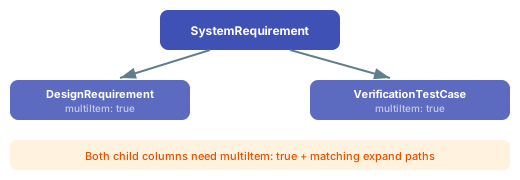
When a parent entity links to multiple child entity types (e.g., `SystemRequirement` links to both `DesignRequirement` and `VerificationTestCase`), the second and subsequent linked columns **must** be declared with `multiItem: true` in the sheet configuration. This is a non-obvious requirement that frequently blocks new users.
The `multiItem` property should align with the relationship cardinality in your data model:
| Cardinality | `multiItem` Needed? | Display Behavior |
| -------------- | ------------------- | -------------------------------- |
| `one-to-one` | No | Single-value cell |
| `many-to-one` | No | Single-value cell |
| `one-to-many` | Yes | Multiple items with separators |
| `many-to-many` | Yes | Multiple items with linking mode |
Check your data model `relationships` section:
```yaml theme={null}
relationships:
- from: SystemRequirement
to: DesignRequirement
cardinality: one-to-many # Requires multiItem: true
storage: linkedWorkItems
linkRole: has_parent
direct:
name: designRequirements
back:
name: systemRequirement
```
Multi-item columns require the corresponding expansion path to be defined in the `sources` section. Without expansion, the related entities will not load:
```yaml theme={null}
sources:
- model: my-model
from: UserNeed
expand:
- systemRequirements.systemRequirement:
- designRequirements.designRequirement # Must be expanded
- verificationTestCases.verificationTestCase # Must be expanded
```
 Multi-item cells display a list of related items. Control what text appears for each item using the `display` property:
```yaml theme={null}
columns:
systemRequirements.systemRequirement.designRequirements.designRequirement:
title: "Design Requirements"
width: 250
multiItem: true
display: title # Show title of each related item
```
Available `display` values include `id`, `title`, and `titleOrName`.
Begin with a single-entity configuration that works correctly, then add multi-item columns one at a time. Jumping directly to complex multi-item configurations makes errors difficult to diagnose.
When `multiItem: true` is set correctly, double-clicking a multi-item cell opens an autocomplete editor with a dropdown for selecting additional items. Each item displays with a separator and an external link icon for navigation.
Multi-item columns also support:
* **Filtering**: Click the filter icon to filter by item combinations
* **Linking mode**: For many-to-many relationships, use linking mode to create associations
## Verification
After applying the fix:
1. Save the sheet configuration
2. Reload the powersheet document
3. You should now see multiple related items displayed in the column, separated by semicolons
4. Double-click the cell to verify the multi-item picker opens with autocomplete functionality
## See Also
* [Configure Multi-Item Column](/powersheet/guides/sheet-configuration/configure-multi-item-column) -- full multi-item setup
* [Configure Many-to-Many Relationships](/powersheet/guides/data-model/configure-many-to-many) -- relationship setup
* [Configure Sources](/powersheet/guides/sheet-configuration/configure-sources) -- expansion path configuration
* [Incremental Configuration Approach](/powersheet/getting-started/incremental-configuration) -- build complexity gradually
***
Multi-item cells display a list of related items. Control what text appears for each item using the `display` property:
```yaml theme={null}
columns:
systemRequirements.systemRequirement.designRequirements.designRequirement:
title: "Design Requirements"
width: 250
multiItem: true
display: title # Show title of each related item
```
Available `display` values include `id`, `title`, and `titleOrName`.
Begin with a single-entity configuration that works correctly, then add multi-item columns one at a time. Jumping directly to complex multi-item configurations makes errors difficult to diagnose.
When `multiItem: true` is set correctly, double-clicking a multi-item cell opens an autocomplete editor with a dropdown for selecting additional items. Each item displays with a separator and an external link icon for navigation.
Multi-item columns also support:
* **Filtering**: Click the filter icon to filter by item combinations
* **Linking mode**: For many-to-many relationships, use linking mode to create associations
## Verification
After applying the fix:
1. Save the sheet configuration
2. Reload the powersheet document
3. You should now see multiple related items displayed in the column, separated by semicolons
4. Double-click the cell to verify the multi-item picker opens with autocomplete functionality
## See Also
* [Configure Multi-Item Column](/powersheet/guides/sheet-configuration/configure-multi-item-column) -- full multi-item setup
* [Configure Many-to-Many Relationships](/powersheet/guides/data-model/configure-many-to-many) -- relationship setup
* [Configure Sources](/powersheet/guides/sheet-configuration/configure-sources) -- expansion path configuration
* [Incremental Configuration Approach](/powersheet/getting-started/incremental-configuration) -- build complexity gradually
***