> ## Documentation Index
> Fetch the complete documentation index at: https://learn.nextedy.com/llms.txt
> Use this file to discover all available pages before exploring further.
# Debug Template Errors
> Identify and fix Nextedy POWERSHEET server-rendered template failures by recognizing error markers, checking server logs, and applying systematic debugging techniques on Siemens Polarion ALM.
export const LastReviewed = ({date}) => {
if (!date) return null;
const formatted = new Date(`${date}T00:00:00Z`).toLocaleDateString("en-US", {
year: "numeric",
month: "long",
day: "numeric",
timeZone: "UTC"
});
return
Last reviewed on {formatted}
;
};
## Prerequisites
* A powersheet document with server-rendered properties configured
* Access to Polarion server logs
* Familiarity with [Velocity template syntax](/powersheet/guides/server-rendering/use-velocity-template)
When a Velocity template evaluation fails, Powersheet displays `#SERVER_RENDER_ERROR` in the affected cell instead of the computed value. This is a constant error marker that indicates a template configuration problem.
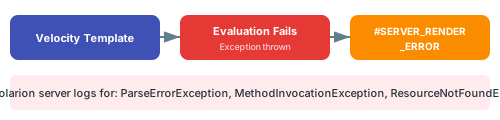 The three most common exception types appear in the Polarion server logs when a template fails:
| Exception Type | Cause | Example |
| ------------------------- | --------------------------------- | --------------------------------------- |
| ParseErrorException | Invalid Velocity syntax | Missing `#end`, unbalanced quotes |
| MethodInvocationException | Method call on null or wrong type | `$item.getTitle()` when `$item` is null |
| ResourceNotFoundException | Referenced resource not found | Missing include or macro |
Open the Polarion server log file and search for these exception names to find the exact error message and line number.
Common Velocity syntax errors that cause ParseErrorException:
```yaml theme={null}
# WRONG: Missing #end
serverRender: "#if($item.title)$item.title"
# CORRECT: Properly closed block
serverRender: "#if($item.title)$item.title#end"
```
```yaml theme={null}
# WRONG: Unescaped special characters
serverRender: "$item.title & $item.status"
# CORRECT: Escaped or avoided
serverRender: "$item.title and $item.status"
```
Server-rendered expressions are typically single-line strings in YAML. Multi-line Velocity logic must be compressed into one line or use Velocity's inline syntax.
MethodInvocationException commonly occurs when accessing properties on null objects. Always guard against nulls:
```yaml theme={null}
# WRONG: Assumes $module is always available
serverRender: "$module.moduleName"
# CORRECT: Null check first
serverRender: "#if($module)$module.moduleName#else N/A#end"
```
Key variables that can be null:
* `$module` -- null when entity is not document-scoped
* `$wi` -- null when entity is not a work item
* Custom field values -- null when not set on the work item
Always wrap service calls and property access in `#if` checks: `#if($var && $var.method())$var.method()#else default#end`
When debugging a complex template, simplify to isolate the problem:
1. Replace your template with a constant: `serverRender: "test"` -- verify rendering works at all
2. Add one variable: `serverRender: "$item.id"` -- verify context is available
3. Add the failing expression piece by piece until the error reappears
Ensure the property hosting the server-rendered expression is correctly configured:
```yaml theme={null}
properties:
computedField:
serverRender: "$item.title"
readable: true # Must be true to display
updatable: false # Always false for server-rendered
```
Some Polarion service methods may behave differently across versions. If a method call in your template causes errors, verify the method signature against your Polarion installation's API documentation.
## Common Error Patterns
| Symptom | Likely Cause | Fix |
| ------------------------------- | ---------------------------- | ----------------------------------------- |
| All rows show error | Template syntax error | Check for missing `#end` or bad directive |
| Some rows show error | Null data on specific items | Add null checks for optional fields |
| Error after Polarion upgrade | API change in service method | Update method calls to new API |
| Error on document entities only | `$wi` used on non-work-item | Use `$item` instead or add type check |
## Verify
After fixing template errors:
1. Open the powersheet document in Polarion
2. You should now see computed values in all cells that previously showed `#SERVER_RENDER_ERROR`
3. Test with work items that have empty or null fields to confirm null checks work
4. Verify that the Polarion server logs no longer show template-related exceptions
## See Also
* [Create a Computed Property](/powersheet/guides/server-rendering/create-computed-property) -- setting up server-rendered properties
* [Use Velocity Templates](/powersheet/guides/server-rendering/use-velocity-template) -- template syntax reference
* [Access Polarion Services](/powersheet/guides/server-rendering/access-polarion-services) -- platform service usage
* [Troubleshooting Guides](/powersheet/guides/troubleshooting/index) -- general troubleshooting resources
The three most common exception types appear in the Polarion server logs when a template fails:
| Exception Type | Cause | Example |
| ------------------------- | --------------------------------- | --------------------------------------- |
| ParseErrorException | Invalid Velocity syntax | Missing `#end`, unbalanced quotes |
| MethodInvocationException | Method call on null or wrong type | `$item.getTitle()` when `$item` is null |
| ResourceNotFoundException | Referenced resource not found | Missing include or macro |
Open the Polarion server log file and search for these exception names to find the exact error message and line number.
Common Velocity syntax errors that cause ParseErrorException:
```yaml theme={null}
# WRONG: Missing #end
serverRender: "#if($item.title)$item.title"
# CORRECT: Properly closed block
serverRender: "#if($item.title)$item.title#end"
```
```yaml theme={null}
# WRONG: Unescaped special characters
serverRender: "$item.title & $item.status"
# CORRECT: Escaped or avoided
serverRender: "$item.title and $item.status"
```
Server-rendered expressions are typically single-line strings in YAML. Multi-line Velocity logic must be compressed into one line or use Velocity's inline syntax.
MethodInvocationException commonly occurs when accessing properties on null objects. Always guard against nulls:
```yaml theme={null}
# WRONG: Assumes $module is always available
serverRender: "$module.moduleName"
# CORRECT: Null check first
serverRender: "#if($module)$module.moduleName#else N/A#end"
```
Key variables that can be null:
* `$module` -- null when entity is not document-scoped
* `$wi` -- null when entity is not a work item
* Custom field values -- null when not set on the work item
Always wrap service calls and property access in `#if` checks: `#if($var && $var.method())$var.method()#else default#end`
When debugging a complex template, simplify to isolate the problem:
1. Replace your template with a constant: `serverRender: "test"` -- verify rendering works at all
2. Add one variable: `serverRender: "$item.id"` -- verify context is available
3. Add the failing expression piece by piece until the error reappears
Ensure the property hosting the server-rendered expression is correctly configured:
```yaml theme={null}
properties:
computedField:
serverRender: "$item.title"
readable: true # Must be true to display
updatable: false # Always false for server-rendered
```
Some Polarion service methods may behave differently across versions. If a method call in your template causes errors, verify the method signature against your Polarion installation's API documentation.
## Common Error Patterns
| Symptom | Likely Cause | Fix |
| ------------------------------- | ---------------------------- | ----------------------------------------- |
| All rows show error | Template syntax error | Check for missing `#end` or bad directive |
| Some rows show error | Null data on specific items | Add null checks for optional fields |
| Error after Polarion upgrade | API change in service method | Update method calls to new API |
| Error on document entities only | `$wi` used on non-work-item | Use `$item` instead or add type check |
## Verify
After fixing template errors:
1. Open the powersheet document in Polarion
2. You should now see computed values in all cells that previously showed `#SERVER_RENDER_ERROR`
3. Test with work items that have empty or null fields to confirm null checks work
4. Verify that the Polarion server logs no longer show template-related exceptions
## See Also
* [Create a Computed Property](/powersheet/guides/server-rendering/create-computed-property) -- setting up server-rendered properties
* [Use Velocity Templates](/powersheet/guides/server-rendering/use-velocity-template) -- template syntax reference
* [Access Polarion Services](/powersheet/guides/server-rendering/access-polarion-services) -- platform service usage
* [Troubleshooting Guides](/powersheet/guides/troubleshooting/index) -- general troubleshooting resources