> ## Documentation Index
> Fetch the complete documentation index at: https://learn.nextedy.com/llms.txt
> Use this file to discover all available pages before exploring further.
# Use Predicates
> Filter entity query results in your Nextedy POWERSHEET sheet configuration using predicate operators for equality, comparison, null checks, and logical composition.
export const LastReviewed = ({date}) => {
if (!date) return null;
const formatted = new Date(`${date}T00:00:00Z`).toLocaleDateString("en-US", {
year: "numeric",
month: "long",
day: "numeric",
timeZone: "UTC"
});
return
Last reviewed on {formatted}
;
};
## Predicate Basics
Predicates are conditions placed in the `where` clause of a source query. The query engine evaluates predicates to determine which entities from Siemens Polarion ALM are included in the sheet. Simple predicates compare a property value to a target; composite predicates combine multiple conditions with AND/OR logic.
The simplest predicate matches a property to an exact value:
```yaml theme={null}
sources:
- id: main
model: rtm-model
query:
from: UserNeed
where:
severity: critical
```
This returns only `UserNeed` entities where `severity` equals `critical`.
For explicit equality syntax:
```yaml theme={null}
where:
severity:
eq: critical
```
The following comparison operators are available for filtering:
| Operator | Meaning | Example |
| ---------- | --------------------- | ----------------------------- |
| `eq` | Equals | `severity: { eq: critical }` |
| `ne` | Not equals | `status: { ne: deleted }` |
| `gt` | Greater than | `priority: { gt: 3 }` |
| `ge` | Greater than or equal | `priority: { ge: 2 }` |
| `contains` | Substring match | `title: { contains: safety }` |
```yaml theme={null}
where:
priority:
gt: 3
```
The `gt` and `ge` operators work with numeric properties (integer, float). They are not applicable to string or boolean properties.
Null value predicates (`eq: null` and `ne: null`) are **not working in the current version**. The syntax shown below is the intended usage once the limitation is resolved, but these predicates will not currently filter entities by null status. Use alternative filtering approaches until this is fixed.
To filter entities based on whether a property has a value:
```yaml theme={null}
# Entities where title IS NOT null (has a value)
where:
title:
ne: null
# Entities where title IS null (missing value)
where:
title:
eq: null
```
Once functional, null checks will be useful for finding incomplete work items or ensuring required fields are populated.
Use the `and` operator to require all conditions to match:
```yaml theme={null}
where:
and:
- severity: critical
- status: approved
```
This returns entities that are both `critical` severity AND `approved` status. AND arrays support any number of sub-predicates:
```yaml theme={null}
where:
and:
- severity: critical
- status: approved
- priority:
ge: 2
```
Use the `or` operator when any condition should match:
```yaml theme={null}
where:
or:
- severity: critical
- severity: major
```
This returns entities where severity is either `critical` OR `major`.
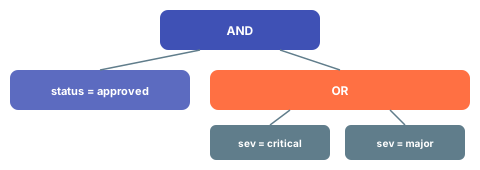
AND and OR predicates can be nested for complex filtering logic:
```yaml theme={null}
where:
and:
- status: approved
- or:
- severity: critical
- severity: major
```
This returns approved entities with either critical or major severity.
 ## Verification
After updating the `where` clause in your sheet configuration and reloading the document:
1. You should now see only entities that match your predicate conditions
2. The row count in the sheet should reflect the filtered result set
3. Verify that excluded entities are not displayed in the sheet
## See Also
* [Write an Entity Query](/powersheet/guides/queries/write-entity-query) -- complete source query setup
* [Filter by Document](/powersheet/guides/queries/filter-by-document) -- scope predicates to a specific document
* [Optimize Queries](/powersheet/guides/queries/optimize-queries) -- performance tips for predicate-heavy queries
* [Configure Sources](/powersheet/guides/sheet-configuration/configure-sources) -- full source configuration reference
## Verification
After updating the `where` clause in your sheet configuration and reloading the document:
1. You should now see only entities that match your predicate conditions
2. The row count in the sheet should reflect the filtered result set
3. Verify that excluded entities are not displayed in the sheet
## See Also
* [Write an Entity Query](/powersheet/guides/queries/write-entity-query) -- complete source query setup
* [Filter by Document](/powersheet/guides/queries/filter-by-document) -- scope predicates to a specific document
* [Optimize Queries](/powersheet/guides/queries/optimize-queries) -- performance tips for predicate-heavy queries
* [Configure Sources](/powersheet/guides/sheet-configuration/configure-sources) -- full source configuration reference