> ## Documentation Index
> Fetch the complete documentation index at: https://learn.nextedy.com/llms.txt
> Use this file to discover all available pages before exploring further.
# Optimize Queries
> Improve Nextedy POWERSHEET query performance by structuring predicates, constraints, and expansion paths to minimize server load and response times on Siemens Polarion ALM.
export const LastReviewed = ({date}) => {
if (!date) return null;
const formatted = new Date(`${date}T00:00:00Z`).toLocaleDateString("en-US", {
year: "numeric",
month: "long",
day: "numeric",
timeZone: "UTC"
});
return
Last reviewed on {formatted}
;
};
## Prerequisites
* A working powersheet document with configured data sources
* Familiarity with [entity queries](/powersheet/guides/queries/write-entity-query) and [predicates](/powersheet/guides/queries/use-predicates)
* Access to Polarion server logs for debug output
When Powersheet loads data, each query goes through a processing pipeline that translates your configuration into Polarion Lucene queries. Understanding this pipeline helps you write efficient queries.
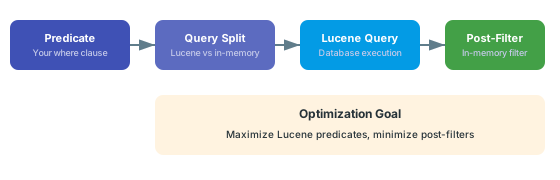 The query engine splits predicates into two categories:
* **Lucene-compatible predicates** execute as database queries (fast)
* **Complex predicates** execute as in-memory post-filters after fetching (slow for large datasets)
Your goal is to keep as many predicates as possible in the Lucene-compatible category so the database does the heavy lifting.
Simple equality and comparison operators translate directly to Lucene and execute efficiently. Structure your `where` clause to use these operators:
```yaml theme={null}
sources:
- id: requirements
model: rtm
query:
from: SystemRequirement
where:
status:
eq: approved
priority:
gt: "2"
```
These operators translate directly to Lucene: `eq`, `ne`, `gt`, `lt`, `ge`, `le`. Use these whenever possible instead of complex expressions. Alias operators (`==`, `!=`, `>`, `<=`) also work and are converted internally.
Avoid mixing complex logical groupings when simple predicates will do. The query engine handles `and` at the top level automatically, so flat predicate structures perform best:
```yaml theme={null}
# Efficient -- flat predicates, all Lucene-compatible
query:
where:
status:
eq: approved
severity:
eq: high
priority:
gt: "3"
```
Predicates that use `contains` on non-indexed fields or deeply nested `or` groups may not translate to Lucene. These execute as in-memory post-filters, meaning the server first fetches a broader result set, then filters in memory. On large datasets (1000+ items), this causes noticeable delays.
Always define project and document constraints in your data model. The query engine resolves these early in the pipeline, dramatically reducing the result set before other filters apply:
```yaml theme={null}
domainModelTypes:
SystemRequirement:
polarionType: systemRequirement
constraints:
load:
project:
id: myProject
document:
moduleFolder: Requirements
moduleName: System-Requirements
```
Project and document constraints work together as pre-filters. The query engine converts them to Lucene clauses that narrow the search scope before your `where` clause predicates are evaluated.
Without project or document constraints, queries scan all work items of a type across the entire Polarion instance. For large installations with thousands of work items, this causes significant delays. Always specify at least a project constraint.
For dynamic document scoping, use `applyCurrentDocumentTo` in your constraints so the sheet automatically filters to the current LiveDoc without hardcoding document paths:
```yaml theme={null}
domainModelTypes:
UserNeed:
polarionType: requirement
constraints:
load:
applyCurrentDocumentTo: UserNeed
```
This injects the current document ID as a query parameter, scoping results to the active document context.
Deeply nested `expand` clauses cause cascading queries. Each expansion level triggers additional database lookups for related entities:
```yaml theme={null}
# Shallow expansion (fast) -- one level of related entities
sources:
- id: requirements
from: SystemRequirement
expand:
- designRequirements
# Deep expansion (slow) -- use with caution
sources:
- id: requirements
from: SystemRequirement
expand:
- designRequirements:
- hazards:
- riskControls
```
The expand clause is converted internally to dot-notation strings for the query protocol. Each level adds another round of relationship resolution on the server.
Create separate [views](/powersheet/guides/sheet-configuration/create-view) for different analysis needs. A lightweight view showing only direct properties loads faster than a full traceability view with three levels of expansion. Users switch views as needed rather than loading everything at once.
Sorting interacts with query performance. Inside a `query:` block, use `orderBy` to determine the order of returned results. (Note that `sortBy` is a separate sheet-level option that belongs at the YAML root, not inside `query:`.)
```yaml theme={null}
sources:
- id: requirements
model: rtm
query:
from: SystemRequirement
orderBy:
- outlineNumber asc
```
Keep sort properties simple and aligned with indexed Polarion fields. Sorting by navigation property paths (e.g., `designRequirement.title`) requires the server to resolve relationships before sorting, which adds overhead.
When no `orderBy` is specified, results come back in Polarion's default order (typically by work item ID). Specify `outlineNumber asc` for document-ordered display.
Powersheet auto-discovers enum properties from metadata and dynamically creates data sources for dropdown pickers. Each enum source generates a query to fetch `EnumOption` entities. To avoid unnecessary queries:
* Only include enum columns in views where they are needed
* Use constraints on enum queries to limit results to the relevant project and work item type
* The auto-discovery uses `polarionType`, `projectId`, and `enumId` metadata to build targeted queries
To identify slow queries, use the `explain` query parameter. The server logs each executed query with details:
* The entity type being queried
* The full Lucene query string generated from your predicates and constraints
* The result count
* A preview of the first returned items
Check your Polarion server's logging configuration for the exact log level and category needed to enable query debug output. The `explain` parameter in query configuration enables additional diagnostic information.
## Performance Decision Matrix
| Scenario | Recommendation | Impact |
| ---------------------------- | --------------------------------------------- | ------ |
| Loading all items of a type | Add project + document constraints | High |
| Filtering by string value | Use `eq` instead of `contains` where possible | High |
| Deep hierarchy display | Limit `expand` depth to 2--3 levels | High |
| Large result sets (1000+) | Add narrowing predicates to `where` clause | High |
| Cross-project queries | Specify explicit project ID constraints | Medium |
| Multiple enum columns | Use views to load only visible enum sources | Medium |
| Sort by related entity field | Sort by direct properties instead | Low |
## Verify
After applying optimization changes:
1. Open the powersheet document and note the initial load time
2. You should now see faster data loading compared to before your changes
3. Check Polarion server logs for query execution output to confirm Lucene queries are being generated (not in-memory post-filters)
4. Compare the predicate split -- fewer post-filter operations means better performance
5. Test with views that hide deep expansion columns to confirm they load faster
## See Also
* [Write an Entity Query](/powersheet/guides/queries/write-entity-query) -- query structure fundamentals
* [Use Predicates](/powersheet/guides/queries/use-predicates) -- predicate operator reference
* [Filter by Document](/powersheet/guides/queries/filter-by-document) -- document scoping techniques
* [Expand Navigation Properties](/powersheet/guides/queries/expand-navigation-properties) -- controlling expansion depth
* [Query Baseline or Revision](/powersheet/guides/queries/query-baseline-revision) -- historical query considerations
* [Configure Sources](/powersheet/guides/sheet-configuration/configure-sources) -- data source setup
The query engine splits predicates into two categories:
* **Lucene-compatible predicates** execute as database queries (fast)
* **Complex predicates** execute as in-memory post-filters after fetching (slow for large datasets)
Your goal is to keep as many predicates as possible in the Lucene-compatible category so the database does the heavy lifting.
Simple equality and comparison operators translate directly to Lucene and execute efficiently. Structure your `where` clause to use these operators:
```yaml theme={null}
sources:
- id: requirements
model: rtm
query:
from: SystemRequirement
where:
status:
eq: approved
priority:
gt: "2"
```
These operators translate directly to Lucene: `eq`, `ne`, `gt`, `lt`, `ge`, `le`. Use these whenever possible instead of complex expressions. Alias operators (`==`, `!=`, `>`, `<=`) also work and are converted internally.
Avoid mixing complex logical groupings when simple predicates will do. The query engine handles `and` at the top level automatically, so flat predicate structures perform best:
```yaml theme={null}
# Efficient -- flat predicates, all Lucene-compatible
query:
where:
status:
eq: approved
severity:
eq: high
priority:
gt: "3"
```
Predicates that use `contains` on non-indexed fields or deeply nested `or` groups may not translate to Lucene. These execute as in-memory post-filters, meaning the server first fetches a broader result set, then filters in memory. On large datasets (1000+ items), this causes noticeable delays.
Always define project and document constraints in your data model. The query engine resolves these early in the pipeline, dramatically reducing the result set before other filters apply:
```yaml theme={null}
domainModelTypes:
SystemRequirement:
polarionType: systemRequirement
constraints:
load:
project:
id: myProject
document:
moduleFolder: Requirements
moduleName: System-Requirements
```
Project and document constraints work together as pre-filters. The query engine converts them to Lucene clauses that narrow the search scope before your `where` clause predicates are evaluated.
Without project or document constraints, queries scan all work items of a type across the entire Polarion instance. For large installations with thousands of work items, this causes significant delays. Always specify at least a project constraint.
For dynamic document scoping, use `applyCurrentDocumentTo` in your constraints so the sheet automatically filters to the current LiveDoc without hardcoding document paths:
```yaml theme={null}
domainModelTypes:
UserNeed:
polarionType: requirement
constraints:
load:
applyCurrentDocumentTo: UserNeed
```
This injects the current document ID as a query parameter, scoping results to the active document context.
Deeply nested `expand` clauses cause cascading queries. Each expansion level triggers additional database lookups for related entities:
```yaml theme={null}
# Shallow expansion (fast) -- one level of related entities
sources:
- id: requirements
from: SystemRequirement
expand:
- designRequirements
# Deep expansion (slow) -- use with caution
sources:
- id: requirements
from: SystemRequirement
expand:
- designRequirements:
- hazards:
- riskControls
```
The expand clause is converted internally to dot-notation strings for the query protocol. Each level adds another round of relationship resolution on the server.
Create separate [views](/powersheet/guides/sheet-configuration/create-view) for different analysis needs. A lightweight view showing only direct properties loads faster than a full traceability view with three levels of expansion. Users switch views as needed rather than loading everything at once.
Sorting interacts with query performance. Inside a `query:` block, use `orderBy` to determine the order of returned results. (Note that `sortBy` is a separate sheet-level option that belongs at the YAML root, not inside `query:`.)
```yaml theme={null}
sources:
- id: requirements
model: rtm
query:
from: SystemRequirement
orderBy:
- outlineNumber asc
```
Keep sort properties simple and aligned with indexed Polarion fields. Sorting by navigation property paths (e.g., `designRequirement.title`) requires the server to resolve relationships before sorting, which adds overhead.
When no `orderBy` is specified, results come back in Polarion's default order (typically by work item ID). Specify `outlineNumber asc` for document-ordered display.
Powersheet auto-discovers enum properties from metadata and dynamically creates data sources for dropdown pickers. Each enum source generates a query to fetch `EnumOption` entities. To avoid unnecessary queries:
* Only include enum columns in views where they are needed
* Use constraints on enum queries to limit results to the relevant project and work item type
* The auto-discovery uses `polarionType`, `projectId`, and `enumId` metadata to build targeted queries
To identify slow queries, use the `explain` query parameter. The server logs each executed query with details:
* The entity type being queried
* The full Lucene query string generated from your predicates and constraints
* The result count
* A preview of the first returned items
Check your Polarion server's logging configuration for the exact log level and category needed to enable query debug output. The `explain` parameter in query configuration enables additional diagnostic information.
## Performance Decision Matrix
| Scenario | Recommendation | Impact |
| ---------------------------- | --------------------------------------------- | ------ |
| Loading all items of a type | Add project + document constraints | High |
| Filtering by string value | Use `eq` instead of `contains` where possible | High |
| Deep hierarchy display | Limit `expand` depth to 2--3 levels | High |
| Large result sets (1000+) | Add narrowing predicates to `where` clause | High |
| Cross-project queries | Specify explicit project ID constraints | Medium |
| Multiple enum columns | Use views to load only visible enum sources | Medium |
| Sort by related entity field | Sort by direct properties instead | Low |
## Verify
After applying optimization changes:
1. Open the powersheet document and note the initial load time
2. You should now see faster data loading compared to before your changes
3. Check Polarion server logs for query execution output to confirm Lucene queries are being generated (not in-memory post-filters)
4. Compare the predicate split -- fewer post-filter operations means better performance
5. Test with views that hide deep expansion columns to confirm they load faster
## See Also
* [Write an Entity Query](/powersheet/guides/queries/write-entity-query) -- query structure fundamentals
* [Use Predicates](/powersheet/guides/queries/use-predicates) -- predicate operator reference
* [Filter by Document](/powersheet/guides/queries/filter-by-document) -- document scoping techniques
* [Expand Navigation Properties](/powersheet/guides/queries/expand-navigation-properties) -- controlling expansion depth
* [Query Baseline or Revision](/powersheet/guides/queries/query-baseline-revision) -- historical query considerations
* [Configure Sources](/powersheet/guides/sheet-configuration/configure-sources) -- data source setup