> ## Documentation Index
> Fetch the complete documentation index at: https://learn.nextedy.com/llms.txt
> Use this file to discover all available pages before exploring further.
# Data Model Issues
> Data Model Issues — common questions about Nextedy POWERSHEET.
export const LastReviewed = ({date, state}) => {
if (!date) return null;
const formatted = new Date(`${date}T00:00:00Z`).toLocaleDateString("en-US", {
year: "numeric",
month: "long",
day: "numeric",
timeZone: "UTC"
});
const label = state === "reviewed" ? `Last reviewed and confirmed up to date on ${formatted}` : `Last updated on ${formatted}`;
return
{label}
;
};
This error occurs when the sheet configuration references an entity type name that does not exist in the data model `domainModelTypes` section. Entity type names are case-sensitive and must match exactly — `SystemRequirement` is not the same as `systemRequirement` or `Systemrequirement`. Verify naming consistency between your data model, sheet configuration column paths, and `sources` definitions.
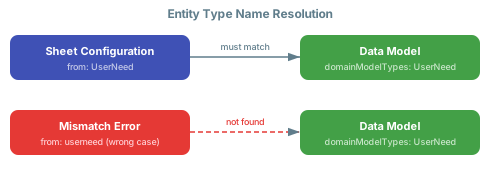 For a detailed walkthrough, see [Fix Type Name Errors](/powersheet/guides/troubleshooting/fix-type-name-errors).
Relationship navigation depends on three things being correctly aligned: the `from` and `to` entity types must exist in `domainModelTypes`, the `linkRole` must match a link role defined in the Polarion project, and the `direct` and `back` navigation property names must be referenced correctly in column binding paths and `expand` arrays. If any of these are mismatched, navigation paths will silently return no data. Review the [Fix Relationship Errors](/powersheet/guides/troubleshooting/fix-relationship-errors) guide for step-by-step diagnosis.
For a detailed walkthrough, see [Fix Type Name Errors](/powersheet/guides/troubleshooting/fix-type-name-errors).
Relationship navigation depends on three things being correctly aligned: the `from` and `to` entity types must exist in `domainModelTypes`, the `linkRole` must match a link role defined in the Polarion project, and the `direct` and `back` navigation property names must be referenced correctly in column binding paths and `expand` arrays. If any of these are mismatched, navigation paths will silently return no data. Review the [Fix Relationship Errors](/powersheet/guides/troubleshooting/fix-relationship-errors) guide for step-by-step diagnosis.