> ## Documentation Index
> Fetch the complete documentation index at: https://learn.nextedy.com/llms.txt
> Use this file to discover all available pages before exploring further.
# Configuration Basics
> Configuration Basics — common questions about Nextedy POWERSHEET.
export const LastReviewed = ({date, state}) => {
if (!date) return null;
const formatted = new Date(`${date}T00:00:00Z`).toLocaleDateString("en-US", {
year: "numeric",
month: "long",
day: "numeric",
timeZone: "UTC"
});
const label = state === "reviewed" ? `Last reviewed and confirmed up to date on ${formatted}` : `Last updated on ${formatted}`;
return
{label}
;
};
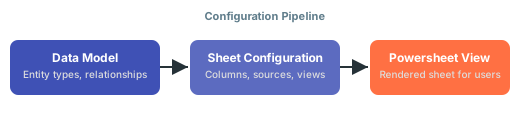
A **sheet configuration** is a YAML file that defines how Nextedy Powersheet displays and interacts with data from the data model. It specifies columns, data sources, views, column groups, formatters, and sorting behavior. Each Powersheet document references a sheet configuration through the `nextedySheetConfig` custom field. Configurations are managed in **Administration > Nextedy POWERSHEET > Sheet Configurations**.
See [Creating Your First Sheet Configuration](/powersheet/getting-started/first-sheet-configuration) for a step-by-step tutorial.
The sheet configuration depends on the data model for entity type definitions, relationships, and property metadata. Column binding paths in the configuration reference properties and expansion paths defined in the data model. The `model` property in the `sources` section specifies which data model to use. If the model and configuration do not match, you will see errors when loading the sheet.
 Start with the simplest possible configuration — a single entity type, a few columns, and one data source. Verify that the basic setup loads correctly, then extend gradually by adding relationships, column groups, and formatters. Jumping to a complex multi-entity configuration leads to difficult-to-diagnose errors.
**Best practice**
See [Incremental Configuration Approach](/powersheet/getting-started/incremental-configuration) for a recommended step-by-step build strategy.
Start with the simplest possible configuration — a single entity type, a few columns, and one data source. Verify that the basic setup loads correctly, then extend gradually by adding relationships, column groups, and formatters. Jumping to a complex multi-entity configuration leads to difficult-to-diagnose errors.
**Best practice**
See [Incremental Configuration Approach](/powersheet/getting-started/incremental-configuration) for a recommended step-by-step build strategy.